

What Is a Digital Signature and How It Actually Works
Learn what is a digital signature, how cryptographic PKI makes it tamper-proof, where ESIGN and eIDAS give it legal weight, and practical picks for small teams.

Tired of nonsense pricing of DocuSign?
Start taking digital signatures with BoloSign and save money.
A digital signature is a cryptographic seal tied to a private key and the exact document data, so any change can be detected and the signing key can be verified. It isn't the same as an electronic signature or a typed name placed on a PDF, because the cryptographic proof depends on the document itself, not just a visual mark.
You may be dealing with this distinction already. A candidate taps a button to accept an offer, a patient completes a consent form, or a client signs a contract from a phone. The experience feels simple, but behind that click a trustworthy signing workflow may be preserving the document version, connecting the signature to a key, checking certificates, recording events, and creating evidence that others can review later.
That difference matters to a small business. An image of a handwritten signature can be copied onto another file. A typed name can show intent, but it doesn't by itself show that the exact PDF remained unchanged or that the person who controlled the signing credential was properly identified. The useful question isn't only, “Did someone sign?” It's also, “What exactly can this signing process prove?”
Why Your Clicks in a Signing App Are More Than Squiggles
A candidate opens an offer letter on the train, taps the signature field, confirms their name, and receives a completion email. The screen shows a quick click. Behind it, the signing workflow may preserve the document version, authenticate the signer, record the signing event, and create an audit trail.
That difference explains why an eSignature workflow involves more than placing a handwritten image into a file. An electronic signature records an action that indicates intent, such as clicking to sign or selecting an acceptance box. A digital signature connects the signed data to a private key, creating a cryptographic check on the document. Products often use the terms interchangeably, but they represent different levels of assurance.
The three relationships that matter
A digital signature brings together three relationships:
- The document: The signature applies to a specific PDF, form, or message.
- The signing key: A private key creates the signature, while its matching public key lets another party check it.
- The signer's identity evidence: A certificate and signing process may connect the public key to a claimed identity. The strength of that connection depends on how the identity was checked.
The first two relationships answer a cryptographic question: did this exact data come from this exact key? The third addresses an identity question: is that key actually controlled by the person or organization named in the agreement?
Those answers are related, but they are not identical. A valid signature can show that unchanged data was signed by a particular key. It does not, by itself, show that the signer understood every contract term or that the identity check met the level of confidence your transaction requires.
NIST describes digital signatures as mechanisms that authenticate a claimed signatory, detect unauthorized modification, and provide evidence that the claimed signatory generated the signature in its Digital Signature Standard. For a small business, that distinction supports a practical choice: use stronger identity evidence for agreements where impersonation or disputed authority would create greater risk, and do not treat a cryptographic match alone as complete identity proof.
Platforms such as BoloSign can expose the surrounding record through an audit trail feature, helping show who received the document, what actions occurred, and when.
Practical rule: Match the confidence level to the agreement. Check the document and key for cryptographic integrity, then examine the identity evidence and audit record before relying on the signature.
The Cryptographic Mechanics Behind Every Digital Signature
A supplier sends your business a signed contract, then claims the payment term was changed afterward. The cryptographic process helps answer one narrow question: did this exact file come from the private key associated with the signature? A separate question remains: does that key really belong to the person or organization you expect?
The process works like a tamper-evident package. The document is the contents, the hash is its fingerprint, the private key is a signing tool that only its holder should control, and the public key is the inspection tool recipients use.
A hash function converts the document's exact data into a compact mathematical value. It is not a readable summary. Change one character, add a page, or alter a payment term, and the resulting hash changes.
The signing sequence
When a PDF or form is signed, the system typically follows this chain:
- The document is hashed. The system calculates a fingerprint from the exact document data.
- The signer uses a private key. That key generates a signature value linked to the hash.
- The signature and certificate data travel with the document. The certificate can connect the public key to a claimed identity.
- The recipient verifies the result. The public key checks whether the signature matches the document's current hash.
If someone edits the file, the recipient's system hashes the altered version. Its new fingerprint no longer matches the signed value, so verification fails. The system does not need to identify the edited character. It only needs to establish that the file is no longer the same signed object.
The private key must remain confidential. Anyone who gains control of it may generate signatures that verify cryptographically. Key storage, access controls, and account security therefore affect the reliability of the signature. The public key can be shared because it verifies signatures rather than creating them.
NIST's Digital Signature Standard, FIPS 186-5, finalized in February 2023. It describes digital signatures as tools for authenticating a claimed signatory, detecting unauthorized modification, and showing that the claimed signatory generated the signature.
Why the file itself matters
The practical consequence is evidentiary: a screenshot of a signed page proves almost nothing about the cryptographic relationship, while the signed PDF carries the data needed to test it. A scanned signature image may look connected to a document, yet someone can copy it onto another PDF without reproducing that relationship.
Teams signing PDFs online should preserve the signed artifact, not only an image of the final page. The file, signature data, certificate path, verification result, and relevant timestamps give reviewers material to examine later. BoloSign supports reusable PDFs and forms, so teams can prepare repeatable signing packets for candidates, customers, or suppliers. Organizations evaluating a stronger EU signing category can consult its qualified electronic signature resources.
How Validators Actually Decide a Signature Is Trustworthy
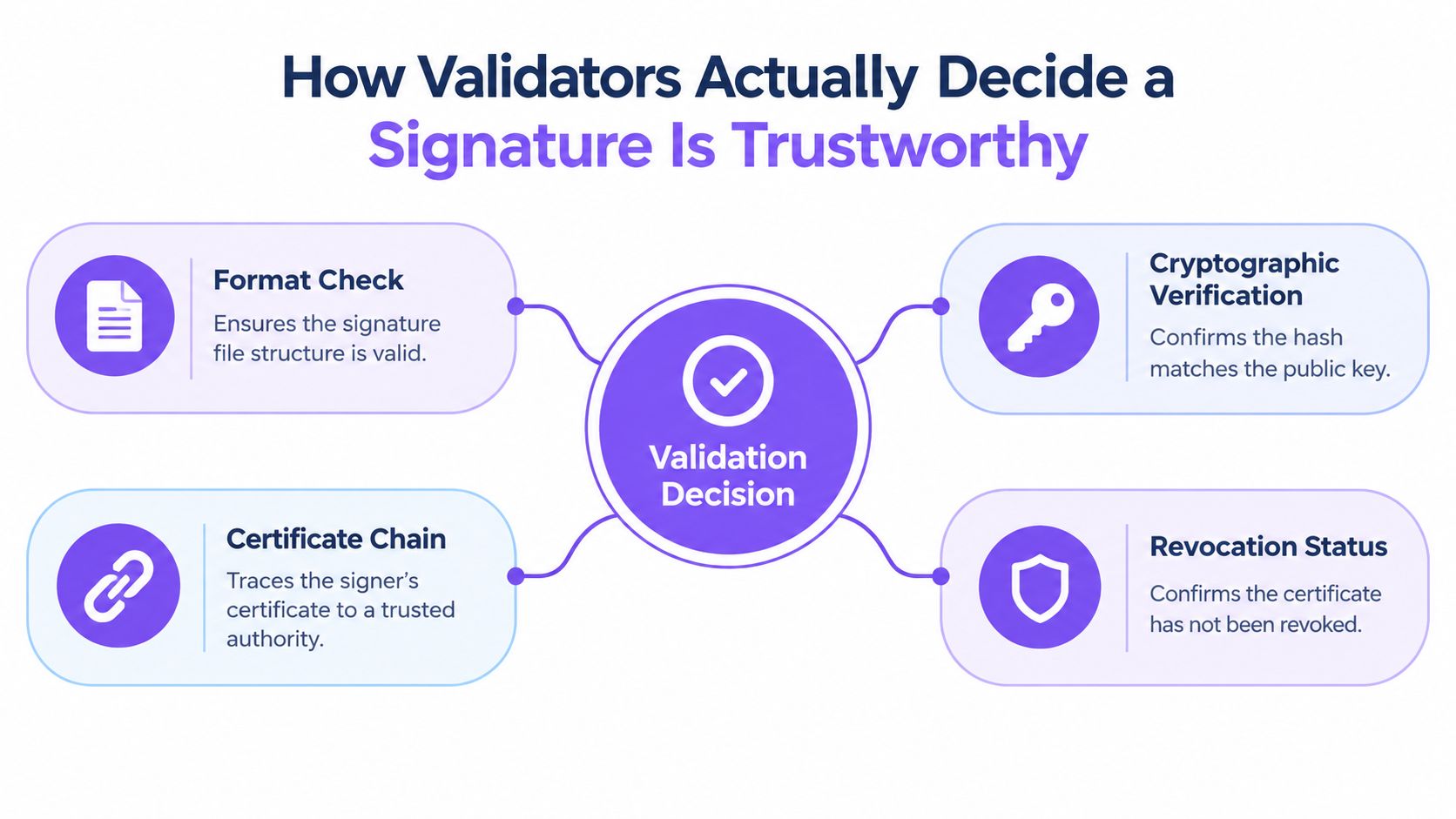
A green checkmark is useful, but it isn't the whole decision. Validation is a sequence of technical and policy checks that asks whether the signature is correctly formed, mathematically valid, connected to a trusted certificate, and acceptable under the organization's rules.
The first check concerns the signature format and its signed attributes. The validator then uses the public key and applicable hash function to test the cryptographic value. If the document content has changed, the integrity check fails.
The certificate and trust checks
A certificate does more than display a name. It binds a public key to an identity through a certificate authority or another trust framework. A validator may check:
- Trust chain: Whether the certificate leads to a trusted authority.
- Validity period: Whether the certificate was valid at the relevant time.
- Key usage: Whether the certificate permits the type of signing being performed.
- Revocation status: Whether the certificate has been withdrawn or compromised.
- Timestamp evidence: Whether the system can establish when the signing event occurred.
ETSI distinguishes signature verification from broader signature validation. The cryptographic calculation may succeed while the overall signature still fails a business policy check. A healthcare provider, school, or commercial team may require a particular certificate profile, identity check, retention method, or approval sequence before accepting the file.
Algorithms also matter. FIPS 186-5 includes approved methods such as RSA, ECDSA, and EdDSA, while DSA is no longer approved for signature generation. For new RSA applications, the IETF identifies RSASSA-PSS as preferred over legacy PKCS #1 version 1.5 signing. Organizations should record the algorithm identifier, key or curve details, certificate path, revocation evidence, timestamp, and validation policy. These records help a later reviewer understand not just whether verification succeeded, but why the signature remained acceptable under the organization's rules. The technical distinction is described in the ETSI validation procedures.
The identity gap
Cryptographic validity and human identity aren't identical. NIST separates identity proofing, which establishes a relationship between a digital identity and a real person, from authentication, which establishes control of the relevant authenticator. Its digital identity guidance supports choosing assurance controls according to transaction risk.
An employee offer signed through an email link may be intact and correctly associated with a credential, but the evidence that the intended candidate controlled that credential may be limited. A high-value agreement may justify identity verification, multifactor authentication, or a stronger signing process. A low-risk acknowledgment may not need that additional friction.
The right signing method isn't the one with the most controls. It's the one that gives you enough confidence for the agreement without creating unnecessary barriers for the signer.
For teams comparing identity and verification technologies, it can also be useful to explore Verifai products as part of a broader identity-assurance review.
Where Digital Signatures Get Their Legal Weight
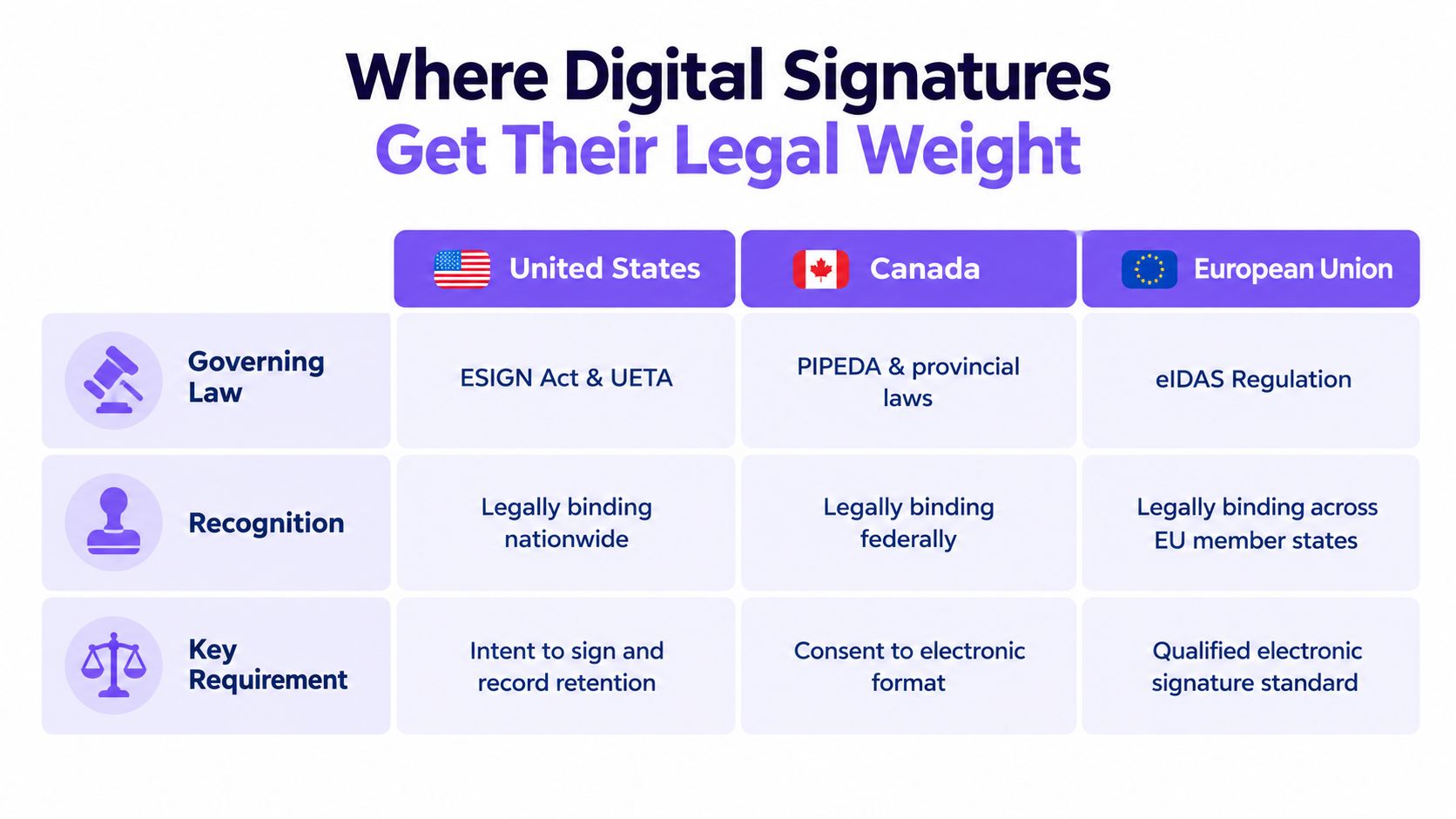
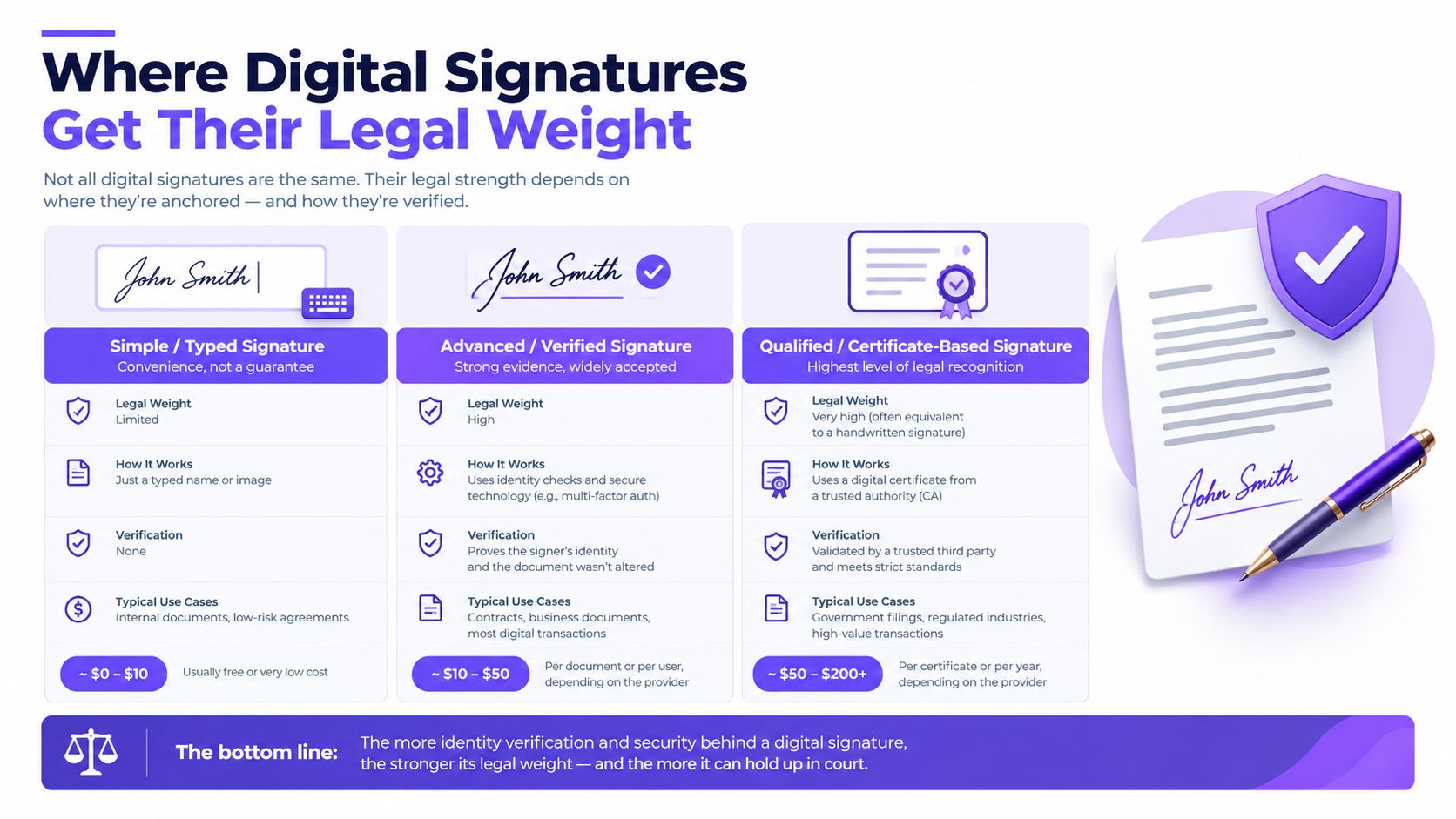
Cryptography answers whether data was altered and whether a particular key produced the signature. Law answers whether the signing act should be recognized, what evidence is required, and whether a document category has extra conditions.
In the United States, the ESIGN Act supports the legal use of electronic records and signatures, while state law such as UETA may shape specific requirements. Businesses generally need evidence of intent to sign, association between the signature and the record, and reliable retention. A platform should make it possible to preserve the signed document and the surrounding transaction record rather than only storing a completed visual page.
Canada combines federal and provincial considerations. The legal analysis may depend on the transaction, the province, the document type, and privacy obligations. A team working across Canada should check whether a particular agreement has special form, witnessing, or retention requirements instead of assuming that every workflow is treated identically.
Australia and New Zealand also recognize electronic transactions through their respective electronic-transactions frameworks, subject to conditions and exceptions. In the UAE, the Federal Decree-Law No. 46 of 2021 addresses electronic transactions and trust services. Cross-border teams should involve local counsel when a contract, regulated record, or government process carries unusual consequences.
The EU baseline
The EU eIDAS framework has applied directly across Member States since July 1, 2016, covering electronic signatures, seals, timestamps, registered electronic delivery, and website authentication, as described by the Spanish government's electronic-signature legal overview. Under Article 25, an electronic signature can't be denied legal effect or admissibility merely because it's electronic or doesn't qualify as a qualified electronic signature.
A qualified electronic signature has the same legal effect as a handwritten signature, and Article 25 also provides cross-border recognition for qualified signatures based on certificates issued in one EU Member State. That doesn't mean every ordinary signature automatically has identical legal weight. eIDAS leaves some effects of non-qualified signatures to national law, and sector-specific rules can add requirements.
Healthcare teams must consider HIPAA and appropriate handling of health information. Businesses processing personal data need GDPR controls, including suitable consent and retention practices where relevant. Education organizations may need to account for student-record obligations, including FERPA-related requirements in the United States.
BoloSign's eSignature legality guidance can help teams organize these questions, but a platform's compliance features don't replace legal advice for a specific country, sector, or document.
Where Small Businesses Actually Use Digital Signatures
A signing workflow becomes easier to evaluate when you attach it to a real document. The same basic mechanics can support different business moments, but each sector has its own participants, records, and risk tolerance.

Six practical examples
- Staffing: A recruiter sends an offer letter, confidentiality agreement, and onboarding packet to a candidate. The candidate signs from a phone, while the agency keeps a record of the document version, recipient, and completion status.
- Healthcare: A clinic routes patient consent or telehealth forms to the patient. The workflow can collect signatures and preserve the completed form without asking staff to print, scan, and reattach pages.
- Real estate: An agent sends a purchase agreement, lease addendum, or disclosure form to buyers, sellers, landlords, or tenants. Multiple recipients can sign in sequence or as part of one coordinated request.
- Logistics: A carrier or warehouse operator captures delivery confirmation, vendor acceptance, or bill-of-lading handoffs. A timestamped record helps operations teams connect the signature event to the shipment file.
- Education: An institution collects an admission acknowledgment, parental consent, or certification form. Form-based signing can make the experience familiar to applicants and families while keeping submissions organized.
- Professional services: A consultancy sends an engagement letter, NDA, or statement of work. Reusable templates reduce repetitive setup, and a complete audit trail gives the team a consistent record for later reference.
BoloSign supports these workflows with PDF signing, reusable templates, forms, multi-recipient requests, customizable emails, and dashboard tracking. A business can generate or upload a document, add signature fields, send it to the appropriate people, and monitor the status as recipients respond. Teams can also add signature fields to a Google Form, which is useful when the form needs to collect structured information alongside consent.
The practical advantage over email-plus-print is control. Email attachments can create uncertainty about which version someone signed, whether a page was replaced, and where the final record lives. A contract automation workflow gives operations staff one repeatable path from preparation to completion.
A good signing process should feel easy to the signer and leave a detailed record for the people responsible for the business.
What to Look For in a Digital Signing Platform
Small teams should judge a signing platform by the friction it removes, not by its feature count. A good choice makes routine agreements easier to prepare, send, track, and retain while matching security controls to the document's risk.
Start with the pricing structure. BoloSign offers unlimited documents, team members, and templates at one fixed price. That avoids per-user and per-envelope charges, which can make recurring staffing, healthcare, education, and logistics workflows easier to budget. Confirm the current commercial terms before purchasing, because product details may change.
Evaluate the workflow, not just the signature field
A platform should answer these questions clearly:
- Can we reuse documents? Look for PDF templates, form-based data capture, and a way to duplicate a workflow that already works.
- Can several people sign? Check for multiple recipients, signing order, reminders, and status tracking.
- Can we preserve evidence? Review the audit trail, signed artifact, timestamps, certificate information, and export options. These records help show what data was signed and when, although identity confidence still depends on how the signer was authenticated.
- Can our existing tools connect? Check for native connections to your CRM, storage, and automation tools.
- Can we automate review? AI-powered contract intelligence may speed contract review and decisions. Ask what the AI analyzes and how users can check its output.
Compliance language needs the same careful reading. A vendor may reference ESIGN, UETA, eIDAS, HIPAA, GDPR, ISO 27001, and SOC 2, but your team must confirm which product controls apply to your document category, location, access model, retention policy, and audit requirements. A certificate can support the cryptographic proof that unchanged data was signed by a particular key. It does not, by itself, prove that the key belongs to the person named in the agreement.
Editing and form support can affect adoption as much as cryptography. Staff may work faster if they can prepare a PDF, add signature fields to a familiar form, route the request, and track responses without switching among disconnected tools. Migration features also matter for teams bringing existing DocuSign templates into a new system.
Closer Innovation Labs Corp. offers BoloSign as an eSignature and contract-management platform with fixed-price access to unlimited signatures, templates, forms, and team members. Its workflow includes reusable PDF templates, multi-recipient requests, dashboard updates, audit trails, integrations such as Zapier, Make, HubSpot, Salesforce, Google Drive, Slack, and Microsoft Teams, plus AI-powered contract intelligence.
Common Myths, Real Risks, and Your Next Step
A digital signature isn't a decorative image. It creates a cryptographic relationship between a document and a signing key, while the surrounding identity process determines how confidently you can connect that key to a person.
A signature on a PDF isn't automatically suitable for every agreement either. Legal effect can depend on intent, consent, document category, jurisdiction, identity assurance, retention, and sector rules. More security isn't always better if the process excludes legitimate signers or adds controls that don't match the transaction's risk.
Use this checklist before sending your next agreement:
- Document: Which exact PDF, form, or contract needs signing?
- Signer: Who must sign, and what evidence identifies that person?
- Risk: Is an email-based authentication step sufficient, or is stronger verification appropriate?
- Record: How will you retain the final artifact, audit trail, certificate data, and timestamps?
- Rules: Do ESIGN, eIDAS, HIPAA, GDPR, or local requirements affect the workflow?
Frequently asked questions
Is a digital signature the same as an electronic signature?
No. An electronic signature can express intent electronically. A digital signature uses cryptography to bind the signature to document data and a signing key.
Can a digital signature prove who signed?
It can provide evidence that a particular key signed unchanged data. It doesn't independently prove that the key was controlled by the intended person unless the identity-proofing and authentication process supports that conclusion.
What can a small business do first?
Choose one recurring workflow, such as an offer letter, client agreement, or consent form. Build it as a reusable template in BoloSign, define the identity check and retention rule, then review the completed record before expanding to other document types.
Closer Innovation Labs Corp. offers BoloSign to help small businesses create, send, and sign PDFs, templates, forms, and Google Forms through secure, AI-powered document workflows. Visit Closer Innovation Labs Corp. to start a 7-day free trial and test digital signing on a real agreement your team handles today.

Paresh Deshmukh
Co-Founder, BoloForms
14 Oct, 2026
Take a Look at Our Featured Articles
These articles will guide you on how to simplify office work, boost your efficiency, and concentrate on expanding your business.



