

Red Line Edits: What They Are and How to Use Them
Learn what red line edits are, why they matter in contracts, and how to manage redlining with better tools, version control, and team collaboration.

Tired of nonsense pricing of DocuSign?
Start taking digital signatures with BoloSign and save money.
Red line edits are the visible marking of proposed additions, deletions, and rewrites against the original contract. Today, reviewers usually make them with tracked changes in word processors such as Microsoft Word or in contract-review systems.
You've just received an agreement back from a customer. The margin is crowded with comments, a paragraph has disappeared, and sales wants to know whether it's ready to sign. Your job isn't to tidy the page. It's to decide what changed, why it matters, who can approve it, and how that decision reaches the signed copy.
What Red Line Edits Are and Where the Term Came From
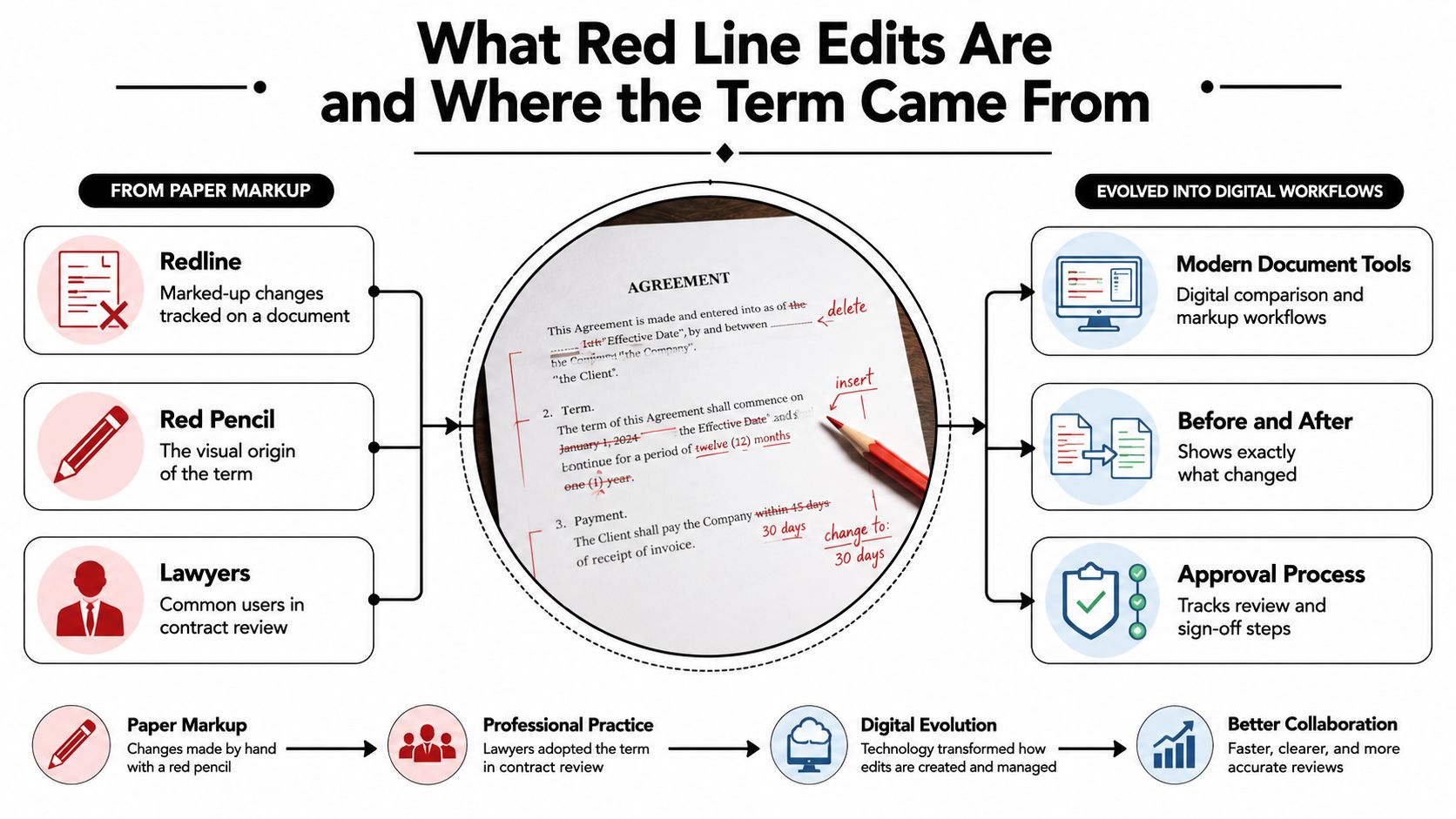
Think of a lawyer holding a red pencil over a printed agreement. They strike through wording they don't accept, add replacement language, and write questions beside the paragraph. The next person can see the proposal without losing sight of the original.
That's where redlining gets its name. Digital redlines serve the same purpose, preserving proposed changes and comments and, when the software supports it, the editor's identity. The history and distinction between redlines and blacklines help explain why markup is more useful than exchanging unexplained clean copies.
The paper-to-digital progression looks like this:
A proposal isn't an agreement
Consider an illustrative staffing clause:
Either party may end the assignment
without noticeby giving written notice under the assignment schedule.
The struck-through words show the proposed deletion. The bold text represents the proposed insertion in this example, although actual software may underline additions instead.
The agency's account manager might want notice so they can arrange replacement work. The customer might need flexibility if a placement doesn't work out. Neither concern disappears because someone has typed a polished replacement sentence.
A redline records a negotiating position, not automatic acceptance. The parties still need to agree on the wording, and their authorized reviewers must approve any exceptions.
Redline or blackline?
The terms overlap in everyday conversation, but the distinction is useful:
- Redline: Records proposed edits as reviewers make them during negotiation.
- Blackline: Shows differences between selected versions through a comparison.
A redline helps you follow the conversation. A blackline helps you establish what differs between documents. Neither format, by itself, tells you whether the business should accept the change.
That last question needs context. A staffing coordinator may understand the operational effect of a notice provision, while legal assesses its interaction with termination rights. Good red line edits keep those responsibilities visible instead of treating every change as a formatting choice.
Why Redlining Consumes So Much Legal Time
The visible edit may take a moment. Understanding it can take much longer.
A Legal Dive report summarizing a survey of 150 legal professionals found that one-third typically spent 3–5 hours reviewing a single contract, while nearly half spent at least 3 hours. The same survey found that approximately 60% lacked formal contract playbooks, while about one-quarter had a detailed playbook.
Those figures describe reported contract-review time, not the duration of every redline exchange. They're still a useful reminder that contract review involves much more than typing.
Where reviewers spend their effort
In a staffing placement agreement, legal might need the account manager to explain a guarantee concession. In healthcare, a reviewer may need to establish whether an intake-form revision changes the intended authorization. A procurement lawyer reviewing a logistics carrier agreement may need operations to confirm whether a proposed service obligation is achievable.
The delay often sits between people:
- Reconstructing context: The reviewer searches for the commercial promise behind a proposed clause.
- Explaining consequences: Legal translates an edit into an operational responsibility.
- Finding authority: Sales or procurement asks who can approve an exception.
- Waiting for decisions: The file sits untouched while stakeholders consider a concession.
Without a playbook, reviewers must repeatedly establish preferred language, acceptable fallbacks, and escalation routes. A clause library helps with wording, but it doesn't necessarily explain when someone may compromise.
Practical rule: Measure time spent making decisions separately from time spent waiting for someone authorized to make them.
Measure your own negotiation cycle
Choose a representative agreement and record when your team receives it, begins substantive review, requests approval, receives that approval, and returns the draft. Note the reason for each pause.
Separate active review time, internal waiting time, and counterparty response time. Don't combine them into a single turnaround figure and assume the editor is responsible for all of it.
Then ask a practical question: what would have allowed the next person to act sooner? Sometimes the answer is better comparison software. Often it's a clear fallback, an available approver, or a comment that explains the requested business outcome.
Reading Tracked Changes Without Missing a Thing
A clean-looking page isn't necessarily an unchanged page. Before evaluating a contract's wording, check how your software is displaying revisions.
In Microsoft Word, Track Changes records edits as they happen. Insertions are typically underlined, deletions use strikethrough, and reviewer colors help distinguish contributions. Word's Track Changes guidance explains Simple Markup and All Markup: the former reduces clutter to a margin indicator, while the latter exposes revision detail.
Treat the margin as a signpost
Simple Markup is useful when you want to read the proposed contract without constant visual interruption. But a margin mark only tells you where to investigate. It doesn't tell you whether someone changed a definition, removed an exception, or altered a cross-reference.
Use All Markup when validating operative language. Check the reviewer settings too, so you aren't looking at a filtered subset of changes.
Consider this illustrative patient-consent clause:
The clinic may disclose information to
the named recipientthe named recipient and its service providers.
The addition looks small. Its meaning isn't. The reviewer needs to establish which recipients are intended, whether the broader wording fits the authorization, and whether privacy review is required.
Don't interpret this illustration as approved consent language. The point is that a few added words can change the scope of permission.
Read beyond the colored words
A useful review routine follows the meaning of the edit, not just its location:
- Confirm identity: Establish who proposed the revision. Don't infer approval authority from a color.
- Read the comment: Look for the business reason, not merely a statement that the clause was updated.
- Check definitions: Follow capitalized terms to their definitions and related exceptions.
- Inspect dependencies: Review connected dates, quantities, schedules, and cross-references.
- Choose a decision: Accept, reject, counter, or escalate. Leave the reasoning with the clause.
A reviewer's name tells you who edited the sentence. It doesn't tell you who authorized the risk.
Accepting an edit applies it to the draft. That action shouldn't substitute for an approval decision. If a procurement manager has approved a delivery change but finance hasn't approved the related payment exposure, the negotiation isn't ready for cleanup.
Finally, read the surrounding paragraph as continuous text. An individually sensible insertion can leave the complete clause contradictory, especially when different reviewers have changed related provisions.
Comparing Drafts with Version Control and Audit Trails
A counterparty returns an attachment with no visible changes and a note saying they've made minor updates. You shouldn't have to rely on that description.
When tracked-change history is missing or unreliable, compare the returned document with the correct earlier draft. Microsoft Word's Compare function can generate a separate comparison result. The document comparison and tracked-changes guidance explains the distinction between recorded revisions and differences reconstructed from selected files.
Redline versus blackline at a glance
| Aspect | Redline | Blackline |
|---|---|---|
| Starting point | Edits recorded during drafting | Selected baseline and revised documents |
| Main purpose | Follow proposed negotiation changes | Identify differences between versions |
| Editor context | May preserve reviewer identities and comments | Can't reliably reconstruct missing authorship |
| Main limitation | Depends on preserved tracking history | Depends on choosing the correct documents |
| Approval value | Supports review of recorded proposals | Supports verification of a version's differences |
The comparison is only as trustworthy as its inputs. Comparing the returned draft with an outdated attachment can make previously agreed wording look new, or leave reviewers uncertain about which changes still need approval.
Make the baseline unambiguous
Use immutable version identifiers, meaning labels that remain attached to their original files. Retain the source documents rather than overwriting them when a new draft arrives.
These document version control practices are especially useful when legal, sales, and counterparties exchange attachments outside a shared workspace.
Apply these controls before relying on a comparison:
- Confirm provenance: Record who supplied each file and which negotiation round it represents.
- Keep originals: Preserve the received files separately from working copies.
- Compare precisely: Use word-level comparison when substantive wording matters.
- Inspect other locations: Check tables, headers, footers, schedules, embedded objects, and signature blocks.
- Reconcile attachments: Confirm that referenced exhibits match the negotiated package.
A visually identical main body doesn't prove that nothing changed. A revised schedule may alter responsibilities while the agreement's central paragraphs remain untouched.
Carry approval evidence into execution
The record should connect the approved comparison, exception decisions, clean execution document, and completed agreement. Someone reviewing the file later should be able to identify which language the approver considered.
Before signature, compare the execution copy against the approved wording and resolve discrepancies. After signing, retain the exact signed document with its approval record.
This is how you prevent version drift, the situation where people approve one draft but circulate or sign another. A convincing filename isn't enough. The relationship between the files needs to be verifiable.
Before and After Clause Examples Across Industries
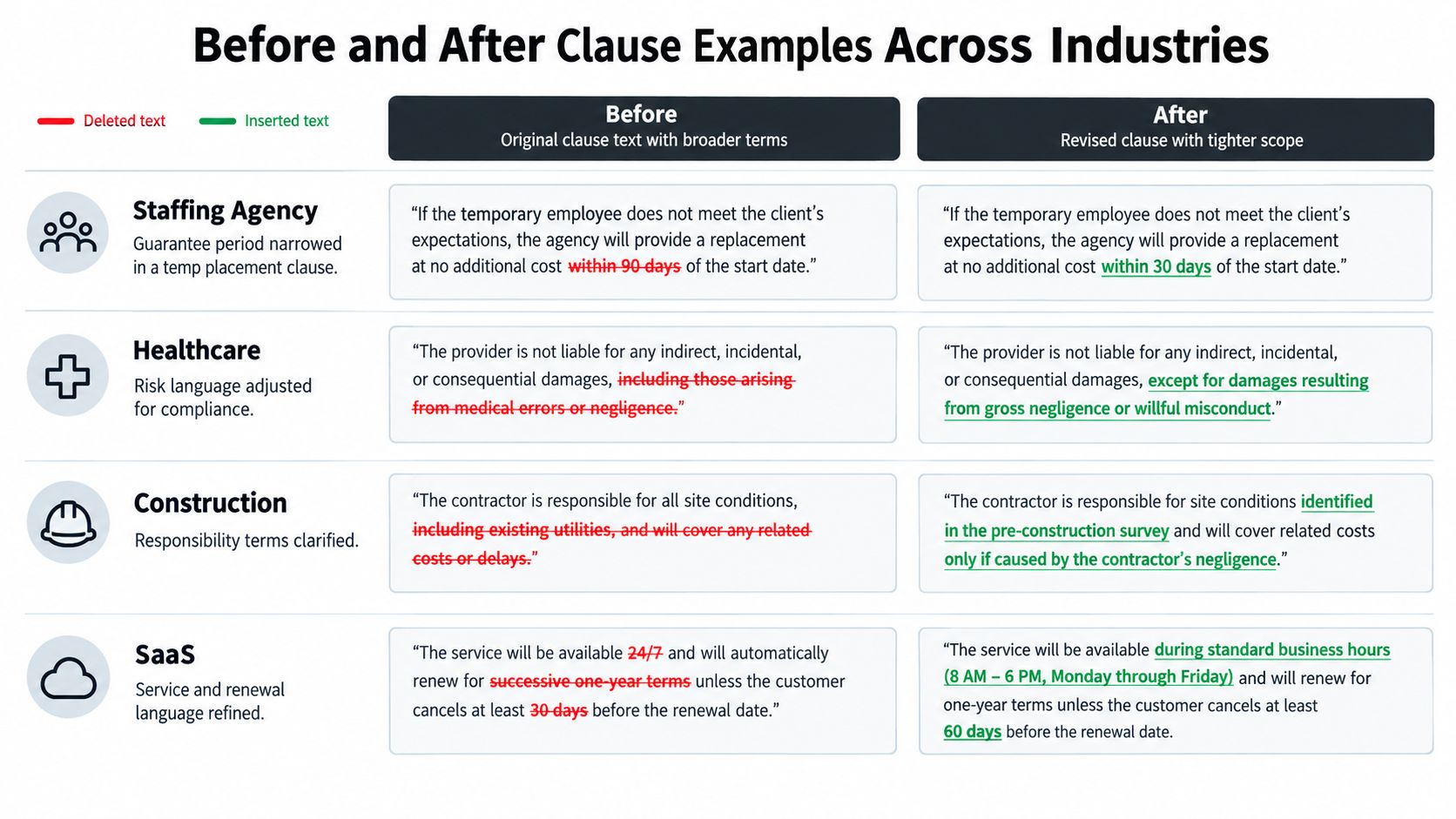
The following examples are hypothetical drafting exercises, not reported customer outcomes or clauses ready for use. Each shows how a reviewer can connect wording to a reason, an approver, and a fallback.
The visual comparison illustrates how broader wording can become more specific:
Staffing guarantee scope
Original: “The agency will replace any temporary worker who leaves during the assignment.”
Proposed: “The agency will provide a replacement where the worker leaves during the guarantee period stated in the assignment schedule, subject to the agreed exclusions.”
The agency wants to avoid an open-ended replacement obligation. The account manager should confirm that the proposed guarantee matches the commercial offer, while legal checks the exclusions and related remedies.
A fallback could preserve the customer's preferred guarantee period but define eligible departures and the replacement process more clearly. The decision record should explain the concession, not just retain the final sentence.
Real estate exclusivity
Original: “The owner appoints the agency exclusively until the property is sold.”
Proposed: “The owner appoints the agency exclusively for the listing term stated in the schedule, with any extension requiring written agreement.”
The owner wants a defined commitment rather than exclusivity tied to an uncertain sale. The agency's authorized commercial lead should assess the business implications, and legal should review termination provisions and any commission entitlement after expiry.
A fallback might allow renewal after an agreed review. The reviewer should avoid changing exclusivity while leaving conflicting commission language untouched.
Logistics liability
Original: “The carrier is responsible for all losses arising from transportation.”
Proposed: “The carrier's liability is subject to the agreed cap and exceptions in the liability schedule.”
The carrier wants clearer exposure. The customer needs to understand what protection remains. Legal, finance, and the insurance owner should assess the limitations of liability, including the relationship between the cap, exclusions, and insurance.
A fallback could distinguish categories of loss rather than force every claim into the same treatment.
For another context where triggers and commercial outcomes need careful drafting, Capstacker's resource on drafting success fee agreements offers a related reading opportunity.
Keep the same clause-by-clause questions beside you when using a video walkthrough:
Business users should accept only edits within their documented authority. A familiar-looking clause isn't permission to approve it. Liability, privacy, remedies, and statutory questions need the designated reviewers, even when the commercial team supports the deal.
Choosing Redlining Tools and Compliance Safeguards
Choose tools around the handoffs your team needs to control. Word may suit a straightforward exchange, while a contract management platform can bring review, approvals, and signing into a shared workflow.
The important comparison isn't which tool displays colorful markup. It's whether reviewers can understand the proposal and prove that authorized people approved the version sent for signature.
Compare the working requirements
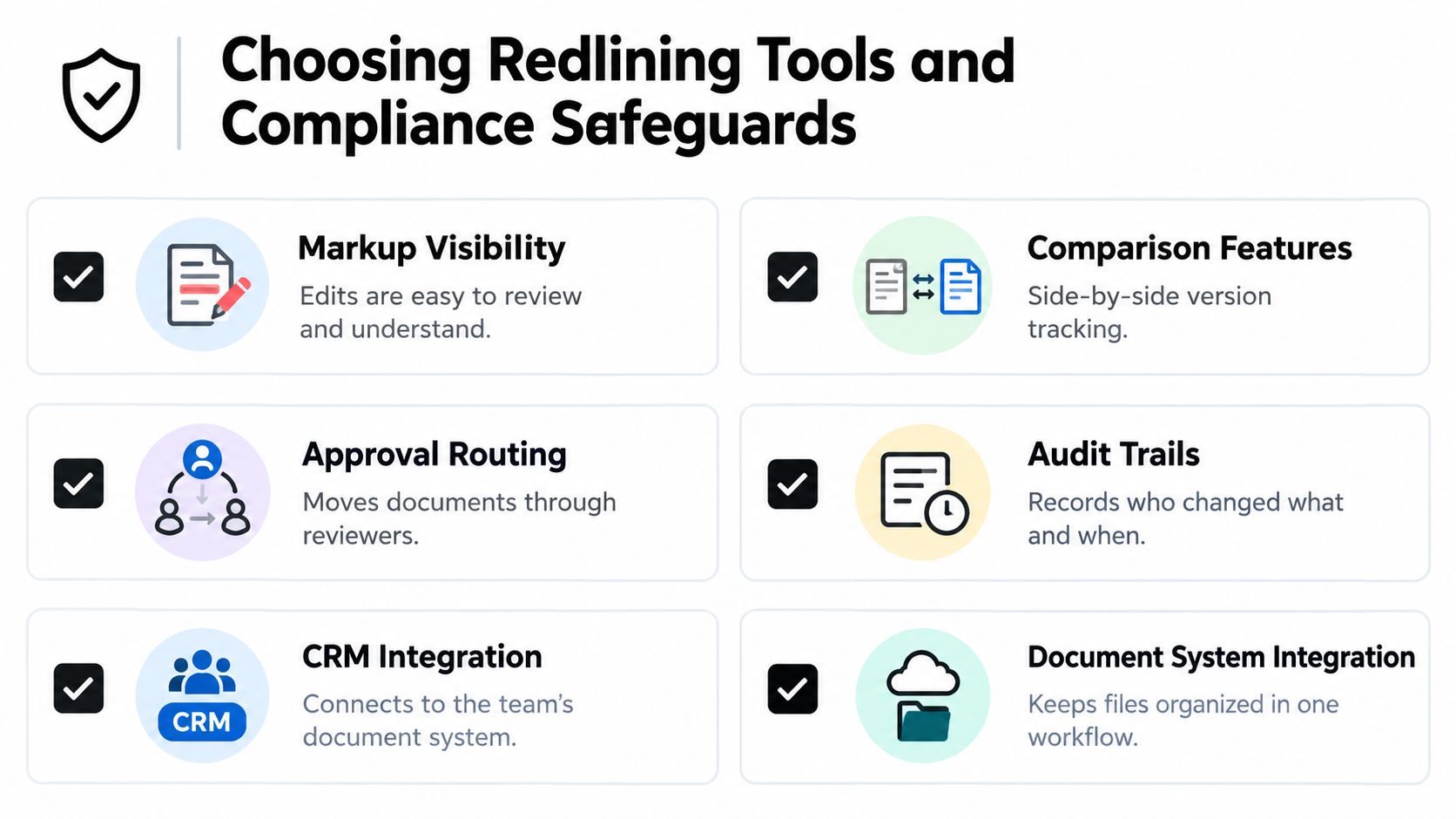
Use this checklist during evaluation:
- Markup visibility: Can reviewers inspect additions, deletions, comments, and authorship?
- Comparison features: Can they establish differences against a known baseline?
- Approval routing: Can exceptions reach legal, finance, privacy, or security?
- Audit trails: Can the organization connect decisions to the approved document?
- CRM integration: Can sales work from the correct customer and agreement records?
- Document system integration: Can teams retain files without creating competing copies?
The selection criteria are summarized visually below:
BoloSign is an AI-powered contract management option that centralizes drafting, redlining, approvals, and eSignature. Its AI assistant supports first drafts, risk flagging, and alternative language, with a Document Signing API and integrations including HubSpot and WordPress.
Teams can create, send, and sign PDFs, templates, and forms instantly using BoloSign, once the document is ready for execution. Its unlimited documents, templates, and team members come at one fixed price, which the publisher positions as up to 90% more affordable than DocuSign or PandaDoc.
Keep intelligence separate from authority
Use AI contract review and contract intelligence to support decisions, not make unapproved concessions. Require the reviewer to record accepted, modified, and rejected suggestions, together with the reason.
That distinction matters because a contracting survey reported that 56% of executives were very concerned about autonomous AI making business decisions without suitable guardrails. Faster automation shouldn't remove accountability.
Match safeguards to the transaction
Treat ESIGN, eIDAS, HIPAA, and GDPR as compliance considerations to assess, not interchangeable badges. For US, Canadian, Australian, New Zealand, and UAE workflows, confirm applicable local requirements rather than assuming a single signature method suits every agreement.
Under eIDAS, electronic signatures can't be denied legal effect solely because they're electronic or aren't qualified; qualified electronic signatures have handwritten-signature equivalence across EU Member States, as the European Commission's eSignature FAQ explains.
For clinics handling electronic protected health information, the HIPAA Security Rule requires administrative, physical, and technical safeguards, including transmission security. Assess access controls, secure transmission, and completed-document handling as part of contract compliance. A visible signature alone doesn't establish compliance.
Putting Redlines into Practice with a Free Trial
Start with an agreement your team understands well, such as a staffing placement or vendor renewal. Choose a document with an available business owner and a reviewer who can explain the organization's preferred positions.
Before opening the editor, write down the commercial outcome you're trying to protect. Then identify who may approve routine changes and who must review exceptions. This gives the trial a useful purpose beyond testing whether the software can display markup.
Test the complete handoff
Follow the workflow through to execution:
- Define the edit: Explain the intended outcome and acceptable fallback.
- Read the proposal: Use full markup and inspect related provisions.
- Verify the version: Compare against the correct baseline and retain the record.
- Approve deliberately: Apply the playbook and route exceptions to authorized people.
- Prepare for signature: Check the clean execution copy against the approved language.
Include the people who will use the process. An education administrator might test an enrollment form, while a professional-services team might use a statement of work. Ask each participant whether they can identify the next action without searching through email.
If your priority is to sign PDFs online, test the approved-document handoff as carefully as the signing screen. If you want to add signature to Google Form workflows, confirm how responses, signer identity, and the executed document would stay connected before choosing an integration.
Judge digital signing solutions by whether colleagues can answer practical questions: what changed, who approved it, and which document is ready? Successful contract automation makes those answers easier to verify, not merely faster to assume.
BoloSign brings AI-assisted contract review, approvals, and secure eSignature into a shared workflow, with unlimited usage at a fixed price. Visit BoloSign to start a 7-day free trial and test an agreement from the first proposed redline through the clean copy your team approves for signature.

Paresh Deshmukh
Co-Founder, BoloForms
29 Oct, 2026
Take a Look at Our Featured Articles
These articles will guide you on how to simplify office work, boost your efficiency, and concentrate on expanding your business.



