

How to Use Electronic Signatures: A Practical Guide for Your Business
Learn how to use electronic signatures to speed up workflows, securely sign, send, and manage documents with ease.

Tired of nonsense pricing of DocuSign?
Start taking digital signatures with BoloSign and save money.
Diving into electronic signatures is way easier than most people think. At its core, you're just uploading a document, telling the platform where you need people to sign or fill something in, and hitting "send." Tools like BoloSign have turned this into a few quick clicks, making the old print-sign-scan routine a thing of the past.
A Practical Look at Electronic Signatures
Switching from paper-based workflows isn't just a nice-to-have; it's a smart business move that pays off almost immediately. When you bring in a digital signing solution, you're not just putting a digital scribble on a PDF. You're building a faster, safer, and more professional way to get agreements done.
Think about the last time you had to get a contract signed the old-fashioned way. It probably involved printing it out, maybe mailing or hand-delivering it, waiting for the other person to sign, getting a scanned copy back, and then filing it somewhere. The whole process is painfully slow, surprisingly expensive, and full of opportunities for things to go wrong—documents get lost, coffee gets spilled, pages get missed.
The Modern, Efficient Alternative
This is where electronic signature platforms completely change the game. What used to be a multi-day ordeal can now be wrapped up in a matter of minutes.
Here’s what that looks like in the real world with a tool like BoloSign:
- Create or Upload: Start with any PDF you have on hand, or better yet, create reusable templates for things you send out all the time, like NDAs, sales contracts, or new hire paperwork.
- Prepare and Send: Just drag and drop the fields you need for signatures, initials, dates, or text. Add your signers, set a specific signing order if one person needs to sign before another, and fire it off with a personalized message.
- Sign from Anywhere: Your recipients get a simple email with a link. They can open and sign the document on any device—phone, tablet, or computer—without needing to download or install a single thing.
- Automate and Track: The moment the last signature is added, everyone automatically gets a finalized copy. Behind the scenes, a secure and legally-binding audit trail is created, tracking every action taken on the document.
This shift isn't just about speed. It strengthens security with compliant audit trails and gives you a bird's-eye view of your document's status at all times. To see exactly how this works under the hood, you can learn more about BoloSign's eSignature capabilities.
To really drive the point home, let's look at how the old, manual process stacks up against a modern digital workflow.
Comparing Document Signing Workflows
| Action | The Old Way (Print, Sign, Scan) | The BoloSign Way (Digital Workflow) |
|---|---|---|
| Document Prep | Manually print, find where to sign. | Upload a PDF or use a saved template. |
| Sending | Mail, courier, or email attachment. | Send a secure link via email in seconds. |
| Signing | Requires a printer, pen, and scanner. | Sign on any device (phone, tablet, PC). |
| Turnaround Time | Days or even weeks. | Minutes or hours. |
| Tracking | Manual follow-ups via phone/email. | Real-time status tracking and auto-reminders. |
| Filing | Manual scanning and physical storage. | Secure, automatic cloud storage with audit trails. |
| Security | Prone to loss, damage, and forgery. | Legally binding with encrypted, time-stamped logs. |
The difference is night and day. One path is filled with manual steps, delays, and uncertainty, while the other is fast, secure, and completely automated, letting you and your team focus on more important work.
Getting Your First Document Signed
Alright, let's get down to business and move from theory to action.
Imagine you're running a busy staffing agency and need to get a new hire onboarded, like, yesterday. The old-school dance of printing, signing, scanning, and emailing employment contracts is a huge bottleneck. This exact scenario is the perfect way to see how electronic signatures can completely change your workflow.
First things first: preparing the document. With a tool like BoloSign, you're not starting from scratch every single time. You can build reusable templates for all those common documents—NDAs, client agreements, new-hire packets, you name it. This feature alone is a massive time-saver and keeps everything consistent across the board.
Setting Up and Sending Your Document
Once you have your PDF ready, you just upload it. This is where the magic happens. You can drag and drop different fields right onto the document. And I'm not just talking about a signature box. You can add fields for:
- Initials on key pages to make sure they've been reviewed.
- Dates that automatically fill in the moment someone signs.
- Text boxes for the new hire to type in their address or contact info.
- Checkboxes to acknowledge they've read the company policies.
Doing this turns a flat, static PDF into a smart, interactive form that captures all the necessary info in one clean pass.
This infographic really drives the point home, showing the clunky old way right next to the streamlined BoloSign way.
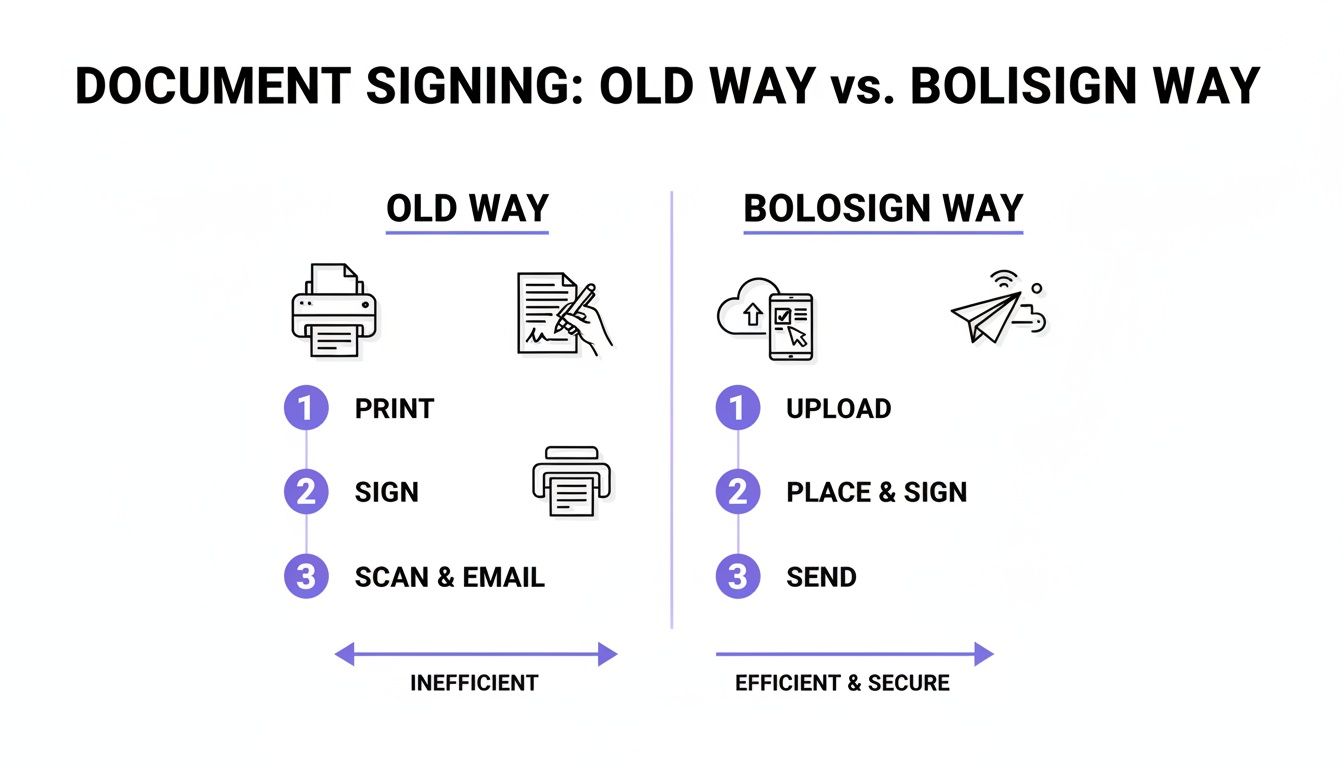
The difference is night and day. A digital workflow cuts out so many pointless steps, drastically shrinking the time it takes to go from a verbal offer to an official hire.
Juggling Multiple Signers Like a Pro
But what if you need signatures from more than one person? This is where a digital solution truly pulls ahead. Back to our staffing agency example: maybe the hiring manager has to sign the offer letter before it ever reaches the candidate. No problem.
With BoloSign, you can set a specific signing order. The document automatically travels from one person to the next, which means you can stop chasing down approvals. The system handles the reminders and keeps you in the loop, making the whole process smooth and predictable. You can also add as many team members as you need without any extra cost—a huge plus for growing businesses.
Key Takeaway: The ability to build templates and define a signing order isn't just a nice feature; it turns document management from a reactive chore into a proactive, automated workflow. This is how top-performing teams in professional services, real estate, and beyond stay ahead of the curve.
This shift toward e-signatures isn’t some niche trend; it’s a global movement. The market has ballooned to over $12 billion and is projected to hit an incredible $238 billion by 2034. That kind of growth tells you one thing: using a digital signing solution is no longer a "nice-to-have"—it's essential for staying in the game. For small businesses, platforms like BoloSign make this jump easy: upload a PDF, add your fields, send it off, and track everything with audit trails that are compliant with ESIGN, eIDAS, and GDPR.
Many of us also rely on forms for collecting information. An education provider, for example, might use a Google Form for student registration. You can actually embed a legally binding signature field right into those forms. Our guide on how to add a digital signature on Google Forms breaks down this powerful feature, merging data collection and signing into a single, seamless step. It’s a practical trick that makes the whole process tangible and easy to implement in your own business.
Automating Workflows Beyond the Signature
An electronic signature shouldn't be the end of the road. Think of it as the starting pistol.
The real power of a signature isn't just getting a "yes" on paper; it's what happens after that "yes." When a signed document automatically kicks off the next chain of events, you turn a simple signature into a powerful command that pushes your business forward without anyone lifting a finger.
Let's walk through a real-world example. Imagine a sales contract is signed. The old way? You'd manually download it, hunt for the right folder, upload it, then draft separate emails to your finance and operations teams to get the ball rolling.
The automated way? The moment that final signature hits, BoloSign can automatically save the executed agreement to a designated folder in Google Drive, ping your team's Slack channel with a notification, and instantly update the deal's status in your CRM. The process is completely hands-off. This is what we mean by contract automation.
Connecting Your Tools for Seamless Flow
This kind of magic happens because modern digital signing solutions like BoloSign are built to talk to the tools you already rely on every day. Integrations with platforms like Salesforce, Pipedrive, and Zapier are the digital glue that holds your entire workflow together.
A professional services firm, for instance, can set up a workflow where dragging a client to the "Won" column in their CRM automatically generates a personalized engagement letter from a template and sends it out for signature. Zero manual data entry. Zero forgotten follow-ups.
This isn't just for sales teams, either:
- Healthcare: A new patient signs their intake forms online. The signed documents are instantly and securely filed away, and the front desk gets a notification to prep for the appointment—all while staying HIPAA compliant.
- Logistics: The second a proof of delivery is signed, it can trigger an invoice to be generated in your accounting software while simultaneously updating your inventory management system.
The Role of AI in Document Intelligence
This automation is getting much smarter than just simple triggers. BoloSign’s AI-powered automation accelerates the entire document lifecycle, not just the final signature.
AI can actually help review incoming contracts, flagging non-standard clauses that need a second look or ensuring every required field is filled out correctly before a document ever goes out the door.
This gives your legal and operations teams a huge head start, cutting down on human error and dramatically speeding up review cycles. It’s all about building a smarter, more secure workflow from the very beginning. For more complex internal processes, you can design multi-step approval sequences. You can learn more about building these structured workflows by exploring our guide on creating a form approval process.
A truly automated system connects every piece of your operational puzzle. A signed document should do more than just sit in a folder; it should update records, notify teams, and initiate the next crucial step in your business process without anyone lifting a finger.
For those looking to build even more advanced, custom workflows, e-signature platforms integrate perfectly with tools like the Microsoft Power Platform and low-code automation. This opens the door for businesses to create highly tailored solutions for their unique operational needs. When you automate these workflows, you're not just saving time—you're building a more reliable, secure, and efficient business from the ground up.
Understanding E-Signature Security and Legal Compliance
Trust is the bedrock of any business agreement. When you take your contracts and approvals online, that trust needs to be backed by rock-solid security and unquestionable legal standing. Diving into electronic signature compliance might sound a little intimidating, but with the right tools, it's actually pretty straightforward.
The whole game changed with laws like the ESIGN Act in the United States and eIDAS in the European Union. These frameworks essentially gave electronic signatures the same legal weight as a wet-ink signature on paper, as long as a few key conditions are met. This means your digitally signed contracts aren't just convenient; they're fully enforceable.
The Power of the Audit Trail
So, what’s the secret sauce that makes an e-signature legally defensible in court? It all comes down to the audit trail.
Think of it as a detailed digital receipt that’s attached to every document you send. This log meticulously records every single action taken, creating a tamper-proof history of the entire signing process from start to finish.
A really thorough audit trail, like the one you get with BoloSign, will capture everything:
- Who Signed: The signer’s full name and their verified email address.
- When They Signed: A precise, undeniable timestamp for every single click and signature.
- Where They Signed: The IP address where the document was accessed and signed.
- Document History: The complete lifecycle, from the moment it was created and sent to when it was viewed and finally completed.
This isn't just a "nice-to-have" feature; it's absolutely critical. A healthcare clinic managing patient consent forms relies on this audit trail to prove HIPAA compliance. A logistics company uses it as undeniable proof of delivery.
The audit trail is your document's unique digital fingerprint. It’s what transforms a simple online signature into a legally sound agreement, giving you total confidence to go paperless.
Going Beyond the Basics with Enterprise-Grade Security
While legal compliance is the baseline, true peace of mind comes from knowing your documents are locked down tight. Leading solutions don’t just stop at meeting the legal minimums; they build their entire platform on a foundation of security.
For example, a platform like BoloSign is engineered to meet tough international standards, holding certifications like SOC 2 and ISO 27001. These aren't just fancy acronyms to throw around. They represent a serious commitment to protecting your data through rigorous controls, regular third-party audits, and constant vigilance.
For businesses operating in sensitive fields, this level of security is non-negotiable. Think about a professional services firm handling confidential client financials or an education provider managing student records. They need absolute certainty that their documents are shielded from any unauthorized access. That's why top-tier platforms also ensure compliance with specific regulations like GDPR and HIPAA, providing the secure workflows you need to operate without worry.
The explosive growth of the e-signature market, which is on track to hit $9.85 billion in 2025, is fueled by this demand for secure, cloud-based tools. As more companies embrace remote work, choosing the right e-signature platform means picking one that provides ironclad proof for every transaction. To get a deeper sense of this shift, you can explore the full digital signature market analysis. It’s this powerful combination of legal validity and robust security that makes switching to a digital signing solution a smart, safe move.
How Different Industries Use Electronic Signatures
While the core steps for using an electronic signature are pretty universal, the real magic happens when you see how they solve specific, industry-level headaches. Let's move past the basics and look at how different sectors are putting digital signing tools to work in the real world.

This isn't just a niche trend. The e-signature market is on track to hit $15 billion by 2025, with over 80% of organizations using them as part of their daily routine. This boom is fueled by powerful, affordable tools that solve real problems. We're seeing real estate agencies slash closing times from weeks to days and staffing firms onboard new hires 5x faster. You can dig deeper into the latest electronic signature market trends to see the full picture.
Healthcare: Streamlining Patient Intake
In healthcare, efficiency can never compromise security. Clinics and hospitals are now using e-signatures to send out new patient forms, consent documents, and treatment plans before an appointment. This simple change cuts down on waiting room pile-ups and drastically reduces administrative slip-ups.
Using a platform like BoloSign, every document is managed within a HIPAA-compliant system. Each signature comes with a secure audit trail, creating a legally sound record of patient consent—an absolute must for staying compliant.
Real Estate: Accelerating Agreements
Real estate is a world built on paper—offers, counteroffers, lease agreements, closing documents... the list goes on. The old way of doing things involved printing stacks of paper, driving across town for a signature, then scanning everything back in. It was a massive time sink.
Now, agents can send a purchase agreement straight to a client's phone, where they can sign it in minutes. In a hot market, that kind of speed is a game-changer. A day's delay can easily mean losing out on a dream home. For a closer look at how the industry is changing, check out these use cases for e-signatures for real estate.
Logistics and Field Services: Confirming Delivery
For any company in logistics or field services, proof of delivery or service completion is the name of the game. Drivers and technicians can now use a tablet to capture a client's signature right on the spot, instantly confirming the job is done.
That single signature can kick off an entire automated workflow:
- The signed proof of delivery is automatically filed away securely.
- The accounting department gets a notification to generate the invoice.
- The client receives a final, signed copy for their own records.
This completely eliminates the problem of lost paperwork and shrinks the billing cycle from weeks to just days.
Professional Services: Securing Client Engagements
Law firms, marketing agencies, and consultants all need to get client agreements signed quickly to kick off a project. With e-signatures, they can send out engagement letters, Statements of Work (SOWs), and NDAs and often get them back the very same day.
BoloSign’s model—unlimited documents, team members, and templates for one fixed price—is a perfect fit for these high-volume businesses. It makes professional-grade contract automation affordable, saving firms an estimated 90% compared to the traditional per-envelope pricing of other tools.
Ready to see how these workflows could fit your business? Experience the platform firsthand by starting a 7-day free trial today.
Common Questions About Electronic Signatures
Even as more businesses go digital, a few key questions always seem to pop up about electronic signatures. Let's walk through the most common ones to clear up any confusion and get you moving forward with confidence.
Are Electronic Signatures Actually Legally Binding?
Yes, they are. This is probably the number one question we hear, and the answer is a firm yes. In the United States, the ESIGN Act was passed way back in 2000, giving electronic signatures the same legal weight as a wet ink signature. The same goes for the European Union with its eIDAS regulation, and most other developed countries in places like Canada, Australia, and New Zealand have similar laws on the books.
Platforms like BoloSign are built from the ground up to comply with these global standards. They provide a detailed audit trail that makes every signed document legally defensible, so you can rest easy.
How Secure Is My Signed Document?
Security is the bedrock of any reputable digital signing solution. When you use a secure platform, your documents are wrapped in multiple layers of protection, including data encryption while they're in transit and while they're stored.
BoloSign is compliant with major international security standards, including SOC 2, ISO 27001, HIPAA, and GDPR. Every single action—from the moment a document is sent to the final signature—is logged in a tamper-proof audit trail. This creates a verifiable history that's honestly far more secure than a piece of paper tucked away in a filing cabinet.
An electronic signature from a compliant platform isn't just a digital image; it's a secure, verifiable action backed by a comprehensive log of who signed, when, and where. This level of detail provides far greater security and legal proof than traditional methods.
Can I Use E-Signatures With My Existing PDFs or Forms?
Absolutely. Any decent e-signature tool is designed to be flexible. You can easily upload your existing PDFs—contracts, onboarding paperwork, you name it—and drag and drop signature fields right where you need them.
Better yet, a tool like BoloSign lets you seamlessly add a signature to a Google Form. This is a game-changer because you can collect legally binding approvals through an interface that your team and clients already know and use every day.
What if Multiple People Need to Sign One Document?
This is a core function of modern e-signature platforms, and it’s where they really shine. You can add multiple recipients with ease and even set a specific signing order.
For example, a new client contract might need to go to your sales manager for internal approval first, and only then get sent automatically to the client for their signature. BoloSign handles these multi-signer workflows effortlessly, even sending out automated reminders to nudge people along. You can see the real-time status of any document right from your dashboard, so you’re never left wondering who’s holding things up.
Ready to see just how simple, affordable, and secure e-signatures can be? With BoloSign, you get unlimited documents, team members, and templates for one fixed price, making it 90% more affordable than the big names out there. Start your 7-day free trial today and experience the platform firsthand.

Paresh Deshmukh
Co-Founder, BoloForms
20 Jan, 2026
Take a Look at Our Featured Articles
These articles will guide you on how to simplify office work, boost your efficiency, and concentrate on expanding your business.



