

How to Use Digital Signatures: A Practical Guide for Modern Businesses
Learn how to use digital signatures to streamline workflows and secure documents. This practical guide covers creating, sending, and managing eSignatures.

Tired of nonsense pricing of DocuSign?
Start taking digital signatures with BoloSign and save money.
At its core, using digital signatures is a straightforward three-part dance: Prepare your document, place the signature fields where you need them, and send it off. With the right tools, what used to be hours of administrative hassle—printing, signing, scanning, emailing—can now be done in just a few minutes, securely and from anywhere.
Your First Steps in Using Digital Signatures
Jumping into digital signatures isn’t a complex technical project. The entire workflow is designed to be intuitive, helping you leave the old print-sign-scan cycle behind for a more secure, efficient, and legally sound digital method. The main goal here is to make the experience painless for everyone involved, so documents get signed and returned fast.
This kind of efficiency is a huge win for businesses across the globe. Think about it: a staffing agency in the US can send a new hire an offer letter and get it back signed the same day. A real estate agent in Australia can get a lease agreement signed by tenants living in different cities without any logistical nightmares. It frees you up to do the work that actually matters instead of just chasing paperwork. With a platform like BoloSign, you can create, send, and sign PDFs, templates, and forms in minutes.
Prepare, Place, and Send: The Core Workflow
The whole process really does boil down to that simple sequence. This visual lays out the three key stages you'll go through with any modern digital signing solution.
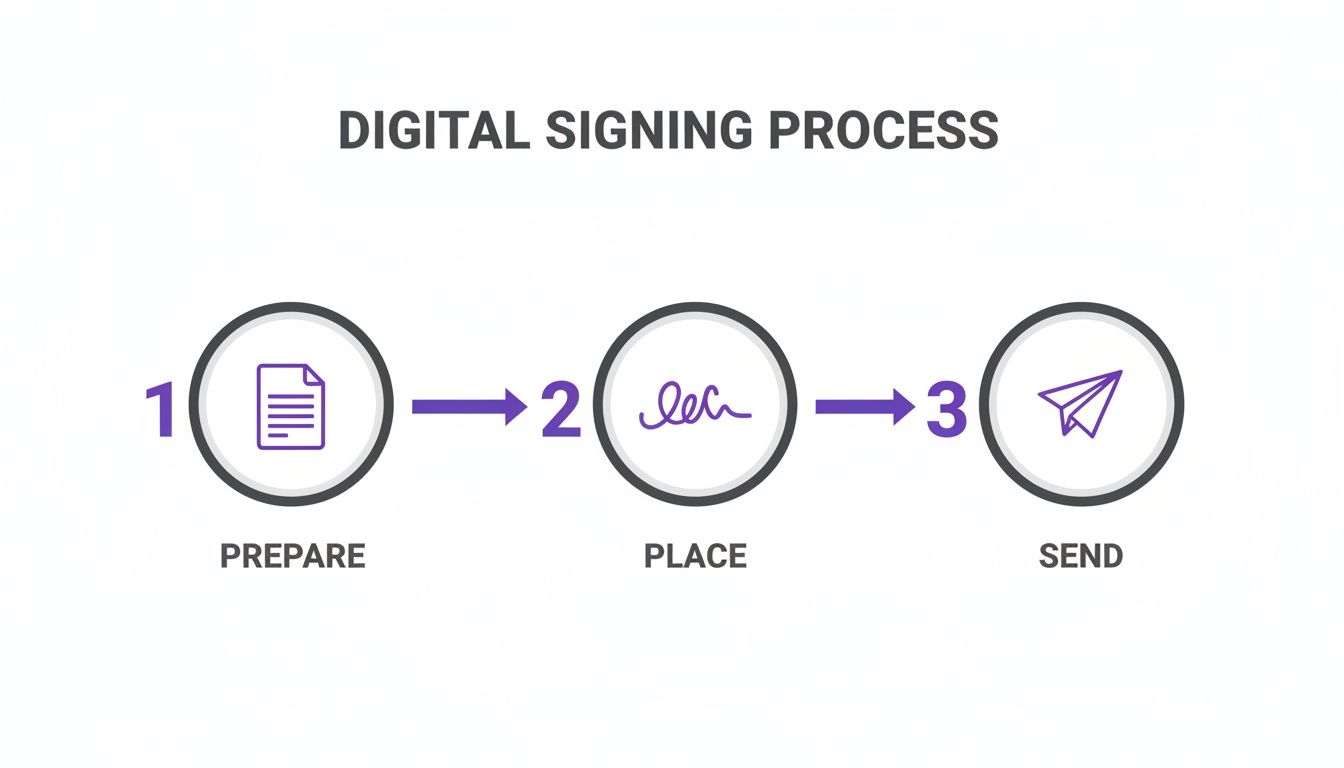
As you can see, it's a logical flow that cuts out all the friction you get with paper-based methods.
How It Works in Practice
So, what does this look like in the real world? Let's say you run a consulting firm in Canada and you're ready to onboard a new client. Here’s how you’d handle the contract using a tool like BoloSign:
- Get Your Document Ready: First, you just upload your existing contract—probably a PDF—right into the platform. No need to recreate anything from scratch.
- Position the Fields: This is where it gets good. You simply drag and drop fields onto the document where you need information. This isn't just for signatures; you can add spots for initials, dates, or text boxes for things like company names and addresses.
- Send It Off: Pop in your client's email, write a quick custom message, and hit send. They'll get a secure link to open and sign the document on any device they have. No special software, no printing required.
The real beauty of a platform like BoloSign is its simplicity. It takes a clunky, manual process and turns it into an automated, trackable system that’s 90% more affordable than other eSignature tools that charge you per user or document. With one fixed price, you get unlimited documents, team members, and templates.
Once you send the document, you get a real-time view of its status. You’ll know when it's been opened, when it's been signed, and the final, legally binding copy comes right back to you automatically. This visibility means no more guessing or sending follow-up emails.
This same logic works just as well for forms. For instance, you can easily add a digital signature to Google Forms to make data collection and consent processes just as smooth.
To give you a better sense of how this looks in practice, here's a quick comparison of the old way versus the new way.
The Digital Signature Workflow at a Glance
Switching from paper to digital isn't just a minor tweak; it fundamentally changes how you handle agreements. This table breaks down the difference at each stage of the process.
| Stage | Traditional Method (Paper) | Digital Signature Method (Using BoloSign) | Key Benefit |
|---|---|---|---|
| Document Preparation | Manually print, fill out recipient details, and prepare for mailing or scanning. | Upload a digital file (PDF, Word) and save it as a reusable template. | Time Savings & Consistency |
| Signature Request | Send via courier, fax, or as an email attachment, requiring the recipient to print. | Send a secure, trackable link directly to the signer's email. | Speed & Security |
| Signing Process | Recipient prints, signs with a pen, scans the document, and emails it back. | Recipient opens the link, reviews the document, and signs electronically on any device. | Convenience & Accessibility |
| Tracking & Follow-up | Manual follow-up via phone or email, with no visibility into the document's status. | Real-time dashboard shows when the document is viewed, signed, or completed. | Visibility & Control |
| Archival & Retrieval | File signed paper copies in physical cabinets; retrieval is slow and cumbersome. | Signed documents are automatically archived in a secure, searchable cloud repository. | Efficiency & Compliance |
As the table shows, the digital method introduces massive efficiencies at every single step, eliminating manual work and giving you complete control over your document lifecycle.
Building Your Digital Signing Foundation
Signing a single document is one thing, but the real magic happens when you build a solid, repeatable system for your entire team. A little bit of thoughtful setup now pays off big time later, saving countless hours of mind-numbing administrative work. This is about more than just picking software; it’s about creating an efficient, scalable signing process that’s up to 90% more affordable than the big-name tools you’re used to.
Getting this foundation right is a huge competitive advantage, especially with the way the market is heading. By 2030, the digital signature market is projected to absolutely explode to USD 70.25 billion, largely because of the massive shift to remote work and e-commerce. According to a detailed industry report, small and medium-sized businesses that nail this can slash their operational costs by a staggering 50-70% thanks to faster document turnaround and fewer mistakes.
Configuring Your Team for Success
First things first: set up your workspace to mirror how your business actually runs. That means getting your team members in and defining what they can and can’t do.
Invite Everyone at Once: A lot of platforms penalize you for growing by charging per user. With BoloSign’s fixed-price model, you can add unlimited team members. This is a massive win for growing businesses in fields like professional services or staffing, where your headcount can change month to month. No more surprise bills just because you hired someone new.
Assign Roles and Permissions: Not everyone needs keys to the kingdom. You can set up administrators to handle billing and high-level settings, while other team members can be given roles just to create, send, and manage documents. It’s a simple way to keep things secure and organized.
Enable Key Security Features: Right from the start, turn on essentials like two-factor authentication (2FA). It’s a simple click that adds a critical layer of protection, making sure only the right people can access your company's sensitive documents.
Creating Your First Reusable Templates
Templates are your secret weapon for efficiency. Instead of building documents from scratch every single time, you create a master version with all the signature and data fields already in place.
Think about it: new hire paperwork, sales proposals, client intake forms. These are documents you send out constantly. A template transforms a 15-minute chore into a 30-second task. It’s not just about speed; it's about consistency and eliminating dumb mistakes.
The impact here is huge in high-volume industries:
- Healthcare: A clinic can create a HIPAA-compliant patient consent form. Now, every new patient signs the exact same legally sound document, every time.
- Real Estate: An agency in the UAE can have a tenancy agreement template ready to go. A new renter can have the lease in their inbox moments after saying yes.
- Education: A university can standardize its student enrollment forms, ensuring consistent data collection from thousands of applicants.
With BoloSign, you can build a library of unlimited templates. This means every department—from HR to sales—can have its own go-to documents ready, making the whole operation run smoother.
Onboarding Your Staff for a Smooth Transition
A new tool is only useful if people actually use it. A quick, clear onboarding process makes all the difference. Start by showing your team the core features, like how to send a document using one of the templates you just created.
Next, show them the tracking dashboard. This is often the "aha!" moment. Explain how they can see in real-time when a document is delivered, opened, and signed. This visibility means no more chasing people with follow-up emails or calls. It frees them up to do actual work. You can explore all the core eSignature features to see just how simple managing the entire document lifecycle can be.
By laying this groundwork, you’re not just buying software. You're building a centralized, secure, and ridiculously efficient system for handling every agreement your business relies on. It’s a strategic move that pays for itself in time, money, and professional polish.
Sending and Managing Signature Requests Like a Pro
With your templates and forms ready to go, you've reached the heart of the process: creating and sending documents for signature. This is where all the setup pays off. Instead of just talking concepts, let’s walk through the practical, real-world scenarios you face every day. The goal is to make getting that signature feel as natural and professional as every other part of your client interactions.
Think about it. A real estate agent in New Zealand needs to finalize a sale. The purchase agreement needs the buyer's signature, the seller's signature, and initials on every single page. Or what about a US healthcare clinic collecting patient intake forms? They need to gather sensitive information while staying completely compliant with HIPAA. These aren't just hypotheticals; they're the daily grind for thousands of businesses.
Crafting the Perfect Signature Request
A smooth signing experience starts with a request that is crystal clear, comprehensive, and dead simple for the recipient to complete. This is about more than just slapping a signature field onto a PDF.
With a platform like BoloSign, you can drag and drop all the fields you need right onto your document:
- Signature & Initials: The absolute essentials. Place these wherever you need formal acknowledgment.
- Date Fields: These can automatically fill in the date of signing, keeping your records airtight and accurate.
- Text Fields: Need a name, address, or company detail? Let them type it directly on the document.
- Checkboxes: Perfect for getting someone to agree to terms and conditions or for making selections on a form.
This kind of flexibility turns a static document into something truly interactive. Imagine a logistics company in the UAE. A driver can use a tablet to get a signature, capture the date, and have the client check a box confirming all goods were received in good condition—all on a single, digital form.
Sequential vs. Parallel Signing Workflows
Not every agreement gets signed by just one person at once. Often, you need a specific order of operations, and that's where signing workflows come into play.
Take a professional services firm in Canada. A new project proposal might need an internal manager's approval before it ever gets to the client for their signature. This is a classic sequential workflow. BoloSign lets you set the signing order, so the document automatically moves from one person to the next only after the previous one has signed. No more manual forwarding or chasing people down.
But in other cases, you might just need signatures from a group of people who can sign in any order. For an education provider onboarding a new group of students, maybe three different department heads need to sign off. A parallel workflow sends the request to everyone at the same time, which really speeds things up.
The ability to define the signing order is a game-changer. It eliminates the manual drudgery of forwarding documents and ensures your internal processes are followed correctly every single time. It's how you prevent bottlenecks and stay compliant.
Turn Google Forms into Binding Agreements
So many businesses are already using Google Forms for everything from event registrations to client feedback. The big challenge has always been, "How do we make these submissions legally binding?"
This is where a direct integration becomes so powerful. You can effortlessly add a signature to Google Form submissions, transforming a simple data-collection tool into a signed, sealed, and delivered agreement. For example, a staffing agency can use a Google Form for candidate applications and simply include a field where the applicant signs to confirm their information is accurate. The signed PDF is then generated automatically, creating a complete, legally sound record.
This approach bridges the gap between the tools you already love and a secure, compliant workflow, saving you the headache of migrating your entire operation to a new system.
Maintain Your Brand and Build Trust
Let's be honest—how you ask for a signature matters. A generic, unbranded email from a service your client has never heard of can feel impersonal, or worse, suspicious. That hesitation can cause delays.
This is exactly why customizing your requests is critical. With BoloSign, you can add your company's logo and branding to the signature request emails and the signing page itself. When a client receives a request, it comes from your brand, which immediately reinforces professionalism and trust. You can also personalize the email message, adding context or specific instructions to guide them through the process.
By controlling these details, you own the entire client experience, making sure every touchpoint is polished and secure. You can also build out a library of reusable PDF templates to standardize your most-used documents, ensuring brand consistency and accuracy across your whole team.
The best way to see how this could all work for your business is to simply try it. You can get a feel for the entire platform and see just how simple and secure eSignatures can be by starting a 7-day free trial.
Understanding Security and Legal Compliance
Trust is the bedrock of any business agreement, and when you move contracts online, that trust is non-negotiable. It's completely natural to have questions about security and whether a digital signature will hold up legally. The good news? A properly implemented digital signature is often more secure and legally defensible than its old-school ink-on-paper counterpart.
The legal foundation here is incredibly strong. Back in 2000, the U.S. government passed the ESIGN Act, making digital signatures legally binding nationwide. Coupled with the Uniform Electronic Transactions Act (UETA) at the state level, this created a solid framework that has supercharged how business gets done. It’s why the global digital signature market is exploding, jumping from USD 4.1 billion in 2020 to a projected USD 19.8 billion by 2026, driven by the need for secure, efficient workflows. For a real-world example, logistics companies using digital signatures for delivery confirmations have seen disputes plummet by over 50%. You can dig deeper into these trends in this detailed industry analysis.
The Technology Behind a Secure Signature
So, what actually makes a digital signature legally sound? It’s not just a picture of your signature pasted onto a document. True digital signing solutions like BoloSign use some serious tech to create a secure, tamper-evident record.
Here’s a peek behind the curtain:
- Bank-Grade Encryption: Every document is locked down with advanced encryption, both while it's being sent and while it's stored. This shields sensitive information—from client contracts to a new hire's personal data—from prying eyes.
- Tamper-Evident Seals: The moment a document is signed, it’s sealed with a cryptographic signature. If anyone tries to alter it, even by changing a single comma, that seal is broken and the signature becomes invalid.
- Secure Document Workflows: The entire signing journey happens inside a protected environment. From upload to the final archived copy, every single step is secure.
This combination of technologies locks in the integrity and authenticity of your agreements, giving you and your signers total confidence.
The Power of a Comprehensive Audit Trail
One of the most powerful features of a digital signature is the audit trail. This is a detailed, court-admissible log that captures every single interaction with your document. Think of it as a digital notary public and a hyper-organized filing cabinet all rolled into one.
The audit trail is your document's complete life story. It creates an undeniable record of who did what and when, which is absolutely critical if an agreement is ever challenged in court.
A robust audit trail, like the one BoloSign generates, will always include:
- The name and email of every signer.
- The IP address used to access the document.
- Timestamps for every key event: when the document was sent, viewed, and signed.
- A unique record of the signature itself.
This level of detail provides what’s known legally as "non-repudiation." In simple terms, it means a signer can’t credibly deny that they signed the document later on.
Meeting Industry-Specific Compliance Needs
For businesses in regulated fields, compliance isn't just a suggestion—it's the law. Any digital signature platform you use has to be built to meet those stringent requirements. For example, healthcare providers in the US must adhere to HIPAA to protect patient health information. Schools and universities have their own data privacy rules to follow.
BoloSign was designed with this in mind, offering full compliance with major global standards like ESIGN, eIDAS (in the EU), GDPR, and HIPAA. This means you can confidently use the platform to sign PDFs online for patient intake forms, financial agreements, or student enrollment contracts without sweating the legal stuff. It ensures your workflow isn't just fast and affordable, but fundamentally secure and legally sound.
Automating Your Document Workflows
Think of digital signatures as more than just a slick replacement for a pen. They're the engine that can power some serious automation in your business. Once you get past signing one-off documents and start connecting your eSignature platform to the other tools you use every day, that's when the magic happens. This is where you eliminate the administrative slog, slash human error, and really start to speed things up.
Picture this: a sales rep moves a deal to "Closed-Won" in your CRM. Instantly, the right contract is generated from a template, the client's details are pulled in automatically, and it's sent out for signature. The moment it's signed, the final PDF lands in the correct client folder on Google Drive, and your finance team gets a ping on Slack. This isn't some far-off dream; it's what's possible today.
This kind of efficiency is why the digital signature market is exploding. It hit USD 5,240.0 million in 2024 and is on track to hit a staggering USD 38,164.4 million by 2030. Industries like healthcare, finance, and logistics are all jumping on board because they need that combination of tight security and speed. For instance, recruitment agencies using these automated workflows are cutting candidate onboarding time from weeks down to mere hours, boosting their placement rates by an average of 25%.
Connecting Your Tools for Seamless Automation
The real power here comes from integrations. When you link your eSignature platform to your other software, you create a domino effect where one action kicks off the next, all without anyone lifting a finger. This is where tools like Zapier come in, acting as a universal translator between your apps.
With BoloSign, you can build out powerful automated recipes (called "Zaps") that connect to thousands of different applications. Let's break down a few real-world examples:
- For Staffing & HR: A new hire finishes their onboarding paperwork in BoloSign. A Zap can automatically create their profile in your HR system, add them to the right Slack channel, and even create a ticket for IT to get their laptop set up.
- For Sales Teams: A lead gets marked as "qualified" in HubSpot or Salesforce. This can trigger BoloSign to fire off a pre-filled Non-Disclosure Agreement (NDA). Once it's signed, the contact record in the CRM gets updated on its own.
- For Professional Services: A client signs off on your project proposal. An automation can then spin up a new project in Asana or Trello, create a shared client folder in Google Drive, and send a personalized welcome email.
As you start to dip your toes into these workflows, it helps to understand the bigger picture of business process automation. It can give you some great ideas for streamlining your entire operation, not just the signature part.
Industry-Specific Automation in Action
The possibilities for contract automation are practically endless and deliver real, tangible results across the board.
A healthcare clinic, for example, can completely automate patient intake. When a new patient books online, they immediately get a link to a secure BoloSign form. After they fill it out and sign, their information is securely funneled straight into their electronic health record (EHR) system, all while staying fully HIPAA compliant.
Or think about a university managing thousands of student financial aid applications. A student submits their form, which triggers an automatic signature request to their parent or guardian. Once everyone has signed, the completed document is filed away and the student's status is updated in the system. This alone can cut administrative costs by as much as 40%.
Automation turns your eSignature tool from a simple utility into a strategic business asset. It’s how you reclaim hours of valuable time, ensure consistency in your processes, and allow your team to focus on high-impact work instead of manual data entry.
AI-Powered Intelligence and the Future of Contracts
The next evolution in automation is weaving in Artificial Intelligence. BoloSign's AI-powered contract intelligence is built to make the review cycle even faster. Imagine uploading a contract from a third party and having an AI assistant instantly flag key clauses, point out potential risks, or just give you a quick summary of the main obligations.
This isn't about replacing your legal team, but about arming them with tools to accelerate that initial review, helping everyone make smarter decisions, faster.
This blend of rock-solid integrations and AI-driven insights gives you a powerful signing solution that can scale right alongside your business. The best way to see how you can automate business workflow is to start exploring what these tools can do for you.
Common Questions About Digital Signatures
Switching to a new way of working always brings up a few questions. That's completely normal. Getting clear, direct answers is the best way to move forward with confidence, so let's tackle some of the most common questions businesses have when they start using digital signatures.
Are Digital Signatures Legally Binding Everywhere?
This is the big one, and the short answer is a resounding yes. In most developed countries, digital signatures carry the same legal weight as a wet ink signature on paper.
This isn't a gray area; it's backed by major legislation. Think of the ESIGN Act in the United States or the eIDAS regulations across the European Union. Similar laws are firmly in place in Canada, Australia, and New Zealand.
But what really makes them so defensible is the technology itself. A compliant platform like BoloSign doesn't just capture a signature; it creates a complete audit trail for every document. This log tracks timestamps, the IP addresses of the signers, and a record of every single action taken. It builds an undeniable, court-admissible record proving who signed what, and when.
How Does a Fixed-Price Model Actually Save Money?
Many eSignature tools follow a pay-as-you-go model, charging you per user or per document "envelope." This might seem fine when you're just starting out, but those costs can spiral out of control as your team grows or your document volume spikes. A single busy month could leave you with a surprisingly large bill.
A fixed-price model completely changes the game. With a platform like BoloSign, you get unlimited documents, unlimited templates, and unlimited team members for one predictable monthly or annual rate.
This approach often makes it up to 90% more affordable and gives you the freedom to scale without ever worrying about surprise costs. For any growing business that needs cost certainty, it’s a massive advantage.
What if I Work in a Highly Regulated Industry?
For sectors like healthcare, finance, or education, security and compliance are non-negotiable. When you're dealing with sensitive data, a generic digital signing solution simply won’t cut it.
You need a platform built from the ground up to meet these strict regulations. BoloSign, for instance, is designed for this exact purpose, with full compliance for standards like HIPAA, GDPR, and SOC 2.
Essential features like advanced, bank-grade encryption and detailed audit trails are built-in to protect sensitive information. This means a healthcare provider can collect patient consent forms or a financial advisor can finalize agreements with total confidence that they are meeting all their legal obligations.
How Difficult Is It to Switch from Another Provider?
The thought of moving your entire document workflow can feel overwhelming. You’ve already invested time creating templates and getting your team comfortable with a system, so the last thing you want is to start from scratch.
We get it. That's why the process is designed to be as painless as possible.
Platforms like BoloSign often include simple migration tools to ease the transition. For example, a one-click import feature can pull in your existing templates from other major providers, so you don't have to rebuild all your most-used documents. The goal is a smooth transition that minimizes any disruption, letting you quickly start benefiting from a more affordable and scalable solution without skipping a beat.
Ready to see how simple, secure, and affordable eSignatures can be? Experience the power of unlimited documents, team members, and AI-powered automation firsthand by starting your 7-day free trial.

Paresh Deshmukh
Co-Founder, BoloForms
4 Feb, 2026
Take a Look at Our Featured Articles
These articles will guide you on how to simplify office work, boost your efficiency, and concentrate on expanding your business.



