

How to Sign a PDF Electronically on Any Device
Learn how to sign a PDF electronically with this practical guide. We cover secure, legally compliant eSignature workflows for businesses of any size.

Tired of nonsense pricing of DocuSign?
Start taking digital signatures with BoloSign and save money.
Learning how to sign a PDF electronically is a lot easier than you might think. It really just comes down to using a secure online tool to upload your document, drop in a legally binding signature field, and finalize everything with a couple of clicks.
This simple workflow completely replaces that slow, painful cycle of printing, signing by hand, scanning, and then finally emailing documents back and forth. With a platform like BoloSign, you can create, send, and sign PDFs, templates, and forms quickly, turning hours of administrative work into minutes.
Why Electronic Signatures Are a Business Game-Changer
Moving away from traditional "wet ink" signatures isn't just about convenience—it's a strategic move that directly boosts your bottom line and how fast you can operate. Businesses are flocking to digital signing solutions because the benefits are immediate and massive.
The old way—print, sign, scan, repeat—is a classic bottleneck. It delays critical agreements and quietly piles up unnecessary costs for paper, ink, and postage. In contrast, electronic signatures shrink that entire process down to a few minutes. That kind of speed is a huge advantage in any industry.
Real-World Speed and Efficiency
Think about it. A real estate agency in Australia can close a property deal in a matter of hours, not days, by getting contracts signed instantly by buyers, sellers, and agents scattered across different time zones.
Or consider a staffing firm in Canada that can onboard a new hire the very same day a job offer is accepted. All the necessary paperwork gets done without a single printed form, helping them lock in top talent before another company can make a counteroffer.
This applies everywhere. A healthcare provider in the US can use BoloSign to send patient intake forms as reusable templates, slashing administrative wait times and creating a smoother patient experience right from the start.
Driving Down Operational Costs
The financial argument for making the switch is just as strong. Shifting to electronic workflows dramatically cuts down on all the expenses tied to managing physical documents.
The cumulative costs of paper, printing, shipping, and storing documents can be surprisingly high. Adopting eSignatures eliminates these expenses, contributing to a leaner, more efficient operation.
Beyond just the speed, e-signatures are a vital step toward true digital transformation. They make the dream of a fully paperless office an actual, achievable reality. If you want to dig deeper into whether going paperless makes sense for you, this article has some great insights.
The BoloSign Advantage for Your Business
This is exactly where a tool like BoloSign gives you a competitive edge. It brings powerful eSignature technology within reach for businesses of all sizes, from a solo consultant in the UAE to a growing logistics company.
By offering unlimited documents, team members, and templates for one fixed price, BoloSign is 90% more affordable than traditional tools that nickel-and-dime you for every user or signature.
This pricing model removes the financial hurdles, letting you build secure, compliant, and automated document workflows without ever worrying about costs spinning out of control. With features like AI-powered automation and full compliance with global standards like ESIGN, eIDAS, and HIPAA, you're getting enterprise-grade power on a small business budget.
The result? Faster deals, quicker onboarding, and a much more professional experience for your clients and partners.
What Makes a Digital Signature Legally Sound?
Before you click to sign that next contract, it’s worth asking what actually makes an electronic signature hold up in a court of law. It’s not about how well you can draw your name on a screen. It’s about a verifiable, secure process that proves who signed, when, and with clear intent.
Fortunately, the legal frameworks around the world are already well-established. This isn't about getting lost in legal jargon, but about understanding a few key ideas that give digital signing solutions their legal muscle.
The Legal Foundations of eSignatures
At their core, legally binding eSignatures all come down to a few critical elements. These aren't just good ideas; they’re principles baked into major regulations like the ESIGN Act in the United States and eIDAS in the European Union.
What really matters is proving three things:
- Clear Intent to Sign: The person signing has to take a clear action showing they mean to sign. That could be clicking an "I Agree" box, drawing their signature, or typing their name.
- Mutual Consent: Everyone involved has to agree to do business electronically. This is usually handled when they first agree to use an eSignature platform for the transaction.
- A Verifiable Audit Trail: This is the digital paper trail. A secure platform logs every single step—who signed, exactly when they signed, and from where.
This is why a marketing agency in Canada can confidently send a binding agreement to a new client in the UAE. When they use a compliant tool, the signature is valid across borders because it’s built on these shared legal standards.
Global Compliance Isn’t Optional
For any business that works across borders or in regulated fields, compliance is everything. A signature is worthless if it doesn’t meet the right legal and security bars. This is especially true in sectors like healthcare, where HIPAA compliance is a must to protect patient data, or for any company dealing with EU citizens, which brings GDPR into play.
BoloSign was built from the ground up to meet these strict global standards. Our platform ensures that every document is not just secure but also court-admissible. This gives your legal and compliance teams the peace of mind they need, knowing that the secure audit trail we generate can stand up to scrutiny if a signature is ever questioned.
An electronic signature's real strength is its audit trail. A wet ink signature is just a scribble on paper, but a compliant eSignature comes with a detailed, tamper-proof log of the entire signing event, making it incredibly hard to deny.
The market’s explosive growth shows just how essential signing a PDF electronically has become. In 2020, the global digital signature market was valued at USD 4.1 billion. It's projected to shoot up to USD 19.8 billion by 2026. This massive jump is all thanks to the worldwide shift to paperless operations, as companies realize how much faster and more convenient it is. You can read more on this growth at Stratview Research.
Why the Audit Trail Is Your Best Friend
Think of the audit trail as your digital notary. It’s a timestamped, unchangeable record of everything that happened to that document.
A solid audit trail from a platform like BoloSign will capture details like:
- The email addresses of everyone who received the document.
- IP addresses showing where the document was accessed.
- Timestamps for every action (viewed, signed, completed).
- A final, tamper-sealed certificate attached to the finished PDF.
This is the kind of detail that gives a digital signature its legal power. It provides concrete evidence that the right person signed the document with full intent, creating a secure and binding agreement that protects everyone involved. Curious to see how we make compliance simple? Check out our AI-powered contract automation features.
Your Practical Guide to Signing a PDF with BoloSign
Alright, let's get down to brass tacks and walk through exactly how to sign a PDF electronically. It’s a surprisingly simple process, whether you're the one signing a contract or sending one out for approval. We'll use BoloSign to show you how it works in the real world.
Most of the time, you'll be on the receiving end of a signature request. It could be anything—a new job offer, a vendor agreement, or a client proposal. With BoloSign, you don't need to download any software or fuss with complicated setups. Everything happens right from your email inbox. You just open the email, click a link to view the document, and follow the on-screen prompts to place your signature. It’s designed to be done in just a few clicks.
Preparing and Sending Your Own PDF for Signature
What about when you’re the one who needs a signature? This is where BoloSign really makes your life easier. You can take any PDF and turn it into a secure, signable document in minutes, making it crystal clear where recipients need to fill things out.
The whole point is to remove the guesswork. No more missed signature fields or incorrectly formatted dates.
Here's how a typical workflow looks:
- Upload Your Document: First, you'll upload your PDF directly into the BoloSign platform. It could be a simple one-page sales contract or a complex multi-page service agreement.
- Add Your Signers: Next, tell the system who needs to sign. You can add one person or several, and even set a specific signing order if approvals have to happen in sequence.
- Drag and Drop Fields: This is where you prep the document. BoloSign’s interface lets you drag and drop different fields right onto the PDF for each signer—think signature boxes, date fields, text boxes for initials, or even checkboxes.
This visual setup ensures every required field is clearly marked. It's almost impossible for a signer to miss something important, which is the key to getting documents back correctly the first time.
A Real-World Example in Healthcare
Let's imagine a busy healthcare clinic in the US that processes new patient intake forms all day long. Their old way of doing things involved stacks of paper, clipboards in the waiting room, and then manually scanning everything into their system. It was slow and full of errors.
By switching to BoloSign, they completely changed their workflow. They created a reusable template from their standard PDF intake form. Now, when a new patient makes an appointment, the staff sends them a secure link to the digital form.
With reusable templates, the clinic’s staff can send a perfectly formatted, multi-page intake form in seconds. The patient fills it out and signs it electronically from their phone or computer before even arriving, saving administrative time and reducing in-office wait times.
This is about more than just convenience; it’s about efficiency and accuracy. The digital form makes sure all required fields are completed. Plus, the final signed document is automatically stored with a secure audit trail, helping the clinic maintain HIPAA compliance.
This short infographic shows the core principles that make an electronic signature legally sound, covering the intent to sign, the consent of all parties, and the creation of a secure audit trail.
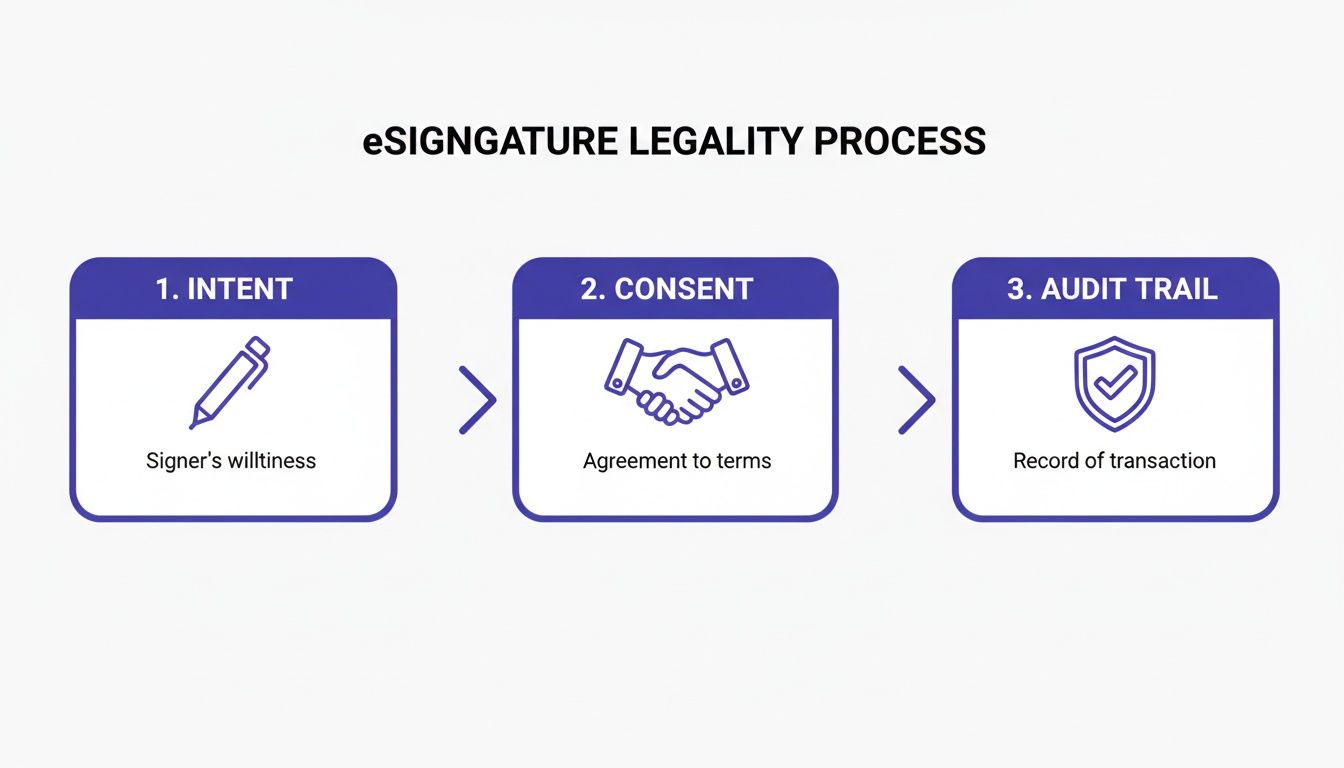
As you can see, a legally binding eSignature isn't just a picture of your signature—it's a whole process. That's why using a compliant platform is so important.
For any business, whether you're a solo consultant in New Zealand or a logistics company in the UAE, this kind of workflow is a game-changer. It cuts down on administrative headaches, gets agreements finalized faster, and makes you look modern and professional. By adopting an intuitive eSignature tool, you can get back to focusing on your actual business instead of chasing paperwork.
Automating Your eSignature Workflows for Maximum Efficiency
Once you get the hang of signing a PDF electronically, the natural next step is to put the entire process on autopilot. Sure, signing a single document saves you a few minutes, but when you start building automated workflows, you can genuinely reshape your business operations. This is the leap from using a simple tool to creating a central system that manages every agreement you handle.
The shift from manual signing to full-blown automation isn't just a niche trend; it's a massive movement, especially in major markets. North America, for example, already makes up a huge 46% of the global e-signature market. The U.S. market alone is expected to hit USD 3.58 billion by 2026, all driven by a constant push for greater efficiency and security. To keep up, you need to be thinking about smarter workflows.
Setting Up Multi-Recipient Signing Orders
One of the most powerful automation features you can use is setting up a sequential signing order. This is a complete game-changer for any process that needs multiple approvals in a specific sequence. Instead of manually chasing down signatures and forwarding a document from one person to the next, you just set the order once, and the system does all the heavy lifting.
Think about a logistics company for a moment. A bill of lading might need three signatures, but the order is critical:
- Warehouse Manager: Must sign first to confirm the goods are loaded.
- Driver: Signs next to acknowledge they've received the shipment.
- Client: Signs last to confirm the delivery was successful.
With BoloSign, you can build this exact sequence right into the workflow. The document only goes to the driver after the manager signs. It only goes to the client after the driver signs. This completely eliminates confusion and makes sure the proper procedure is followed every single time, without fail.
Integrating with Your Existing Business Tools
Real efficiency kicks in when your eSignature software can communicate with the other tools you rely on every day. By connecting with platforms like HubSpot, Google Drive, and Zapier, you can turn BoloSign into a central hub for all your document processes, creating truly hands-off workflows.
This is where the real magic happens. By linking your apps, you can trigger signature requests based on actions that happen in entirely different systems.
Automation isn't just about moving faster; it's about building accuracy and consistency into your operations. Linking your eSignature platform to your CRM or cloud storage gets rid of manual data entry, slashes the risk of human error, and keeps your workflows running 24/7.
For example, an education provider could set up a workflow where a certificate of completion is automatically generated and sent for signature the second a student's status is marked "course complete" in their records. No one has to lift a finger.
The table below breaks down just how significant this shift can be.
Comparing Manual vs Automated eSignature Workflows
This table illustrates the tangible benefits of moving from a basic eSignature process to a fully automated workflow with a platform like BoloSign.
| Feature | Manual Workflow (Basic eSigning) | Automated Workflow (with BoloSign) | Key Business Impact |
|---|---|---|---|
| Document Routing | Manually send to each recipient one by one. | Automatically routes based on a pre-set signing order. | Eliminates delays and ensures the correct approval chain is always followed. |
| Data Entry | Manually copy-paste info from forms to CRM or spreadsheets. | Integrations automatically sync data between systems (e.g., CRM, Drive). | Reduces human error and saves dozens of hours of administrative work. |
| Document Generation | Manually create each new contract from a local template. | Automatically generates documents with pre-filled data when a trigger occurs. | Increases speed and consistency, ensuring all contracts are accurate. |
| Reminders & Follow-up | Manually track who has signed and send follow-up emails. | System sends automatic reminders to anyone who hasn't signed yet. | Drastically reduces turnaround times without any manual effort. |
| Storage & Filing | Manually download and file the signed PDF in the correct folder. | Signed documents are automatically saved to a designated cloud folder. | Keeps documents organized and secure, making them easy to find later. |
As you can see, automation doesn't just make the process faster—it makes it smarter, more reliable, and significantly less prone to error.
A Central Hub for Contract Management
When your entire team can access, manage, and track documents from a single place, collaboration becomes second nature. BoloSign’s platform is designed for this, offering unlimited team members for one flat price. That means your sales, HR, and legal departments can all operate within the same system without ballooning your subscription costs.
This unique approach makes BoloSign 90% more affordable than other platforms that nickel-and-dime you for every user or envelope. You get a powerful, enterprise-level contract automation system without the shocking price tag, giving your team the freedom to build whatever workflows they need. If you want to go deeper on this, our guide on how to automate your company's approval workflow is a fantastic starting point.
For businesses with highly specific needs, it's also worth looking into custom-built applications that integrate advanced workflows directly into a CRM. Specialized automation development services can help create a completely connected ecosystem where documents flow effortlessly.
The best way to see how this all comes together is to try it for yourself. Start your 7-day free trial of BoloSign today and experience firsthand how simple and powerful automated document workflows can truly be.
Signing PDFs Directly Inside Your Favorite Apps
 The most effective tools don't force you to change how you work; they fit right into your existing processes. Real efficiency isn't about learning a new app—it's about eliminating the need to jump between multiple apps just to get one thing done. Knowing how to sign a PDF electronically is a great start, but doing it from the software you already use every day? That’s a total game-changer.
This is where BoloSign really shines. It’s built to meet you where you are, transforming your favorite platforms into hubs for document signing. Instead of adding another piece of software to juggle, it connects the dots between your existing tools.
Supercharging Google Forms with eSignatures
One of BoloSign’s most powerful features is its unique ability to drop a legally binding signature field directly into a Google Form. This simple move turns a basic data collection tool into a powerful engine for agreements, registrations, and official consents.
Think about an education provider in Australia managing admissions. They can create a standard Google Form for applications and just embed a BoloSign field at the end. When a parent or student fills it out, they add their legally binding eSignature on the spot, finalizing their application in one seamless step.
Or, picture a professional services firm in the UAE hosting a webinar. They can use a Google Form for registration and include a signature field to confirm attendees agree to the event's terms. It’s an elegant solution that simplifies the whole process. For a full breakdown, check out our guide on how to add a digital signature on Google Forms.
Closing Deals Faster Inside Your CRM
For any sales team, speed is everything. Every minute spent toggling between a CRM and a separate eSignature tool is a minute not spent with a prospect. A properly integrated solution gets rid of that friction and helps you close deals while the iron is hot.
Let's say your US-based sales team lives in HubSpot. When a deal hits the "contract sent" stage, BoloSign's integration can automatically generate a sales agreement, pulling data directly from the deal record. Your rep sends it for signature right from HubSpot—no need to open another tab.
Integrating your eSignature tool with your CRM is like giving your sales team a superpower. It eliminates manual data entry, prevents errors, and shortens the sales cycle by keeping the entire contract process within a single, familiar environment.
This direct connection means the signed contract automatically flies back into the HubSpot deal record. Even better, the deal stage can be updated to "closed-won" without anyone lifting a finger. The entire workflow is connected, giving you a crystal-clear view of every agreement in real-time.
Creating a Connected Document Ecosystem
The ultimate goal is to build a system where your documents flow effortlessly between the applications that run your business. Whether you're in real estate, logistics, or healthcare, a connected workflow is the secret to scaling your operations without the growing pains.
Here are a few more real-world examples:
- A logistics company can connect BoloSign to their project management tool. When a task is marked "ready for dispatch," it instantly triggers a signature request for the bill of lading.
- An HR team can integrate with cloud storage like Google Drive. As soon as a new hire signs their employment contract, the final document is automatically filed into a secure, designated folder.
- A marketing agency can link its accounting software to BoloSign. The moment a client signs off on a project proposal, an invoice is automatically generated and sent.
This level of integration elevates digital signing solutions from a simple utility into the central nervous system of your business. By picking a platform that plugs into your existing tech stack, you’re not just signing PDFs faster—you're building a smarter, more connected business from the ground up.
Ready to Modernize Your Document Workflows?
Hopefully, this guide has pulled back the curtain on just how straightforward, secure, and genuinely affordable it is to sign a PDF electronically. Whether you're a one-person shop in New Zealand or a growing team in the US, BoloSign delivers an enterprise-level toolkit without that enterprise price tag. Our whole goal is to make managing your documents feel effortless.
With unlimited documents, team members, and templates at one fixed price, you can finally put your agreements on autopilot and focus on what actually matters—running your business. The reality is, BoloSign is 90% more affordable than the big names, which means you can scale up your operations without worrying about surprise fees.
See the BoloSign Difference for Yourself
We built this platform on two core ideas: simplicity and real efficiency. Our AI-powered automation, combined with a rock-solid commitment to global compliance standards like ESIGN, eIDAS, HIPAA, and GDPR, makes every workflow smart and secure. It doesn't matter if you're trying to figure out how to add a signature to a Google Form or set up a complex signing order for multiple stakeholders—the platform just handles it.
The best way to understand the impact of effortless contract management is to see it in action. Moving from cumbersome paper trails to a streamlined digital process can save countless hours and reduce errors.
This isn't just another eSignature tool. It's a complete digital signing solution built for how modern businesses actually work. Take a look at our AI contract automation features to see how you can slash review times and get decisions made faster across the entire company.
Ready to see how simple things can be? We invite you to grab a 7-day free trial of BoloSign and take it for a spin. It’s time to discover what secure, unlimited eSignatures can do for you.
Got Questions? We've Got Answers
Stepping into the world of e-signatures can feel a little new, and it's natural to have a few questions. Let's clear up some of the most common things people ask when they're learning how to sign a PDF online.
Is It Really Safe to Sign a PDF Electronically?
You bet it is. In fact, when you use a secure, compliant platform like BoloSign, it’s often much safer than signing a piece of paper.
Every signature is locked down with encryption and comes with a detailed audit trail. This isn't just a simple log; it's a comprehensive digital record of every single action taken—from the moment the document was opened to the exact time it was signed. That level of transparency and traceability is something you just don't get with old-school ink and paper.
Can I Actually Sign a PDF on My Phone or Tablet?
Absolutely. We live in a mobile world, and modern digital signing solutions are built for it. You don't need to be chained to a desk.
Typically, you'll get an email with a secure link. Just tap it, and you can review and sign the document right there on your smartphone or tablet. There’s no need to download special software, which makes it perfect for busy professionals in fields like real estate or logistics who are always on the move.
Do I Have to Draw My Signature to Make It Legally Binding?
Nope, your artistic skills aren't on trial here. The legal validity of an electronic signature comes down to one thing: your intent to sign.
That's why platforms like BoloSign give you a few different ways to sign, and they're all equally valid:
- Type your name and pick a font style that looks good to you.
- Draw your signature using your mouse, trackpad, or finger.
- Upload a picture of your signature you've already saved.
All these methods are legally sound under regulations like the ESIGN Act and eIDAS because the system securely captures your consent and proves you intended to sign.
What’s the Real Difference Between "Electronic" and "Digital" Signatures?
It's a good question, as people often use these terms as if they're the same thing. There’s a subtle but important technical difference.
Think of an electronic signature as a broad category. It’s any electronic process that shows you agree to something—even something as simple as ticking an "I agree" box on a website counts.
A digital signature, on the other hand, is a specific, more secure type of electronic signature. It uses a certificate-based digital ID to encrypt the document and verify who you are, adding a much stronger layer of security and making it tamper-evident.
BoloSign uses the robust security of digital signatures, so you can be confident that every document you handle is protected with advanced, compliant technology.
Ready to see how simple and smart document management can be? BoloSign gives you unlimited documents, team members, and templates for one flat price, making it 90% more affordable than the other guys.
Start your 7-day free trial of BoloSign today and discover a better workflow.

Paresh Deshmukh
Co-Founder, BoloForms
5 Feb, 2026
Take a Look at Our Featured Articles
These articles will guide you on how to simplify office work, boost your efficiency, and concentrate on expanding your business.



