

Enterprise E-Sign Platform Guide for Growing Businesses
Find the right enterprise e-sign platform for your business. Compare features, security, pricing, and integrations to scale legally binding digital signing.

Tired of nonsense pricing of DocuSign?
Start taking digital signatures with BoloSign and save money.
An HR manager is chasing onboarding packets through email while sales waits for signed agreements and finance wonders which version will survive the next audit. The problem isn't the signature itself. It's the fragmented process around it, including duplicate PDFs, unclear ownership, weak identity checks, and evidence scattered across inboxes.
That's where an enterprise e-sign platform earns its place. The right system lets teams create, send, sign, track, and retain documents in one governed workflow. The wrong one adds a signature box to a PDF and leaves procurement, legal, and security to clean up the consequences.
Why Growing Businesses Need an Enterprise E-Sign Platform
An operations team can tolerate manual signing when agreements arrive occasionally. It struggles when HR sends onboarding documents, sales routes contracts for approval, finance collects vendor forms, and legal reviews exceptions across separate tools. At that point, every department develops its own habits, and nobody has a reliable answer to basic questions: Which document did the signer approve? When did consent occur? Who changed the file before it was signed?
The shift is now mainstream infrastructure rather than an experimental software purchase. One industry report estimates the global digital signature market reached USD 9.85 billion in 2025 and projects it to reach USD 154.52 billion by 2034, with a 35.4% CAGR. The enterprise and business segment is expected to represent 76.8% of global demand in 2026, while approximately 70% to 80% of U.S. organizations have adopted e-signature tools, according to Fortune Business Insights' digital signature market analysis.
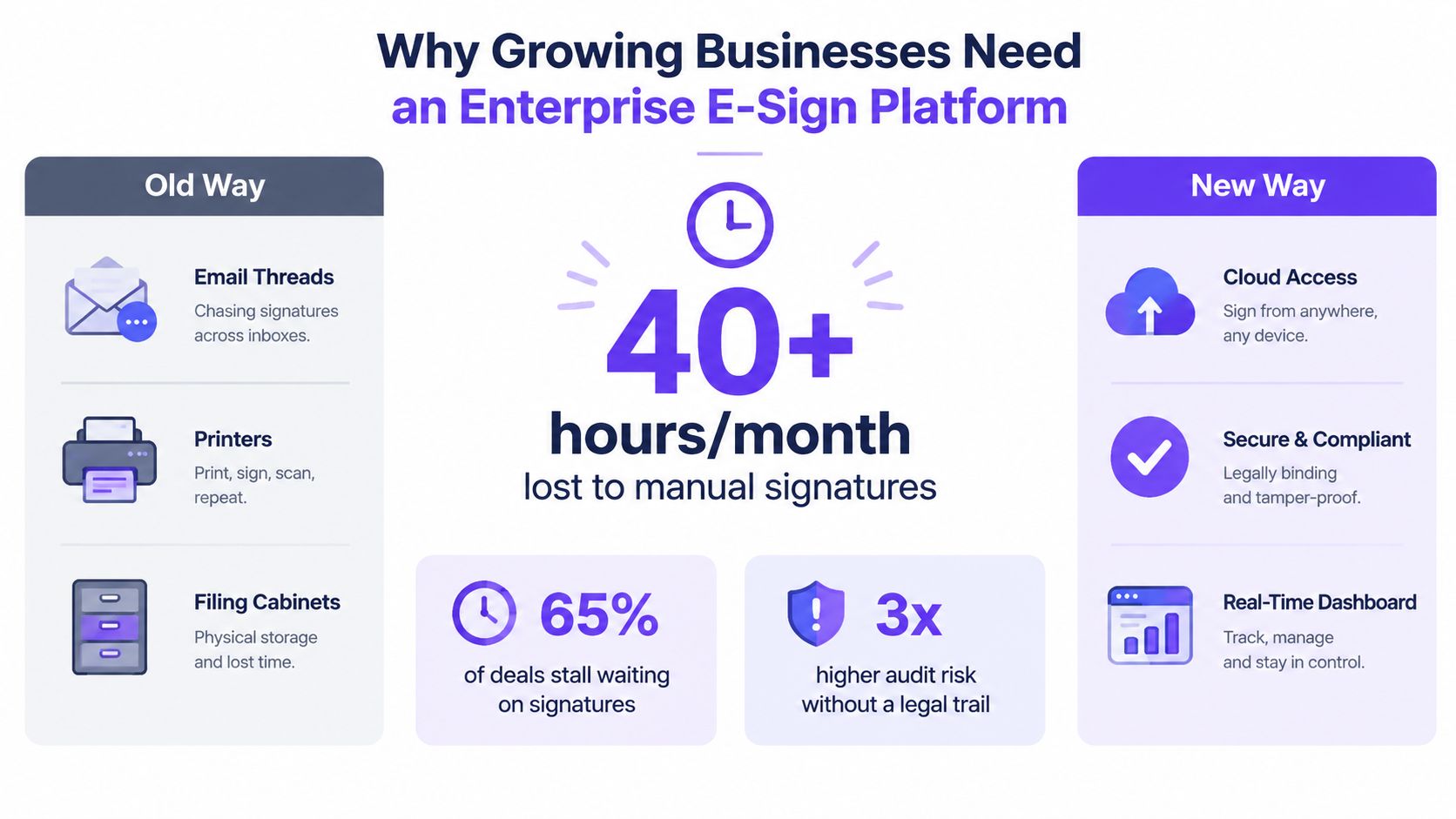
A serious platform centralizes approved templates, standardizes signer journeys, and preserves a tamper-evident record. Legal can control language without becoming the bottleneck for every routine agreement. Operations can see what is pending. Security can review permissions and access. Procurement can evaluate one contract instead of a collection of departmental subscriptions.
Practical rule: Treat standardization as an operating control, not a convenience project.
The legal foundation is established. In the United States, the ESIGN Act was enacted in 2000, and UETA created a state-law framework for electronic contracting. In Europe, eIDAS took effect in 2014 and established a cross-border basis for electronic identification and trust services, as summarized in this overview of e-signature industry developments. The business question is no longer whether electronic signatures belong in mainstream operations. It's whether your current process can produce defensible evidence when someone challenges a document.
What an Enterprise E-Sign Platform Actually Does
An enterprise e-sign platform is a governed workflow system with signatures attached. It should handle reusable templates, conditional routing, bulk sending, data fields, approvals, reminders, and a complete record for every signing transaction. A basic click-to-sign tool usually handles one document and one simple signing event. That distinction becomes costly when the same agreement must pass through a manager, legal reviewer, customer, and finance approver.
Look for workflow behavior, not a long feature list. A capable platform should support sequential and parallel signing, delegated authority, in-person signing, mobile signing for field teams, and rules that determine who receives a document next. It should also centralize template ownership, so legal can approve the master version while departments use controlled copies.
The capabilities that justify the enterprise label
Role-based access, single sign-on, granular permissions, and department controls matter as much as the signer interface. A large organization needs to give recruiting access to offer-letter templates without exposing acquisition agreements. It needs administrators to revoke access when employment ends, and it needs security teams to distinguish document owners from senders and auditors.
The platform should also connect to the systems where work starts. CRM, HRIS, ERP, contract lifecycle management, document management, and workflow automation integrations reduce manual rekeying. BoloSign, for example, supports workflows involving tools such as Salesforce, HubSpot, Pipedrive, Google Drive, Google Sheets, Zapier, Make, Pabbly, Slack, and Microsoft Teams.
| Capability | Enterprise E-Sign Platform | Basic Click-to-Sign Tool |
|---|---|---|
| Template governance | Central ownership, version control, permissions | Individual files and informal sharing |
| Routing | Sequential, parallel, conditional, and delegated workflows | Usually simple signer order |
| Evidence | Detailed audit trail and completion record | Limited event history |
| Administration | SSO, role-based access, department controls | Basic user management |
| Integrations | APIs, webhooks, CRM, HRIS, ERP, and DMS connections | Few connectors or manual exports |
| Scale | Bulk sending, reusable fields, high-volume operations | One document at a time |
| Compliance support | Configurable identity, retention, and evidence controls | Often dependent on plan or add-ons |
The practical test is simple. Ask the vendor to route a real agreement through approval, signing, revision, and completion. If the demo only shows drag, drop, and sign, you're looking at a signature widget, not an enterprise workflow engine.
Security and Compliance Requirements You Cannot Skip
Legal validity is only the first layer. In the United States, ESIGN and UETA support electronic contracting when intent, consent, association with the record, and retention requirements are satisfied. In the European Union, eIDAS provides the legal framework for electronic identification and trust services. The platform must help your team demonstrate those conditions after completion, not merely display a signature on the page.
For regulated teams, privacy and sector obligations sit above that legal foundation. GDPR requires data minimization and controlled handling of personal information. Healthcare workflows may require HIPAA-oriented traceability and appropriate contractual protections. Teams operating across Canada, Australia, New Zealand, the UAE, and other markets also need to check local rules, residency requirements, and trust-service expectations before deployment.
Evidence matters more than the signature image
A defensible audit trail should identify the document, signer, recipient actions, consent text, signature events, and document integrity. Compliance-focused guidance describes supporting metadata such as UTC timestamps, IP address, user agent, signer identity, and a cryptographic hash such as SHA-256 as part of a verifiable record in this enterprise e-signature compliance framework.
For PDF workflows, PAdES embeds the signature inside the PDF. The completed file should also retain a sealed process log, certificate information, and cryptographic binding so later reviewers can inspect whether the document changed, as explained in this guide to signing PDFs with PAdES and X.509 certificates.
| Layer | Requirement | Why It Matters |
|---|---|---|
| Legal recognition | ESIGN, UETA, and eIDAS support | Establishes the foundation for electronic contracting |
| Identity | Email, SMS OTP, knowledge-based checks, or government ID options | Connects the signer to the transaction |
| Consent | Clear disclosure and affirmative action | Helps demonstrate intent |
| Integrity | Hash sealing and certificate validation | Shows whether the record changed |
| Audit evidence | Events, timestamps, IP address, user agent, and completion record | Reconstructs the signing sequence |
| Privacy | Minimization, encryption, restricted access, and retention controls | Limits unnecessary personal-data exposure |
| Assurance | Documented security controls and independent assessments | Supports procurement and risk review |
Cheaper plans often hide the gaps in this stack. An audit log without reliable timestamps is weak evidence. A consent record buried in an email is difficult to retrieve. A platform that can't support the required identity assurance or qualified trust services may fail a regulated use case even if the signing screen looks polished. Review BoloSign's eSignature legality guidance alongside your counsel's requirements, then ask vendors to show the actual evidence package produced after signing.
Comparing Deployment Models and Pricing Structures
Deployment and pricing are separate decisions, and procurement teams should evaluate both. Cloud deployment reduces infrastructure work and usually makes updates easier. Hybrid deployment can keep sensitive systems or customer-managed keys within a controlled environment while connecting to hosted services. On-premise deployment offers the most direct control over hosting and residency, but your team owns more of the security, availability, patching, and disaster-recovery burden.
Market research describes cloud as the dominant deployment direction while noting that on-premise and regulated-use segments remain significant. The same research identifies integration complexity at 22% and security concerns at 17% as enterprise barriers, and highlights regional rule variation, implementation costs, and post-quantum cryptography requirements in Grand View Research's digital signature market report.
The seat-tax trap
Per-seat pricing looks tidy until seasonal contractors, temporary HR teams, or sales hiring pushes the account into another tier. Per-envelope pricing creates a different problem. High-volume departments such as staffing, healthcare claims, and HR can pay heavily for routine documents that each carry little commercial value.
Flat-fee models shift the calculation toward predictable operations. BoloSign offers unlimited documents, team members, and templates at one fixed price, and positions that model as 90% more affordable than traditional tools. Procurement should still test what sits outside the headline price, including API access, advanced authentication, data residency, implementation services, and premium support.
| Dimension | Cloud + Per-Seat | Cloud + Per-Envelope | Cloud + Flat-Fee | Hybrid / On-Premise |
|---|---|---|---|---|
| Primary cost driver | Number of users | Number of transactions | Contracted tier | Infrastructure plus licensing |
| Scaling risk | Temporary users increase spend | High-volume teams drive overages | Feature and usage caps may apply | Internal IT workload expands |
| Best fit | Stable teams with limited senders | Low and predictable document volume | Broad adoption and recurring workflows | Strict hosting or residency needs |
| Main procurement question | Does every recipient need a paid seat? | What counts as an envelope? | Which controls require an upgrade? | Who owns operations and recovery? |
| Hidden exposure | Seat expansion and true-ups | Overage fees and bundled limits | Add-on features | Staffing, maintenance, and redundancy |
Ask vendors what year three looks like under your projected volume. Demand a written answer on price locks, overages, temporary users, API limits, key management, and regional storage. A low first-year quote can become an expensive dependency once templates and integrations are embedded.
A Buyer Checklist and Decision Criteria
A good demo doesn't prove suitability. A structured test does. Take five categories into every vendor conversation, assign weights before the demos, and score the same scenario across all finalists. That stops the slickest interface from winning when the need is identity, evidence, integration, or predictable cost.
Five areas to test
- Identity and authentication: Ask whether SAML or OIDC SSO, multifactor authentication, delegated signing, and stronger verification are available at the required tier. Red flags include SSO locked behind an unexplained upgrade or no clear method for high-risk agreements.
- Audit evidence: Request a completed certificate of completion, event sequence, timestamps, integrity proof, and chain-of-custody record. If the vendor only shows a visual signature or a downloadable PDF, keep the score low.
- Integrations: Test the CRM, ERP, HRIS, CLM, DMS, and iPaaS connections you use. Confirm API and webhook behavior, field mapping, failure handling, and whether your team can export data without professional services.
- Vendor viability: Review security assessments, availability commitments, redundancy, breach-notification language, and data portability. Ask, “Who owns the signed documents if we cancel, and how do we retrieve them?”
- Commercial terms: Check price-lock duration, overage rules, true-up mechanics, implementation hours, training, renewal language, and exit assistance. A flat fee is useful only when the contract defines what it includes.
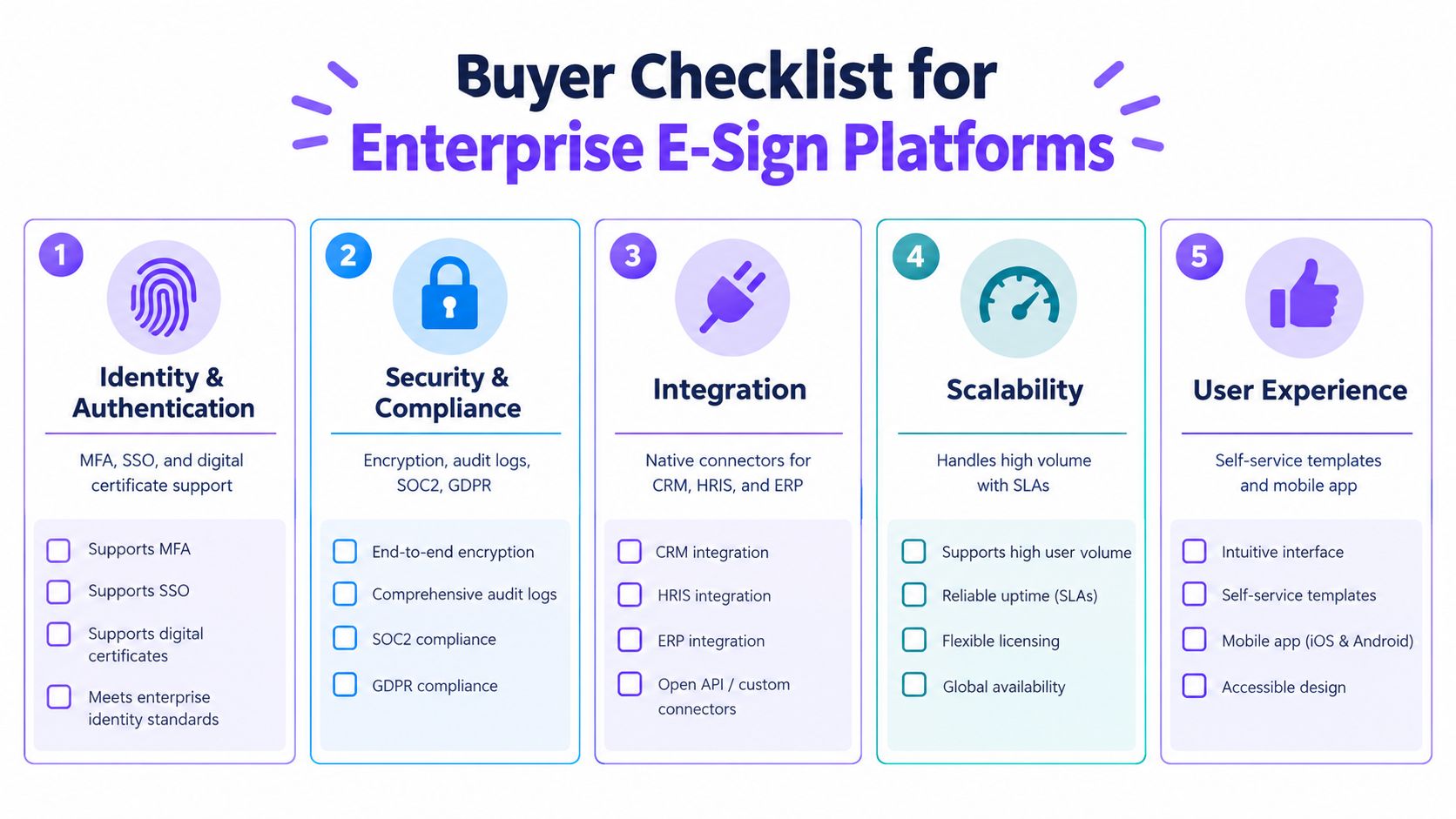
Weight the categories according to risk. A healthcare organization may give evidence and privacy more influence than interface polish. A staffing company may prioritize bulk send, integrations, and predictable pricing. A professional services firm may put CRM automation and template control first.
For teams replacing DocuSign, review BoloSign's DocuSign migration option as one migration path, then validate the same requirements against every shortlisted vendor. The scoring sheet should show why a finalist won and which compromises the business accepted.
Real-World Use Cases Across High-Demand Sectors
A platform earns its keep when it removes a specific operational failure. The feature that matters to a hospital isn't necessarily the feature that matters to a freight carrier, and a polished signer experience can't compensate for missing evidence.
Healthcare teams can use an eSignature workflow for patient intake, telehealth consent, and Business Associate Agreements. The important controls are identity verification, restricted access, retention, and traceability. A clinic should ask where signed records live, who can retrieve them, and whether the vendor can support the organization's HIPAA obligations.
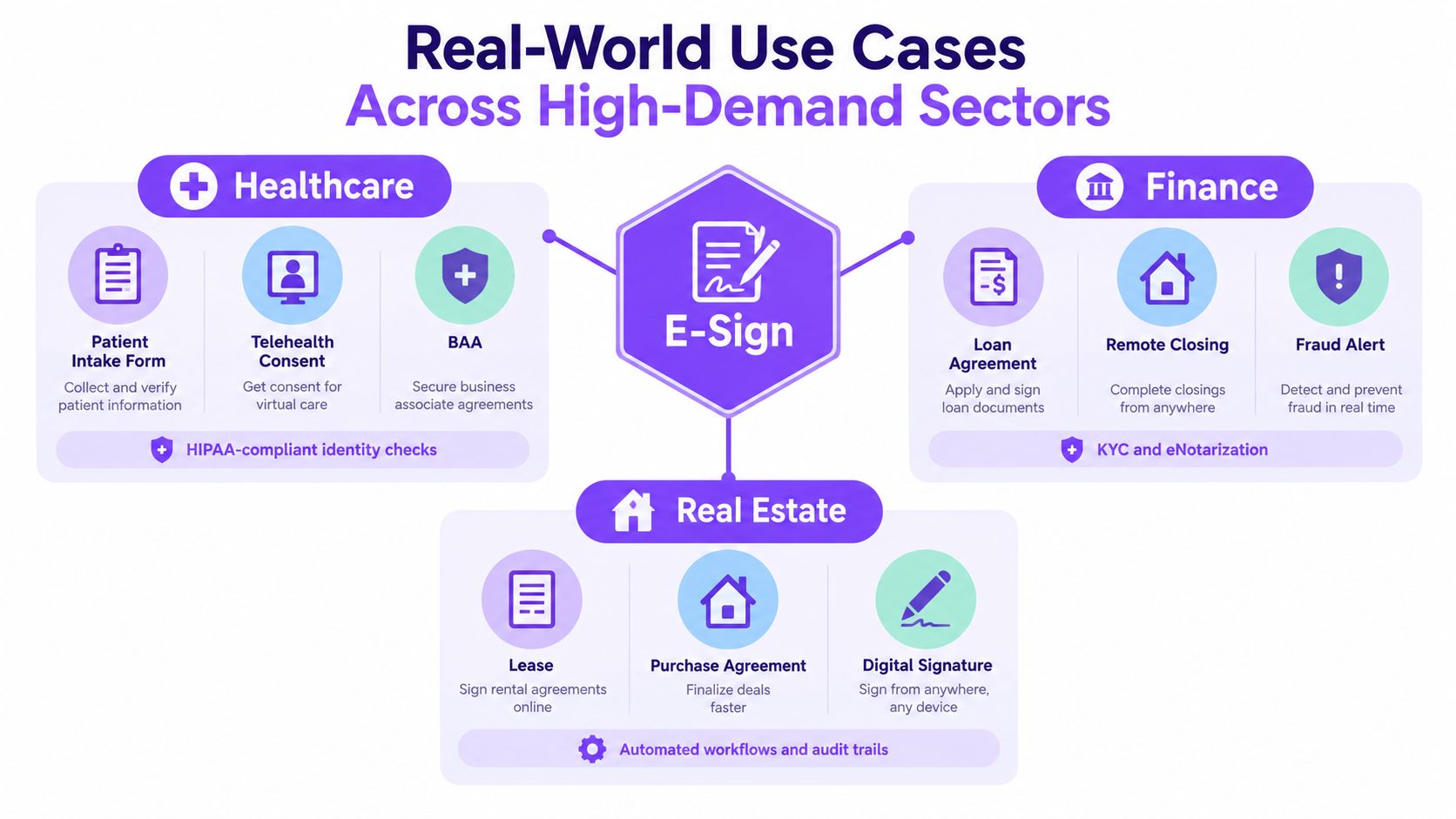
Staffing agencies need fast offer letters, contractor MSAs, and onboarding packets. Monday volume can overwhelm per-envelope economics, so unlimited documents and reusable templates have direct value. HR can create a controlled offer template, populate candidate fields, route approvals, and monitor unsigned packets without searching through separate inboxes.
Real estate teams handle listing agreements, lease addenda, and closings involving several parties. Sequential signing, delegated authority, in-person signing, remote notarization support where applicable, and recording integrations matter more than decorative branding.
Logistics and freight operations need mobile signing for bills of lading, customs documentation, vendor agreements, and proof of delivery. Offline capture and a durable audit trail help when a customer disputes delivery after the driver has left the site.
Education providers can manage enrollment packets, FERPA consents, remote-learning agreements, and certification forms across large cohorts. Professional services firms can connect engagement letters and NDAs to CRM opportunities, eliminating the swivel-chair work between sales and document systems.
For legal operations that coordinate review, deadlines, or administrative follow-up, a virtual legal assistant can help organize supporting work around the signing process. That resource doesn't replace platform controls, but it can complement them when teams need structured human oversight.
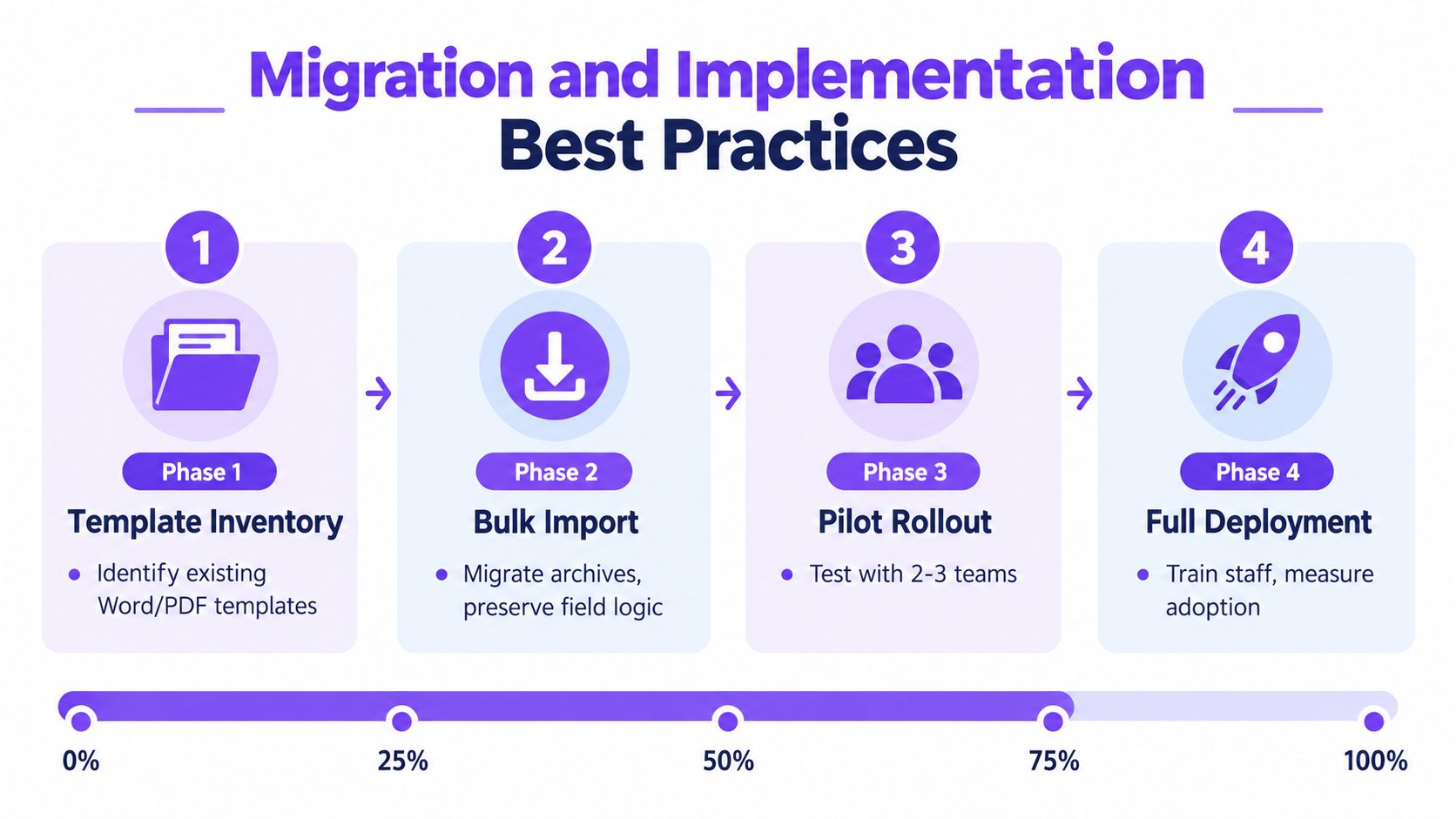
Migration and Implementation Best Practices
Migration fails when leaders treat it as a file transfer. A successful rollout builds governance into templates, identity, routing, and retention before every department starts sending documents.
Start with the documents, not the dashboard
Begin with an inventory of Word files, PDFs, legacy e-sign archives, approval paths, and owners. Remove duplicates, identify obsolete clauses, and decide which templates legal controls centrally. Preserve field logic and conditional language during bulk import rather than asking senders to rebuild each document manually.
Next, configure SSO through SAML or OIDC, map groups to roles, and connect provisioning to the HRIS directory. Offboarding should revoke signing rights automatically. Test administrator, sender, reviewer, and recipient access with real department scenarios.
Roll out in controlled stages
A practical sequence looks like this:
- Inventory: Identify templates, owners, fields, clauses, and retention requirements.
- Import: Migrate approved documents and archives while preserving routing logic.
- Pilot: Test with representative teams, including a high-volume department and a regulated workflow.
- Deploy: Train administrators, publish sender instructions, and monitor adoption and exceptions.
Give workflow builders focused training, provide senders with a short playbook, and record a refresher for occasional signers. Keep a parallel run with the existing system long enough to compare completed records, integration behavior, and exception handling.
Once signing is stable, use AI-powered contract intelligence for clause extraction, obligation tracking, renewal alerts, and review triage. BoloSign is backed by the NVIDIA Inception Program and offers AI-powered contract intelligence as part of its broader platform positioning. For teams moving from another provider, this BoloSign migration guide addresses the practical transition path.
Choosing the Right Platform and Getting Started
Use the trial as a controlled proof of operations, not a tour of the interface. A seven-day evaluation is enough to expose major workflow, evidence, and commercial problems if you use your own documents and systems.
Day one: Build a real contract, add approval or payment logic, and route it through Salesforce, Workday, or NetSuite. Check whether data maps accurately and whether the completed record returns to the right system.
Day two: Test document integrity. Alter a completed file, review the certificate of completion, and confirm that the platform distinguishes the original signed record from a modified copy.
Day three: Request compliance evidence, including SOC 2 materials, penetration-test summaries, HIPAA Business Associate Agreement availability, encryption details, and data-residency options. Don't accept a badge without understanding the scope and date of the assessment.
Day four: Send a non-disclosure agreement to internal and external signers. Evaluate mobile behavior, reminders, accessibility, identity checks, and the clarity of consent language.
Day five: Read the commercial contract. Look for renewal clauses, document ownership, indemnity scope, price changes, overages, data export, and exit assistance.
The remaining days: Run a parallel process against your existing tool, invite users from HR, legal, sales, and operations, and score the results against the checklist. If the vendor won't let you test evidence, integrations, and export behavior, that's useful information by itself.
An affordable enterprise e-sign platform should reduce the seat-tax problem without removing the compliance controls your business needs. It should let teams sign PDFs online, automate contracts, collect form data, and connect signing to existing systems without turning every new user or document into a pricing event.
Closer Innovation Labs Corp. offers BoloSign, an eSignature and contract management platform for creating, sending, and signing PDFs, templates, and forms with AI-powered automation, integrations, audit trails, and fixed-price access to unlimited documents, team members, and templates. Visit Closer Innovation Labs Corp. to start a 7-day free trial and test a real signing workflow with your team.

Paresh Deshmukh
Co-Founder, BoloForms
19 Sep, 2026
Take a Look at Our Featured Articles
These articles will guide you on how to simplify office work, boost your efficiency, and concentrate on expanding your business.



