

eSignature for Contract Management: A Practical Guide
Discover how eSignature for contract management accelerates deal cycles, ensures global compliance, and integrates seamlessly into your existing CLM workflows.

Tired of nonsense pricing of DocuSign?
Start taking digital signatures with BoloSign and save money.
A sales agreement is ready, the customer has approved the terms, and the deal is waiting on one signature. Someone downloads the PDF, emails it to the counterparty, follows up when it disappears, receives a scanned copy, and then forwards it to legal or finance for storage. The contract is technically executed, but the workflow around it is still slow, difficult to audit, and disconnected from the work that comes next.
That's why eSignature for contract management should be treated as more than a digital replacement for wet ink. Signing is the execution layer inside a broader contract lifecycle, connecting approved language, identity, consent, audit evidence, storage, renewals, and operational obligations. A signing tool can close a document. A connected contract process helps the business know what to do with it afterward.
Understanding eSignature for Contract Management
Electronic signatures became part of mainstream contract infrastructure after the U.S. passed the ESIGN Act in 2000, followed by the EU's eIDAS framework, which became fully applicable on 1 July 2016 and replaced the 1999 eSignature Directive. That history matters because it established a legal foundation for digital contracting across major markets, rather than leaving each enterprise dependent on paper procedures or country-by-country assumptions. The eSignature standards timeline provides useful context for how that transition developed.
The practical definition is simple. An eSignature is the electronic indication that a person intends to sign a document. eSignature for contract management goes further by placing that act inside a controlled workflow. The system should help a team prepare the correct document, populate it from an approved template, route it to the right people, capture consent and authentication, preserve the final record, and make the signed agreement available for future work.
From digital pen to execution engine
A modern workflow typically starts with a PDF, reusable template, or structured form. The sender uploads the document, adds signature and initials fields, assigns recipients, sets signing order where needed, and sends the request by email or SMS. The recipient reviews the document on a phone or computer, completes the required fields, and signs without printing, scanning, or installing specialist software.
That workflow becomes more useful when the signing event also carries business data. A completed agreement can be associated with the customer record, supplier, employee, property, patient intake process, or project. The signed PDF and its completion record can then move into a secure repository, while alerts and follow-up tasks are created for dates and obligations.
Adoption reflects this operational role. A 2026 industry report found that 68% of participants use eSignature tools, while another cited survey reported that 69% of legal departments use e-signature technology, ahead of contract management tools at 61% and AI at 52%. Faster processing was the main adoption driver for 89% of organizations in the same reporting, and one report described average execution time falling from 5 days on paper to 2 hours with eSignatures. These figures are reported in the State of Contract Management report.
What a connected workflow changes
Disconnected signing creates hidden work. Sales re-enters customer data, legal searches inboxes for the final version, procurement can't see whether a vendor agreement was completed, and operations misses the date that should trigger a renewal review. Each handoff introduces another opportunity to use the wrong version or lose context.
A unified platform helps teams:
- Create documents quickly: Build agreements from approved templates or upload existing PDFs.
- Route with control: Assign multiple signers, approvers, and signing order without relying on email instructions.
- Capture evidence: Preserve identity information, intent, timestamps, document integrity, and completion history.
- Support AI contract review: Use AI-assisted workflows to identify unusual clauses, missing information, or review points before sending.
- Trigger the next action: Store the executed agreement and connect it to obligations, renewals, reporting, or CRM records.
The point isn't to add another destination for documents. It's to make the signature a reliable data event in the contract lifecycle.
Navigating Security and Global Compliance Standards
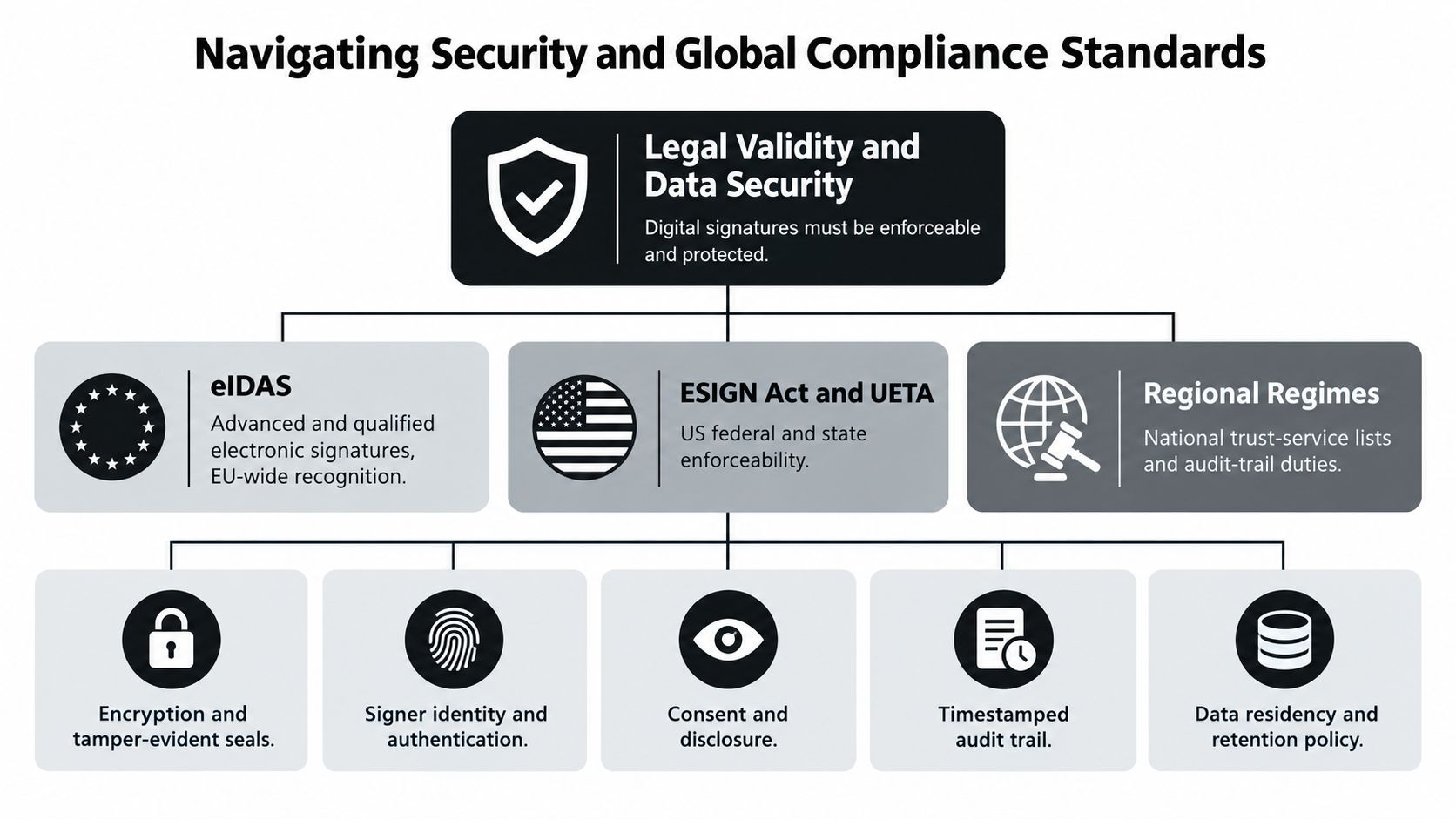
A contract may be signed in seconds, yet its enforceability depends on the evidence surrounding that action. The record should show who signed, what they intended to sign, which document they approved, and whether the record remained intact afterward. It should also preserve an audit trail that explains the signing sequence if a customer, regulator, auditor, or court later questions the transaction.
Enforceability depends on evidence
In the United States, ESIGN and UETA workflows generally require a clear connection between the electronic signature and the associated record. In the European Union, eIDAS provides a framework for electronic identification and trust services across borders. Article 25 of eIDAS states that an electronic signature can't be denied legal effect or admissibility as evidence solely because it is electronic or because it isn't a qualified electronic signature, as explained in the European Commission's eSignature FAQ.
The law does not make every signing method appropriate for every agreement. A simple electronic signature can suit a routine, lower-risk transaction when the organization can demonstrate consent and retain the relevant record. An advanced electronic signature provides stronger links to the signer and better evidence of control. A qualified electronic signature uses a higher level of identity assurance and qualified trust-service infrastructure, which may be required by regulation, transaction risk, or a counterparty.
For a deeper explanation of the underlying mechanisms, review this guide to electronic signature technology.
The practical question is whether the chosen method provides enough identity assurance and evidence for the document, jurisdiction, and risk profile. A routine internal approval, a healthcare-related agreement, and a high-value cross-border contract should not automatically use the same assurance level.
Practical rule: Set signature policies by transaction risk. Define when basic authentication is sufficient and when stronger identity checks, certificates, or additional review are required.
Security controls protect the record
Legal validity and technical security must work together. A signing platform should encrypt documents in transit and at rest, limit production access, and create a certificate or completion record that supports non-repudiation. Centralized access control, vulnerability testing, HTTPS/TLS, AES-256, OWASP-aligned development practices, and frameworks such as SOC 2 and ISO 27001 are controls teams commonly assess in serious eSignature environments. The DocuSign eSignature security overview describes safeguards that organizations may evaluate.
Security review must include the workflow around signing. A healthcare provider needs appropriate handling of sensitive patient information and should assess HIPAA requirements. A global business must address GDPR obligations, data retention, access rights, and the jurisdictions where information is stored or processed. ESIGN and eIDAS govern electronic transactions, but they do not remove the organization's responsibility to protect personal and confidential data.
Before selecting a provider, ask:
- Identity: How is each signer authenticated, and can stronger verification be applied to higher-risk agreements?
- Intent: Does the workflow clearly present the document, required disclosures, and act of signing?
- Integrity: Can the system show that the signed PDF was not altered after completion?
- Auditability: Are timestamps, recipient actions, authentication details, and the final record retained?
- Access: Can administrators limit, review, and revoke access by role?
- Retention: Can the organization define how long agreements and audit records remain available?
A secure eSignature process should capture the required evidence automatically. If staff must later assemble screenshots, email threads, and separate approval notes after a dispute starts, the signing tool is disconnected from the contract record. That gap creates avoidable legal exposure and administrative work. A unified, AI-powered CLM system can treat the completed signature as trusted execution data, while preserving the controls needed for review and compliance.
Integrating Signing into the Full Contract Lifecycle
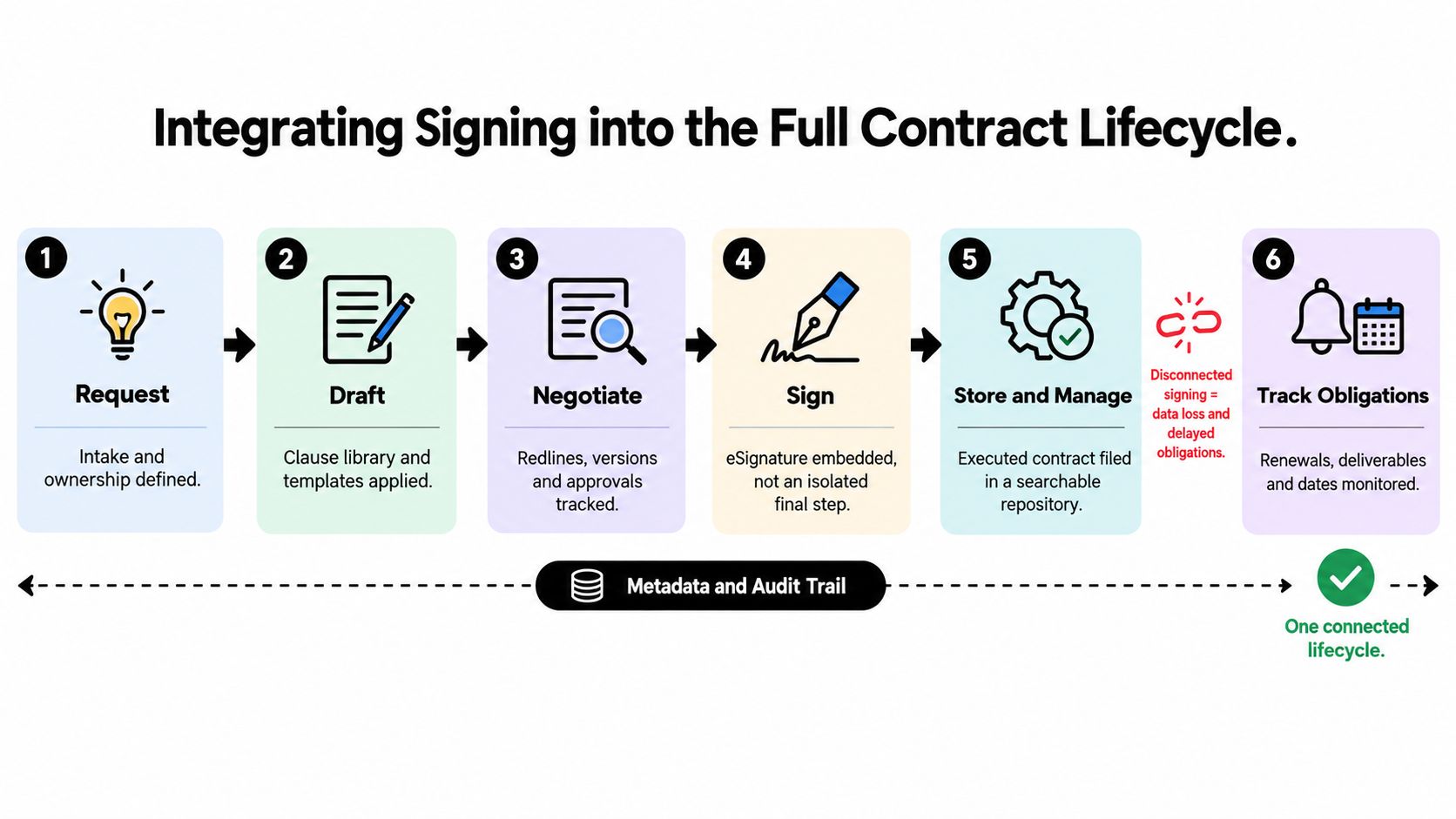
Signing works best when it arrives as the natural result of a controlled process, not as a separate website visited at the end. A useful lifecycle begins with an intake request and continues through drafting, negotiation, approval, execution, storage, and obligation tracking.
Build the handoffs deliberately
1. Start with structured intake. Capture the counterparty, contract type, owner, deadline, business terms, and any special compliance requirement. A form-based intake process prevents legal or operations from receiving incomplete requests through scattered email threads.
2. Draft from controlled materials. Use approved templates and clause libraries for common agreements. AI contract review can help identify missing provisions, compare language against approved positions, and surface unusual clauses, but a qualified human should retain responsibility for legal judgment.
3. Keep negotiation history attached. Redlines, comments, versions, and approvals should remain associated with the contract record. This prevents a final PDF from appearing without a clear explanation of how it reached approval. Teams that regularly negotiate amendments may also benefit from browse contract modification posts for practical guidance on managing changes.
4. Treat approval as a gate. Route the correct version to legal, finance, procurement, or a business owner before signature. The signing request should be generated from the approved version, not from a file downloaded earlier and modified locally.
5. Make execution create a record. Once all parties sign, the final PDF, certificate, audit trail, and relevant metadata should be stored together. The signed document shouldn't depend on the inbox of the person who sent it.
6. Connect obligations to ownership. Renewal dates, deliverables, notice periods, payment milestones, and compliance tasks need an owner and a reminder. A signature proves agreement. It doesn't, by itself, ensure that anyone performs the agreement.
A Nordic 2025 survey found that 40% of organizations still had no systems connected to contract management, even though nearly all surveyed companies used digital signing tools and 81% used authenticated digital signatures for domestic contracts. The contract management versus eSignature analysis highlights the operational gap. Adoption of signing is high, but integration maturity can lag behind it.
Use the signature event as a trigger
In a connected CLM workflow, completion can update a CRM stage, save the agreement to a repository, notify finance, create a renewal task, or start onboarding. The exact action depends on the organization, but the principle remains consistent: the signature should advance the process rather than end it.
A platform such as CLM software for connected contract workflows can bring intake, authoring, review, approvals, execution, and post-signature management into one environment. That approach reduces manual re-entry and gives teams a shared view of the contract's status.
The test is straightforward. After signing, can someone in finance find the final agreement, confirm the approved version, see the relevant dates, and identify the person responsible for the next action without asking the original sender? If not, the organization has digitized execution but hasn't yet connected the lifecycle.
Industry-Specific Workflows and Real-World Applications
The same signing capability supports very different operating models. The template, routing sequence, identity requirements, and post-signature tasks should reflect the industry rather than forcing every team into a generic document flow.
Staffing and healthcare
A staffing agency may begin with a candidate intake form, generate an employment or contractor agreement, and route it to the candidate and agency representative. Once signed, the system can make the agreement available to onboarding, payroll, and the account manager. Bulk sending is useful when multiple candidates need the same approved document, but each recipient still needs a distinct record and audit trail.
A healthcare clinic has a different risk profile. It may use signing for patient intake documents, vendor agreements, consent forms, or workforce records. The workflow should limit access to sensitive information, apply appropriate authentication, retain the audit record, and align the surrounding data handling with HIPAA and GDPR obligations where relevant. A fast click is not enough if unauthorized staff can access the completed document.
Real estate and professional services
A real estate agency often coordinates buyers, sellers, agents, brokers, lenders, and property managers. Multi-recipient routing helps define who signs first and who receives a completed copy. Reusable templates can standardize offers, disclosures, management agreements, and amendments while leaving property-specific fields for the transaction.
Professional services firms benefit from tying the signed statement of work to the client record and delivery team. The workflow can separate commercial approval from client execution, then make the final scope, fees, dates, and responsibilities available to project management. That reduces the chance that a delivery team works from an outdated proposal.
Logistics and education
A logistics provider may manage carrier agreements, shipper terms, subcontractor documents, and cross-border paperwork. Since counterparties and jurisdictions can vary, the organization should apply risk-based identity and audit requirements rather than assume one signing method fits every route. The signed agreement should connect to vendor records and renewal monitoring.
An education or training institution may use templates for enrollment agreements, instructor contracts, procurement documents, and partnership arrangements. It can route a form to a student, guardian, administrator, or supplier, then save the completed PDF alongside the relevant record.
Google Forms is useful for collecting structured information, but it doesn't have built-in eSignature capability. Current workflows use add-ons or third-party integrations. BoloSign's Google Forms add-on can add signature fields, automatically generate a signed PDF, and support sending by email, multi-signer routing, or bulk sending from CSV, as described in the Google Forms signature integration listing.
The best workflow starts with the user's existing process, then adds control where risk and volume justify it.
Implementation Best Practices and Integration Options
A signing portal is the easiest place to start, but it isn't always the best long-term architecture. The right option depends on where employees already work, how much data must move between systems, and whether the organization expects signing volume to grow.
| Integration Type | Best Use Case | Key Advantage |
|---|---|---|
| Web portal | Small teams and occasional contract execution | Fast setup without development work |
| Document Signing API | Product teams and high-volume workflows | Automated signing from an existing application |
| Embeddable component | Customer-facing or employee-facing portals | Keeps users inside the primary experience |
| CRM integration | Sales and account management teams | Reduces context switching and manual data entry |
| Forms integration | Intake, enrollment, onboarding, and structured requests | Converts collected information into a signable record |
Choose the least complicated architecture that works
A portal can be appropriate when legal or operations owns the process and users don't need to initiate agreements from another system. An API or embedded component makes more sense when signing is part of a customer onboarding flow, marketplace, HR application, or internal platform.
CRM integrations are valuable when a sales representative needs to create an agreement from a HubSpot, Salesforce, or similar record. The representative should be able to use approved templates, send the document, and see completion status without copying data between tabs. The CRM remains the source for the relationship, while the contract platform preserves document and signature evidence.
Forms integrations solve a different problem. They standardize intake and reduce re-keying, especially for staffing, education, healthcare administration, and vendor onboarding. The organization should still define who owns the resulting contract and how the completed document enters the repository.
Calculate total cost, not just subscription price
Per-envelope pricing can look attractive when signing volume is low, but it becomes difficult to predict when every department, template, resend, or additional signer affects usage. A fixed-price model with unlimited documents, templates, and team members gives finance a clearer operating baseline and lets teams expand usage without rationing routine agreements. BoloSign offers that structure and positions its eSignature workflow as a more affordable alternative to per-envelope platforms, with claims of being up to 90% more affordable than DocuSign or PandaDoc. Because pricing and competitor comparisons can change, buyers should verify current terms directly before making a purchase decision.
Review these cost drivers before signing:
- Usage limits: Confirm whether documents, templates, recipients, and users are capped.
- Integration fees: Check whether API access, CRM connectors, or embedded signing require another plan.
- Administration: Estimate the staff time spent chasing signatures, correcting versions, and filing completed PDFs.
- Migration: Ask how existing contracts, templates, and metadata will be imported.
- Compliance needs: Verify whether the plan supports the audit, identity, security, and retention controls your jurisdictions require.
For a practical checklist covering consent, document integrity, signer identity, and completion records, consult these electronic signature best practices. PDF-focused teams can also review PDFWix electronic signature tips when standardizing how staff prepare and send signable files.
The strongest implementation usually begins with one high-volume workflow, such as sales agreements, employee onboarding, or vendor contracts. Measure where requests stall, remove unnecessary handoffs, and then extend the same pattern to other departments.
Modernizing Your Execution Strategy
The strategic value of eSignature appears when execution stops being the last isolated task and becomes part of a dependable operating system. Intake gives the team visibility. Templates create consistency. AI contract review focuses human attention on exceptions. Approval routing creates accountability. eSignature captures intent and evidence. Repository and obligation tools keep the agreement useful after completion.
That combination matters more than any individual feature. A fast signing experience can't compensate for an unapproved template, missing audit evidence, or a renewal date buried in an inbox. A complex CLM platform won't deliver value if sales, procurement, HR, or operations avoid using it. The practical target is a workflow that people can follow without special effort and that produces reliable records automatically.
Start with a narrow process and define its controls:
- Choose one contract category: Select a workflow with visible volume or recurring delays.
- Standardize the source document: Remove duplicate templates and identify approved variations.
- Set risk-based signing rules: Match identity and authentication requirements to the agreement.
- Connect the next action: Store the completed record and assign obligations or renewal ownership.
- Review adoption: Talk to the people who send and sign documents, then adjust the workflow around real behavior.
A unified platform should also support practical execution. BoloSign provides tools for creating, sending, and signing PDFs, templates, and forms, along with AI-powered contract automation, reusable templates, team collaboration, and integrations designed to connect signing with the wider contract process. Teams should test those capabilities with their own documents, approval rules, and post-signature tasks rather than judging a platform only from a product tour.
The right question isn't whether your organization needs electronic signatures. Most modern contract teams already do. The question is whether signing is connected to the decisions, records, and obligations that make the contract valuable.
BoloSign combines secure eSignature, reusable templates, forms, AI contract review, and connected contract automation in one workflow. Start a 7-day free trial at BoloSign to create, send, and sign your own PDFs while testing unlimited documents, templates, and team collaboration in practice.

Paresh Deshmukh
Co-Founder, BoloForms
7 Oct, 2026
Take a Look at Our Featured Articles
These articles will guide you on how to simplify office work, boost your efficiency, and concentrate on expanding your business.



