

E-Sign Software ServiceNow Integration: A Practical Guide
Learn e-sign software ServiceNow integration step by step, from prerequisites and OAuth setup to Flow Designer, webhooks, testing, and troubleshooting.


Tired of nonsense pricing of DocuSign?
Start taking digital signatures with BoloSign and save money.
A lot of ServiceNow teams reach the same point at the same time. The workflow works fine until a contract, offer letter, consent form, vendor agreement, or policy acknowledgment needs a real signature. Then the record stops moving, someone exports a PDF, and the clean automation story turns into inbox chasing.
That problem shows up in staffing, healthcare, real estate, logistics, education, and professional services because signature isn't a document problem alone. It's a workflow design decision. If you're evaluating e-sign software ServiceNow integration, the important choice isn't just which connector to turn on. It's whether you want signing to behave like a native workflow state, a spoke-driven handoff, or an API-managed process you fully control.
Why ServiceNow Workflows Stall at the Signature Step
A staffing firm HR team is a good example because the failure is easy to spot. An HR agent submits a contract request in ServiceNow, approvals fire, the document generates from a template, and then the request just sits there. The contract is technically ready, but nobody has wired the signature event into the workflow.
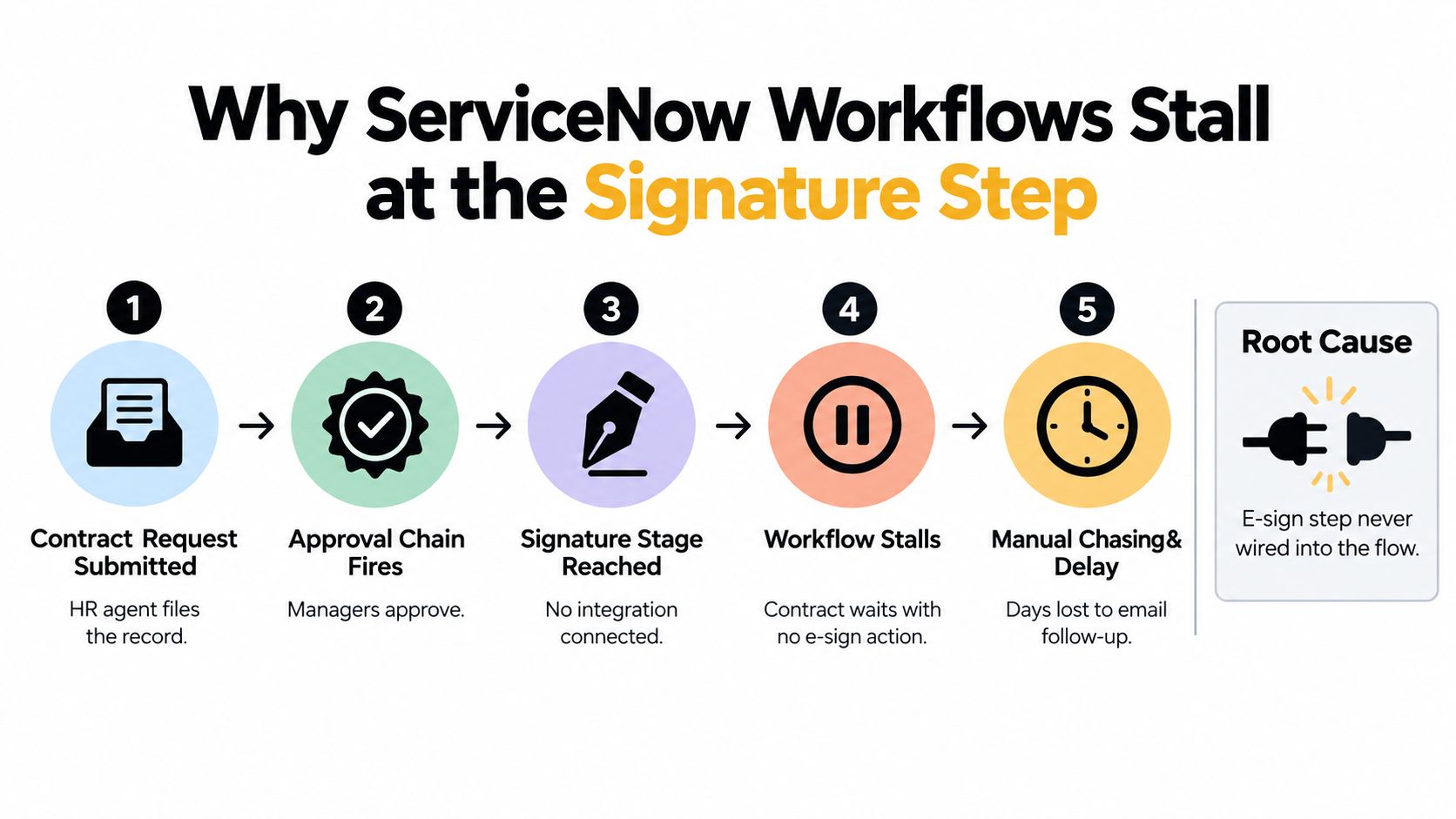
I've seen the same stall pattern in legal intake, procurement approvals, education onboarding packets, and healthcare workforce forms. The names of the records change. The bottleneck doesn't. Someone manually emails a PDF, tracks replies in Outlook, and reattaches the signed file later, if they remember.
The four failure points that repeat
Native e-signature isn't active: ServiceNow does have a built-in e-signature capability as a scoped application, and its documentation says users can sign managed documents or knowledge items and request signatures through task forms and templates in workflows (ServiceNow e-signature documentation). But many instances never turn that capability into an end-to-end production flow.
The spoke exists but setup never finished: ServiceNow's HR integration guidance makes the setup sequence explicit. Admins must configure the provider spoke, register OAuth, create credential and connection records, and synchronize the external signing service before any signing flow runs (ServiceNow HR DocuSign integration guidance).
Approvals expect attachments, not signing events: Teams often build approvals around “document attached” rather than “signature completed.” That sounds minor, but it changes how state transitions, SLAs, reminders, and audit evidence behave.
Templates live outside the workflow system: When the PDF is generated somewhere else and sent manually, the audit trail in ServiceNow and the audit trail in the signing tool don't always reconcile cleanly.
Practical rule: If the record can reach an “Awaiting Signature” state but the platform can't also drive it to a signed completion state automatically, the integration isn't finished.
ServiceNow's own contract workflow docs show what a wired flow should look like. Contract requests can route finalized documents to integrated providers such as DocuSign or Adobe Acrobat Sign, then update status to “Awaiting Signature” when sent and “Contract Signed” after all parties sign. ServiceNow also supports electronic, wet/manual, and offline signature types in the same platform design, which is a strong sign that mixed workflows are expected rather than edge cases (ServiceNow contract signature workflow documentation).
Choosing Your Integration Path
The biggest mistake is treating all signature options as if they solve the same problem. They don't. In ServiceNow, there are three real paths: native platform e-signature, an IntegrationHub spoke to a provider such as DocuSign or Adobe Sign, or a direct external API approach.
What each path is really buying you
ServiceNow's release history shows e-signature has matured into a platform capability across approvals, HR cases, and contract workflows. There's community content on multi-party DocuSign flows from June 2, 2020, a support FAQ on e-signature and document templates dated July 20, 2021, and an Approval with e-Signature plugin page posted on April 9, 2026 (ServiceNow community article on multi-party eSignature flow). That matters because it means you're not choosing between “possible” and “impossible.” You're choosing where to accept limits.
| Dimension | Native ServiceNow e-signature | IntegrationHub spoke (DocuSign/Adobe Sign) | External API (BoloSign) |
|---|---|---|---|
| Workflow fit | Best for simpler internal signing tied closely to tasks and managed content | Good for operational workflows that need provider-based sending and status sync | Best when you want signing to behave like a custom workflow service inside ServiceNow |
| Document complexity | More limited by ServiceNow document model | Stronger for provider-managed templates and recipient routing | Strong control over custom templates, payload structure, and embedded flows |
| Audit behavior | Depends heavily on document type and ServiceNow history model | Provider audit trail plus ServiceNow updates | You design the callback, attachment handling, and audit storage pattern |
| Implementation effort | Lower if your use case matches native behavior | Faster than custom API if the spoke and provider model fit | Higher because you own mapping, auth, webhooks, and error handling |
| Cost shape | Usually operationally lighter if native is enough | Can involve separate spoke, subscription, and provider pricing layers | Better when you want predictable platform-level signing economics and tighter app control |
| Compliance fit | Viable for governed internal flows, but validate artifact behavior early | Strong when provider controls meet legal and operational needs | Strong when you need to align signing, retention, and application security end to end |
The hidden trade-off most teams miss
The underexplained decision point is not “which vendor signs PDFs.” It's “which system owns the truth.”
ServiceNow's legal contract integration docs show separate paths for HR Service Delivery, legal contracts, and the DocuSign spoke in IntegrationHub, and note that the spoke requires an Integration Hub subscription (ServiceNow legal contracts e-sign integration documentation). The same docs also note a critical output nuance. Only HR Document Template signatures can be embedded inside the document itself. Managed documents and knowledge articles may not display the signature in the file.
That's why the recommendation logic is simple:
- Use native ServiceNow e-signature when the workflow is internal, document presentation requirements are modest, and you can live within ServiceNow's document types.
- Use an IntegrationHub spoke when the provider's prebuilt model already matches your process.
- Use a direct API pattern when you need control over templates, embedded signing, callback logic, recipient roles, and downstream contract automation. This is also where AI contract review and contract intelligence fit more naturally into the same operating model.
Prerequisites and OAuth Setup
Most failed builds don't fail in Flow Designer. They fail before the first action runs because identity and connection records were treated as admin housekeeping instead of production architecture.
Get the ServiceNow side clean first
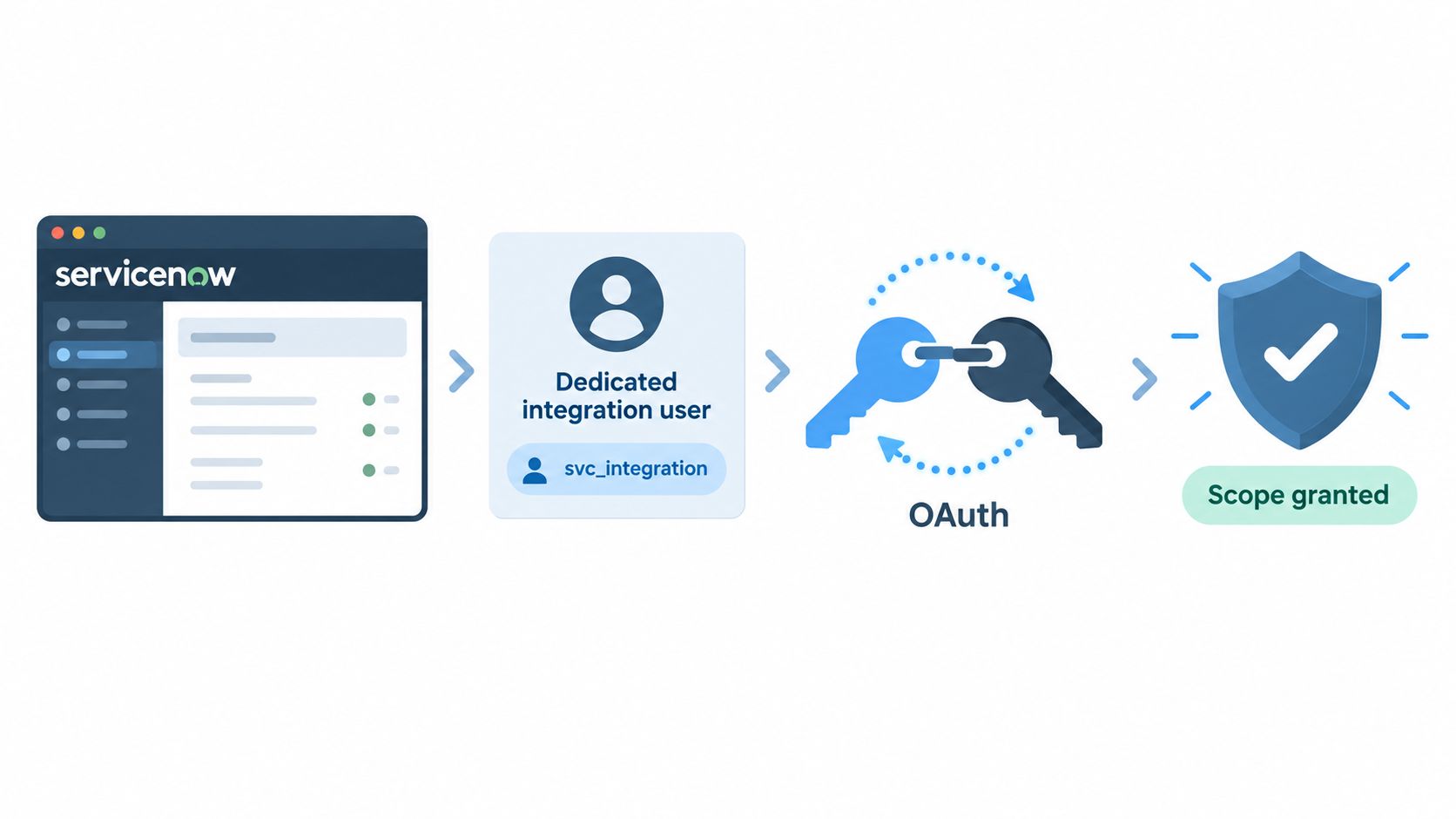
Create a dedicated integration user rather than reusing an admin or workflow account. Store credentials in a Credential Alias or Connection & Credential Alias record, and make sure the flow can read and update the contract or HR table without relying on impersonation side effects. ACL gaps often break otherwise correct integrations.
A lot of ServiceNow hiring guides also hint at the practical skill set this requires. A useful reference is this ServiceNow developer posting, because it reflects the mix of scripting, integration, platform governance, and workflow ownership that signature projects usually demand.
Register the provider app with the right grant model
If you're using a spoke-based provider, register ServiceNow as an OAuth client and match the redirect URI exactly. If you're using an API-key pattern, generate a scoped credential with only the permissions needed to create and read signing requests. Don't over-scope from day one.
Approval failures that look random are often identity-path failures. The API connection works, but the user or callback path doesn't.
ServiceNow support notes that approval behavior can differ for local login versus SSO, and that the SAML flow changes for e-signature requests (ServiceNow support KB on e-signature approval behavior). That's one of the reasons I validate authentication before building business logic. If SSO users hit a different path than locally authenticated users, you need to know that before testing sign-off routes.
The setup mistakes that waste the most time
- Scope mismatches in connection records: The alias exists, but the action can't see it.
- Integration user missing the right roles: The provider call succeeds, but the record update fails.
- Webhook endpoint not publicly reachable or not allowlisted: Envelopes get sent, then completion never returns.
- Testing with the wrong document path: Ad hoc and template-based signing are separate models in ServiceNow HR, and each requires its own PDF template and service configuration, as noted in the HR integration documentation linked earlier.
Before touching Flow Designer, prove one thing only: a test signing request can be created successfully and the platform can read the result back. If that handshake isn't stable, workflow logic just hides the underlying issue.
Building the Flow Designer Signing Action
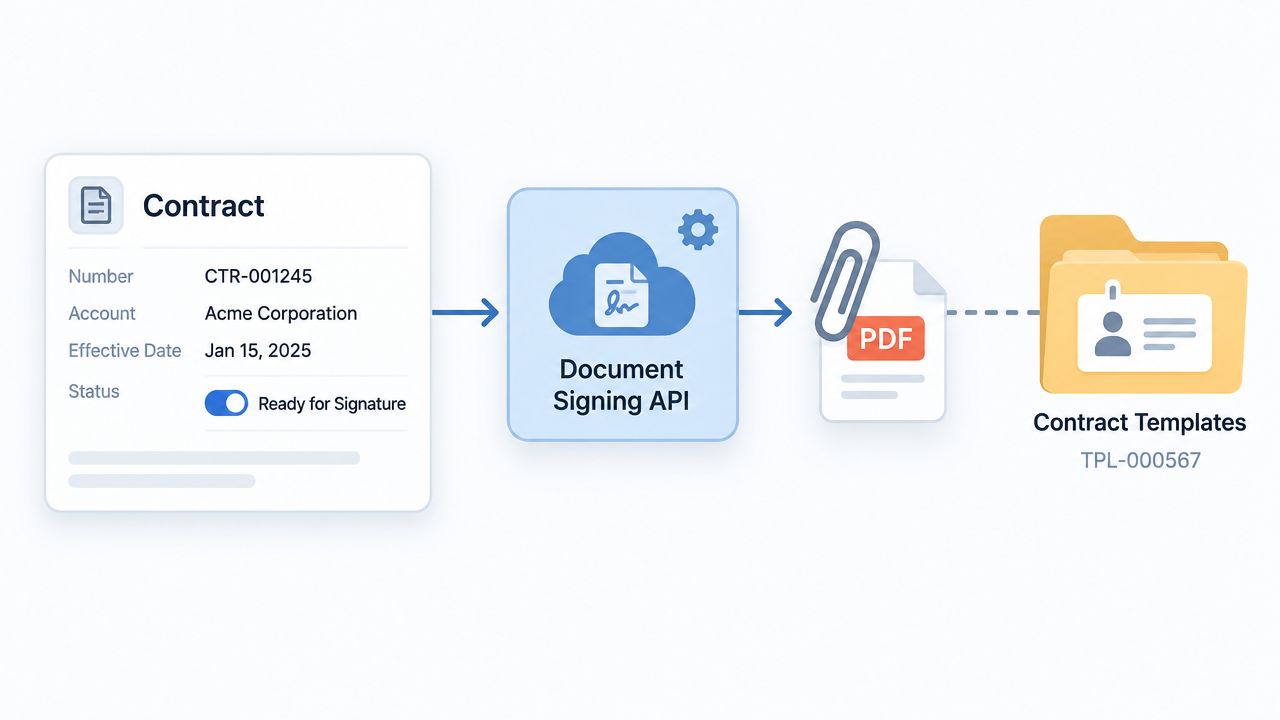
The cleanest pattern is a subflow triggered by a state change on the business record. Let the record drive signing, not the other way around.
Build the subflow around the record state
Start with a trigger such as contract ready for signature, HR packet approved, or procurement document approved for execution. Pull the generated PDF by attachment reference. Then pass that file, along with template identifier and recipient metadata, into your signing action.
If you're evaluating external tools, BoloSign is one route for this pattern because it supports creating, sending, and signing PDFs, templates, and forms instantly through a signing API and embeddable workflows. That matters in ServiceNow because you can keep the request, approval, and execution states inside one process rather than forcing users into manual email handoffs. It also aligns well with teams that want contract automation, AI contract review, and digital signing solutions in the same lifecycle.
Use scripting for the payload, not only field mapping
For anything beyond one signer and one document, build the JSON payload in a Script step. Flow Designer's basic input mapping often becomes clumsy when you need nested participants, optional reviewers, or conditional CC logic.
A common structure looks like this:
- Primary signer: Map from the contract owner, candidate, patient contact, tenant, or vendor contact field.
- Counter-signer: Pull from the internal approver or legal owner on the record.
- Conditional template routing: Choose one template for HR documents, another for procurement, another for real estate agreements.
- Preview URL handling: Save the returned signing or preview URL back to the record for agent visibility.
Here's the design principle that keeps the flow stable. Don't duplicate the whole subflow for each department. Branch on document type and feed a different template and recipient map into the same action. Staffing firms can route offer letters and NDAs differently. Healthcare teams can separate patient consent packets from workforce forms. Education teams can split enrollment agreements from policy acknowledgments.
Field mapping rule: Keep ServiceNow responsible for business data. Keep the signing provider responsible for signature presentation and event completion.
ServiceNow's e-signature framework is role-based and template-driven. Users need correct e-signature roles, and document templates can define participant actions such as sign, fill, or review, with the workflow tracking which participant is pending at each stage (ServiceNow e-signature usage documentation). That's useful, but it also means incomplete participant definitions can stop a document even when the integration itself is healthy.
This walkthrough gives a good visual pattern for embedded signing and API-driven execution inside broader workflows:
Don't block the user transaction
Run the provider call asynchronously where possible. Use a wait condition, callback-driven update, or other async pattern so the user doesn't sit on a form while the external service processes the request. This matters more than teams think. A synchronous design often “works” in test and feels unreliable in production under load.
For PDF generation and quick user instructions, remember the signer experience is still simple on the front end. Adobe's public online signing flow shows the expected mechanics clearly: upload the PDF, complete fields, add the signature in the Sign panel, then download or share the file (Adobe online PDF signing workflow). Your ServiceNow integration should preserve that simplicity for the signer even if the back end is doing more orchestration.
Webhook and Callback Handling
If the send action creates the signing request, the callback is what finishes the workflow. I prefer receiving completion events through a Scripted REST Resource or similarly controlled endpoint rather than relying only on low-visibility flow triggers for regulated processes.
Route events like audit data, not notifications
When the provider sends a completed event, update the originating ServiceNow record to its signed state and attach the final document as a new artifact. Don't overwrite the original source file. Keep version history clear.
| BoloSign Event | ServiceNow Action | Audit Log Entry | Error Handling |
|---|---|---|---|
| Document sent | Update record to awaiting signature | Store envelope/request ID and recipients | Alert owner if record update fails |
| Recipient viewed | Optional activity update or journal note | Log viewer and timestamp | No retry unless callback was malformed |
| Document completed | Set record to signed and attach final PDF artifact | Store signer details, completion time, and callback payload summary | Route to integration error flow if attachment write fails |
| Document declined or canceled | Move record to exception state | Store event reason and actor | Notify contract owner for manual resolution |
| Callback error | Leave business record unchanged until validated | Log raw event for replay | Prevent silent retries that could duplicate processing |
For teams building embedded or API-led signing, BoloSign's guide to e-signature API with embedded signing is useful because it frames signing as an application event stream rather than a standalone document send.
What to log every time
- Envelope or request ID: Your correlation key between systems.
- Signer identity fields: Emails and role labels used in the flow.
- Timestamp trail: Sent, viewed, completed, declined, or errored.
- Callback payload snapshot: Enough to replay or investigate later.
- Attachment result: Whether the final signed file landed where expected.
Never assume “signature completed” means “audit requirements satisfied.” The callback must update the record, preserve the artifact, and leave enough evidence for revalidation later.
Security and Compliance for Regulated Workflows
Security breaks most often at the boundary between systems. The signing platform may be compliant on its side, while ServiceNow still mishandles retention, access, or identity paths.
Map controls before go-live
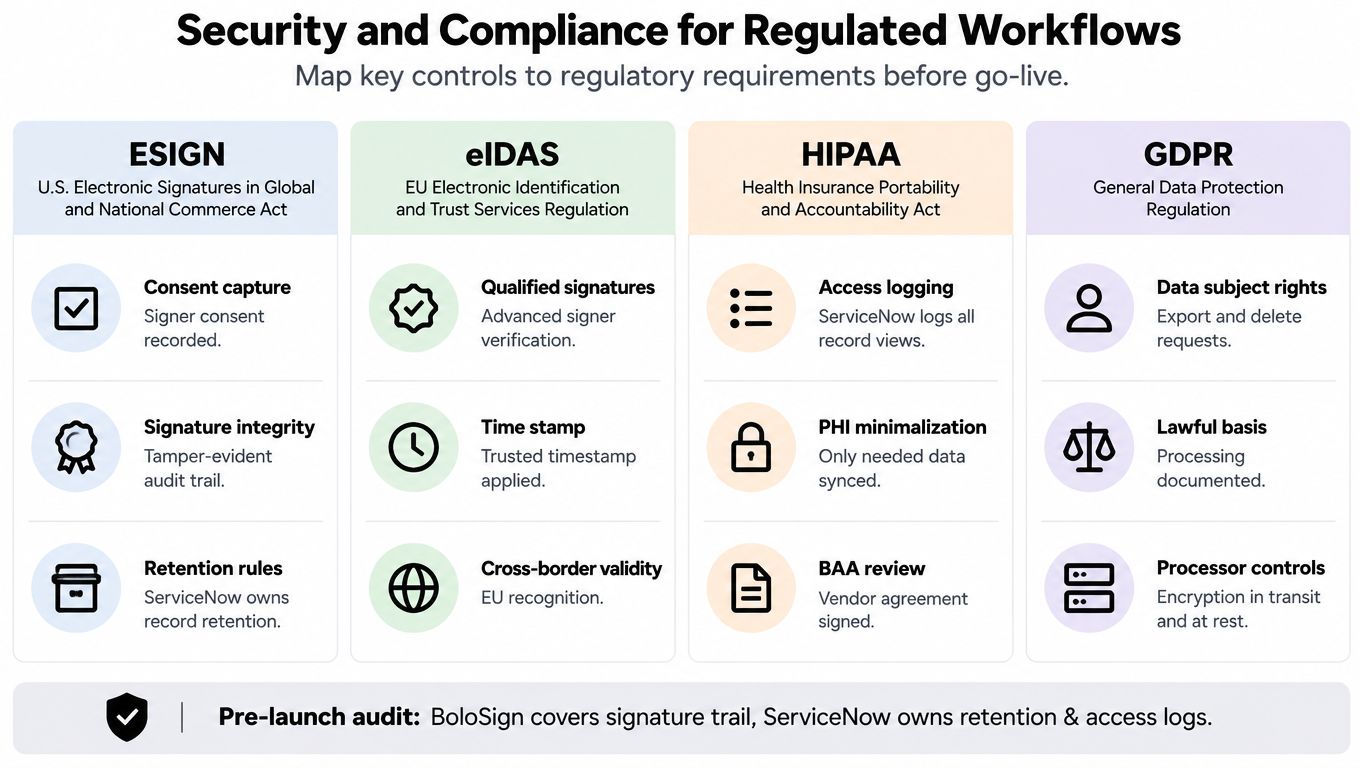
A compliance review for e-sign software ServiceNow integration should map each control to the system that owns it. Signature evidence may come from the signing platform. Record retention, access logging, and data governance often remain ServiceNow responsibilities.
A practical compliance baseline comes from the legal and technical distinctions between ESIGN and eIDAS, along with the security controls expected in HIPAA-grade signing systems. Those controls include strong authentication, audit trails, system integrity, and document non-repudiation for electronic protected health information (compliance overview for ESIGN, UETA, eIDAS, and HIPAA expectations).
The SSO issue that catches regulated teams
ServiceNow support specifically notes that e-signature approval behavior changes depending on local login versus SSO. That becomes a real operational issue when a healthcare approver, HR manager, or external signer opens an embedded task from a mobile device and hits a second authentication prompt. The signing tool may be fine. The approval chain still fails in practice if the identity flow isn't aligned.
Security review isn't complete until you test the signer journey under the same SSO policy your production users actually face.
For GDPR-heavy environments, especially in the UK, EU-linked operations, UAE entities working with EU residents, or global education and professional services groups, it helps to review a practical checklist on how service providers comply with GDPR. It's a useful reminder that lawful processing, vendor boundaries, and deletion or export rights don't disappear because the workflow feels internal.
If HIPAA is part of the design, which e-sign tools are HIPAA compliant is worth reviewing alongside your ServiceNow retention and access model. The signing platform can cover the signature trail. ServiceNow still needs to protect who can view, update, and retain the signed record.
Testing Checklist and Troubleshooting Playbook
Many teams test whether a document can be sent. Fewer test whether the final signed artifact, callback, state update, and audit evidence all survive real production conditions. That's the difference between a demo and a durable rollout.
Pre-go-live checks that actually matter
Run testing in a sub-production instance with representative documents from each business lane. One clean HR letter isn't enough if legal uses a different template model and procurement stores PDFs differently.
- Browser coverage: Test signer behavior in Chrome, Edge, and Safari, especially if your users sign from personal devices.
- Mobile pass: Approvers and candidates often open links from email on phones first.
- SSO path validation: Test embedded and linked signing with the same identity provider rules used in production.
- Artifact validation: Open the final PDF and confirm the signature appears where your business expects it to appear.
- Webhook failure path: Simulate a callback problem and confirm the business record doesn't move to signed prematurely.
- Rollback plan: Be able to disable the send action or spoke without trapping active requests in a dead state.
The troubleshooting matrix teams keep rebuilding from scratch
ServiceNow's own docs call out some of the most painful issues directly. Support notes that formatting, padding, margins, and font issues can occur during PDF conversion, and customers on newer releases are advised to switch the PDF conversion property from iText5 to iText7 to reduce those defects. The docs also warn that some document types do not embed the signature directly in the generated file, storing it only in e-signature history instead. Both issues need explicit validation before production, not after users complain. Those details appear in the earlier linked ServiceNow HR integration and e-signature usage documentation.
| Failure mode | Root cause | Fix in ServiceNow / BoloSign |
|---|---|---|
| Blank or missing signature fields | Wrong template type or mismatched field mapping | Validate the document model, use the right ServiceNow template path, and remap signing fields before resend |
| PDF layout collapses or fields shift | Rendering engine mismatch during PDF conversion | Validate output in the target release and switch to the recommended PDF engine where applicable in ServiceNow |
| Signature completed but not visible in PDF | Document type stores signature in history rather than inside the file | Choose a template model that embeds signatures in the artifact when the business needs a signed PDF |
| Approver or signer can't complete task under SSO | Identity path differs between local login and SAML-based request flow | Test the SSO journey end to end, adjust authentication routing, and avoid assuming local-login success equals production readiness |
What works after go-live
The stable pattern is boring, and that's a good thing. Use one clear send state, one callback path, one audit record model, and one final signed-state update. Keep templates governed, keep recipient mapping explicit, and verify the actual PDF artifact for each document family.
That's how the original HR stall disappears. The contract request doesn't stop in Work in Progress. It moves to a real awaiting-signature state, then to signed, with the evidence attached and the workflow intact.
If you want that kind of controlled signing flow without piling on per-user complexity, BoloSign gives teams a way to create, send, sign PDFs online, automate contract workflows, and add AI-powered contract review in the same process. Its model is especially practical for ServiceNow-led teams that need secure, compliant eSignature workflows with predictable operations, and you can start with a 7-day free trial to see how it fits your records, templates, and approval paths firsthand.

Paresh Deshmukh
Co-Founder, BoloForms
9 Oct, 2026
Take a Look at Our Featured Articles
These articles will guide you on how to simplify office work, boost your efficiency, and concentrate on expanding your business.



