

E-Sign Platform for 1000+ Users: A Practical Buyer's Guide
Choosing an e-sign platform for 1000+ users? Compare scalability, admin controls, compliance, pricing, and migration before you decide.

Tired of nonsense pricing of DocuSign?
Start taking digital signatures with BoloSign and save money.
A 900-person HR operations team can discover the cost of an e-signature platform on an ordinary Tuesday. A sales vice president closes an acquisition, onboarding packets must go out by Friday, the API starts throttling requests, and a regional administrator can't see which employees signed which documents. Then the renewal quote arrives, pricing the next seats as if every new user were a separate enterprise account.
That problem isn't solved by adding a few more sender licenses. An e-sign platform for 1000+ users must control total cost, identity, templates, workflows, integrations, and evidence across a distributed organization. The right question isn't which vendor has the longest feature list. It's whether the platform still works for HR, sales operations, contractors, seasonal workers, branch administrators, and compliance teams on day 100.
The Moment Your Signing Tool Outgrows Itself
The breaking point often appears in HR or sales operations before leadership sees it. A process that worked for one department now spans shared templates, several locations, contractors, managers, and occasional approvers. Manual account creation and scattered permissions turn ordinary workforce changes into administrative work.
At 1,000 users, per-seat pricing becomes an operating decision, not merely a budget line. Charging for every employee, contractor, or infrequent approver can discourage adoption while increasing procurement friction. A fixed-fee model may cost more upfront, yet reduce the need to police access and signing frequency. Compare both models against actual users, documents, integrations, and expected growth.
Procurement rule: If pricing discourages employees from using the approved workflow, the apparent saving can become administrative cost.
The symptoms show up quickly:
- Provisioning slows down: New branches and departments wait for accounts, permissions, or template access.
- Visibility fragments: Regional administrators struggle to separate completed, pending, expired, and rejected documents.
- Templates drift: HR, sales, and legal teams circulate slightly different versions of the same agreement.
- Integrations strain: API limits or added integration charges appear as automated workflows expand.
- Audit evidence scatters: Legal teams reconstruct signed agreements from logs, emails, and storage systems.
Electronic signature law is established across major markets. The Uniform Electronic Transactions Act in 1999, the US federal ESIGN Act in 2000, and the European eIDAS Regulation in 2014 helped remove legal uncertainty around electronic records and signatures (history of electronic signatures).
The shortlist must focus on day-100 operations. Can an administrator delegate safely? Can HR send a packet to many recipients without creating each request manually? Can compliance export the full signing record without engineering support? Can finance calculate the cost after light users, templates, API calls, and overages?
BoloSign offers unlimited documents, team members, and templates at one fixed price, instead of charging separately for each user or envelope. The company states that this model is 90% more affordable than traditional tools. Buyers should test that claim against their own usage, integrations, compliance requirements, and administrator workload before selecting a vendor.
What Enterprise E-Sign Really Means at 1000+ Users
At 1,000 users, legal validity is only the starting point. The buying decision turns on total cost of ownership and the controls administrators still have on day 100. UETA became a model law in 1999, while the ESIGN Act became federal law in 2000 and established that electronic signatures and records could not be denied validity solely because they were electronic. In Europe, eIDAS was adopted in 2014 to establish a tiered framework across EU member states.
Those laws provide the floor. They do not show whether a vendor can provision 1,000 users, limit template editing, preserve evidence, or meet data-handling requirements across HR, sales operations, and distributed approval workflows.
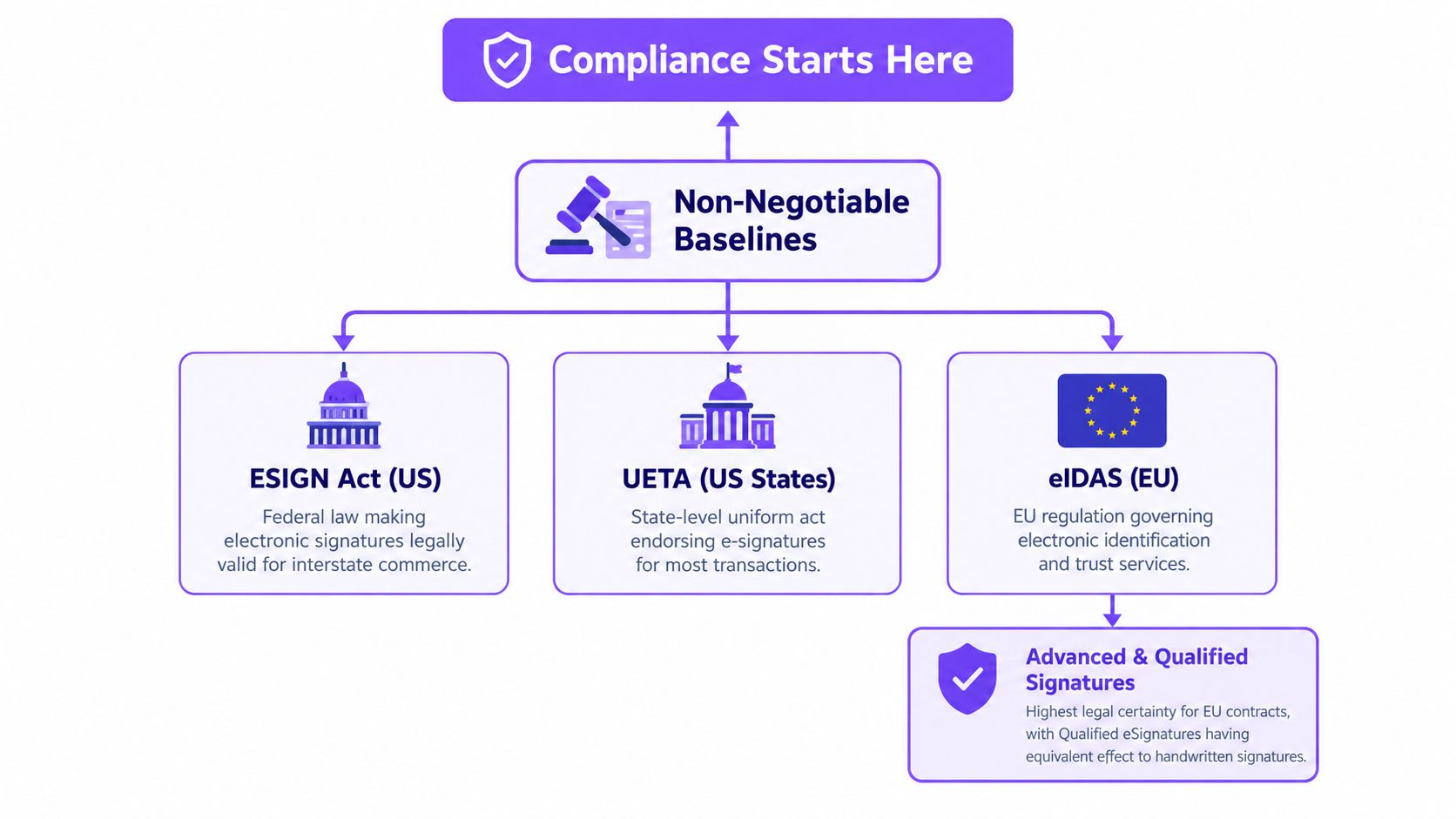
Separate legal baselines from enterprise controls
Use this sequence during vendor assessment:
- Confirm intent and consent. The signer must intend to sign and consent to transact electronically.
- Confirm association. The signature must remain connected to the relevant document and signer.
- Confirm retention. The organization must retain and reproduce the record.
- Evaluate identity and access. SSO, SAML, role-based access control, and delegated administration limit unauthorized activity.
- Test governance. Centralized templates, approval rules, configurable retention, and regional storage options become more important as departments multiply.
- Inspect evidence. An immutable audit trail should preserve the events needed to explain what happened.
For European workflows, confirm that the platform supports the eIDAS signature level required for each transaction. Advanced and Qualified Electronic Signatures may apply when a contract demands stronger identity assurance or the legal effect associated with a Qualified Electronic Signature.
Enterprise-grade e-signature also includes operational controls that product demos often minimize. Administrators need bulk sending, bulk archiving, delegated admin rights, group provisioning through SCIM, configurable retention, and clear API capacity. Certifications such as SOC 2 Type II, ISO 27001, HIPAA, and GDPR alignment can support assurance reviews. Request current evidence rather than accepting a badge on a marketing page.
A consumer signing app lets one person upload and send a document. An enterprise platform must let HR, sales operations, legal, and finance share infrastructure without losing control. If a vendor cannot demonstrate policy inheritance, role separation, searchable records, and a workable process for employee changes, exclude it from the shortlist.
Scalability, Provisioning, and Admin Control at Scale
User count alone doesn't determine scale. The test is how many organizational changes administrators can absorb without manual intervention. A staffing agency may add a branch, onboard a contractor, change a manager, and deactivate a worker in the same operating cycle. A healthcare network may need separate permissions for clinicians, HR staff, compliance reviewers, and external signers.
Consider three representative operating patterns. A staffing organization with 1,200 seats should be able to provision users by branch through SCIM and deactivate contractors when assignments end. A healthcare network with 3,000 clinicians needs role-based templates so sensitive consent workflows route only to authorized signers, while retention and access controls support its HIPAA obligations. A sales organization with 1,500 representatives needs automated offer-letter generation and countersigning without licensing rules that punish occasional users.
Controls administrators should demand
- Identity: SSO through a supported identity provider, SAML, and group-based provisioning.
- Permissions: Custom roles that separate senders, template owners, approvers, auditors, and regional administrators.
- Workflow capacity: Bulk import, bulk send, delegated administration, and clear API rate limits.
- Governance: Central template ownership, version control, retention rules, and department-level visibility.
- Regional operations: Data residency and signing-key options appropriate to the countries and regulated workflows involved.
- Lifecycle management: Automated deactivation and permission changes when employees, contractors, or locations leave the organization.
BoloSign's SSO capabilities should be tested against your actual identity architecture, not just a checklist. Ask the vendor to demonstrate a new user joining a group, receiving the correct role, accessing an approved template, and losing access after deactivation.
| Control | Staffing, 1,200 seats | Healthcare, 3,000 seats | Sales, 1,500 seats |
|---|---|---|---|
| Provisioning | Branch-based SCIM groups and rapid contractor deactivation | Department and credential-based groups | Automated onboarding for sales and RevOps |
| Roles | Recruiter, branch admin, client signer | Clinician, HR, compliance, external signer | Rep, manager, legal, finance |
| Templates | Offer letters, agreements, onboarding packets | Consent and credentialing workflows | Offers, order forms, counter-signature packets |
| Automation | Bulk send and branch-level routing | Conditional routing and retention controls | CRM-triggered generation and approval |
| Administration | Delegated regional management | Central governance with audit visibility | Shared templates with team-level permissions |
Platforms that sell provisioning, SSO, API capacity, or advanced administration as separate add-ons deserve closer scrutiny. Those charges may be justified in some environments, but they belong in the implementation budget and total-cost model from the start.
Pricing Models That Survive 1,000 Seats
Per-seat pricing is easy to explain and often difficult to defend at scale. A vendor can quote a monthly user rate, but finance needs the full operating cost: annual seats, envelope allowances, API access, identity verification, storage, overages, implementation, administration, and the cost of excluding light users from the process.
Public pricing illustrates the issue. DocuSign lists a plan at $45 per user per month with an annual envelope allowance on its pricing page (DocuSign eSignature plans and pricing). At 1,000 seats, that rate annualizes to $540,000 before envelope overages or additional services. The arithmetic is straightforward, but the strategic question is more important: do all 1,000 people need a paid seat, or do many approve or sign occasionally?
Market summaries cited in 2025 describe enterprise pricing as commonly moving toward custom rates around $25 to $40 per user per month, with add-ons such as API access or identity verification. The same summary reports that large enterprises represented 62.10% of e-signature platform market size, cloud deployment represented 76.05%, and North America held approximately 37.20% to 38% of global revenue share, reinforcing why enterprise vendors prioritize large, cloud-based deployments (e-signature statistics in 2025).
BoloSign offers a contrasting model, with unlimited users, documents, and templates at a fixed price, and its published pricing page presents a $199 per month unlimited-user plan (BoloSign pricing). SignWell and jSign also illustrate fixed-fee or nontraditional packaging, although their suitability depends on administration, integration, compliance, and support requirements.
| Vendor & Plan | List Price, per user/month | Annual Cost at 1,000 Seats | Envelope/API Limits | Hidden Fees | Effective Cost per Signature |
|---|---|---|---|---|---|
| DocuSign listed plan | $45 | $540,000 | Annual envelope allowance | Overages, API, identity services may apply | Depends on actual usage |
| BoloSign unlimited-user plan | Fixed fee | Based on published plan | Unlimited documents and users | Confirm enterprise services and integrations | Falls as usage spreads across users |
| SignWell enterprise | Custom sender-based pricing | Custom | Confirm volume and API terms | Confirm support and add-ons | Depends on completed volume |
| jSign fixed-fee tiers | Fixed fee structure | Custom | Confirm workflow and API terms | Confirm enterprise requirements | Depends on completed volume |
The hidden traps are predictable: envelope caps, SMS delivery fees, SSO add-ons, API charges, identity verification, and migration work. Per-seat pricing can also discourage contractors and seasonal staff from participating, forcing teams to route documents through a smaller group of licensed users.
Finance test: Compare annual platform cost plus administration, overages, integration fees, and migration effort against the actual number of documents completed. Don't compare monthly seat prices in isolation.
Security, Compliance, and Audit Trails You Can Defend
A signed PDF isn't enough. Legal and compliance teams need evidence showing who acted, what they signed, when each event occurred, how identity was verified, and whether the document changed afterward.
US workflows should demonstrate intent to sign, consent to electronic business, association between the signature and record, and retention. HIPAA-oriented workflows also require encryption in transit and at rest, access controls, audit logs, and a Business Associate Agreement with the provider (e-signature compliance guidance for developers).
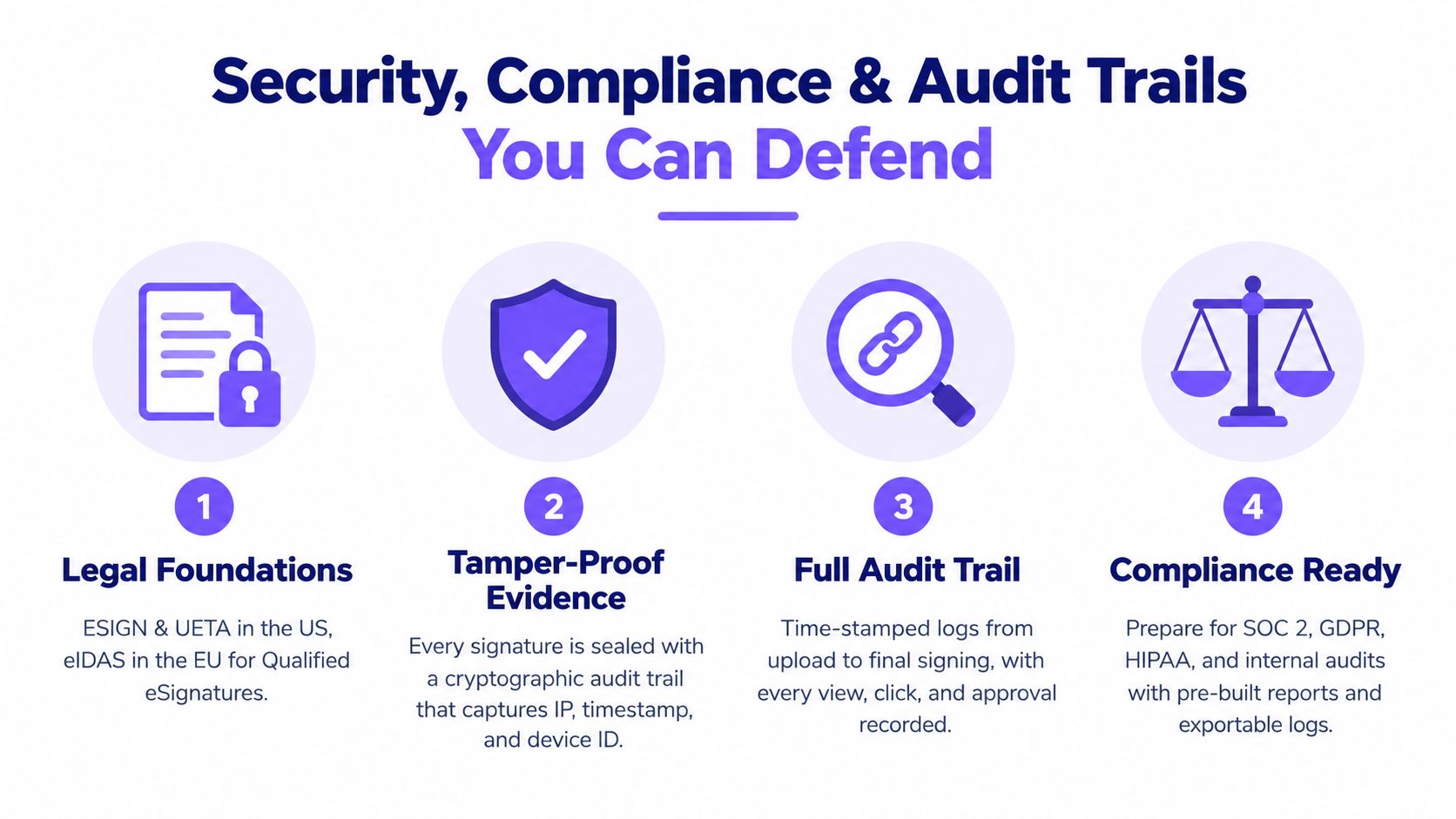
Treat the audit trail as evidence
OneSpan describes an audit trail embedded directly in the document, capturing identity verification, authentication, and signature events across the agreement process. Keeping evidence with the signed file reduces the need to reconcile separate systems and allows legal, compliance, and operations teams to work from one canonical record (OneSpan enterprise e-signature audit trail).
A defensible record should include a document hash, UTC timestamps for each event, signer identity verification, IP or location data, device or browser information, explicit electronic consent, and a final certificate of completion that preserves chain of custody (audit trail checklist). Teams assessing broader logging practices can also use HGV audit trail log software as a reference point for audit-log expectations.
Request evidence for these controls:
- Encryption and keys: Ask how documents are encrypted at rest and in transit, and who controls access.
- Identity assurance: Verify available authentication methods and signer verification records.
- Tamper evidence: Request a sample completion certificate and inspect its relationship to the final PDF.
- Access governance: Test role-based access, delegated administration, and export permissions.
- Privacy operations: Confirm data minimization, data-subject-rights handling, and retention controls under GDPR guidance (GDPR e-signature compliance checklist).
- Retrieval: Ask whether signed documents and audit trails can be retrieved promptly for an audit or dispute.
BoloSign describes protections including AES-256 encryption, SAML SSO, regional AWS storage, SOC 2 certification, and GDPR-aligned handling. Validate those statements against the current contract, security documentation, and your required HIPAA or regional data terms. Its audit trail feature should be evaluated using a real test document, not a screenshot.
Integrations, Automation, and Migration Without Downtime
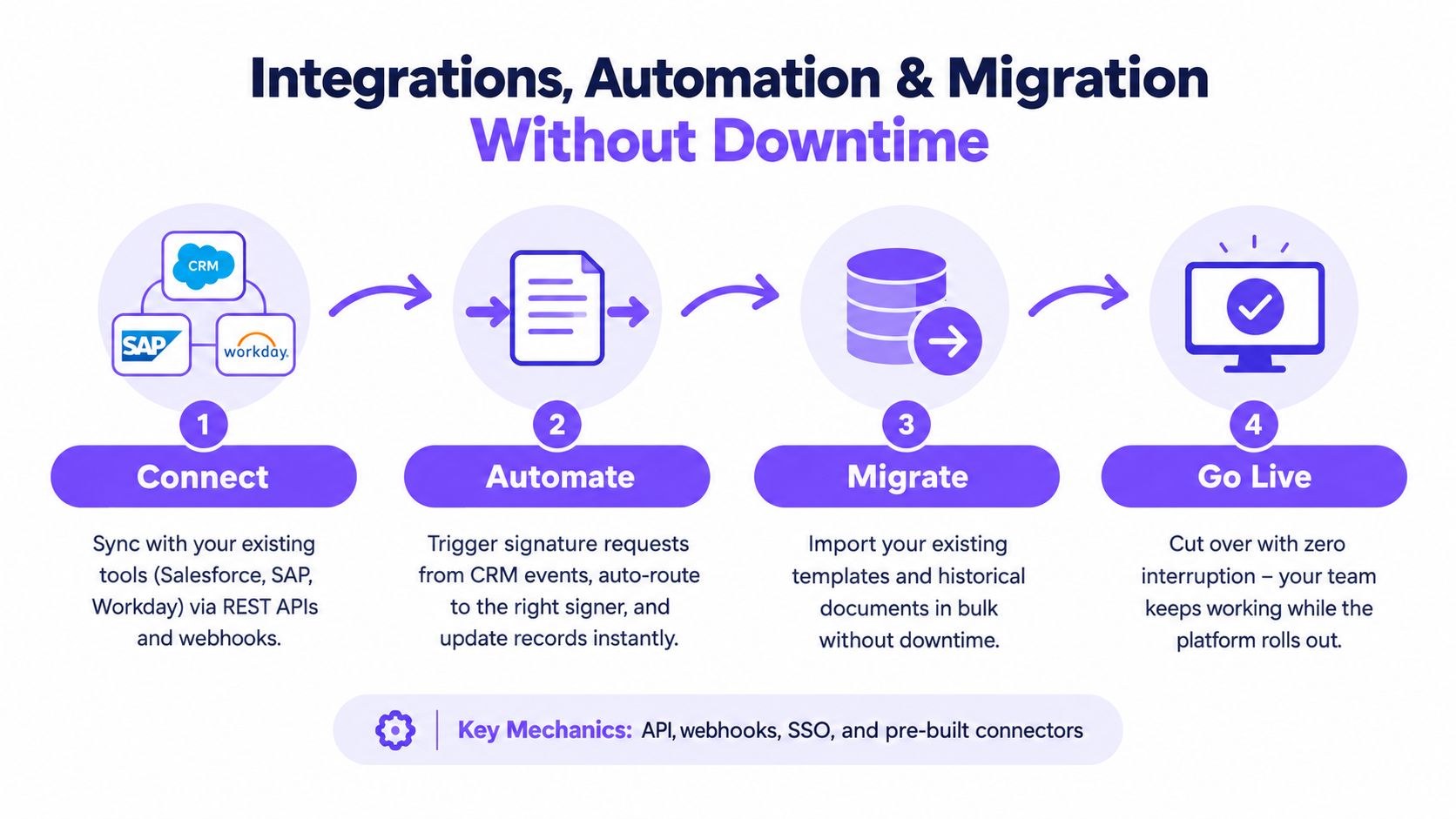
At 1,000 users, e-signature becomes part of the operating system for contracts. The platform should connect to CRM, HRIS, ERP, storage, and collaboration tools so employees don't copy data between systems or chase status updates through email.
The practical integration layer includes Salesforce, HubSpot, and Zoho for sales; Workday, BambooHR, and ADP for HR; and Zapier, Make, Pabbly, or REST APIs for custom workflows. BoloSign also supports connections with Google Drive, Google Sheets, Slack, and Microsoft Teams, while alternatives such as pdfFiller, Jotform Sign, and signNow bring different integration profiles.
Google Forms requires special attention. Google Forms doesn't natively include a signature field, but third-party add-ons can insert a signature widget before the Submit button and turn responses into signed PDFs (Google Forms signature add-on). That makes add signature to Google Form a useful workflow for admissions, consent, intake, and internal approvals.
Use a controlled migration sequence
- Export: Gather templates, completed PDFs, field definitions, recipient roles, and retention requirements from the legacy platform.
- Validate: Map fields, signer order, notifications, conditional logic, and access permissions.
- Pilot: Move one department, such as HR or a regional sales team, and test representative documents.
- Switch identity: Connect SSO and group provisioning after roles and templates pass validation.
- Import and launch: Bulk-import approved templates, train administrators, and monitor live status.
- Decommission carefully: Keep records according to policy, then retire the legacy contract only after retrieval and export tests pass.
BoloSign supports one-click DocuSign template import, reusable PDF templates, forms, multi-recipient requests, and AI-powered contract intelligence. The goal isn't merely to replace a signing screen. It's to create contract automation that starts with structured data, routes the document correctly, and updates the business system when signing finishes.
Sector Snapshots From the Front Line
The best platform is the one that fits the work people already do. A staffing firm, hospital, logistics operator, and university may all need legally binding eSignatures, but their templates, permissions, integrations, and retention rules differ.
| Sector | User Count | Primary Workflow | Key Integration | Admin Lever |
|---|---|---|---|---|
| Staffing | 2,400-person firm | Offer letters and I-9 workflows during hiring surges | ATS or HRIS with bulk-send automation | Branch roles and centralized template governance |
| Healthcare | Regional hospital network | Patient consent and clinician credentialing | HRIS, clinical systems, and secure storage | HIPAA-aligned roles, BAA-covered workflows, and retention |
| Logistics | Operator with distributed teams | Bills of lading, delivery confirmations, and vendor agreements | Transportation management system | Shipment metadata mapping and mobile signing |
| Education | State university | Admissions, financial aid, housing, and certification forms | Student information system and Google Workspace | Shared template library with department permissions |
A 2,400-person staffing firm needs recruiters to send repeatable packets quickly while branch administrators see only their assigned workflows. Central legal teams should own the approved templates, while bulk sending handles predictable hiring periods.
A hospital network must separate patient consent, clinician credentialing, and general HR documents. The platform should preserve detailed audit evidence and restrict sensitive workflows to authorized roles. HIPAA obligations don't disappear because a document is signed electronically.
A logistics company benefits when shipment metadata flows into a bill of lading or delivery confirmation. Mobile signing, automatic status updates, and searchable records matter more than decorative branding when drivers, vendors, and operations teams work across locations.
A university needs a shared library that serves admissions, financial aid, housing, and certification without letting every department edit the master version. BoloSign's forms and PDF workflows can support processes such as sign PDFs online, collect structured responses, and route multiple recipients through one request.
Your RFP Checklist and 30-Day Implementation Plan
A strong RFP asks vendors to prove the workflow, not repeat product language. Send each question with a request for evidence, such as a security document, sample certificate, sandbox demonstration, contract clause, or export file.
| Category | Question for the vendor | Evidence to request |
|---|---|---|
| Legal validity | Does the platform support ESIGN, UETA, and relevant eIDAS signature levels? | Legal documentation and signature samples |
| Identity | How do SSO and SCIM handle onboarding and deactivation? | Live demonstration and integration documentation |
| Roles | Can administrators create custom roles and delegate regional access? | Role matrix and sandbox test |
| Audit trail | Can legal export the complete record with the signed PDF? | Sample certificate and export |
| Encryption | How are documents protected in transit and at rest? | Security architecture and contract terms |
| Data residency | Where are documents and signing keys stored? | Regional storage options and data-processing terms |
| Assurance | Can the vendor provide SOC 2 or ISO 27001 evidence? | Current reports or certificates |
| Availability | What uptime commitment and support response apply? | SLA and escalation policy |
| API | What limits, webhooks, and authentication options apply? | API documentation and tested limits |
| Migration | Can existing templates and field mappings be imported? | Migration plan and sample import |
A practical 30-day rollout
Week one is discovery. Inventory users, departments, templates, integrations, signer types, retention needs, and regulated workflows. Exit the week with an approved requirements matrix.
Week two is the pilot. Select one department, import representative templates, test SSO, send real workflow samples, and inspect the completion certificates. Don't proceed if administrators can't find or export the evidence they need.
Week three is controlled expansion. Add a second department, validate CRM or HRIS triggers, test delegated administration, and resolve field-mapping issues. Train template owners before opening editing rights widely.
Week four is cutover. Import the remaining approved templates, activate groups, communicate the new process, monitor pending requests, and verify historical-document retrieval. Decommission the legacy tool only after the export, retention, and access tests pass.
Use BoloSign's 7-day free trial to pressure-test the checklist with live workflows. Create, send, and sign PDFs, test templates and forms, connect the integrations your teams depend on, and compare the resulting administration against your current platform.
Closer Innovation Labs Corp. offers BoloSign, a fixed-price eSignature and contract management platform with unlimited documents, team members, templates, and forms, plus AI-powered automation and secure workflows aligned with ESIGN, eIDAS, HIPAA, and GDPR needs. Visit Closer Innovation Labs Corp. to start a 7-day free trial and evaluate how the platform handles your 1,000-plus-user signing workflows.

Paresh Deshmukh
Co-Founder, BoloForms
25 Sep, 2026
Take a Look at Our Featured Articles
These articles will guide you on how to simplify office work, boost your efficiency, and concentrate on expanding your business.



