

E-Sign Integration with Salesforce Enterprise Guide
Learn e-sign integration with Salesforce enterprise patterns, security and rollout steps to send and sign PDFs inside Salesforce faster.

Tired of nonsense pricing of DocuSign?
Start taking digital signatures with BoloSign and save money.
A signed contract sits in a sales rep's inbox, the latest PDF lives in a shared drive, and Salesforce still shows the opportunity waiting for execution. Legal can't tell whether the customer received the right version. Operations can't trigger onboarding. The rep sends another email, someone downloads an attachment, and the audit trail starts to split across systems.
That's the operational problem behind e-sign integration with Salesforce enterprise. The signature itself is rarely the difficult part. Bulk routing, signer order, governor limits, merge fields, document versioning, webhook reliability, and the handoff of the executed file determine whether the workflow survives real volume. An effective design lets teams create, send, and sign PDFs, templates, and forms instantly, while keeping contract data connected to the Salesforce records that drive the business.
Why Enterprise Teams Embed E-Sign Inside Salesforce
A staffing agency may create an offer packet from a candidate record, a healthcare provider may send a consent form tied to a patient relationship, and a property developer may route a lease through several approvers. In each case, the commercial or operational event already begins in Salesforce. Moving the signing step into a separate application creates a gap precisely where accountability matters most.
Salesforce documents its own workflow for Salesforce Contracts, stating that electronic signature integration lets teams prepare, negotiate, manage, and sign contracts inside the CRM instead of handling physical documents. The workflow uses DocuSign and requires both a DocuSign account and a Salesforce Contracts license, according to Salesforce's electronic signature documentation. That positioning matters. Salesforce treats e-signature as part of the contract lifecycle, not merely as a button that adds a signature image to a file.
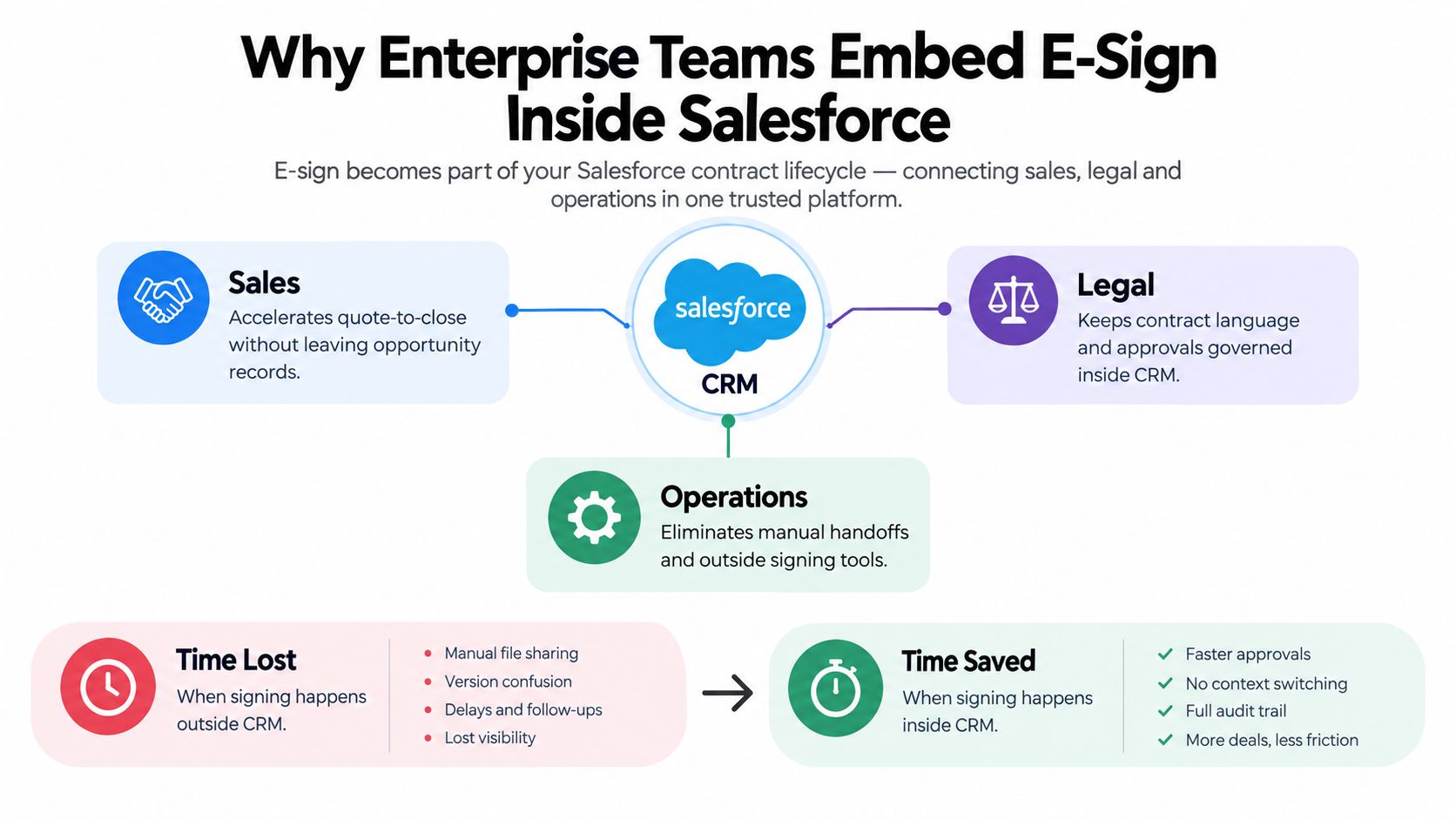
The CRM record should remain the operational anchor
When signing happens outside Salesforce, teams often lose visibility into four connected events:
- Preparation: The document needs current opportunity, account, contact, pricing, or service data.
- Governance: Legal needs the approved template, clause rules, verifier groups, and signer sequence.
- Execution: The correct people must receive the right version with suitable authentication.
- Completion: Salesforce needs the final status, signed PDF, audit evidence, and exception details.
That pattern applies across industries. A logistics company can route carrier agreements after procurement approval. An education provider can send enrolment forms without asking staff to rekey learner data. A professional services firm can tie a statement of work to the opportunity and make the signed version available to delivery teams immediately.
Independent 2026 industry coverage reports that 72% of organizations use eSignature APIs to embed signing into existing workflows, while 63% of new Salesforce tenants activate signature connectors within 30 days of deployment. The same coverage reports that 95% of businesses are either using or planning to use eSignature technology. These figures are presented in Verdoсs' digital signature trends coverage, and they support a practical conclusion: embedded signing is increasingly treated as standard enterprise infrastructure.
The business case still needs to account for implementation effort, licensing, security, support, and ownership. A useful way to frame that decision is to compare the costs and benefits of enterprise apps before selecting a connector or API strategy. Success looks less like “the rep clicked Send” and more like this: the approved document is populated correctly, routed automatically, signed securely, stored against the correct Salesforce record, and available to the next team without manual chasing. For a broader comparison of available approaches, review these Salesforce-integrated contract workflow solutions.
Choosing Your Integration Pattern for Salesforce
The right architecture depends on who owns the workflow, how much routing logic you need, and whether Salesforce is the only system where documents are created. Enterprise teams generally choose among three patterns.
A managed package connector is usually the fastest route for a standard sales process. Administrators get configuration screens, mapped fields, status actions, and familiar Salesforce permissions. The trade-off is dependency. If your process needs unusual conditional routing, nonstandard object relationships, or high-volume orchestration, the connector may force workarounds or custom extensions.
A direct API integration provides control over the complete lifecycle. Salesforce can create the contract record, generate or attach a document, assign signers, define order, send the envelope, and process callbacks. Salesforce's documented enterprise path supports sending an envelope from a source object through /connect/e-sign/signature-requests/{sourceObjectId}/envelope/send, and the APIs can operate independently of the user interface, as described in this technical discussion of the Salesforce e-signature API path. That's valuable when Flow alone can't express the routing rules or when a staffing, logistics, or procurement process sends many agreements from a controlled queue.
Embeddable components and a Document Signing API suit organizations that need signing inside several products. A healthcare portal, WordPress intake experience, HubSpot workflow, and Salesforce record can each present the appropriate signing step while the backend maintains a consistent contract record. BoloSign's e-signature API with embedded signing is an example of this broader approach, where the signing experience can sit where users already work rather than forcing every participant into a separate interface.
| Pattern | Best For | Customization | Maintenance |
|---|---|---|---|
| Managed package connector | Standard Salesforce sales and service workflows | Moderate, within package capabilities | Lower initial effort, but tied to vendor updates |
| Direct API orchestration | Complex routing, high-volume queues, and custom objects | High, including backend logic and event handling | Higher engineering ownership |
| Embeddable components or Document Signing API | Multi-system portals and branded user journeys | High at the experience and integration layers | Shared responsibility across Salesforce and connected systems |
Match the pattern to the workflow
For a high-volume staffing offer process, a managed connector may be sufficient if the offer template, signer sequence, and storage destination are stable. For regulated healthcare consents, the team may need stronger identity controls, explicit consent capture, and a carefully governed audit trail, making API or embedded components more appropriate.
Don't choose an API because it sounds more enterprise-ready. Direct orchestration gives you power, but it also makes your team responsible for retries, authentication, payload validation, monitoring, and vendor changes. Conversely, a managed package can be the wrong choice when bulk routing or custom approval logic is central to the process.
Architecture rule: Choose the smallest integration pattern that handles your real routing, volume, compliance, and ownership requirements. Complexity should solve a known constraint, not decorate the design.
Mapping Data Models and Automating with Apex and Flow
Reliable Salesforce signing starts with a clean data model. Treating the PDF as the system of record is a mistake. The contract record, opportunity, account, signer, document version, and execution status should each have a clear relationship and ownership rule.
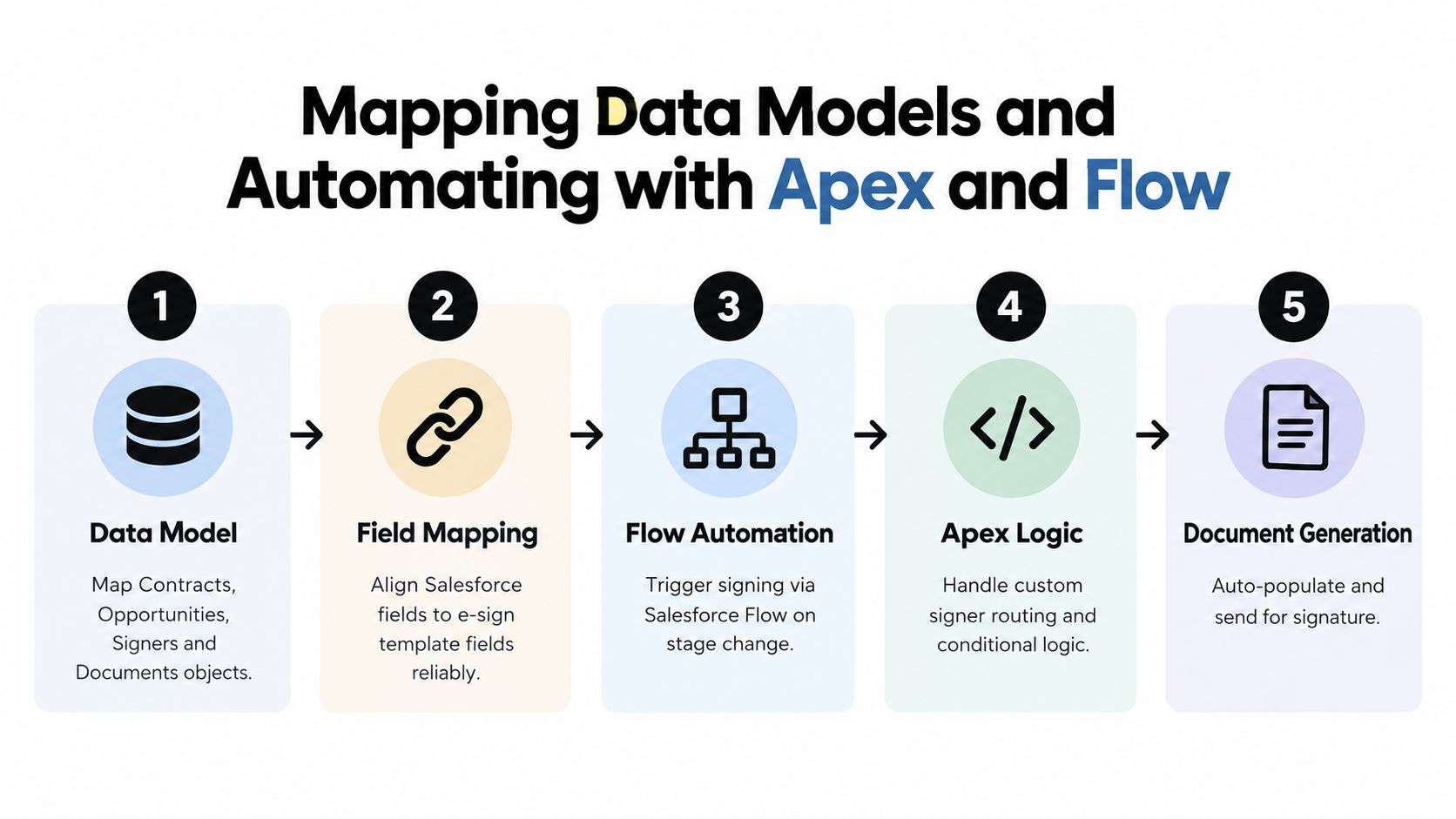
A practical build sequence looks like this:
- Create the contract record. Store contract type, source opportunity, account, business unit, approval state, document version, and signing status. A custom Contract object or Salesforce Contracts record can act as the lifecycle anchor.
- Generate or attach the document. Use an approved template or attach a controlled PDF. Record the template version used so a later amendment doesn't overwrite the executed agreement.
- Map signers and order. Store signer role, contact reference, authentication requirement, and whether the signer is sequential or parallel. Don't infer order from email lists.
- Send through the integration. Invoke the Salesforce endpoint or connected provider API only after validation and approval checks pass.
- Return the outcome to Salesforce. Process sent, viewed, signed, declined, expired, and failed states. Attach the executed PDF and audit material to the correct record.
Where Flow works well
Salesforce Flow is a good fit for predictable events. A stage change to Closed Won can create a contract task. An approved healthcare form can trigger a send action. A completed signature event can update the opportunity, create an onboarding task, and attach the file to the account.
Use Flow for declarative routing and administrative ownership. Keep the automation readable. A flow that hides signer rules across multiple subflows becomes difficult for a legal operations team to maintain.
Where Apex becomes necessary
Bulk workflows expose limits that a single-record demo never reveals. Salesforce implementation guidance and community material call out Apex callout limits and the need for Queueable or @future handling when workflows process records in bulk. A batch of staffing offers, vendor agreements, or property documents shouldn't perform every external callout synchronously inside one transaction.
A safer Apex pattern is:
- Validate synchronously: Confirm required fields, approved template, signer email, and current version.
- Queue the external work: Use Queueable or an appropriate asynchronous mechanism for callouts.
- Persist an idempotency key: Prevent a retry from creating a duplicate envelope.
- Handle callbacks separately: Let webhook processing update the contract record without relying on the original transaction.
- Attach deliberately: Link the signed file to the contract and its parent opportunity, account, case, or custom object according to a single storage rule.
Merge-field breakage is another frequent failure point. A field called Customer_Name in a template won't populate reliably if the Salesforce mapping sends AccountLegalName without a defined transformation. BoloSign templates can be used as one option for controlling reusable fields and reducing formatting errors, but the same discipline applies to any provider: define field ownership, test null values, and lock the approved document structure before production.
Use the following video as a visual reference for how an enterprise signing workflow can be organized around Salesforce automation.
The best implementation isn't the one with the most automation. It's the one where every record has a known document, signer, status, version, and recovery path.
Security Authentication and Compliance You Can Trust
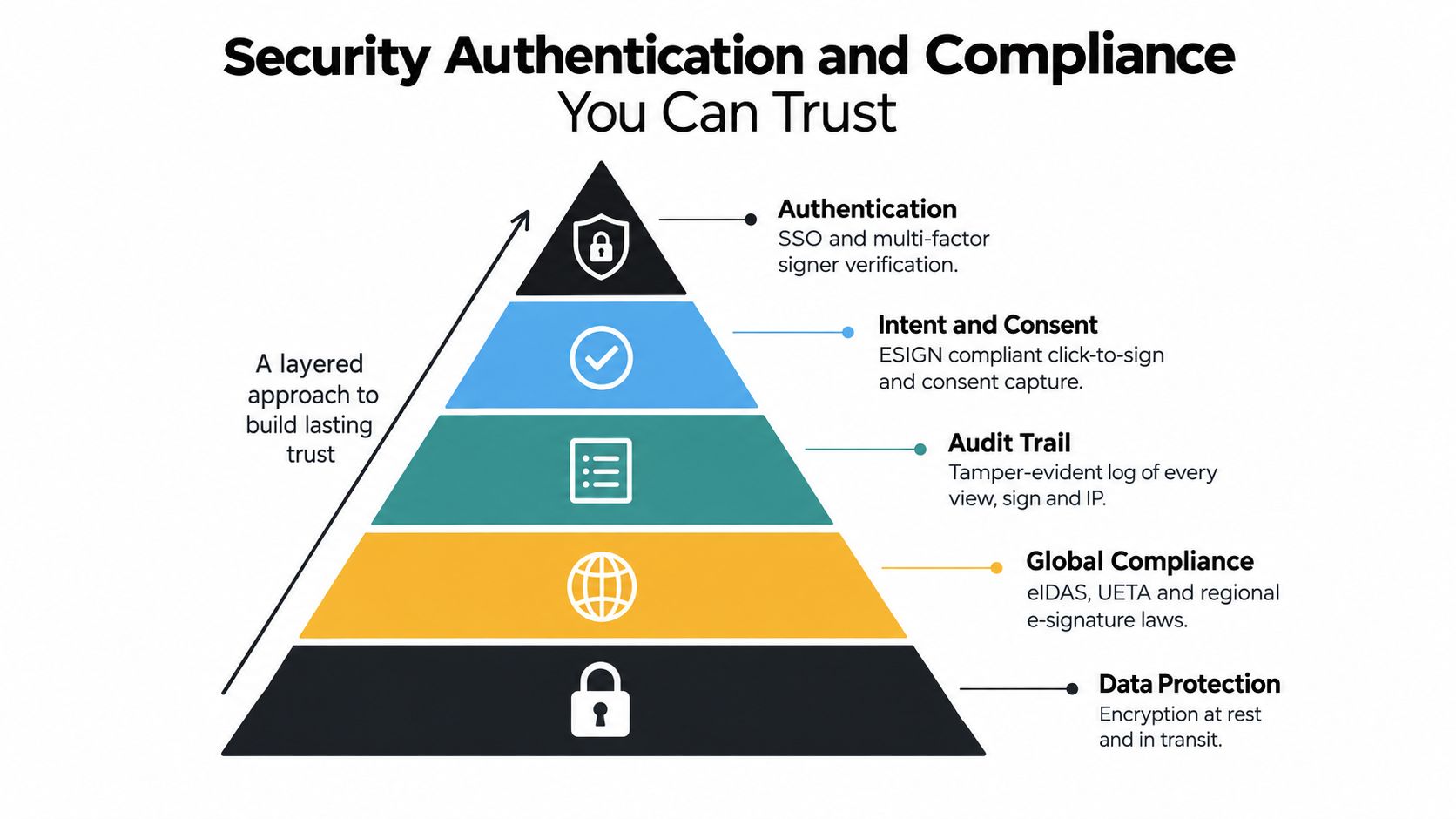
A signature workflow is defensible only when it proves more than the final mark. Enterprise buyers need to know who signed, what they saw, whether they intended to sign, how the document was protected, and whether the completed record can be reproduced.
Start with the legal mechanics
Under U.S. law, an electronic signature is generally valid when the signer intends to sign, consents to conduct business electronically, the signature is associated with the record, and the signed record can be retained and reproduced, according to this developer-focused explanation of e-signature compliance. A Salesforce workflow should therefore capture consent and intent as part of the signing event, preserve the association between signer and document, and retain a reproducible final record.
The EU requires a more nuanced decision. Under eIDAS, an electronic signature can't be denied legal effect solely because it's electronic or not qualified. A qualified electronic signature, however, has the highest legal standing and carries EU-wide equivalence to a handwritten signature, as explained in this eIDAS compliance overview. That distinction matters for European real estate, public-sector-adjacent procurement, and regulated transactions where a basic click-to-sign event may not meet the required assurance level.
Build controls around the signer and record
Salesforce documentation emphasizes signature trails, ordered verifiers, and page-level placement for a pending signature component. Those controls make implementation more than an embedded button. Routing errors often arise because verifier grouping or signature order was configured incorrectly, not because the signer couldn't complete the act.
A defensible enterprise design should define:
- Authentication: Use SSO for internal users and stronger signer verification where transaction risk requires it.
- Access control: Separate template administration, approval, sending, and reporting permissions.
- Audit evidence: Preserve views, sends, signer actions, timestamps, status changes, and the final document.
- Data protection: Limit sensitive healthcare, financial, and identity data in payloads and attachments.
- Regional rules: Map U.S. ESIGN and UETA expectations separately from European eIDAS and national identity requirements.
BoloSign is positioned as an AI-powered contract management and e-signature option with support for SOC 2 Type I/II, ISO 27001:2022, GDPR, eIDAS, ESIGN Act, HIPAA, and CCPA, alongside unlimited documents, templates, and team members at one fixed price. Its commercial positioning says that this can be up to 90% more affordable than DocuSign or PandaDoc, a claim that should be validated against your own plan, volume, support, and integration requirements. For identity administration, compare the practical requirements in these enterprise e-signature tools with SSO and SCIM.
Compliance isn't a checkbox attached after launch. It's a set of design decisions that must appear in the data model, authentication path, template governance, retention policy, and incident process.
Testing Deployment and Change Management Checklist
A sandbox should test the workflow people will use, not just whether a test user can sign a PDF. Populate records with missing fields, long names, multiple signers, declined requests, changed approvers, expired links, and duplicate retry attempts. A real estate lease and a simple education enrolment form should not be assumed to have identical routing or evidence requirements.
Salesforce e-signature documentation supports configurable signature order and verifier grouping. Test both sequential and parallel paths, including what happens when the first signer delays or a verifier rejects the document.
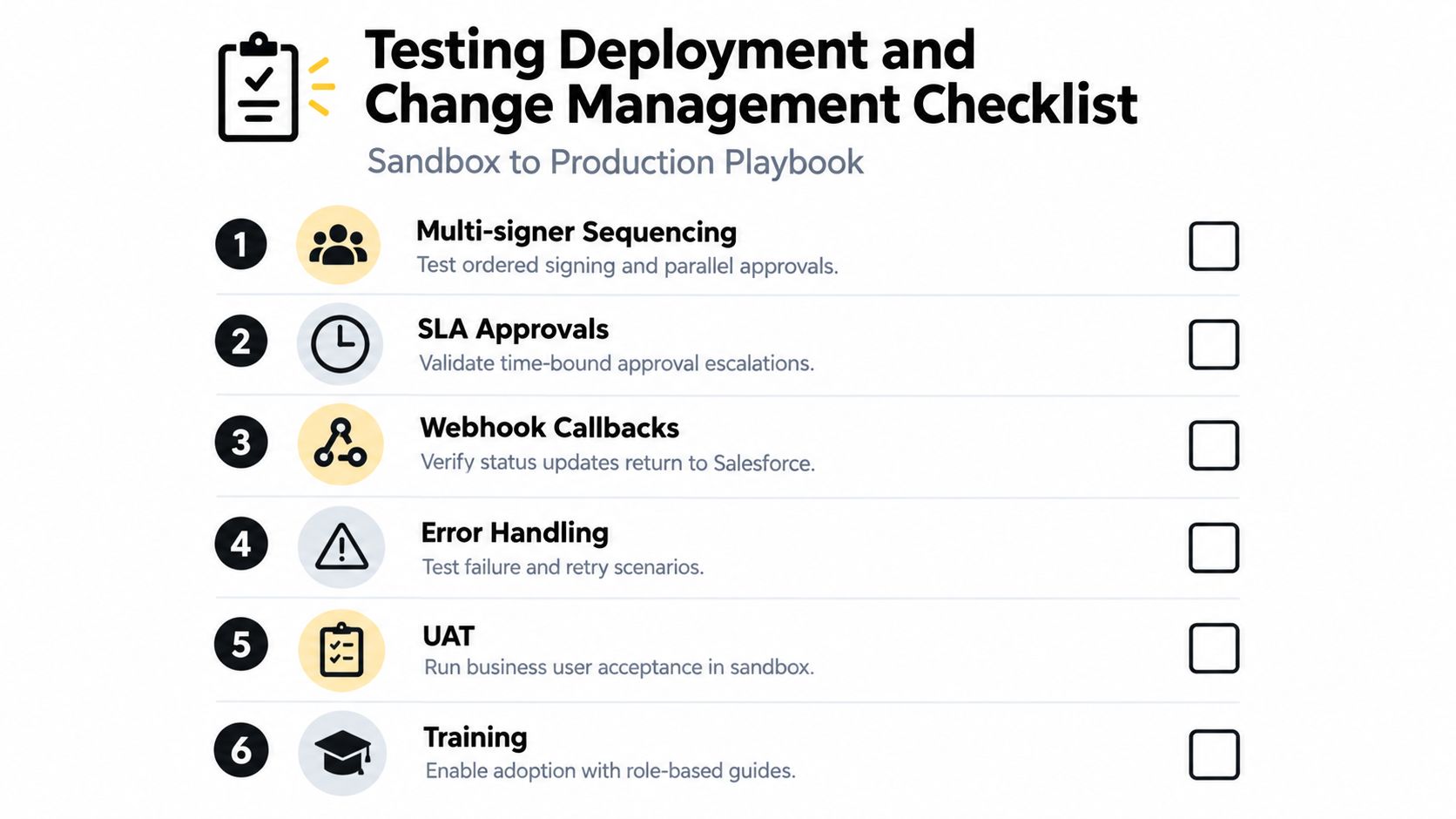
A production-readiness checklist
- Permission sets: Confirm who can create, edit, approve, send, cancel, and view signed files.
- Template versions: Test every merge field, conditional section, date, currency, address, and blank-value behavior.
- Signer routing: Verify ordered verifiers, parallel approvals, reassignment, and external signer details.
- Webhook callbacks: Confirm that every meaningful status update returns to the correct Salesforce record.
- Error handling: Simulate provider failures, invalid payloads, missing files, timeouts, and safe retries.
- Governor-limit load: Exercise Queueable or
@futureprocessing with realistic bulk volumes and confirm that records don't remain stuck. - Rollback: Define how administrators stop new sends, isolate failed records, and resume without duplicate envelopes.
- User acceptance: Have sales, legal, operations, and business-unit owners complete representative workflows in the sandbox.
- Training: Give template owners and approvers role-specific instructions rather than a generic platform tour.
Weak synchronization standards create operational risk. An independent Salesforce CLM automation paper reports that integration-related synchronization issues can affect roughly 15% of contract volume during initial implementation, with 8% of document version disputes and 12% of time-sensitive contracts impacted by signature workflow disruptions when standards are weak. The same source reports that standardized webhooks and APIs can improve real-time synchronization by 96%. These figures appear in the Salesforce CLM automation research, and they point to a clear testing priority: status callbacks and version control deserve the same attention as the signing screen.
Roll out by business unit. Start with a controlled sales or procurement workflow, capture defects, update templates and permissions, then expand to healthcare, education, property, or logistics processes with their own approval and retention rules. Let nontechnical owners manage approved templates and routing settings, but require governance for changes that affect legal language, identity, or storage.
Monitoring Troubleshooting and Scaling Your Rollout
Go-live isn't the finish line. Monitor each envelope from creation through completion, and make the Salesforce record explain the current state without asking an administrator to inspect a provider dashboard.
Useful operational fields include envelope identifier, current status, last callback time, retry count, document version, signer awaiting action, failure category, and final-file location. A scheduled exception view should surface records that have remained in one state too long, lost their document relationship, or received a callback that doesn't match the stored envelope.
Fix the failures that matter
Merge-field mismatches usually appear as blank values, truncated content, incorrect dates, or broken formatting. Compare the Salesforce payload with the template schema, test null and unusually long values, and prevent sending when required fields fail validation.
Bulk queue failures need controlled retries rather than repeated manual sends. Record the failed job, preserve the original idempotency key, and let an administrator retry only after the underlying issue is corrected.
Webhook gaps create false views of reality. Store the last event received, reject out-of-order updates when appropriate, and reconcile Salesforce against the provider when a callback is missing. A signed document should never be treated as complete solely because a user says it was signed.
AI can improve the upstream review process as well. A 2026 benchmark tested 11 AI models across 3,282 pairwise contract reviews on 21 precision-critical guidelines, according to LegalOn's contract review benchmark. Separate 2026 industry summaries report that AI contract review can reduce standard review time by about 80% to 85%, so clause scanning, risk flagging, and first-pass review can sit before Salesforce sends the approved document. The output still needs human legal judgment, especially for unusual indemnity, privacy, liability, or jurisdiction language.
Track adoption through operational signals such as failed-send categories, time spent waiting for approvals, percentage of records with a final attachment, template defect frequency, and support requests by business unit. Train CRM-driven sales teams to initiate signing from the opportunity, show legal users how to manage governed templates, and give operations owners a clear exception queue.
A platform such as BoloSign can support the document and signature layer with PDFs, templates, forms, AI-powered contract intelligence, API integration, embedded signing, and compliance-oriented controls. Its fixed-price model includes unlimited documents, templates, and team members, which gives enterprise teams a straightforward alternative to usage structures that become harder to forecast as adoption expands.
Start a 7-day free trial of BoloSign to create, send, and sign PDFs, templates, and forms while evaluating how the workflow fits your Salesforce operating model. Visit BoloSign to test AI-powered contract automation, secure eSignatures, and unlimited usage for your teams.

Paresh Deshmukh
Co-Founder, BoloForms
17 Sep, 2026
Take a Look at Our Featured Articles
These articles will guide you on how to simplify office work, boost your efficiency, and concentrate on expanding your business.



