

CLM Integration Salesforce CPQ Guide to Faster Closings
Learn CLM integration Salesforce CPQ step by step — architecture, mapping, automation, testing and security to turn quotes into signed contracts faster.

Tired of nonsense pricing of DocuSign?
Start taking digital signatures with BoloSign and save money.
A quote gets accepted at 4:57 p.m. The sales rep expects a contract to reach the customer immediately, but legal still has to rebuild the document, check pricing, confirm approval history, and reconcile terms with billing. By the time the agreement is ready, the buyer is waiting, the implementation team lacks a reliable scope, and finance can't tell which version should drive invoicing or revenue recognition.
That gap is why CLM integration Salesforce CPQ projects should be designed around the entire revenue process, not just document generation. The useful connection carries approved commercial data from quote to contract, signature, billing, renewals, co-terms, and amendments without forcing teams to re-enter the same information. This guide focuses on the workflow details that determine whether the integration works after launch, including data mapping, failure handling, compliance, and practical eSignature execution.
Why CLM Integration Matters for Salesforce CPQ Teams
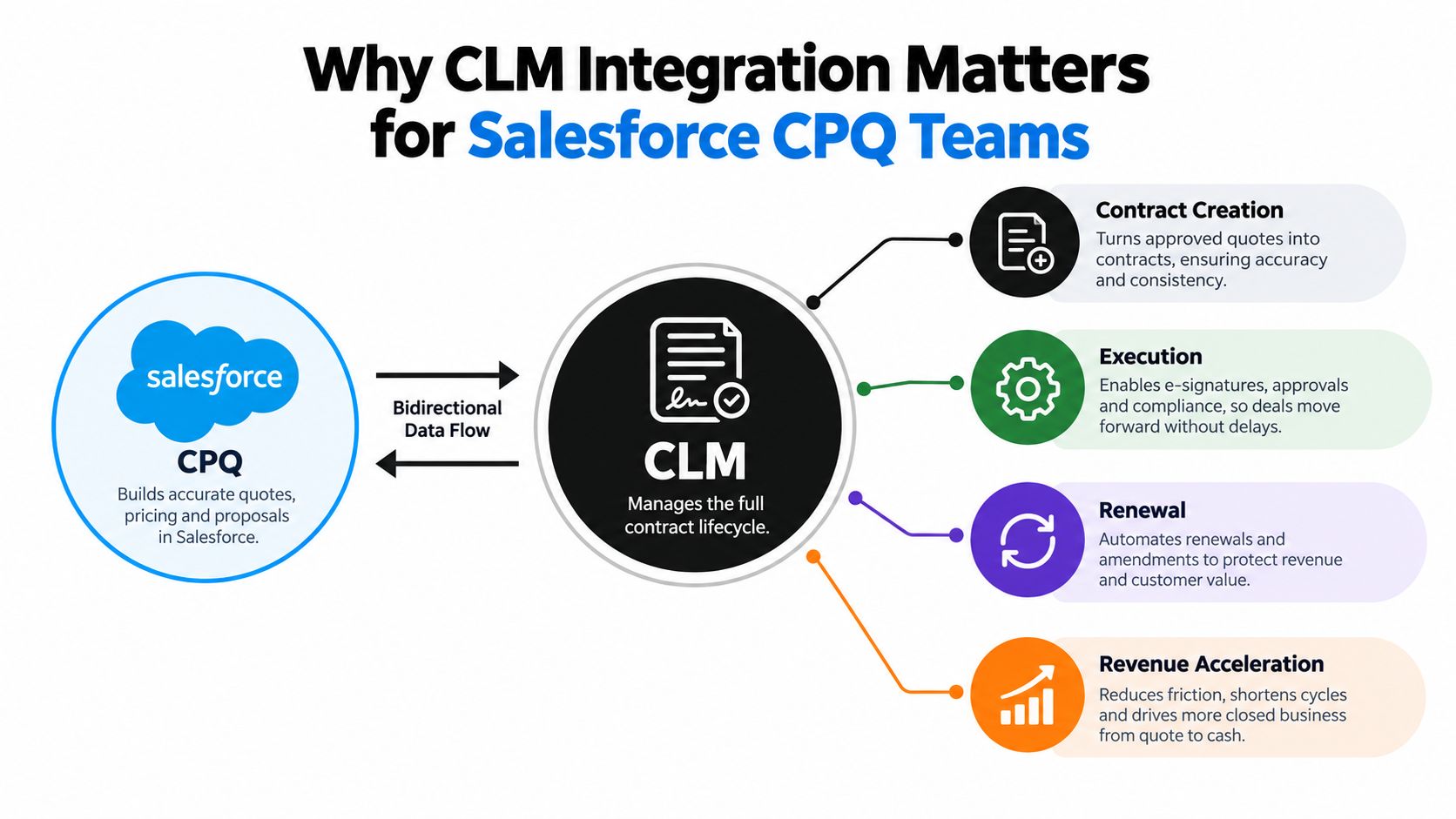
Salesforce CPQ is built to help sales configure an offer, apply pricing logic, secure approvals, and produce a quote. CLM takes responsibility for the agreement after that commercial decision, including creation, negotiation, execution, renewal, and history. Salesforce describes CLM as managing contracts from creation through execution and renewal, while its integration guidance shows how quote output can populate contract objects and routes for legal review and redlining through Salesforce's CLM and CPQ integration guidance.
Consider a staffing agency selling a managed recruitment service. CPQ calculates the approved service package, rates, discounts, and start date. The buyer accepts the quote, but the legal team still needs a staffing agreement with data-processing terms, replacement provisions, payment conditions, and an execution path. Without integration, someone copies values into a template, legal compares the contract against the quote manually, and finance later checks whether the signed terms match what the billing system can process.
With a connected workflow, acceptance triggers contract creation. The CLM record receives the customer, products, prices, approved concessions, and relevant metadata. Legal can redline within the controlled process, procurement can review the correct version, and the final agreement returns a reliable status to Salesforce. The audit trail stays connected to the deal instead of being scattered across email attachments and local folders. A practical overview of this lifecycle is available in BoloSign's guide to a contract lifecycle management platform.
The business case has changed
The CLM software market was valued at USD 2.32 billion in 2025 and is projected to reach USD 5.458 billion by 2032, with a projected 13.0% CAGR, according to Ken Research's global CLM market estimate. That growth reflects broader quote-to-cash modernization, where contract data must support downstream operations rather than stop at signature.
Salesforce's shift toward Revenue Lifecycle Management in 2024, followed by Salesforce CPQ being described as officially end of sale in 2025, creates a transition point for organizations with older CPQ-linked contracting workflows. The right response isn't to replicate a fragile handoff in a new interface. It's to preserve quote-to-contract continuity while making the CLM record dependable for status, approvals, amendments, renewals, and audit history.
Practical rule: A successful integration doesn't merely create a contract. It preserves the commercial truth of the deal after the customer signs.
Choosing Your Integration Architecture
Architecture should follow operating reality, not a vendor feature checklist. A small sales organization with standard agreements has different needs from a global enterprise handling complex approvals, negotiated clauses, regional rules, and recurring amendments.
Three patterns appear most often:
| Architecture | Best For | Pros | Cons |
|---|---|---|---|
| Native Salesforce CLM | Salesforce-centric teams with relatively consistent processes | Familiar data model, simpler user experience, direct access to Salesforce objects | Can require substantial configuration, and specialized CLM capabilities may remain limited |
| Middleware or iPaaS | Organizations connecting Salesforce CPQ with separate CLM, ERP, billing, or finance platforms | Centralized orchestration, reusable connectors, clearer separation between systems | Adds another platform to govern, monitor, secure, and maintain |
| Custom API or webhook build | Teams with unusual workflows, strong engineering capacity, or strict control requirements | Maximum flexibility, precise event handling, custom validation and transformation | Higher build and maintenance burden, greater upgrade and ownership risk |
Native architecture usually works when Salesforce remains the operational center and the contract process doesn't need extensive transformation. It can reduce integration surface area, but the team still has to resolve object ownership, approval routing, document versioning, and post-signature updates. “Native” doesn't mean “automatic,” and it doesn't remove the need for data governance.
Middleware makes more sense when billing, ERP, revenue recognition, or a separate CLM has its own authoritative records. The integration layer can transform a CPQ quote into the structure expected by the CLM, then pass approved contract terms to downstream systems. This pattern is more resilient when the systems use different product identifiers, date models, or amendment logic, but it introduces operational overhead.
Custom APIs are appropriate when the business has a capable engineering team and workflows that packaged connectors can't represent. They can handle event sequencing, idempotency, custom retries, and complex transformations. The trade-off is long-term ownership. Salesforce releases, managed-package changes, CLM API changes, and security requirements become the organization's responsibility.
Decision test: If finance or billing uses a different definition of product, term, start date, or amendment, assume you need explicit transformation logic rather than a simple field-to-field connector.
Implementation cost and adoption also influence the choice. Independent commentary on the 2025 CPQ market reports that 41% of companies spend USD 100,000 to USD 200,000 on implementation, 30% say Salesforce CPQ is easy to use, and 35% report hidden costs beyond licensing, as summarized in the published CPQ market commentary. Those figures make a practical point: a technically elegant architecture can still fail if users find it difficult or administrators can't support it.
Teams comparing implementation patterns can also review solutions for Salesforce-integrated contract workflows before choosing between native, iPaaS, and custom approaches.
What to Prepare Before You Connect Anything
Integration work goes faster when the team settles business rules before opening an API document. Start by documenting the current quote-to-cash path, from opportunity and quote through order, contract, billing, renewal, and amendment. Include the people who approve discounts, negotiate terms, create orders, issue invoices, and maintain revenue schedules.
Audit the Salesforce CPQ objects
Identify which records drive contract creation and which records provide authoritative values. At minimum, review the quote, quote line, order, order product, account, contact, opportunity, approval, and contract relationships. Confirm how the organization distinguishes draft, approved, accepted, closed-won, expired, and superseded quotes.
Pay special attention to the Primary Quote relationship on the Order. Salesforce documents that contract creation can fail without an error when the Order's Primary Quote lookup is null, and that updating the Order Product Contracted checkbox can also fail when validation rules are met, as described in Salesforce's contract creation troubleshooting documentation. These dependencies need explicit test cases before production deployment.
Clean the commercial vocabulary
Create a shared dictionary for:
- Customer identity: Account, legal entity, billing entity, sold-to party, and ship-to party.
- Products: CPQ product ID, billing SKU, service category, contract line label, and revenue category.
- Dates: Quote acceptance, contract effective date, service start, billing start, renewal, and termination.
- Commercial terms: Quantity, unit price, discount, currency, payment terms, tax treatment, and escalation language.
- Change types: New business, renewal, co-term, upsell, downsell, suspension, cancellation, and amendment.
A product name that looks correct to sales may be unusable for billing. A contract may describe a bundled service in legal language while the finance system requires separate performance obligations or billing components. Resolve those differences in the data model rather than asking legal or finance to repair them in every agreement.
Lock approval and success rules
Map which conditions require sales leadership, finance, legal, security, procurement, or executive approval. Capture the difference between a quote being commercially accepted and a contract being approved for signature. Then define measurable checks before building, including quote-acceptance-to-signature cycle time, sync latency, field-level accuracy, and duplicate-record avoidance, following the implementation guidance in this CPQ and CLM integration guide.
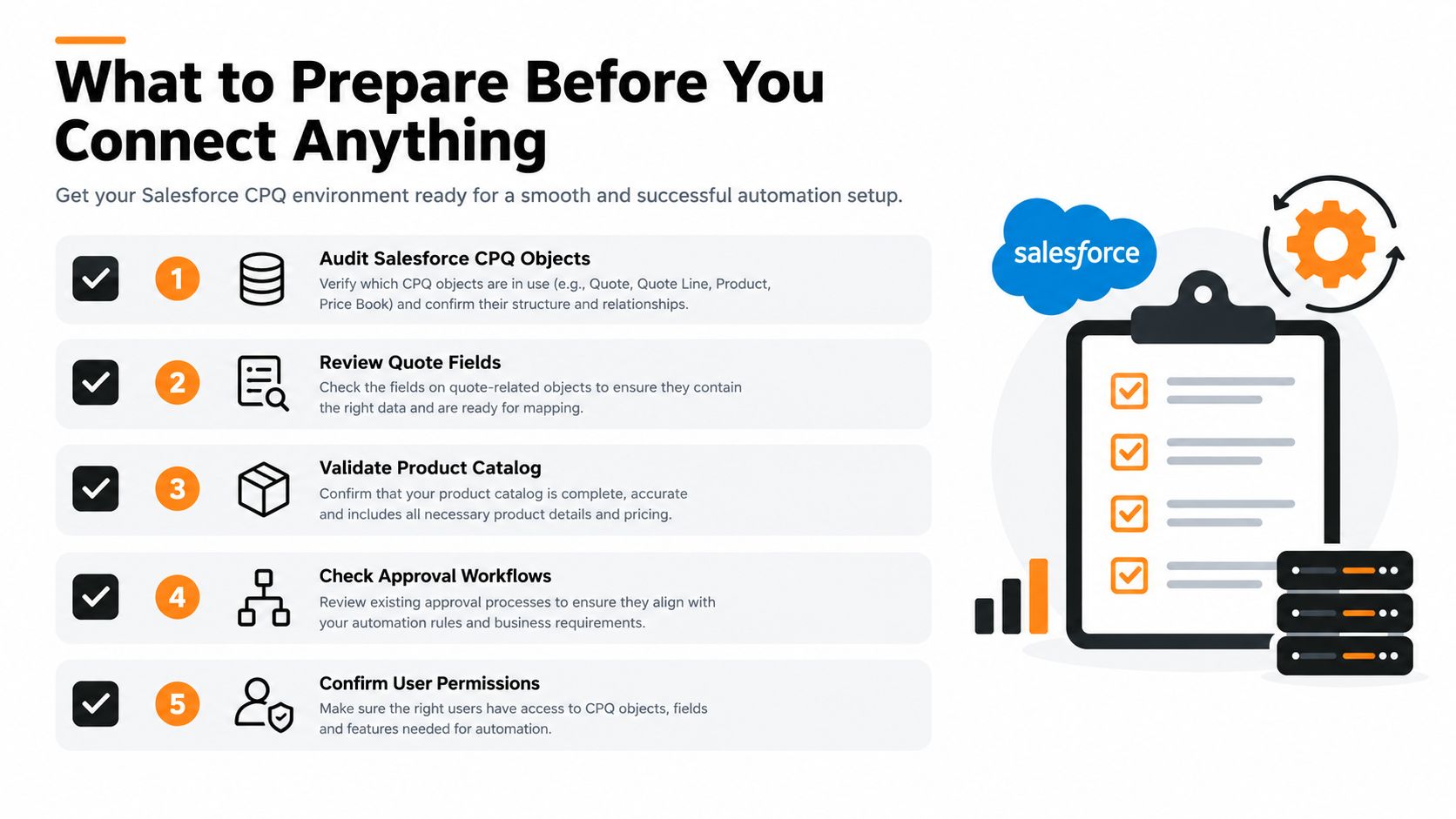
Finally, confirm permissions, integration-user ownership, template access, clause-library access, signature authority, and retention policies. A workflow that works for an administrator can still fail for a sales rep, legal reviewer, or regional signer if those users lack the right permissions.
Mapping Data and Templates Without Breaking Revenue Recognition
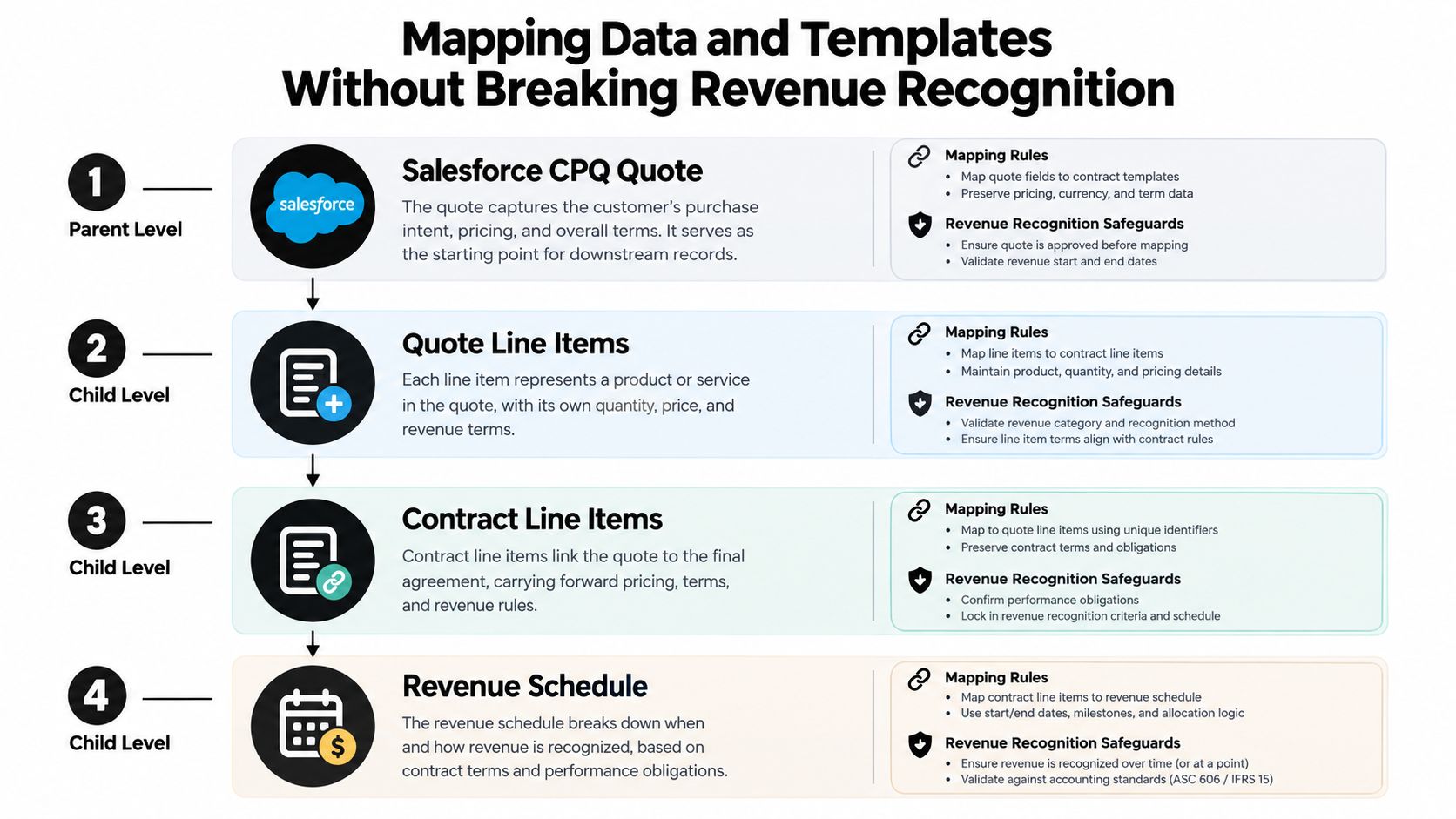
The mapping layer is where a fast quote becomes a reliable contract record. The basic pattern is straightforward: quote line items map to contract line items, pricing rules map to payment terms, and customer fields map to the CLM record. The difficult work begins when the contract structure doesn't match the billing or revenue-recognition structure.
Map the commercial hierarchy
Don't map only visible document fields. Map the parent-child relationships that explain what was sold:
- The Salesforce CPQ quote establishes the approved commercial package.
- Quote line items carry products, quantities, prices, discounts, currencies, and service periods.
- Contract line items represent the enforceable obligations and agreed commercial terms.
- Billing and revenue systems consume the contract structure according to their own schedules and rules.
For a staffing agreement, the CPQ quote might contain recruiting services, placement fees, replacement periods, and regional rate cards. The CLM template should translate those values into a statement of work or service schedule, while billing receives the identifiers and dates it needs. For a healthcare provider, the quote may include clinical services, locations, provider categories, privacy language, and payment schedules. The contract needs the right operational and compliance clauses, but finance still needs clean line-level amounts and service periods.
A real estate workflow creates a different challenge. A lease or property-management agreement may include premises, commencement dates, renewal options, deposits, maintenance obligations, and variable charges. The document can group those provisions for readability, while downstream systems may require distinct charge types and dates. Preserve both views. The contract should remain understandable to people, and the integration should remain usable by billing and revenue systems.
Revenue-safe design separates document presentation from financial structure. The agreement can be organized for legal clarity while the integration retains the granular identifiers needed for billing, amendments, and recognition.
Design for changes before launch
Renewals, co-terms, and mid-term changes should not overwrite the original commercial record. Give each event a clear relationship to the original contract and define which values are inherited, replaced, prorated, or newly introduced.
For a co-term, store the original line, the added or reduced quantity, the shared end date, and the effective date of the change. For a renewal, distinguish the renewed term from the prior term and record any new pricing or product configuration. For a mid-term amendment, preserve the signed baseline and create a controlled change record that can flow to billing and revenue operations.
This is the area many implementations underdesign. Coverage on legacy Salesforce CPQ and revenue operations highlights that CPQ outputs may not match what billing and revenue-recognition systems can ingest, particularly when Salesforce CPQ uses a separate managed-package data model. The result can be manual work, leakage, and audit friction, as discussed in this analysis of Salesforce CPQ's end-of-sale implications.
Use templates as controlled logic
Templates should reflect contract type, jurisdiction, product family, approval path, and risk profile. A staffing template may need assignment terms and candidate replacement language. A healthcare template may require privacy and data-processing provisions. A logistics master services agreement can use service levels, insurance, claims, and delivery schedules. Education agreements may need institution, instructor, learner, and cancellation terms. Professional services contracts often need deliverables, milestones, acceptance criteria, and change control.
BoloSign can create, send, and sign PDFs, templates, and forms instantly through secure eSignature workflows. Used as the execution layer, it can support standardized templates, automated routing, and AI-assisted contract review without forcing teams to purchase usage in separate document bundles. Treat AI contract review as an aid for identifying deviations and missing provisions, not as a substitute for legal judgment.
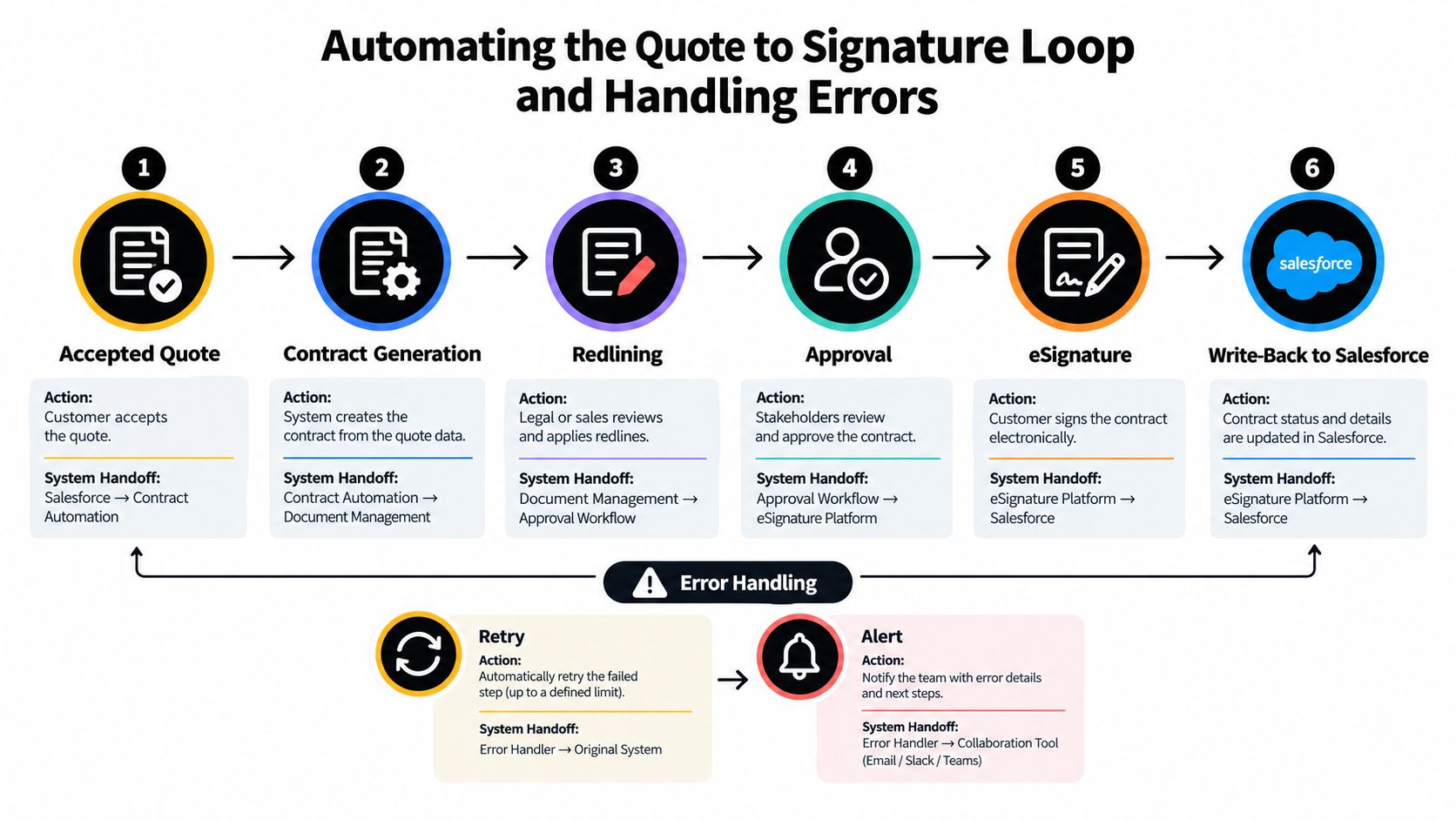
Automating the Quote to Signature Loop and Handling Errors
The most dependable automation starts with a narrow trigger. Generate a contract only when the quote reaches an Accepted or Closed-Won state, and require the record relationships and approval conditions to be valid before the event fires. This prevents draft quotes, abandoned versions, and unapproved discounts from creating contractual records.
A typical loop looks like this:
- Accepted quote: Salesforce CPQ confirms the commercial version and its approval state.
- Contract generation: The integration sends mapped fields and line items to the CLM.
- Legal review: The CLM selects the correct template and routes deviations for redlining.
- Approval: The agreement moves through legal, finance, procurement, or business approvals based on defined rules.
- eSignature: The final PDF or generated agreement is sent to the authorized signers.
- Write-back: Signature status, executed document location, dates, and contract identifiers return to Salesforce.
Keep events and statuses explicit
Use a stable external ID for the quote and contract so retries don't create duplicates. Store the source quote version, the generated contract ID, the integration status, the last successful synchronization time, and the reason for any failure. Statuses should distinguish “queued,” “generated,” “in legal review,” “approved,” “sent,” “partially signed,” “executed,” “declined,” and “failed.”
Webhooks are useful for near-real-time updates, but they shouldn't be treated as proof that every downstream action completed. The receiving service should validate the payload, check whether the event was already processed, and return a clear result. Scheduled reconciliation remains valuable because network interruptions, expired tokens, user edits, and platform maintenance can leave systems temporarily out of sync.
BoloSign supports instant creation, sending, and signing of PDFs, templates, and forms, which fits the final execution stage of this loop. Teams can also use clickwrap when a standardized online acceptance process is more appropriate than a negotiated agreement. In a staffing workflow, the signed client agreement can trigger onboarding tasks. In logistics, a completed master services agreement can release operational setup. In education, signed enrollment or vendor forms can move into the next administrative queue.
The practical distinction is important. CPQ should remain responsible for the approved commercial configuration. CLM should govern contract language, negotiation, approval, execution, and lifecycle status. Billing and revenue systems should consume a validated contract structure rather than infer financial meaning from a PDF.
A workflow video can help stakeholders visualize how status changes and handoffs fit together:
Test the failures, not only the happy path
End-to-end testing should cover the quote, order, order product, contract, signature, billing, and revenue records. Test missing Primary Quote values, validation rules on Contracted updates, rejected approvals, expired signature requests, duplicate webhook deliveries, changed quote versions, and amendments created while an earlier contract is still pending.
Test every object dependency before users do. A silent failure at the Order stage can look like a legal delay, a sales follow-up problem, or a missing document even though the root cause sits in Salesforce validation logic.
Use a retry queue for transient failures and a manual exception queue for data problems. Retries should be bounded and idempotent. Alerts should identify the record, failed step, payload reference, owner, and next action, rather than reporting that “integration failed.”
For duplicate avoidance, the integration should check whether a contract already exists for the source quote version before creating another one. For corrections, create a new controlled event or amendment instead of changing a signed record. That audit discipline protects sales, legal, finance, and customers when someone asks why the executed agreement differs from an earlier quote.
For teams looking to operationalize these controls, contract management workflow automation provides a useful companion perspective on routing, approvals, and execution.
Securing Deployment and Scaling Your Integrated Workflow
Security begins with the workflow, not the signature button. In the United States, ESIGN and UETA generally depend on intent to sign, consent to conduct business electronically, association between the signature and the record, and retention of the signed record, as outlined in this eSignature compliance guide for developers. In the European Union, eIDAS distinguishes SES, AdES, and QES, with QES carrying the highest legal weight.
GDPR doesn't certify a signature type by itself. Compliance depends on the full processing operation, including the personal data collected, the purpose for collecting it, access controls, retention, and how individuals exercise their rights, according to this explanation of GDPR-compliant electronic signatures. Teams serving customers in the US, Canada, Australia, New Zealand, and the UAE should also confirm local retention, identity, privacy, and sector requirements with qualified counsel.
Use a controlled deployment runbook
Promote configuration through separate environments, test with representative records, and document the version of every template, clause library, mapping rule, and integration endpoint. Monitor failed events, processing queues, permission errors, signature status, and reconciliation differences after launch. Keep rollback procedures for template changes, routing changes, and field transformations.
Before sending live agreements, validate signer identity, consent text, audit records, document retention, access permissions, and the relationship between the signed file and Salesforce contract record. For customer and contact hygiene, a service such as BillionVerify's Email Validation API can help teams verify addresses before signature invitations are sent, reducing avoidable delivery failures.
BoloSign provides AI-powered contract automation, contract intelligence, secure eSignature, and compliance support including ESIGN, eIDAS, HIPAA, and GDPR. Its pricing model includes unlimited documents, templates, and team members at one fixed price, with the company positioning it as up to 90% more affordable than DocuSign or PandaDoc. That model can suit staffing, healthcare, real estate, logistics, education, and professional services teams that need frequent signing without variable document usage costs.
BoloSign lets teams create, send, and sign PDFs, templates, and forms instantly while keeping contract automation, AI contract review, eSignature, and compliance workflows in one place. Start a 7-day free trial through BoloSign and test a revenue-safe quote-to-signature process with your Salesforce CPQ workflow.

Paresh Deshmukh
Co-Founder, BoloForms
26 Sep, 2026
Take a Look at Our Featured Articles
These articles will guide you on how to simplify office work, boost your efficiency, and concentrate on expanding your business.



