

Bulk Send E-Signature: How to Get Many Signatures Fast
Learn how to bulk send e-signature requests to a list, a form link or an API, track each signer, and avoid per-envelope fees.

Tired of nonsense pricing of DocuSign?
Start taking digital signatures with BoloSign and save money.
Your new hires need offer letters, the handbook acknowledgment still needs signatures, and your inbox already contains several versions of the same PDF. Sending another round of attachments won't tell you who's finished, who's stuck, or whose request went to the wrong address.
A bulk send e-signature workflow replaces that chase with individual signing requests and a shared status view. The important choice isn't just which tool to use. It's whether you need named requests, an open signature form, or signing triggered by your own software.
Choose Bulk Send, a Form Link or the API
Use Bulk Send when you know exactly who must sign, and a signature form link when anyone in an eligible group can respond. Use the API when your software should trigger each request without an employee clicking Send.
Which collection method fits your signers
| Method | Best for | Who signs | What you track |
|---|---|---|---|
| Bulk Send to a list | Known recipients, one document each | Named people, each gets a personal copy | Status and completion for every signer |
| Signature form link | Open groups, sign-up sheets, permission slips | Anyone who opens the link or scans the QR code | Responses collected in one list |
| API | Automated, high-volume sending from your own system | Recipients triggered by your app or CRM | Status events sent back to your system |
Say a staffing agency needs agreements from 40 placed workers whose names and emails are already in its system. That's a named-list job. A school collecting permission slips from parents whose contact details aren't yet recorded needs a form link, with parent or guardian identification built into the response.
A sales team has a different problem: its CRM should issue a vendor agreement when a deal closes. Developers can use the document signing API to connect that event to a signing request rather than create another manual handoff.
Decision rule: Do you know the names and emails in advance? Start with a list. If you don't, start with a form. If your software owns the trigger, use the API.
If you only need to sign PDFs online occasionally, Documind's guide to signing PDFs with Adobe or free tools is useful background. Repeated collection needs more than a signature placed on a PDF: it needs recipient routing and completion tracking.
Before configuring anything, count your intended recipients and note whether anyone must approve or sign before someone else can act.
Signing Order and Approvals for Multi-Signer Batches
Choose the order based on dependencies, not seniority. Someone who only needs the completed copy shouldn't become a signing bottleneck.
Choosing the signing order for common cases
| Case | Order | Why |
|---|---|---|
| Offer letter, then HR countersignature | Sequential | HR should see the signed version before countersigning |
| Worker agreement with client rate approval | Sequential with approval step | The approval must happen before the worker is asked to sign |
| Permission slips for a school trip | Parallel | Parents act on their own schedule before one deadline |
Sequential signing routes the document to Signer 1, then Signer 2, then Signer 3, with real-time status for each person. The later signer receives the document after the earlier signing action, rather than being asked to act on an unfinished agreement.
Parallel signing lets the required parties act without waiting for each other. Our multi-signer workflow guide explains the routing choices, but the operational distinction is simple: parallel removes unnecessary waiting; sequential preserves required dependencies.
Put approval before commitment
Consider a staffing agreement. The client first approves the rate, the worker signs the agreed terms, and the agency countersigns. Add the approval action inside the reusable PDF template, assigned to the client role, before routing to the worker.
Keep approval and signature responsibilities distinct. An internal reviewer confirming a pay rate isn't necessarily the person authorized to execute the agreement.
Don't use parallel routing when a later participant needs to inspect earlier signatures or approved terms. Also, don't treat sequential routing as permission to edit an agreement after someone has signed it. Material changes need a controlled replacement and renewed consent.
Every required waiting step should have a business reason. An FYI recipient belongs on the completed-copy distribution, not in the approval chain.
Decide the order before building the template. For an incorrectly routed live batch, the safe correction is to stop the affected requests and issue a new batch, rather than leave conflicting signing paths active.
How to Bulk Send to a Named Recipient List
Start with the approved PDF, not an old attachment pulled from someone's inbox. Confirm the wording, field locations, and recipient list before generating personal copies.
Prepare the document and recipient file
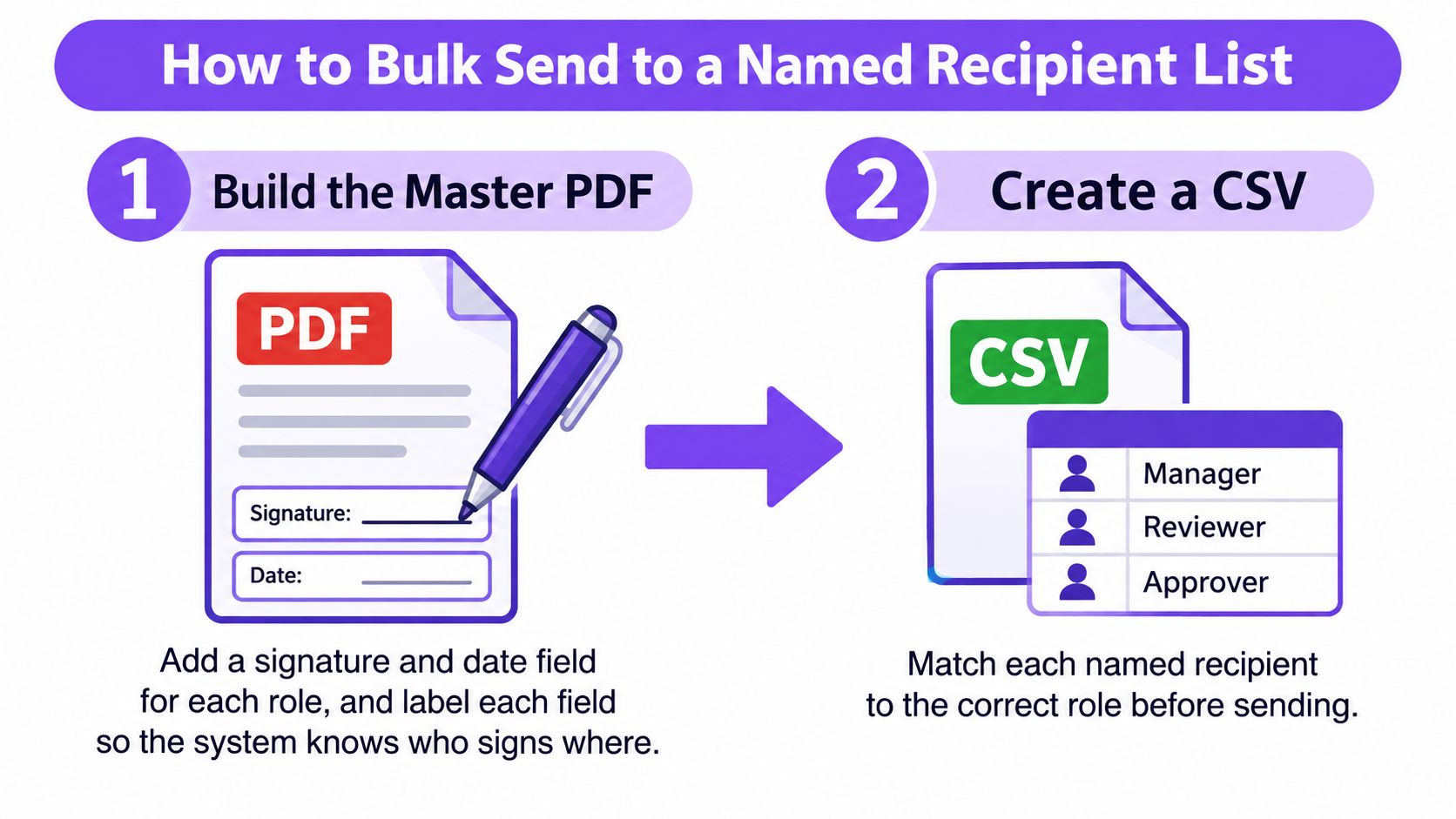
Build the master PDF. Upload the PDF to BoloSign and place signature and date fields where each party signs. Assign each field to the correct role; an Employee field assigned to HR can block the intended signer.
Create a CSV with one row per intended recipient, including names, email addresses, roles, and approved merge values. Trim accidental whitespace and review duplicate addresses, especially when workers share an office inbox.
Save the PDF as a reusable template. Use clear role names that match your recipient file, such as Employee and HR. Don't alternate between Employee, Candidate, and Worker unless they represent different signing roles.
CSV layout for a bulk send batch
| Column | Required | Example | What it does |
|---|---|---|---|
| name | Yes | Dana Ruiz | Fills the name line on the signature block |
| Yes | dana@example.com | Delivers the request; must be unique per signer | |
| role | Yes, if the template has roles | Employee | Matches the signing role on the template |
| start_date or other merged field | Optional | Monday orientation | Pre-fills the matching field in each personal copy |
Treat this as a preparation layout, not a promise that every importer accepts those exact headers. Use the column structure shown in your upload workflow and explicitly map each value.
Preview before releasing the batch
Upload the CSV and map its columns. Match recipient details to roles and merge values to document fields. Preview a representative row, checking that the person's name, rate, and start information belong together.
Confirm the signing order and invitation text. State who is requesting the signature, what the document covers, and when it needs attention; an unexplained attachment-style message is easy to ignore.
Click Send to launch the batch. Each recipient receives a personal signing copy with their details pre-filled. Don't use an unrestricted shared link as a shortcut for agreements that require named attribution.
For real estate disclosures, check property and tenant details particularly carefully. For professional-services engagement letters, check the legal entity and scope fields, not just the signature block.
After sending, inspect bounces and unchanged statuses first. Mailgun's email deliverability guidance explains why acceptance by a receiving server doesn't prove inbox placement or signer visibility. Correct bad addresses, investigate failed invitations, and avoid repeatedly resending a request that can't reach its recipient.
How to Collect Signatures from an Open Group
An open link works when you need participation without preparing a named recipient file. It doesn't establish someone's identity merely because they typed a name, so reserve it for workflows whose identity checks fit that approach.
Publish a form people can actually finish
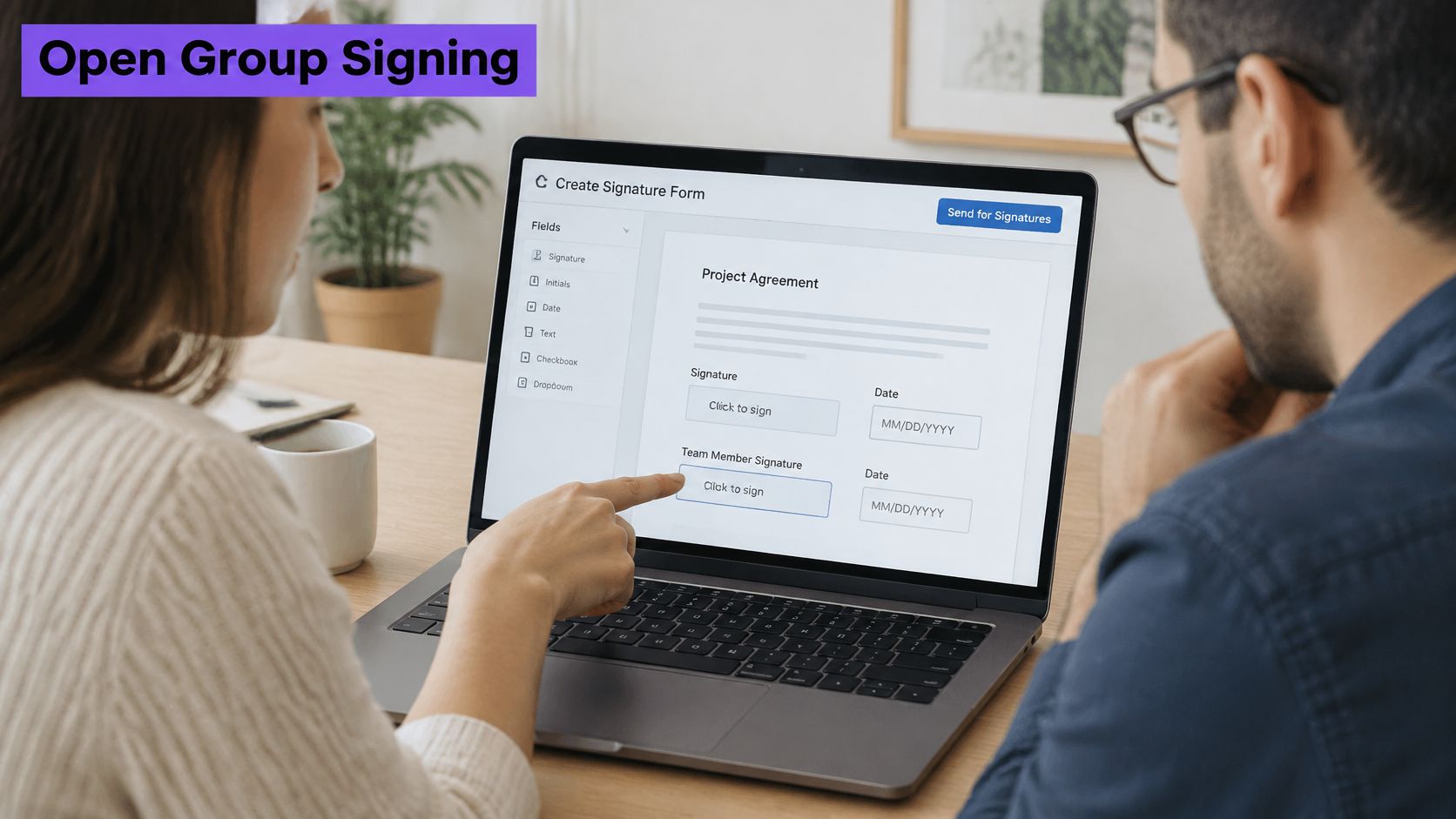
Create the signature form. Place signature and date fields in the form editor, alongside the wording the person is agreeing to. Keep the agreement visible before the signature action.
Collect the signer's name and email so you can reconcile responses later. Ask for only the additional information needed to identify the response or administer the activity.
Share the link through the group's normal channel. Email, text, or a QR code on a poster can all direct people to the form. A texted link may suit field staff better than an invitation to an inbox they rarely check.
Embed the form on your website when participants already visit it. If the group already uses Google Forms, add the signature collection to that existing process rather than creating an unrelated second journey.
State the deadline and close collection deliberately. Use a closing control where available, then export and reconcile the response list. Test the entire journey on a phone before distributing the link.
Sign-up sheets, event waivers, and permission slips fit this method well. Avoid posting a link without a deadline, requesting unrelated personal details, or collecting a child's signature where a parent or guardian must consent.
Test access, not just appearance
The Section 508 electronic-signature guidance calls for keyboard access, logical tab order, clear instructions, alternative text, and accessible CAPTCHA alternatives. Test with a keyboard and screen reader, check field labels, and confirm that authentication doesn't block assistive technology.
A permission slip isn't ready to publish if a parent can read it but can't reach or complete the signature field.
Provide an equivalent assisted or non-digital route for anyone who can't complete the form. After launch, check that responses arrive and that the exported names reconcile with your roster, not merely that the form recorded submissions.
Track Every Signer Through a 50-Hire Onboarding
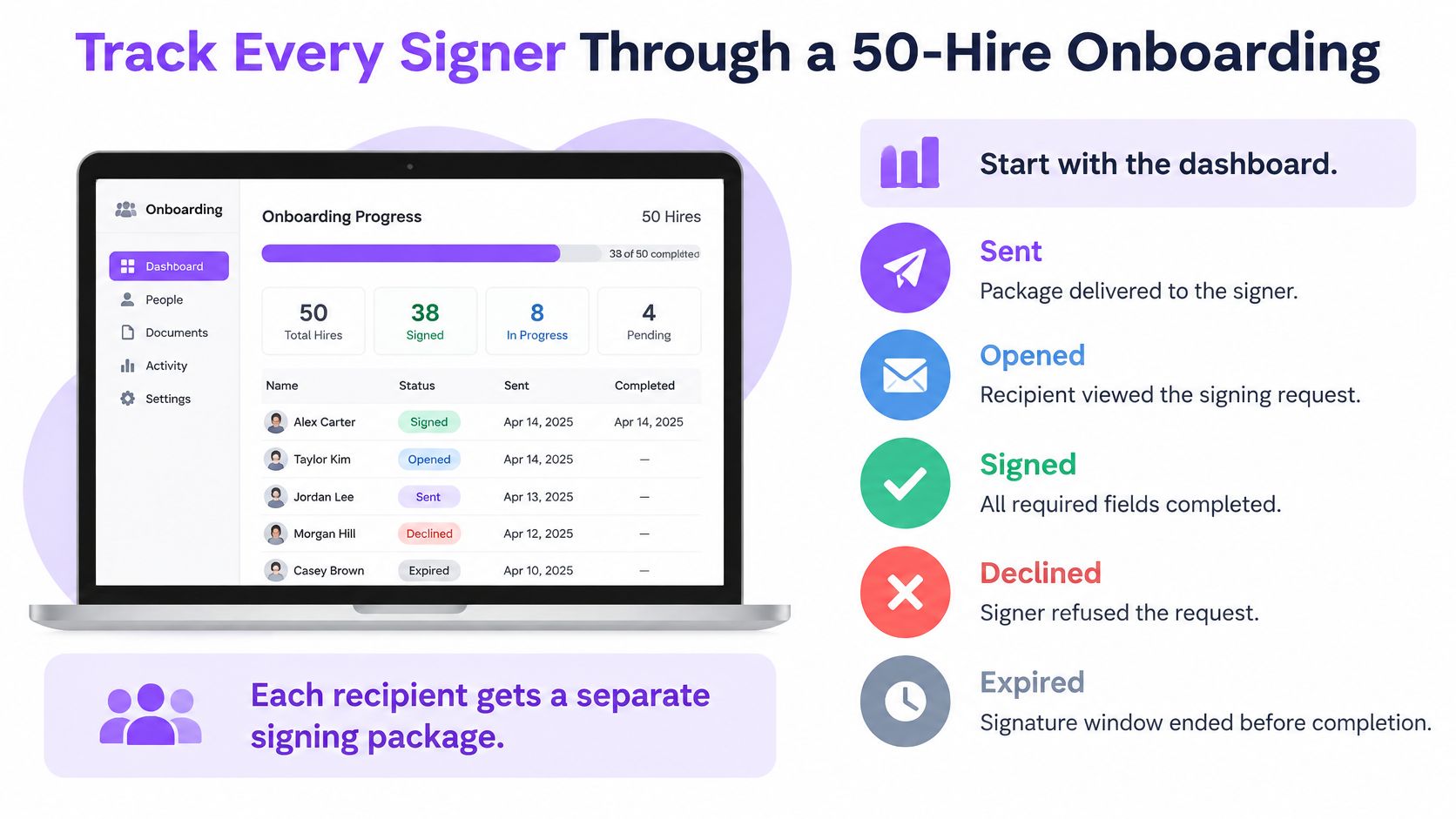
Start with the dashboard, not your sent folder. Review sent, opened, signed, declined, and expired states so you can distinguish an invitation problem from a decision that needs a conversation.
Each hire should have a separate signing package, request identifier, and assigned role. Keep the final document and its audit record associated with that individual, rather than treating the hiring wave as one shared signature event.
Prepare the afternoon's batch
Suppose you're onboarding 50 new hires. The afternoon's objective is to prepare, validate, and launch the requests, not promise that every candidate will sign before the office closes.
Finalize the offer package. Prepare the offer-letter template with candidate and HR roles, plus the handbook acknowledgment. Our offer-letter workflow for HR teams provides a relevant starting point for organizing that process.
Export the names and emails from the hiring system into a CSV, then map start dates and pay rates. Have the authorized HR reviewer check those values before sending confidential employment terms.
Route candidate first, HR second. Test a sample package with internal recipients before releasing the live list. Check both the candidate view and the countersignature handoff.
Plan follow-up before sending. For this example, schedule a nudge after two days, another after five, and a final notice the day before the deadline; treat these as your team's schedule, not a guaranteed automatic-reminder setting.
Check delivery on launch day. Correct bounced addresses promptly. Where appropriate and authorized, use SMS delivery for field staff who don't read email regularly.
Handle the exceptions personally. A declined offer needs a conversation, and a senior signer's outstanding approval may need a call rather than another generic reminder.
Automate the trigger without losing control
For automatic signing reminders, verify the controls available in your account and test whether completion stops further messages. If the required schedule isn't available, assign manual follow-ups or implement them through your connected workflow. Too many nudges can generate complaints and make later requests easier to ignore.
According to Certinal, 72% of organizations used electronic-signature APIs in 2025 to integrate signing into existing workflows and business applications. For API-based contract automation, require duplicate-request protection, failed-event handling, and reconciliation between the hiring system and signing records.
The most reliable API for bulk send and signing isn't established by a feature label. Test what happens when a request times out, an address changes, or your system receives the same status event again.
For evidence, retain the approved document version, signer association, authentication events, and chronology. The ChainDoc audit-trail compliance guide explains why a signature image alone isn't a complete evidence package.
After all parties sign, BoloSign emails everyone the completed copy and a Certificate of Completion. Apply the same controlled process to school enrollment consents or logistics acknowledgments; for clinic forms containing electronic protected health information, the HHS HIPAA Security Rule guidance requires appropriate administrative, physical, and technical safeguards.
Compare Costs and Start a Team Trial
Compare pricing against completed individual agreements, not the number of times an administrator clicks Send. Under a per-envelope model, a named batch creates a separate billable unit for every recipient's agreement, so batch cost scales with headcount rather than effort.
Cost of a 50-signer batch by pricing model
| Option | Pricing model | Recipients per batch | Cost for 50 signers |
|---|---|---|---|
| BoloSign | One fixed price for unlimited signatures, templates and team members | Full list in one Bulk Send | Same fixed price at 10 or 500 signers |
| Per-envelope tools | Charged for each envelope or signer | Each recipient is a billable unit | Billable envelopes multiplied by the applicable envelope rate |
| Per-user tools | Charged for each seat | Limited by seat count and plan | Seat count times seat price; check current pricing |
BoloSign offers unlimited documents, team members, and templates at one fixed price. Because the fixed price stays the same whether you send to 10 or 500 signers, test the comparison against your actual volume, seats, and required features.
Compare the full operating requirement
Use the pricing page for current plan details. The enterprise option includes single sign-on, approval workflows, and bulk requests to larger signer lists. When comparing plans, distinguish the signing allowance from technical batch limits and throughput, since a plan can permit bulk sending while still throttling how fast requests go out.
If you need to add a signature to Google Form responses, review the Google Forms eSignature add-on rather than pricing a separate document workflow unnecessarily. Comparing against your own competitor quotes and current plan limits will give you a more reliable answer than any single dollar figure.
Start a team trial
The free trial includes unlimited document signing, reusable templates, signing order, audit trails, mobile signing, Google Sheets integration, and team collaboration, with no credit card required. Setup takes under 2 minutes, so the practical test is cheap: run one real batch, such as your next 10 onboarding packets, and measure time per agreement and cost per completed signature before you commit to a plan.
Answers to Common Bulk Send Questions
Is a bulk-sent e-signature legally valid?
Bulk sending doesn't remove the need for intent, attribution, and retained evidence. Each signed copy still has to show who agreed, what they agreed to, and when. In the EU, eIDAS Article 25 prevents rejection solely because a signature is electronic or isn't qualified, while a qualified electronic signature carries the legal effect of a handwritten one.
BoloSign meets ESIGN and UETA requirements for enforceable electronic signatures in the US. For Canada, Australia, New Zealand, and the UAE, check the applicable local rules and document exclusions, particularly where notarization or witnessing is required.
Can every signer complete the batch?
A clean desktop preview proves nothing about completion. Test the source PDF, field labels, reading order, keyboard navigation, mobile view, and authentication journey before release, then provide an alternative completion route where needed. Signers on phones should be able to finish without downloading an app, printing, or scanning.
Can I change the signing order after sending?
Treat a routing correction as a replacement batch. Editing live requests leaves recipients holding competing links to the same document. Cancel the affected outstanding requests, preserve their history in the audit trail, and issue a corrected batch with the order you want.
What if someone declines or their link expires?
Check the status view and resolve the reason before issuing a fresh request to that person. A decline often signals a wrong address, a wrong field, or a dispute worth a phone call. Leave completed agreements and earlier refusal or expiration records intact; they are part of your evidence.
Can a signature form take hundreds of responses?
Yes. Adding signature fields through the form editor lets you manage hundreds of signatures without creating individual documents, and the form can be embedded on your own website so people submit and sign without leaving the page.
Higher-risk agreements call for named requests and proportionate identity checks, since an open response alone doesn't prove who signed. The Anvil electronic-signature checklist distinguishes consent, attribution, and retention, all relevant to workflows under ESIGN, eIDAS, GDPR, and HIPAA obligations where applicable.
Closer Innovation Labs Corp. offers BoloSign to help teams prepare reusable agreements, collect signatures, and track each request without per-envelope charges. Visit Closer Innovation Labs Corp. to start a free trial, which requires no credit card, send a small batch from a template, and check the status view, reminder controls, and completed copy before releasing your full list.

Paresh Deshmukh
Co-Founder, BoloForms
4 Nov, 2026
Take a Look at Our Featured Articles
These articles will guide you on how to simplify office work, boost your efficiency, and concentrate on expanding your business.