

Bulk E-Sign Enterprise: The 2026 Playbook
Bulk e-sign enterprise workflows explained for 2026. Learn requirements, security, ROI, and how small teams scale without per-user fees.

Tired of nonsense pricing of DocuSign?
Start taking digital signatures with BoloSign and save money.
Priya is staring at 80 offer letters at 8:12 a.m. Her recruiting team had a strong quarter. Great news, until Monday hits. She has a CSV of new hires, approved templates, and a hard deadline before lunch because candidates won't wait while HR fights with a signing tool.
That moment is where “enterprise” starts for most companies. Not at Fortune 500 headcount. Not at some giant procurement threshold. It starts when one team needs to send a lot of signature requests at once, keep each document defensible, and avoid getting trapped by per-seat pricing, weak audit logs, or a workflow that breaks the minute legal adds a countersignature.
A 50-person company can hit that point just as fast as a 5,000-person one. If you hire across states, close deals across borders, or onboard vendors in batches, you already need bulk e-sign enterprise capabilities. The question isn't whether your business is “big enough.” The question is whether your documents carry enough risk, volume, or urgency that consumer-grade sending no longer cuts it.
When Monday Mornings Require Enterprise E-Sign
Priya's problem isn't just speed. She needs all 80 offers out in parallel. She needs completed PDFs back before noon for the candidates who are ready to sign immediately. Her CFO wants records outside counsel can review without a scavenger hunt. Legal may drop in a countersigned NDA for part of the batch. Remote hires live in three different states, so identity and consent can't be sloppy.

That's the operational definition of enterprise. A workflow becomes enterprise-grade when failure has consequences. Delayed signatures slow onboarding. Missing evidence creates legal cleanup later. One broken template can hold up an entire hiring class.
What the workflow actually needs
Priya doesn't need a bloated platform. She needs four things to work on the first try:
- Parallel sending: every new hire gets an individual packet at the same time.
- Per-document proof: each signed offer has its own event history and completion record.
- Remote-friendly verification: enough identity confidence for distributed hiring.
- Flexibility: the process can absorb legal changes without rebuilding the whole batch.
If your team sends documents in batches and still has to manually babysit each one, you don't have an enterprise workflow. You have a manual process hiding inside nicer software.
This is why bulk e-sign enterprise matters in HR, sales, procurement, and operations. A staffing firm pushing onboarding packets, a healthcare group sending intake forms, a real estate team processing lease renewals, and a logistics operation managing carrier paperwork all hit the same wall. They need scale without losing document-level accountability.
BoloSign fits this kind of Monday well because teams can create, send, and sign PDFs, templates, and forms quickly, including high-volume sends from reusable templates. It also supports secure workflows, AI-powered automation, and compliance needs that show up long before a company feels “large.”
Enterprise starts earlier than most buyers think
The market has already moved in this direction. The U.S. ESIGN Act became law in 2000, and the EU's eIDAS regulation took effect on 1 July 2016, giving businesses legal frameworks for electronic signing in major markets. Independent market reporting also says the global digital signature market was valued at USD 17.68 billion in 2026 and is projected to reach USD 66.26 billion by 2031, a 30.2% CAGR according to MarketsandMarkets digital signature market reporting. That growth tracks what operators already know. Signing isn't a side task anymore. It's a production workflow.
What Enterprise Bulk E-Sign Actually Means
Bulk e-sign enterprise comes down to four essentials. If a vendor misses one, move on.
The four capabilities that matter
Volume comes first. Can the platform send hundreds of independent envelopes from one CSV without forcing re-uploads or one-by-one rescue work?
Evidence comes next. A defensible audit trail should capture when a document was sent, viewed, and signed, along with authentication method, device context, IP address, and a cryptographic hash so any later change is detectable, as described in Anvil's audit trail checklist for e-signature evidence.
Identity is where weak tools get exposed. Some documents are fine with email-based signing. Others need stronger verification depending on risk, geography, or internal policy.
Control is what procurement and IT care about after the pilot. Department templates, role-based access, and sign-off governance can't depend on one power user remembering where fields live.
If you're comparing vendors, this is the blunt test:
- Volume test: Can I upload one CSV and send independent agreements at scale?
- Evidence test: Can I download proof for one specific envelope without support?
- Identity test: Can I adjust verification by document type?
- Control test: Can HR, legal, and ops share the platform without stepping on each other?
For teams evaluating batch sending specifically, BoloSign bulk send is the relevant capability to inspect.
Enterprise Bulk E-Sign Four Non-Negotiables vs Common Tool Tiers
| Capability | Consumer Tier | Prosumer Tier | Enterprise Tier |
|---|---|---|---|
| Volume | Good for one-off sends | Handles modest batch work with friction | Built for high-volume CSV-driven independent envelopes |
| Evidence | Basic status history | Some certificate support | Full per-envelope audit trail with tamper-evident records |
| Identity | Usually email-only | Limited verification options | Configurable verification by workflow risk |
| Control | Single-user oriented | Small team collaboration | Role-based access, department templates, governed administration |
Vendor test: Ask for the exact evidence artifact generated for one bulk-sent document, not a dashboard screenshot. If they can't show that cleanly, the rest doesn't matter.
Don't confuse “more features” with enterprise readiness
A lot of tools look capable during a demo because they can place fields on a PDF and fire reminders. That's not the bar. The test shows up when legal asks for one signed document from a batch, procurement asks how permissions work, and a dispute requires proof of signer attribution.
That's why I push teams to evaluate bulk e-sign enterprise as an operations system, not a signing widget.
Security and Compliance for High-Volume Signing
Compliance talk usually gets lost in vocabulary. Keep it practical. Match the rule to the envelope.
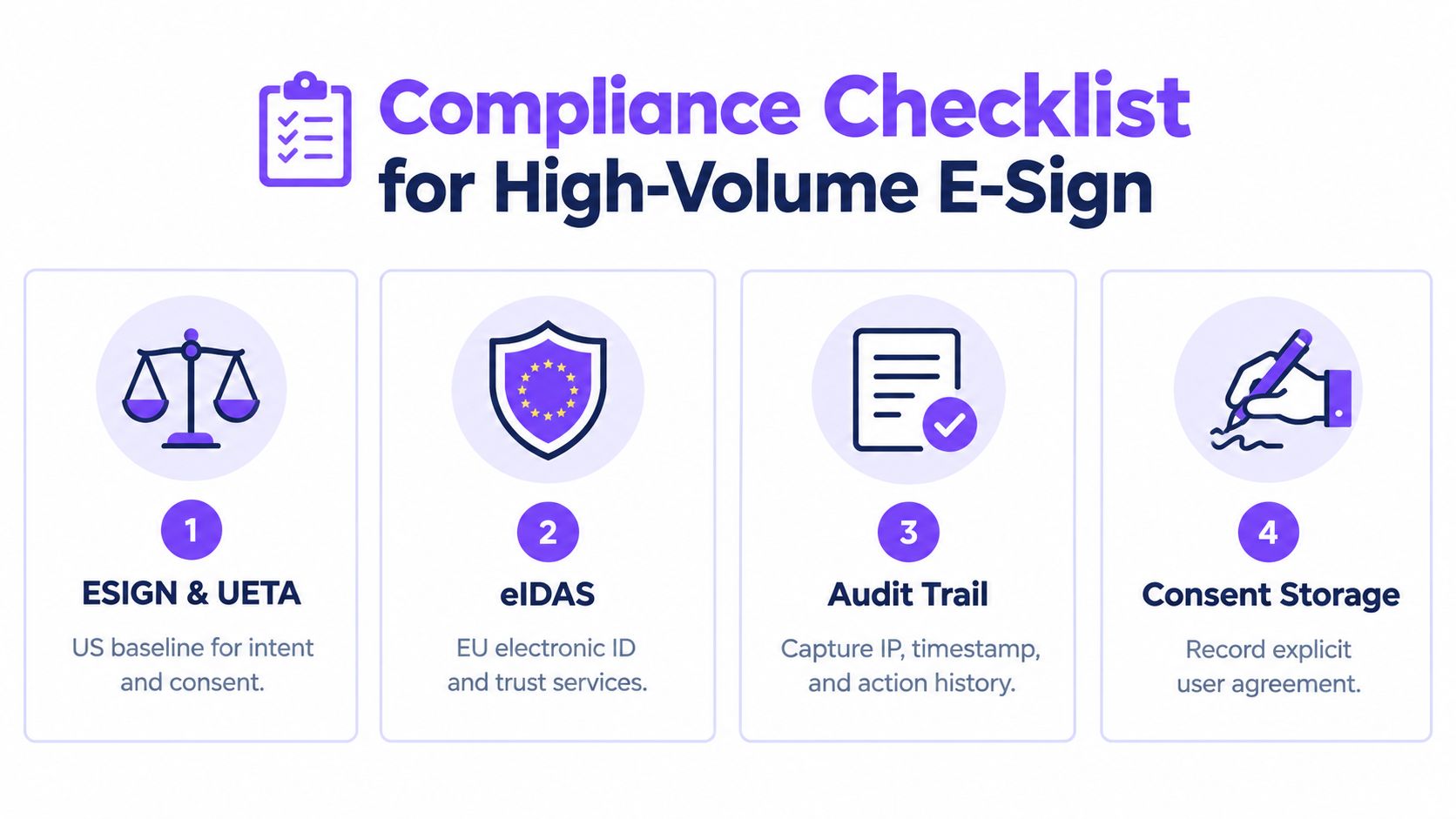
The legal stack teams actually touch
In the U.S., the baseline starts with ESIGN. For businesses working internationally, the EU framework matters too. The eIDAS Regulation has applied directly in all EU Member States since 1 July 2016, creating a single framework for cross-border electronic interactions according to the European Commission's eSignature legislation overview.
For legal validity questions, a useful plain-English reference is BoloSign's overview of eSignature legality.
Then there's the signature level question. eIDAS recognizes basic or simple, advanced, and qualified electronic signatures. Wolters Kluwer explains that advanced signatures must be uniquely linked to the signer, capable of identifying the signer, created with data under the signer's sole control, and tamper-evident. Qualified signatures add certificate-based digital ID from a qualified trust service provider plus a qualified signature creation device, as summarized in Wolters Kluwer's guide to eIDAS signature levels.
Match the compliance level to the document
Use this checklist in procurement reviews:
- US offer letters: usually fit a standard e-sign workflow when intent, consent, attribution, and document integrity are preserved.
- EU master services agreements: need closer review of eIDAS alignment and stronger evidence retention.
- US patient intake and payer documents: require HIPAA-aware storage and access controls.
- Any document with EU personal data: needs GDPR-conscious processing and vendor controls.
- Sensitive internal approvals: should still keep a clean event trail for audits and disputes.
The legal value of an e-signature often turns on evidence, not the visual mark itself. Strong guidance on compliance-focused audit trails says the record should include send, view, and sign timestamps, signer authentication method, IP address, device details, and a tamper-evident cryptographic seal, as outlined in Anvil's e-signature audit trail compliance guidance.
Cross-border document, health data, or a contract above your legal team's threshold? Increase the verification level and preserve the full evidence package by default.
The shortcut I actually use
Don't make every envelope heavyweight. That frustrates users and slows the business.
Instead, escalate when one of these is true:
- The document crosses a border
- The file contains health or regulated personal data
- The agreement creates material legal exposure
That's the line between sensible control and pointless friction.
Bulk Send Versus Multi-Signer Routing
Teams waste a lot of time because they use the wrong workflow for the wrong job. Bulk send and multi-signer routing are not interchangeable.
Independent envelopes versus one shared transaction
Bulk send means one document template is turned into many separate envelopes, usually from a CSV. Each recipient gets an individual signing packet, and each packet has its own audit trail and completion event. Independent documentation on this distinction makes the point clearly: bulk send creates separate envelopes and separate audit trails, while multi-signer routing keeps multiple parties in one envelope until the final signer completes it, as explained in SignProof's overview of bulk send document workflows.
Multi-signer routing is for one deal, one agreement, or one transaction moving through multiple people.
Bulk send vs multi-signer routing
| Dimension | Bulk Send (Independent Envelopes) | Multi-Signer Routing (Sequential/Parallel) |
|---|---|---|
| Core model | Many separate documents sent at once | One shared document routed through multiple signers |
| Audit trail | One per recipient | One per transaction |
| Best fit | HR packets, NDAs, policy acknowledgements, lease renewals | Sales contracts, approvals, countersigned agreements |
| Completion | Each envelope closes on its own | Whole envelope completes after all required signers finish |
| Failure mode | Wrong for deals needing countersignature | Overkill for large batches of unrelated recipients |
Here's the simple decision rule I give teams.
- Use bulk send when every signer needs their own copy and their own evidence artifact.
- Use routing when multiple parties are participating in the same agreement.
Ask one question: Who needs the completed PDF? If the answer is more than one internal approver plus the recipient, you probably need routing, not bulk send.
Where teams usually get burned
HR almost always wants bulk send for offers, onboarding acknowledgements, and policy updates.
Sales and legal often need routing because the document isn't done when the first external signer finishes. It still has to move through counsel, finance, or a final internal signatory. If you misuse bulk send there, each envelope closes independently and the countersignature flow falls apart.
Implementation and Migration Without the Downtime
A tool migration fails when the business has to stop sending while ops cleans up the backend. Don't do that. Run the old tool and the new one in parallel long enough to protect outbound work, then cut over deliberately.
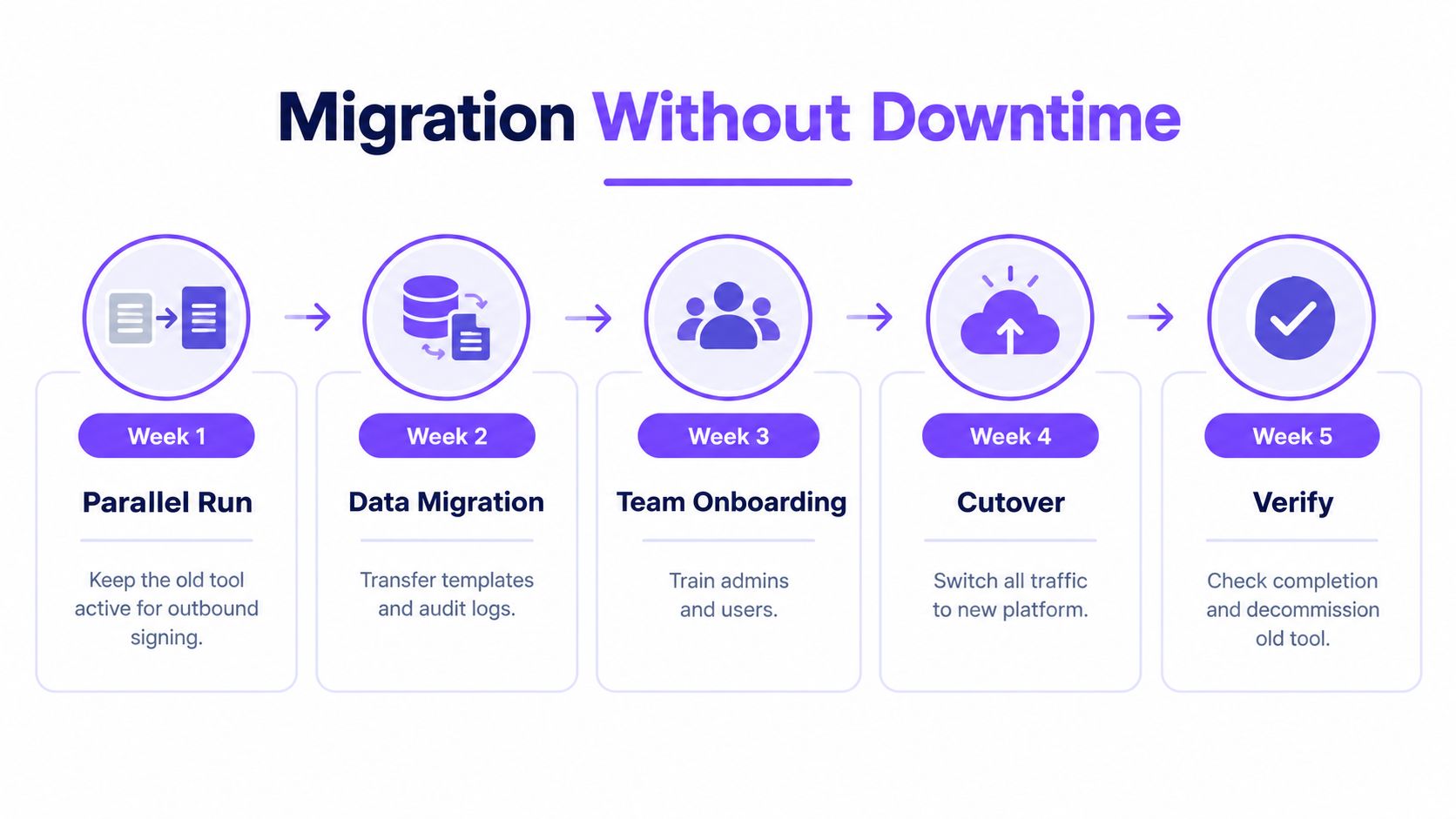
Start with a parallel run
Keep the legacy platform active for live outbound signing while the new system imports templates, roles, and integration endpoints. One-click migration matters more than flashy features.
If you're moving from DocuSign, BoloSign's DocuSign migration path is the kind of capability worth checking because it addresses the pain point. Preserving templates without rebuilding every field by hand.
During migration, clean up the junk you've been tolerating:
- Orphan fields: remove fields nobody uses but everyone works around.
- Hardcoded emails: replace them with role-based placeholders.
- Stale branding: update outdated logos, legal names, and sender copy.
- Broken ownership: assign every high-use template to a real business owner.
Build the batch workflow before full cutover
Bulk operations live or die on CSV discipline. Your first serious test should include field mapping for names, emails, titles, dates, and any personalized variables. Then run a dry batch against a handful of records before you send a large wave.
Independent guidance on bulk contract sending recommends CSV-driven recipient lists, templates, and detailed per-signature audit data including IP, timestamp, and device context, so each individual signature remains defensible even when large volumes are dispatched at once, as outlined in ZIASIGN's discussion of CSV-based bulk e-sign workflows.
A practical rollout sequence looks like this:
- Import templates first
- Map CSV fields and test personalization
- Send a small dry run
- Review evidence output for each document
- Handle bounced or malformed recipient records before scale-up
Run five records before five hundred. Every team says this is obvious. Half of them still skip it.
Protect the systems your team already uses
The e-sign platform shouldn't force a reset of the rest of your stack. Keep your CRM, HRIS, and messaging tools in place.
That usually means:
- Salesforce or HubSpot for contract triggers tied to opportunity stages
- BambooHR or Workday for new-hire and policy packets
- Slack for completion alerts to the teams that care
- Zapier or webhooks for the odd workflows nobody wants to code from scratch
If your sales org also depends on outbound teams, look at how adjacent functions work. A guide on structuring cold callers is useful here because it shows the same operational truth. Handoffs fail when process owners, tooling, and timing aren't aligned. Signature workflows aren't different.
Train the people who click send
The biggest migration mistake isn't technical. It's assuming users will “figure it out.”
Run a short clinic for HR coordinators, legal ops, recruiting, and sales support. Show them how to launch a batch, inspect a completion record, and pick bulk send versus routing correctly. If they can't do those three things, adoption will stall even if the platform is solid.
Sectors Scaling on Bulk E-Sign
The best way to judge a bulk e-sign enterprise setup is to pattern-match your operation against teams already living in volume.
Staffing
A staffing team doesn't need theory. It needs candidates credentialed fast enough that placements don't slip. Bulk send works well for offer letters, onboarding packets, policy acknowledgements, and recurring compliance forms because each worker needs an individual envelope and an individual record.
BoloSign's reusable templates and form-based capture fit this especially well in staffing. Recruiters can sign PDFs online, personalize documents from structured data, and keep a consistent process without rebuilding packets every week.
Healthcare
Healthcare teams care less about “digital transformation” language and more about removing printer, scanner, and fax dependencies. Patient intake, remote consent, payer paperwork, and vendor agreements all benefit from a secure document workflow with stronger access controls and evidence retention.
The priority here is simple: protect sensitive information, keep consent records accessible, and make sure the audit trail is strong enough for internal review.
In healthcare, convenience matters. Evidence matters more.
Real estate
Property managers and broker teams usually hit volume in waves. Lease renewals, owner approvals, tenant notices, and service agreements all cluster around dates that are easy to predict and hard to manage manually.
Contract automation starts paying off. A template-based process with independent envelopes lets teams push batches on schedule instead of scrambling at the end of every cycle. For firms serving investors or cross-border owners, predictable signing and clean records matter as much as turnaround time.
Logistics and professional services
Logistics operators deal with rate confirmations, carrier agreements, and shipment-related paperwork that often needs to move quickly without losing document-level proof. If a dispute lands later, the audit trail has to stand on its own.
Professional services firms have a different shape but the same need. Engagement letters, SOWs, renewals, and change orders move faster when teams can use digital signing solutions tied to CRM workflows instead of emailing PDFs back and forth.
Education belongs in this list too. Admissions packets, parent consents, acknowledgements, and staff forms all benefit when teams can collect signatures through PDFs or even add signature to Google Form style workflows without sending users into a clunky separate process.
ROI and the Real Cost of Per-Seat Pricing
I care less about vendor ROI calculators than I do about whether the pricing model gets worse as your team grows. Per-seat pricing usually does.
One fixed-price model is easier to govern because finance knows the cost, operations can add senders without debate, and department heads stop rationing access. That matters when your signature volume jumps without warning.
What actually changes the math
There are three levers that matter:
- Admin time: sending, chasing, correcting, and filing signatures takes real staff time.
- Cost model: paying for dormant seats is wasteful when usage is uneven across teams.
- Rework risk: bad routing, missing evidence, and mis-sent packets create legal and operational cleanup.
BoloSign's pricing model is unusually clear on this point. It offers unlimited documents, team members, and templates at one fixed price, and the company states that it is 90% more affordable than traditional tools. For procurement teams, that predictability is often more important than feature sprawl.
Per-Seat vs Flat-Fee Cost at Four Volume Tiers
| Monthly Signatures | Per-Seat Cost (25 users) | Flat-Fee Enterprise Cost | Annual Savings |
|---|---|---|---|
| 250 | Predictable seat spend, even if some users are inactive | Predictable fixed platform spend | Savings depend on seat waste and overage structure |
| 1,000 | Seat model starts to feel rigid | Flat fee is easier to scale operationally | Often improves when more teams need access |
| 2,500 | Add-on pressure usually increases | Fixed pricing stays simpler to budget | Savings become easier to justify internally |
| 5,000 | Per-seat governance becomes a bottleneck | Flat pricing supports broader adoption | Procurement usually prefers the cleaner model |
The exact crossover depends on your contract. But the pattern is consistent. Once multiple departments need access, per-seat billing starts charging you for organizational structure, not business value.
Your 30-Day Enterprise E-Sign Rollout
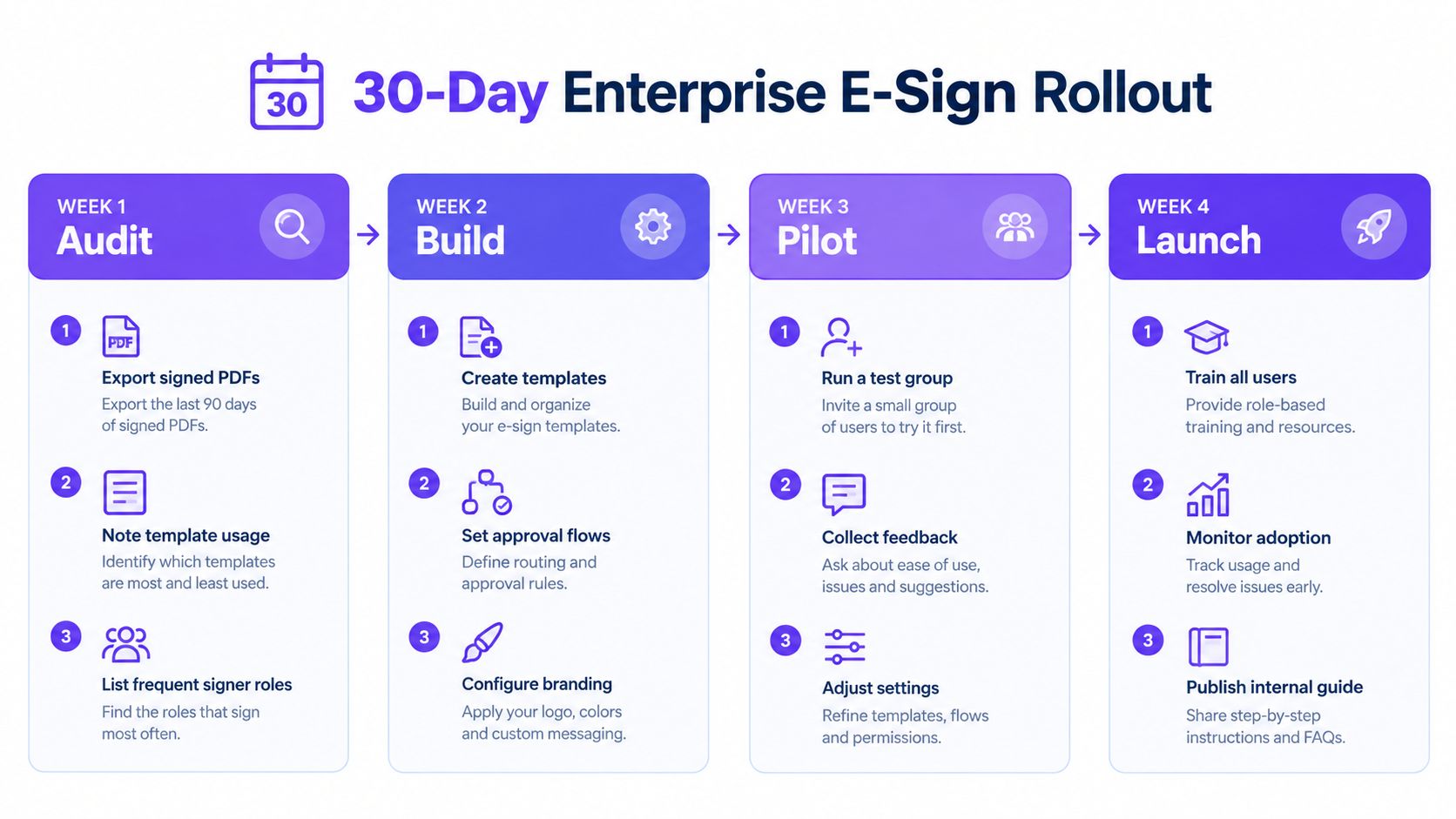
A real rollout doesn't need six months. It needs a disciplined month.
Week by week actions
- Week 1 audit: export the last 90 days of signed PDFs, identify template owners, and list the integrations that must survive.
- Week 2 trial: test one bulk send, one sequential routing workflow, and one certificate download path.
- Week 3 cutover prep: import templates, set up SSO and access roles, then run a pilot with one team while the legacy tool stays live.
- Week 4 switch: turn off per-seat billing, archive old envelopes, and review admin time, completion speed, and exception handling.
The trial shouldn't be abstract. Test what breaks under real conditions. Upload a CSV. Route a contract through multiple signers. Download the evidence package for one completed document. If the platform handles those three jobs cleanly, you're close to a decision.
For US, Canada, Australia, New Zealand, and UAE teams, the same operational standard applies. Pick a tool that lets you sign PDFs online, automate contracts, support compliance, and scale without punishing you for adding users. If it can also support Google Forms style signature collection, AI-assisted workflows, and department-level governance, even better.
Then stop debating and run the pilot. That's how enterprise buying should work.
Closer Innovation Labs Corp. builds BoloSign for teams that need bulk e-sign enterprise capability without enterprise-style pricing games. If you want fixed-price eSignature, contract automation, secure audit trails, Google Forms signature support, and migration paths that don't disrupt the business, visit Closer Innovation Labs Corp. and start a 7-day free trial to test it with your own templates and workflows.

Paresh Deshmukh
Co-Founder, BoloForms
26 Sep, 2026
Take a Look at Our Featured Articles
These articles will guide you on how to simplify office work, boost your efficiency, and concentrate on expanding your business.



