

BoloSign vs PandaDoc: 2026 eSign Comparison Guide
Compare BoloSign vs PandaDoc head-to-head for features, pricing, and ease of use. Discover which eSignature tool fits your business needs in 2026.

Tired of nonsense pricing of DocuSign?
Start taking digital signatures with BoloSign and save money.
BoloSign charges one fixed price for unlimited signatures and team members, while PandaDoc charges per seat and per document. For growing teams, BoloSign's $49/month flat-rate model is significantly more affordable than PandaDoc's seat-based plans, which can reach $190–$490/month for a 10-person team.
That difference matters the moment signing stops being a one-person task. Sales needs proposals, HR needs offer letters, operations needs approvals, and finance needs recurring agreements. The right BoloSign vs PandaDoc decision isn't about which platform has the longest feature list. It's about whether your document workflow stays predictable as more people and more documents enter the process.
Why eSignature Costs Spike When You Grow
A small consultancy can start with one person sending an occasional contract. The first subscription looks harmless, the workflow is easy to learn, and nobody worries about who needs access. Then the company hires a recruiter, adds sales representatives, and gives operations responsibility for vendor agreements. The same eSignature tool now sits in the budget as a recurring cost that grows with every new user.
That pricing wall usually appears without warning. A manager adds another seat for HR, a sales lead requests access for an account executive, and a finance employee needs to check completed documents. The team isn't using a radically different product. It just has more people who need to prepare, send, monitor, and sign documents.
Practical rule: Count every person who touches the workflow, not just the person who clicks “send.”
The two platforms take different approaches. PandaDoc uses per-user pricing and may add document charges depending on the plan. BoloSign's model is built around one fixed price with unlimited signatures, templates, documents, and team members. That makes the comparison less about the cost of a single signature and more about the cost of collaboration across departments.
Consider a staffing agency. A recruiter might begin with a few candidate agreements, but the same process can later involve HR, account management, compliance, and payroll. Under a seat-based model, each additional participant can affect the monthly bill. Under a flat-rate model, the agency can give the whole team access without turning every hiring workflow into a pricing decision.
This is why BoloSign is positioned as 90% more affordable than traditional tools for teams seeking unlimited usage at one fixed price, as described in its comparison of affordable PandaDoc alternatives. The useful question isn't “Which platform is cheaper for one user?” It's “Which platform keeps total cost understandable when sales, HR, and operations all need access?”
Platform Overview and Core Purpose
PandaDoc and BoloSign solve related problems, but they aren't built around the same operating philosophy. PandaDoc began in 2013 and has grown into a broader document automation platform. PandaDoc reports more than 60,000 organizations globally, more than 56,000 customers by August 2024, more than $100 million in annual recurring revenue in 2024, and a $1 billion valuation in September 2021 in its company overview. Those milestones help explain why its product reaches beyond basic signing into sales documents, CPQ, contract automation, and enterprise workflows.
BoloSign takes a more direct route. Its core job is to help a business create, send, and sign PDFs, templates, and forms without requiring a lengthy implementation project. A team can upload a PDF, place signature and data fields, assign recipients, and send the document for completion. Reusable templates support offer letters, NDAs, service agreements, consent forms, vendor contracts, and recurring approvals.
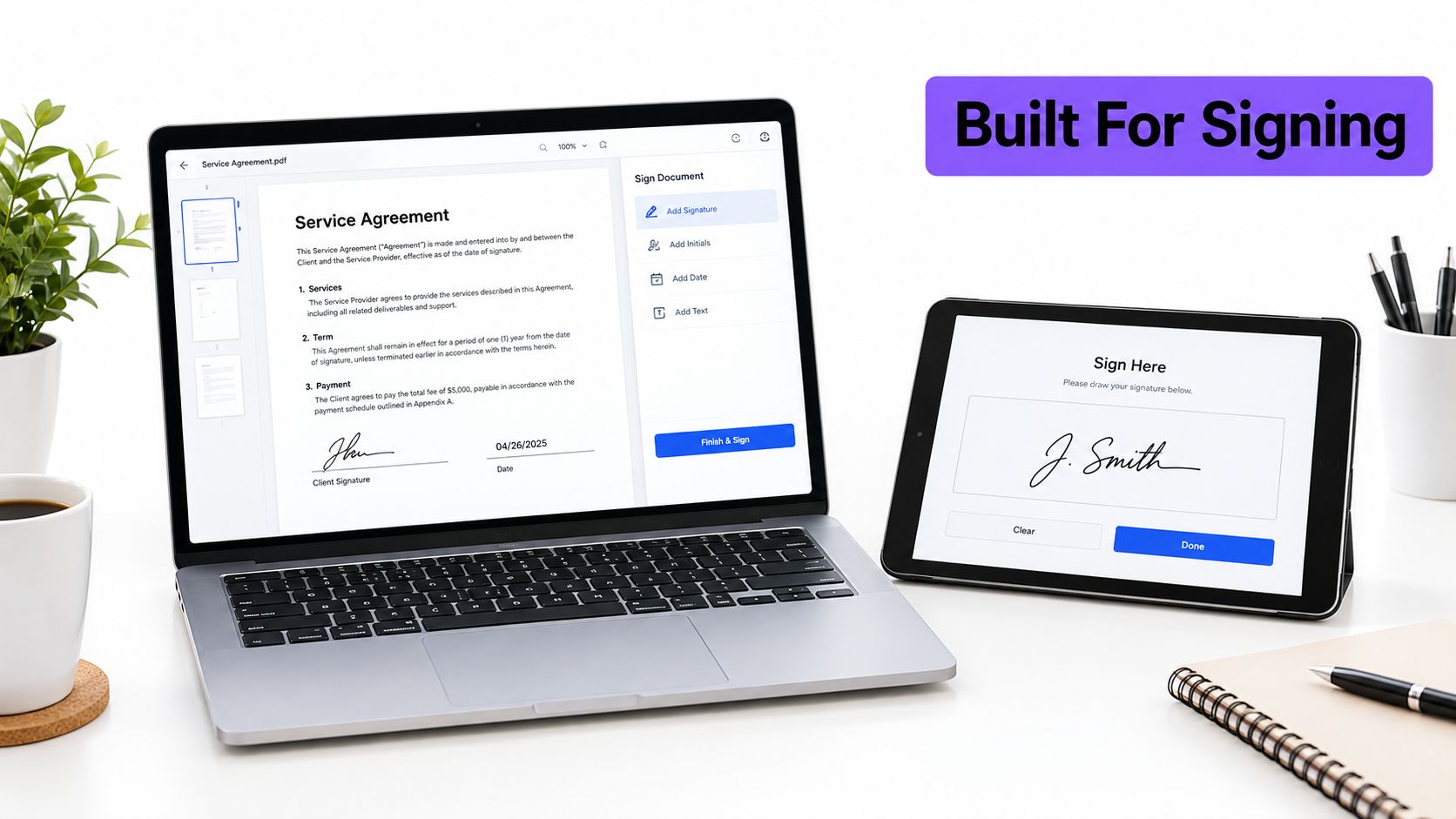
BoloSign also supports a practical form-first workflow. Businesses can add legally binding signature fields inside Google Forms, collect information in a familiar form interface, and route the resulting document for signing. That matters for schools, staffing firms, event teams, and smaller operations departments that don't want to build a complex sales document system just to collect a completed approval.
What each platform is designed to handle
PandaDoc is a natural fit when documents are tightly connected to a structured sales process. Its platform is designed for teams that need proposals, quotes, contract automation, CRM data, and deal-stage visibility in one environment. A larger sales organization may value that depth enough to accept more configuration and a higher total cost.
BoloSign is better suited to organizations that want fast deployment and broad access. A healthcare office can prepare patient forms, a logistics provider can send delivery confirmations, and a professional services firm can standardize statements of work without asking every user to become a document-automation specialist. The platform's online signature workflow focuses on moving a document from preparation to secure completion with minimal friction.
The difference is important. PandaDoc can feel powerful when a business needs a connected revenue operation. BoloSign can feel more efficient when the primary requirement is reliable digital signing across many departments.
Pricing Models That Define Total Cost
The most important pricing question is what happens after the first few users. PandaDoc's public pricing is commonly reported at $19 per user per month on annual billing or $35 per user per month on monthly billing, while its free plan is capped at 5 documents per month. Paid plans can also charge for additional documents, and integrations may depend on the selected tier, according to PandaDoc pricing and eSignature software coverage.
BoloSign uses a different structure. Its flat-rate plan is reported at $49 per month and includes unlimited signatures, templates, and team members. The resulting cost remains the same whether an HR manager joins the workspace or a sales team adds another user.
| Feature | BoloSign | PandaDoc |
|---|---|---|
| Core pricing approach | Fixed-rate model | Per-seat model |
| Reported monthly price | $49/month | $19/user/month annually or $35/user/month monthly |
| Team members | Unlimited | Cost increases with seats |
| Signatures and documents | Unlimited signatures and templates, with unlimited document usage positioned as part of the model | Free plan capped at 5 documents per month, with additional documents potentially billed on paid tiers |
| Best cost profile | Growing teams with several departments | Teams that need deep document and sales automation and can manage seat costs |
A 10-person team illustrates the exposure. At $19 per user per month, the seat cost is $190 per month. At $35 per user per month, it is $350 per month, while the reported range of $190–$490 per month reflects different plan tiers and add-ons. BoloSign's reported $49 per month remains fixed as the team expands.
That isn't just a lower invoice. It changes how managers approve access. With a seat-based tool, someone may delay adding a coordinator because the coordinator only needs to prepare documents occasionally. That creates shared logins, manual handoffs, or bottlenecks around one administrator. A flat-rate workspace lets the business assign access based on the workflow rather than on the marginal cost of another seat.
Where PandaDoc can justify the higher spend
PandaDoc's cost can make sense when the company needs a sales operating system, not just an eSignature tool. A team that depends on CRM synchronization, quote configuration, document analytics, and structured deal workflows may gain operational value from those capabilities.
BoloSign makes the stronger financial case when many employees need to send standard agreements, forms, onboarding documents, or approvals. It also works well when usage varies by department, because the business doesn't need to predict which employees will send enough documents to justify separate licenses.
The break-even question is therefore operational. If your priority is predictable access for a growing team, BoloSign's 90% more affordable positioning is the relevant advantage. If your priority is deep sales configuration and your organization accepts per-seat and per-document complexity, PandaDoc may earn its premium through workflow depth.
Security and Compliance Standards
A signature carries little value if the surrounding workflow cannot prove what happened. Before choosing either platform, confirm that the record identifies the signer, the document, the time of signing, and any later changes to the final file. The controls must also fit the information involved, particularly for healthcare, finance, education, and cross-border work.
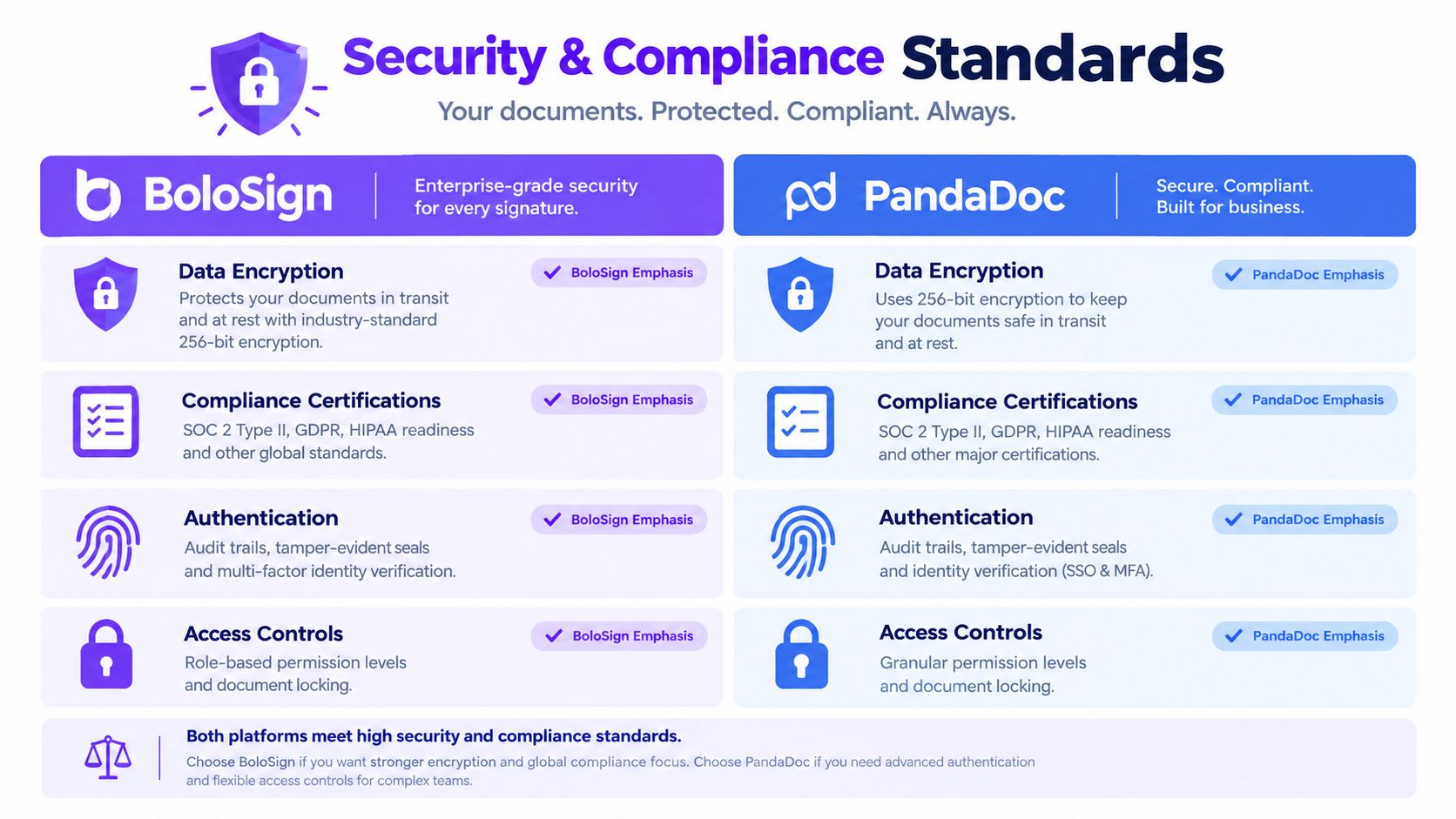
PandaDoc lists support for ESIGN, UETA, eIDAS, GDPR, HIPAA, and SOC 2. Some compliance capabilities are tied to higher tiers, according to independent PandaDoc ERP and eSignature coverage. BoloSign presents ESIGN, UETA, eIDAS, GDPR, HIPAA, ISO 27001, and SOC 2 as part of its security and compliance coverage. The practical difference for a growing team is access: controls that require a higher plan can make compliance costs less predictable as more users and workflows come online.
Compliance must match the workflow
A standards list does not answer every implementation question. A healthcare provider must restrict access to protected health information, a school must retain consent records, and an international company must determine which signature type and evidence model its counterparties accept. European Commission's eSignature guidance connects the choice to the workflow, IT specifications, architecture, and security controls.
Use these checks during evaluation:
- Audit evidence: Confirm that completed documents record recipient activity, signing events, and document status in a form your team can review.
- Data handling: Check how each platform treats sensitive information, including protected health information and data subject rights under GDPR.
- Access management: Set permissions for creating templates, sending documents, viewing completed agreements, and managing recipients.
- Regional acceptance: Match the signature process to the jurisdictions and industries where agreements will be used.
A compliant setup also needs audit logs and a clear process for breach-notification responsibilities, as described in this security and compliance guide for eSign workflows. BoloSign's practical advantage is that smaller teams can apply these controls without starting with a complicated enterprise rollout. Its AI-powered contract intelligence, backed through the NVIDIA Inception Program, can help review contract content faster while leaving approval with a human decision-maker.
PandaDoc suits organizations that want compliance within a broader enterprise document environment. BoloSign suits teams seeking secure workflows, clear auditability, and recognized compliance coverage without adding seat friction or a complex configuration burden. Teams should compare the controls included in the selected plan, not only the standards named on each product page.
Integrations and Workflow Automation
A growing team can lose budget predictability when every new user needs a paid seat. Integration design affects that cost indirectly: the more work a platform removes from sales, operations, and administration, the fewer people need to touch each document manually. PandaDoc and BoloSign solve that problem in different ways.
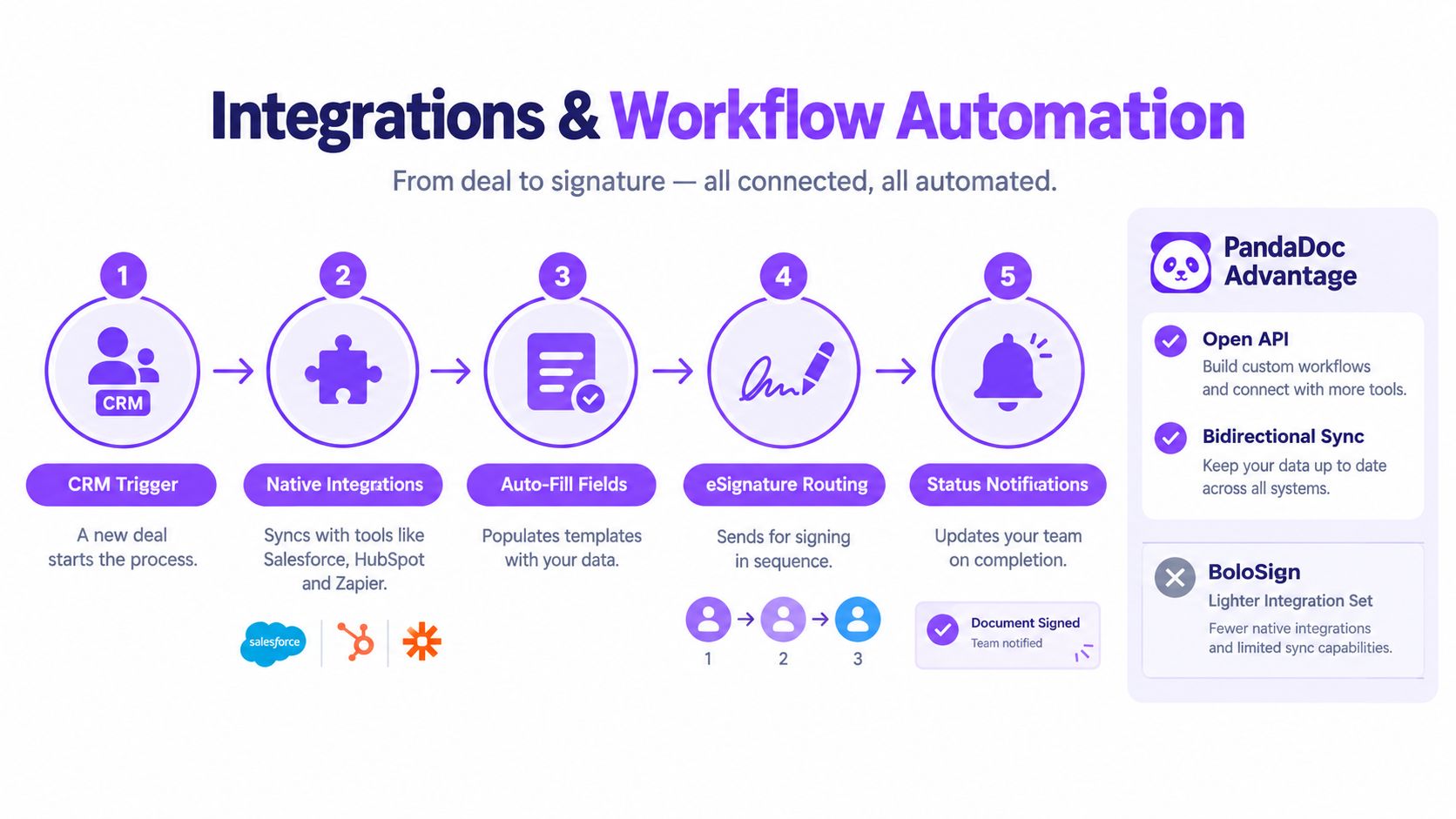
PandaDoc fits CRM-led sales processes. It connects with Salesforce, HubSpot, Pipedrive, Zoho CRM, and Microsoft Dynamics 365, allowing teams to move from an opportunity to a document and then track its status in the same pipeline. Its REST API and automation connections also support custom processes. That setup can reduce manual updates, but the value depends on how central the CRM is to daily work.
PandaDoc's CPQ capabilities add another advantage for sales teams that build quotes from CRM data. A representative can open a deal record, populate a document, send it for signature, and keep the opportunity current without asking another user to update the status. Sales managers get a clearer view of open agreements, while the business can assess whether the added platform seats and configuration work are justified.
BoloSign prioritizes accessible automation
BoloSign connects with tools many small and mid-sized teams already use, including Zapier, Make, Pabbly, HubSpot, Salesforce, Pipedrive, Google Drive, Google Sheets, Slack, and Microsoft Teams. Its integration options can connect signing events with notifications, storage, spreadsheets, and CRM updates without requiring a dedicated technical implementation team.
The form workflow is particularly practical for operational teams. A staffing firm can collect candidate information through a Google Form and route an offer letter for signature. A training provider can gather enrollment details and consent through one familiar process. A field-service company can create a PDF confirmation, send it to a customer or vendor, and store the completed file in its usual workspace.
Choose the integration map, not the longest list
PandaDoc is the stronger choice when CRM activity starts and controls the document process. BoloSign is often a better fit when work begins in forms, spreadsheets, shared drives, email, or operational checklists.
Test one complete workflow before choosing:
- A person submits information or a deal changes stage.
- The system fills a reusable template.
- The correct recipients receive the document in sequence.
- Each signer completes the required fields.
- The team receives a status update.
- The final file enters the correct storage location or CRM record.
If PandaDoc removes several manual steps, its broader sales workflow may justify the investment. If the team needs automation across everyday tools and wants to limit seat-driven cost growth, BoloSign may deliver the required result with less configuration.
Best Use Cases Across Industries
The best platform depends on where documents begin and who needs to complete them. A sales-led SaaS company may start with a CRM opportunity, while a school may start with a form. A logistics provider may need a mobile-friendly confirmation, while a healthcare practice may need a controlled intake process.
The global electronic signature market is projected to reach $28.5 billion by 2030, with a 22.1% compound annual growth rate from 2023 to 2030, according to electronic signature market statistics. That expansion reflects demand for connected document workflows across many operating environments, not just sales departments.
Where BoloSign fits naturally
Staffing and recruitment: Recruiters can prepare reusable offer letters, contractor agreements, and onboarding forms. Unlimited team access helps recruiters, HR, and compliance staff work in the same system without passing documents through one administrator.
Healthcare: Clinics can use forms for patient intake, authorizations, and internal approvals, with HIPAA-aware workflows and audit trails as part of the compliance evaluation. Teams should still confirm that their exact process and data handling meet applicable legal requirements.
Real estate: Agents and property managers can send service agreements, rental-related paperwork, vendor documents, and client approvals from reusable templates. The benefit is speed and consistency across repeated transactions.
Logistics: Dispatchers and operations teams can send delivery confirmations, vendor agreements, and proof-of-approval documents while staff work away from a central office. A simple PDF workflow is often more useful than a complex proposal builder.
Education: Schools, colleges, and training providers can collect consent, admissions information, enrollment details, and certification acknowledgments through forms that recipients already understand.
Professional services: Consultants, agencies, and accounting firms can standardize statements of work, NDAs, engagement letters, and recurring approvals while keeping the process accessible to nontechnical staff.
PandaDoc is the stronger match for enterprise sales teams where proposals, quotes, CRM records, and contract stages must operate as one connected revenue process. BoloSign is the more practical choice when the business needs to sign PDFs online across multiple departments and wants forms, templates, and team access without a separate pricing discussion for every participant.
Migration, Setup, and Final Recommendation
Migration succeeds when the team moves the workflow, not just the files. Before switching, identify active templates, recurring recipients, approval steps, storage locations, and documents that still need signatures. A short checklist covering ownership, permissions, retention, and user training can prevent the common mistake of importing templates without recreating the process around them. These Creventa migration tips offer a useful framework for organizing that change.
PandaDoc provides more depth, but that depth can require more setup. Teams may need to configure CRM fields, document variables, approval rules, user roles, and automation paths before the system feels natural. That investment can be sensible for a mature sales operation, but it isn't always appropriate for a small business that needs to send an agreement today.
BoloSign emphasizes a shorter path from account creation to completed signature. Users can upload PDFs, build reusable templates, assign multiple recipients, customize signing emails, and monitor status from a central dashboard. Businesses moving away from DocuSign can use BoloSign's DocuSign migration workflow to import existing templates, reducing the need to rebuild frequently used documents from scratch.

The decision in practical terms
Choose PandaDoc when your commercial engine depends on deep native CRM synchronization, CPQ, structured proposals, and contract workflows for a substantial sales organization. Its higher cost and configuration effort can be reasonable when those capabilities directly support the way your team sells.
Choose BoloSign when your priority is simple, secure, and affordable digital signing across a growing team. It suits businesses that create and sign PDFs, templates, and forms for HR, operations, healthcare, education, logistics, real estate, and professional services. The fixed $49 monthly structure protects budget predictability, while unlimited team members remove the temptation to restrict access.
A seven-day trial is the most useful final test. Import one working template, create one form, send a multi-recipient request, connect a storage or notification tool, and review the audit trail after completion. That exercise will show whether your team needs PandaDoc's broader sales architecture or BoloSign's straightforward contract automation.
Closer Innovation Labs Corp. offers BoloSign, a fixed-price eSignature and contract management platform with unlimited signatures, templates, forms, and team members, plus AI-powered review and integrations for everyday business workflows. Visit Closer Innovation Labs Corp. to start a 7-day free trial and test how BoloSign handles your PDFs, forms, approvals, and recurring agreements.

Paresh Deshmukh
Co-Founder, BoloForms
15 Oct, 2026
Take a Look at Our Featured Articles
These articles will guide you on how to simplify office work, boost your efficiency, and concentrate on expanding your business.



