

BoloSign vs DocuSign Enterprise: An Honest 2026 Guide
BoloSign vs DocuSign enterprise comparison for 2026. See pricing, security, integrations, migration steps, and the right pick for your team.

Tired of nonsense pricing of DocuSign?
Start taking digital signatures with BoloSign and save money.
The popular advice is simple: choose the biggest, most expensive eSignature vendor and call the decision safe. That advice is incomplete. In enterprise procurement, BoloSign vs DocuSign Enterprise isn't mainly a contest between signature fields, PDF uploads, or polished dashboards. It's a decision about total cost of ownership, workflow depth, compliance, and how difficult it will be to leave.
DocuSign remains a formidable incumbent. It reported about $3.2 billion in FY2026 revenue and $836.9 million in fourth-quarter revenue, with fourth-quarter revenue up 8% year over year, according to its FY2026 financial results announcement. BoloSign takes a different position, offering a fixed-price model with unlimited documents, templates, signatures, and team members, alongside AI-powered automation and integrations.
The right question is practical: does your organization need DocuSign's mature agreement-management control plane, or would BoloSign's predictable pricing and simpler operating model handle the work without creating unnecessary cost and lock-in?
Why Enterprise Buyers Are Rethinking Their eSignature Stack
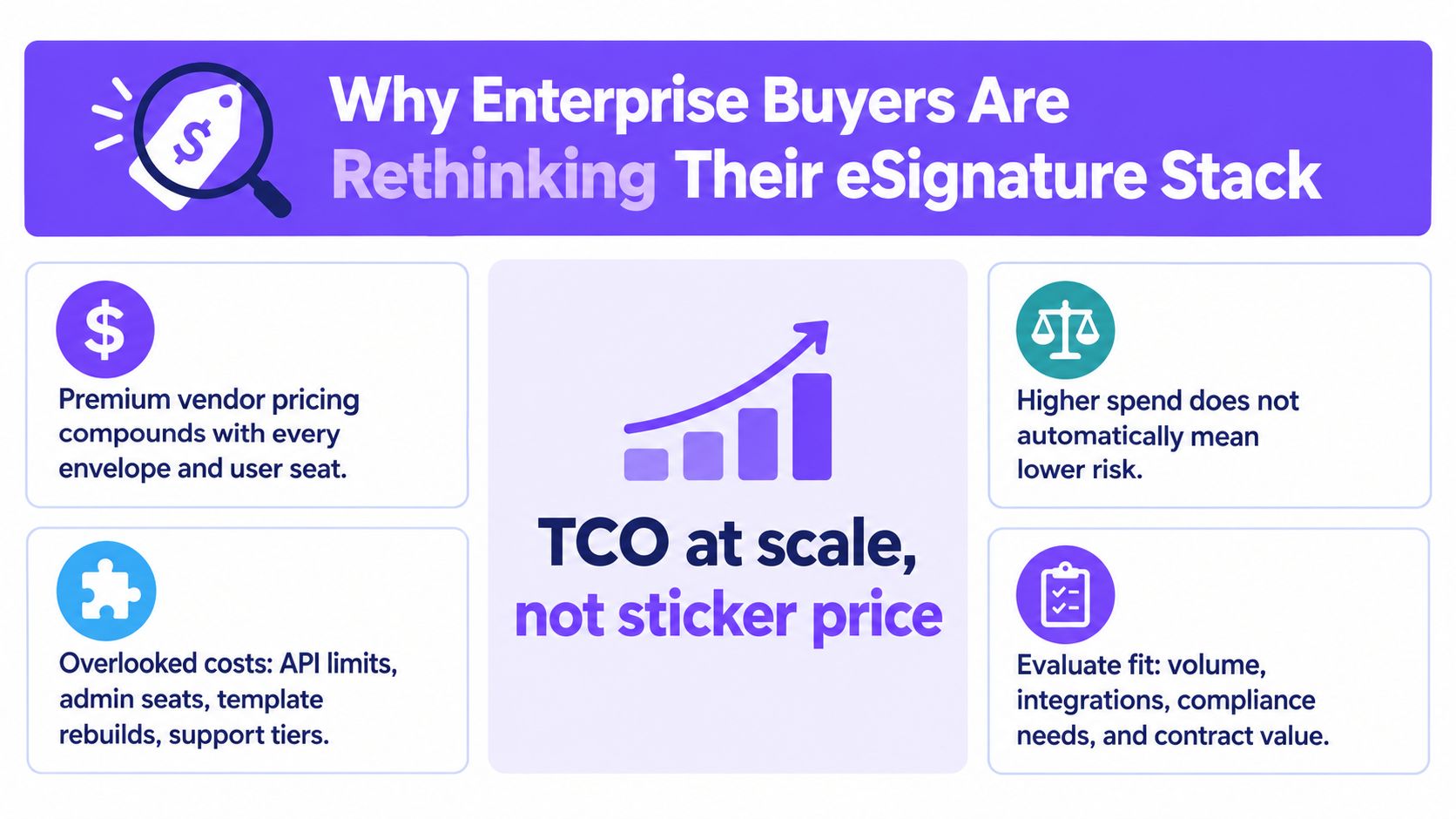
The most expensive platform isn't automatically the safest enterprise choice. Higher spend may buy stronger governance, broader support, and deeper compliance options, but it can also hide envelope limits, seat expansion, premium integrations, implementation work, and renewal surprises.
The eSignature market is already mature enough for procurement teams to compare operating models instead of assuming one vendor owns every use case. One market summary estimates that global electronic signature revenue could grow from $6.7 billion in 2022 to $14.6 billion by 2027, a projected 17.8% compound annual growth rate. The same summary reports that North America represented 38% of global revenue in 2022, while 73% of US small and medium-sized businesses used eSignatures in daily operations. Those figures come from the electronic signature industry statistics summary.
The procurement questions that matter
CFOs and procurement teams should pressure-test four areas before renewing an incumbent:
- Volume economics: What happens when document volume spikes during hiring, leasing, enrollment, or seasonal sales?
- Governance requirements: Do legal and compliance teams need advanced approval controls, identity verification, audit reporting, or regional signing options?
- Integration ownership: Which CRM, HRIS, ERP, storage, and messaging systems depend on the current API?
- Exit portability: Can the organization move templates, audit trails, approval logic, and integrations without a prolonged migration?
DocuSign's scale is evidence of durable enterprise adoption, not proof that every department needs its full platform. Its subscription revenue was about $3.2 billion in FY2026, showing how strongly its business is tied to recurring enterprise use. That makes it a credible long-term standard, but it also means buyers should examine whether they're paying for agreement-management capabilities that their teams never use.
Procurement rule: Evaluate the annual cost of signing, administration, integrations, compliance, and exit risk together. The license price is only one line in the business case.
For organizations comparing broader alternatives, this DocuSign versus Adobe Sign comparison is useful background. The same discipline applies here. BoloSign can make eSignatures simple, affordable, and secure, but DocuSign's maturity remains valuable where governance complexity is the core buying requirement.
BoloSign and DocuSign at a Glance
BoloSign is best understood as a fixed-price eSignature and contract automation platform. It lets teams create reusable templates, upload PDFs, send multi-recipient signing requests, collect information through forms, and manage completed records through an audit trail. Its operating model is designed to remove per-envelope and per-user friction, particularly for HR, sales, operations, staffing, logistics, education, and professional services.
DocuSign Enterprise is the incumbent platform for organizations that need a broad agreement-management environment. Independent reviews describe advanced approval workflows, SSO, audit logs, granular user controls, and the wider Agreement Cloud suite as important differentiators. That depth is most relevant when a global company needs centralized governance across departments, subsidiaries, jurisdictions, and contract stages. The trade-off is that advanced API, administration, and compliance capabilities are generally associated with higher tiers and direct-sales packaging, as outlined in this DocuSign enterprise review.
| Attribute | BoloSign | DocuSign Enterprise |
|---|---|---|
| Primary model | Fixed-price platform with unlimited signatures, documents, templates, and team members | Tiered enterprise platform commonly structured around users, envelopes, modules, and packaging |
| Best fit | High-throughput signing, forms, templates, and connected workflows | Complex agreement management, centralized governance, and mature global administration |
| PDF signing | Create, send, and sign PDFs online through reusable workflows | Mature document preparation and signing workflows |
| Templates | Unlimited templates and one-click DocuSign template migration | Deep template governance and broad enterprise library capabilities |
| Forms | Public forms, data capture, and signature collection | PowerForms and broader enterprise workflow options |
| Automation | Visual workflows, approval chains, AI-assisted extraction, and field detection | Agreement Cloud workflows, CLM, IAM, and Intelligent Insights |
| Integrations | API access across plans plus CRM, productivity, storage, and automation connections | Large integration catalogue, enterprise APIs, and mature Connect ecosystem |
| Governance | Enterprise options including SSO, roles, permissions, and auditability | Strong maturity in centralized administration, controls, and compliance modules |
| Commercial advantage | Predictable cost at high volume, marketed as 90% more affordable than traditional tools | Mature functionality, but total cost can rise with seats, envelopes, and add-ons |
| Main trade-off | Public evidence is more vendor-published than independently benchmarked | More complexity, higher packaging friction, and greater migration lock-in |
The decision should therefore use more than a feature checklist. Evaluate signing depth, workflow automation, security evidence, CRM and ERP connectivity, administrative control, and portability. If your team mostly needs to sign PDFs online, reuse templates, and automate approvals, BoloSign deserves a serious financial review. If legal operations needs a full agreement lifecycle, DocuSign is harder to displace.
Feature-by-Feature Comparison for Enterprise Workflows
The basic signing event is no longer the differentiator. Both platforms can support common workflows such as bulk sending, in-person signing, conditional routing, signer attachments, and mobile capture. BoloSign includes these capabilities within its flat-tier operating model, while DocuSign's advanced routing and administrative controls can depend on the selected business tier.
Signing, templates, and forms
A staffing team can upload a PDF onboarding pack, place signature and initials fields, assign recipient roles, and send the same workflow to multiple candidates. A real estate team can prepare lease addenda and renewal documents from templates. A logistics operator can send delivery confirmations and vendor agreements without rebuilding the document each time.
BoloSign's practical advantage is breadth without the same concern about each additional sender or document consuming a separate commercial unit. Its public positioning includes unlimited documents, templates, and team members, plus API access on all plans. DocuSign's advantage is template governance. Large legal departments often need tighter control over approved clauses, reusable blocks, permissions, and contract lifecycle processes.
For web intake, both platforms support form-oriented collection. BoloSign emphasizes unlimited public form submissions, which suits applications, consent forms, candidate intake, and customer onboarding. DocuSign's PowerForms and adjacent CLM workflows are a better fit when the form is only one step in a governed agreement process.
Automation and AI
BoloSign's visual workflow builder can connect data collection, approvals, signing, notifications, and storage in a single process. Its AI features focus on extraction and field detection, helping teams prepare PDFs and identify information that should become structured fields.
DocuSign approaches automation through Agreement Cloud, CLM workflows, IAM, and Intelligent Insights classification. That matters when a legal team needs to analyze agreements across a wider lifecycle rather than only prepare and complete signatures.
Operational test: Give each vendor the same hiring, contract renewal, or purchase approval workflow. Compare how many manual handoffs remain after the integration is connected.
Integrations and switching
Both ecosystems can connect with Salesforce, HubSpot, Workday, Microsoft tools, and Zapier. BoloSign also positions a one-click switch for teams already using DocuSign templates, reducing the first migration barrier. DocuSign has the stronger mature-installation advantage when an organization depends on custom Connect integrations, established internal expertise, or highly specific enterprise workflows.
The distinction is straightforward. BoloSign is attractive when the workflow is broad and repetitive. DocuSign wins when the workflow is governed, heavily customized, and embedded in a mature contract-management program.
Pricing Models and Total Cost of Ownership
A credible BoloSign vs DocuSign enterprise comparison can't invent a break-even price without a negotiated quote. DocuSign pricing varies by tier, contract, envelope allocation, user requirements, identity services, and modules. BoloSign's fixed-price model changes the math, but buyers still need to validate enterprise support, implementation, custom integrations, and compliance requirements in writing.
The main cost difference is structural. DocuSign commonly separates sender seats, envelope allowances, advanced administration, SMS delivery, identity verification, API or automation capacity, eSignature Insights, and CLM modules. BoloSign offers unlimited documents, signatures, templates, and team members at one fixed price, and promotes that model as 90% more affordable than traditional tools. Procurement should treat that statement as a commercial positioning claim to validate against its own quote and usage profile, not as a substitute for a TCO model.
| Cost Component | Scenario A: 50 seats / 1k envelopes | Scenario B: 250 seats / 8k envelopes | Scenario C: 1,000 seats / 25k envelopes |
|---|---|---|---|
| Base subscription | Compare the quoted tier and included usage | Compare enterprise tier and included usage | Compare global enterprise package |
| Envelope overages | Model seasonal sales and hiring peaks | Model recurring legal and operations volume | Model regional and subsidiary demand |
| Sender seats | Include sales managers and administrators | Include legal, operations, and department owners | Include regional admins and delegated senders |
| Identity verification | Add only for high-risk transactions | Apply to regulated or sensitive workflows | Model advanced identity proofing by jurisdiction |
| API and automation seats | Count CRM and workflow owners | Include integration and platform teams | Include global integration governance |
| Implementation services | Estimate template and connector setup | Include workflow redesign and training | Include change management and regional rollout |
| BoloSign fixed-price baseline | Validate fixed-price scope and support | Test unlimited-use economics against volume | Test enterprise terms, custom integrations, and support |
| Primary TCO risk | Paying for unused capacity | Envelope growth and module expansion | Multi-region governance and migration complexity |
Where the math flips
For a 50-seat sales organization sending 1,000 envelopes a month, BoloSign becomes compelling if the team mainly needs templates, CRM-connected requests, approvals, and unlimited usage rather than full CLM. A 250-seat legal and operations group processing 8,000 monthly envelopes should focus on overage exposure, administrator costs, audit requirements, and integration ownership. A 1,000-seat enterprise processing 25,000 monthly envelopes with advanced identity proofing must compare not only subscription costs but also regional compliance, implementation services, and support commitments.
There is no responsible universal break-even envelope volume without actual contract quotes. The correct crossover point is the volume at which DocuSign's recurring envelope, seat, module, and service costs exceed BoloSign's fixed-price package while BoloSign still meets the organization's control requirements.
Deloitte data cited by DocuSign reports that enterprises using agentic workflows on an end-to-end agreement platform reported nearly 30% higher ROI, 36% efficiency gains, and 72% accuracy improvements compared with point solutions, according to DocuSign's enterprise solutions page. The lesson isn't that DocuSign must win. It's that buyers should price workflow outcomes, not signature events alone.
Security and Compliance Across Frameworks
A legally useful eSignature workflow needs more than a visual signature. It should record who signed, when they signed, how identity was established, and whether the completed record was altered. A signature field and audit trail explanation makes the practical point clearly: a bare Google Form response is weak evidence without those supporting elements.
Match the framework to the control
In the United States, ESIGN and UETA generally focus on consent, intent, electronic records, and retention. In Europe, eIDAS distinguishes signature types, including advanced and qualified signatures, with qualified workflows requiring qualified certificates and trust service providers. GDPR adds obligations around personal data handling, residency decisions, subprocessors, and privacy assessments.
HIPAA becomes central when forms or agreements contain protected health information. Healthcare buyers should verify business associate arrangements, access controls, audit logs, encryption, and incident handling rather than accepting a generic “secure” label. BoloSign's published compliance material references GDPR, HIPAA, and ISO 27001, while broader enterprise reviews commonly assess SOC 2, SSO, role-based access, and auditability.
| Framework | What It Requires | DocuSign Enterprise | BoloSign |
|---|---|---|---|
| ESIGN and UETA | Consent, intent, electronic records, and reliable retention | Mature signing records and audit controls | Legally binding eSignature workflows and audit trails |
| eIDAS | Appropriate signature level, certificates, and trust services | Stronger maturity for complex regional requirements | Verify the required signature type and regional support for each workflow |
| GDPR | Lawful data handling, subprocessors, residency, and privacy governance | Broad enterprise administration and compliance packaging | Published GDPR support, with buyer validation of deployment details |
| HIPAA | PHI safeguards, access controls, audit logs, and contractual protections | Mature regulated-enterprise controls | Published HIPAA support, with BAA and workflow review required |
| ISO 27001 | Information security management controls | Enterprise trust and security documentation | Published ISO 27001 certification claim |
| SOC 2 | Independent controls reporting and evidence | Common enterprise procurement requirement | Verify current report scope and availability during diligence |
DocuSign's maturity wins when the organization needs granular admin control, centralized auditability, identity options, or a larger compliance program across regions. BoloSign is a reasonable choice when the workflow requires secure document creation, signing, and storage without a sprawling agreement-management layer.
For legal departments assessing broader tooling, resources on law firm compliance document tools can help frame the relationship between document management, review, retention, and signing. Buyers should also review the practical legal considerations in this eSignature legality guide before deploying a standardized workflow.
Migration Path From DocuSign to BoloSign
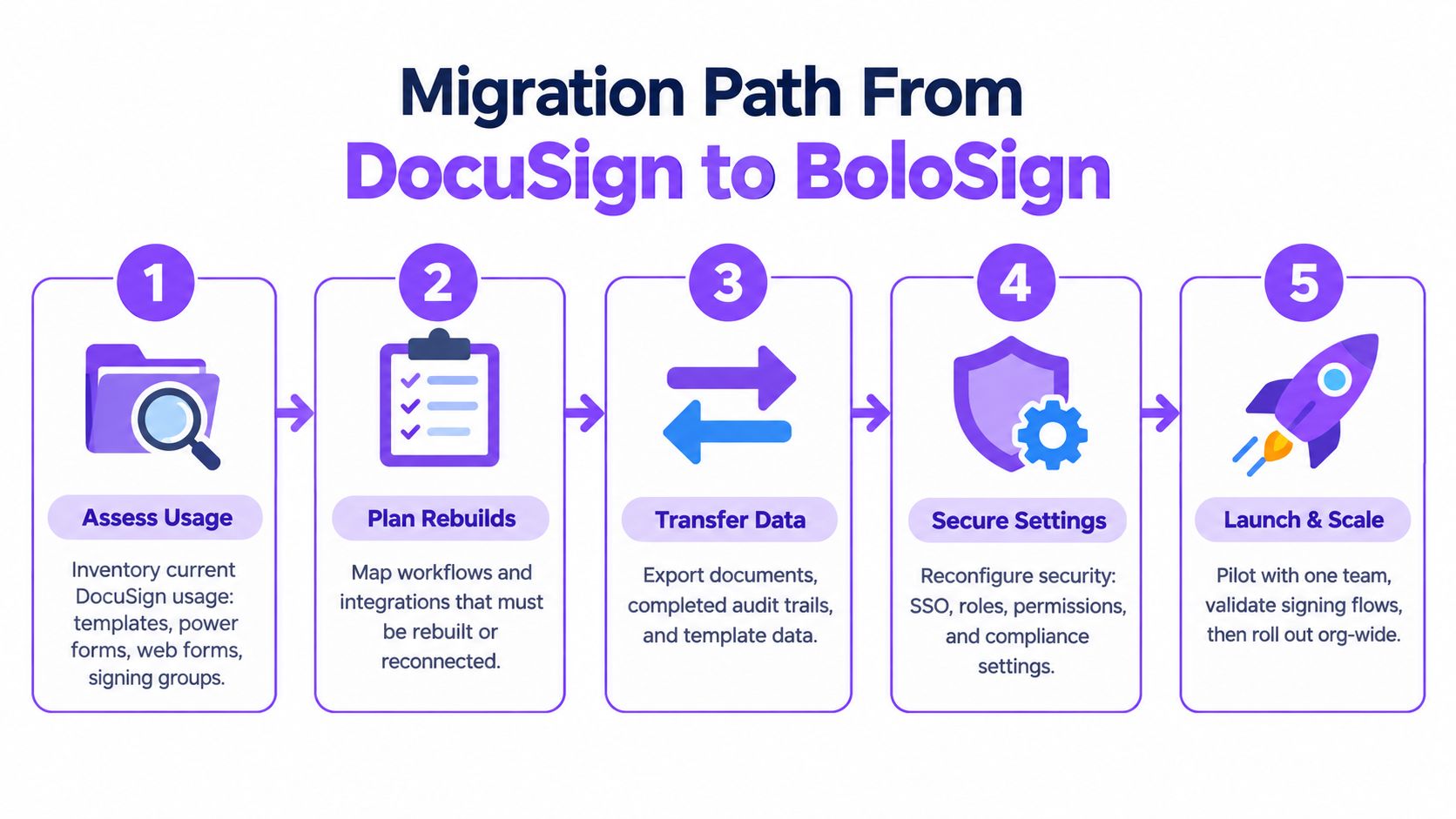
Migration fails when teams treat it as a template export exercise. The risky assets include approval logic, signer groups, web forms, API payloads, audit history, identity settings, and downstream automations.
A practical sequence
- Inventory usage. List templates, PowerForms, web forms, signing groups, bulk-send jobs, integrations, reports, and retention obligations. Rank the workflows that carry most operational volume and start there.
- Import and map. Export templates and use BoloSign's one-click DocuSign import to convert DOCX templates, recipient roles, tabs, and merge fields. Flag custom Connect integrations and PowerForm URLs for manual review.
- Reconnect integrations. Rebuild Salesforce, HubSpot, Workday, Slack, or Microsoft Teams connections. Test webhook payloads against every downstream consumer, especially CRM status updates and document storage.
- Run a parallel pilot. Send equivalent agreements through both systems. Compare signer experience, completion certificates, audit trails, notifications, and data captured by integrations.
- Cut over deliberately. Set a freeze window, archive legacy data for retention, validate SSO, SCIM provisioning, roles, permissions, and IP allowlisting, then retire DocuSign seats in stages.
A migration should have a named owner from IT, legal, procurement, and the business unit with the highest volume. Use the DocuSign migration feature guide to confirm the import path, but don't assume imported templates preserve custom integration behavior.
DocuSign support materials state that migrations for affected CLM and Gen customers to Microsoft Azure Cloud began in February 2026 and are expected to conclude by February 28, 2027, with a freeze period from December 5 through January 5 under Q1. Those dates come from the DocuSign CLM and Gen migration FAQ. The broader point is important: even staying with an incumbent can involve migration planning.
Real-World Use Cases by Industry
The best platform depends on the operational bottleneck, not the industry label. A staffing agency with seasonal hiring has a different requirement from a law firm managing negotiated agreements, even if both send contracts for signature.
| Industry | Common Workflow | BoloSign Strength | DocuSign Enterprise Strength | Better Fit |
|---|---|---|---|---|
| Staffing | Candidate onboarding, W-4 acknowledgments, client agreements | Unlimited templates and team members support fluctuating recruiter activity | Mature governance for large multi-state programs | BoloSign for volume simplicity, DocuSign for complex enterprise controls |
| Healthcare | Patient intake, consent, provider agreements, compliance forms | Forms, PDF signing, audit trails, and HIPAA-oriented workflows | Deeper enterprise administration and regulated deployment maturity | DocuSign when governance is highly complex, BoloSign for standardized intake |
| Real estate | Lease addenda, renewals, disclosures, broker forms | Fast template reuse and predictable high-volume signing | Broad enterprise controls for large property portfolios | BoloSign for repetitive transactions, DocuSign for portfolio-wide governance |
| Logistics | Bills of lading, delivery confirmations, vendor agreements | High-throughput forms and integrations without envelope anxiety | Mature integration and audit expectations across large operations | BoloSign for operational speed, DocuSign for complex administration |
| Education | Admissions, financial aid, consent, certifications | Unlimited forms and templates for recurring enrollment processes | Stronger fit where institutional procurement demands mature controls | BoloSign for distributed departments, DocuSign for centralized governance |
| Professional services | Engagement letters, SOWs, amendments, partner approvals | AI-assisted extraction, reusable templates, and fixed cost | CLM, clause governance, and reviewer controls | DocuSign for negotiated portfolios, BoloSign for repeatable engagements |
A staffing agency may switch to BoloSign when recruiters need to send large batches of onboarding documents without asking procurement to expand envelope capacity. A healthcare practice may prefer BoloSign for standardized intake, but it should choose DocuSign if its compliance team requires extensive centralized controls and mature enterprise administration.
Real estate and logistics teams often care about speed and repeatability. BoloSign's ability to create, send, and sign PDFs, templates, and forms through connected workflows addresses that need directly. Universities and professional services firms face a more divided decision. BoloSign keeps broad departmental use affordable, while DocuSign's CLM and review governance can justify its premium when agreements require partner, legal, or institutional oversight.
Which Platform Fits Your Buyer Persona
Four buyer profiles make the decision clearer.
The SMB scaling toward enterprise should start with BoloSign when predictable cost, unlimited templates, and broad team access matter more than advanced CLM. DocuSign remains the safer fallback when customers, partners, or internal teams already expect its signing experience.
The legal or compliance lead should lean toward DocuSign when granular audit controls, retention, identity workflows, regional law coverage, and agreement lifecycle management are mandatory. BoloSign can fit standardized, lower-complexity workflows, but the buyer should validate evidence and control scope before replacing an incumbent.
The sales or revenue operations manager should choose BoloSign when Salesforce, HubSpot, or another CRM already drives the sales cycle and the team wants quick document automation without per-envelope friction. DocuSign is stronger when the CRM workflow is surrounded by mature enterprise governance and established internal administration.
The procurement lead planning a 500-seat rollout should run the fixed-price BoloSign model against actual DocuSign usage. Once envelope volume becomes a material renewal concern, BoloSign deserves a commercial pilot. If deep CLM is mandatory, DocuSign may remain the better-value choice despite the higher license complexity.
| Buyer Persona | Primary Need | Recommended Platform | Key Trade-off Accepted | Next Step |
|---|---|---|---|---|
| Scaling SMB | Predictable cost and simple signing | BoloSign | Gives up some incumbent maturity | Import priority templates |
| Legal and compliance lead | Governance, audit, retention, and regional controls | DocuSign Enterprise | Accepts higher complexity and packaging | Review control requirements |
| Sales operations manager | CRM-native speed and repeatable automation | BoloSign | Accepts a less mature enterprise ecosystem | Pilot one CRM workflow |
| Procurement lead | Lower TCO across a broad rollout | BoloSign when usage is high and workflows are simple; DocuSign when CLM is essential | Balances cost against agreement depth | Conduct a renewal and migration review |
Start with a low-pressure migration sandbox import or a guided DocuSign renewal review. Closer Innovation Labs Corp. offers BoloSign for creating, sending, and signing PDFs, templates, and forms with AI-powered contract workflows, compliance-oriented controls, integrations, and a fixed-price model. Visit Closer Innovation Labs Corp. to start a 7-day free trial and test the platform with your own enterprise workflows.

Paresh Deshmukh
Co-Founder, BoloForms
9 Oct, 2026
Take a Look at Our Featured Articles
These articles will guide you on how to simplify office work, boost your efficiency, and concentrate on expanding your business.



