

Audit Trail Software: A 2026 Buyer's Guide
Learn what audit trail software does, which features matter most, and how to choose a compliant, reliable tool for your team in 2026.

Tired of nonsense pricing of DocuSign?
Start taking digital signatures with BoloSign and save money.
A client asks which version of a contract was signed. A clinic administrator needs to show who accessed a patient form before it was completed. An HR manager has only a signed PDF, a few email threads, and a vague recollection of who approved the final wording. Suddenly, “who signed what and when?” becomes an operational problem, not a theoretical compliance question.
Audit trail software turns that uncertainty into a reviewable record. It connects document creation, access, edits, authentication, approvals, signatures, and completion in chronological order, so an authorized reviewer can reconstruct the transaction without searching across inboxes and shared folders. For a practical introduction to the topic, CEFCore's complete guide to audit trail software offers useful background on how these records support transparency and accountability.
The Moment an Audit Trail Becomes Urgent
Few teams start by searching for audit trail software. They start with a difficult email.
A customer may ask whether a statement of work was changed after approval. A property buyer may question whether every party received the same disclosure. A staffing agency may need to prove that a candidate signed the correct onboarding agreement. A school may need to confirm which parent completed a consent form. In each situation, the completed signature is only one part of the answer.
The broader questions are:
- Who accessed the document?
- Which version did they review?
- Was an edit made before signing?
- Did authentication succeed?
- In what order did recipients act?
- Can the business produce the evidence in a readable format?
A shared drive may contain the final PDF, but it usually won't explain the entire transaction. Email can show intent, yet it may not establish which file a person signed. A word processor's version history can show edits, but it isn't necessarily connected to recipient authentication, signature completion, or the final exported record.
Practical rule: A signature proves that an action occurred. An audit trail helps prove the surrounding story.
That distinction matters for a small business because disputes rarely arrive in a neat format. The person requesting evidence may not know the internal workflow, and the employee who managed it may be unavailable. A strong digital signing solution gives the organization a consistent record that another authorized person can understand quickly.
BoloSign helps teams create or import PDFs, templates, and forms, route them to one or more recipients, collect eSignatures, and monitor progress from a central dashboard. Its audit trail is designed to preserve document actions and transaction history, while its reusable workflows reduce the temptation to handle each agreement manually.
The need appears across sectors. A healthcare provider manages consent documents. A real-estate office routes disclosures. A logistics company collects delivery confirmations. A professional-services firm approves a statement of work. A staffing team completes candidate onboarding. In every case, the business benefits when the record is created as the work happens instead of reconstructed after a problem appears.
What Audit Trail Software Does
An audit trail functions as a register of events, similar to a careful notary's journal. It records the sequence that produced a completed transaction, rather than displaying only a “completed” status.
A useful trail captures meaningful actions around a document or transaction, orders them chronologically, identifies the responsible person or service, and protects the history from silent alteration. NIST defines an audit log as a chronological record of system activity, including access and operations performed during a specific period, in its audit log definition.
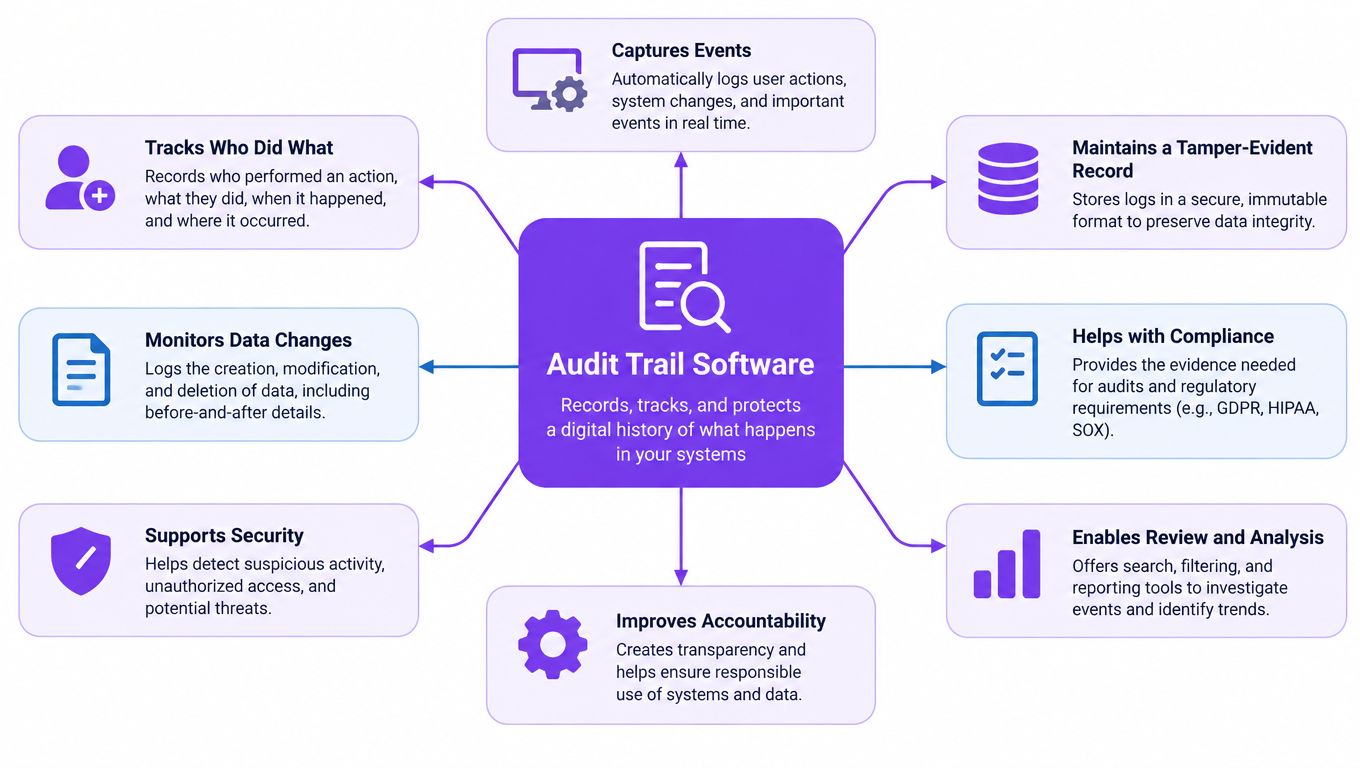
Three properties separate a trail from an activity feed
Chronology shows what happened first. The viewer opened the file before completing the form. The recruiter edited a template before sending it. The client signed after authentication succeeded.
Attribution connects each event to a person, account, or service. The record should distinguish a recruiter from a candidate, an administrator from a parent, and a human reviewer from an automated feature.
Tamper resistance helps reveal unauthorized changes. If someone can delete or rewrite an event without detection, the record offers limited value during an investigation.
An activity feed might say, “John updated document.” That can support everyday collaboration, yet it leaves practical questions unanswered: which document version changed, what was changed, whether the update succeeded, who accessed the file afterward, and whether the final record remains protected.
Audit trail software also differs from a server access log or a word processor's version history. A server log may record a technical request without its business meaning. Version history may show edits without consent, recipient routing, or signature authentication. A transaction trail connects those details.
The event fields matter
NIST guidance identifies useful fields such as timestamps, user or process identifiers, event descriptions, success or failure indicators, filenames, and access-control rules. In an online signing workflow, those fields can describe:
- Creation: A PDF or template enters the workflow.
- Routing: The sender addresses one or more recipients.
- Access: A recipient views the document.
- Authentication: An identity or access check succeeds or fails.
- Change: A field, setting, or document version changes.
- Signature: A signer completes the assigned action.
- Completion: The transaction reaches its final state.
- Export: An authorized user produces an evidence package.
AI-assisted contract review adds another layer. The trail should identify when an AI feature analyzed a document, which file or version it processed, what finding or suggested change it produced, and whether a human accepted, rejected, or edited that result. This keeps automated assistance distinguishable from a person's decision.
Retention and export choices matter for lean teams. A business should set a retention period that matches its operational and regulatory needs, then confirm that records can be exported in a readable package with event details and document context. That approach avoids relying on a vendor dashboard alone or paying for unnecessary enterprise controls.
For healthcare teams, document auditability also connects with broader operational concerns described in TOOLii's approach to telehealth challenges. The same principle applies: activity should remain understandable to the people responsible for reviewing it.
BoloSign applies this model to eSignatures and contract workflows. Teams can sign PDFs online, use reusable templates, collect information through forms, and retain transaction history without assembling separate tools for preparation, routing, and signature tracking.
The Features That Make an Audit Trail Defensible
A dispute can begin with a simple question: who changed the recipient, and when? An activity feed may show an answer, but a defensible audit trail must let a reviewer test that answer and understand the evidence without guesswork.
The strongest systems protect past records, identify each actor, preserve event order, and make the evidence usable outside the application. The audit trail feature documentation should explain these controls in concrete terms rather than merely calling the logs secure.
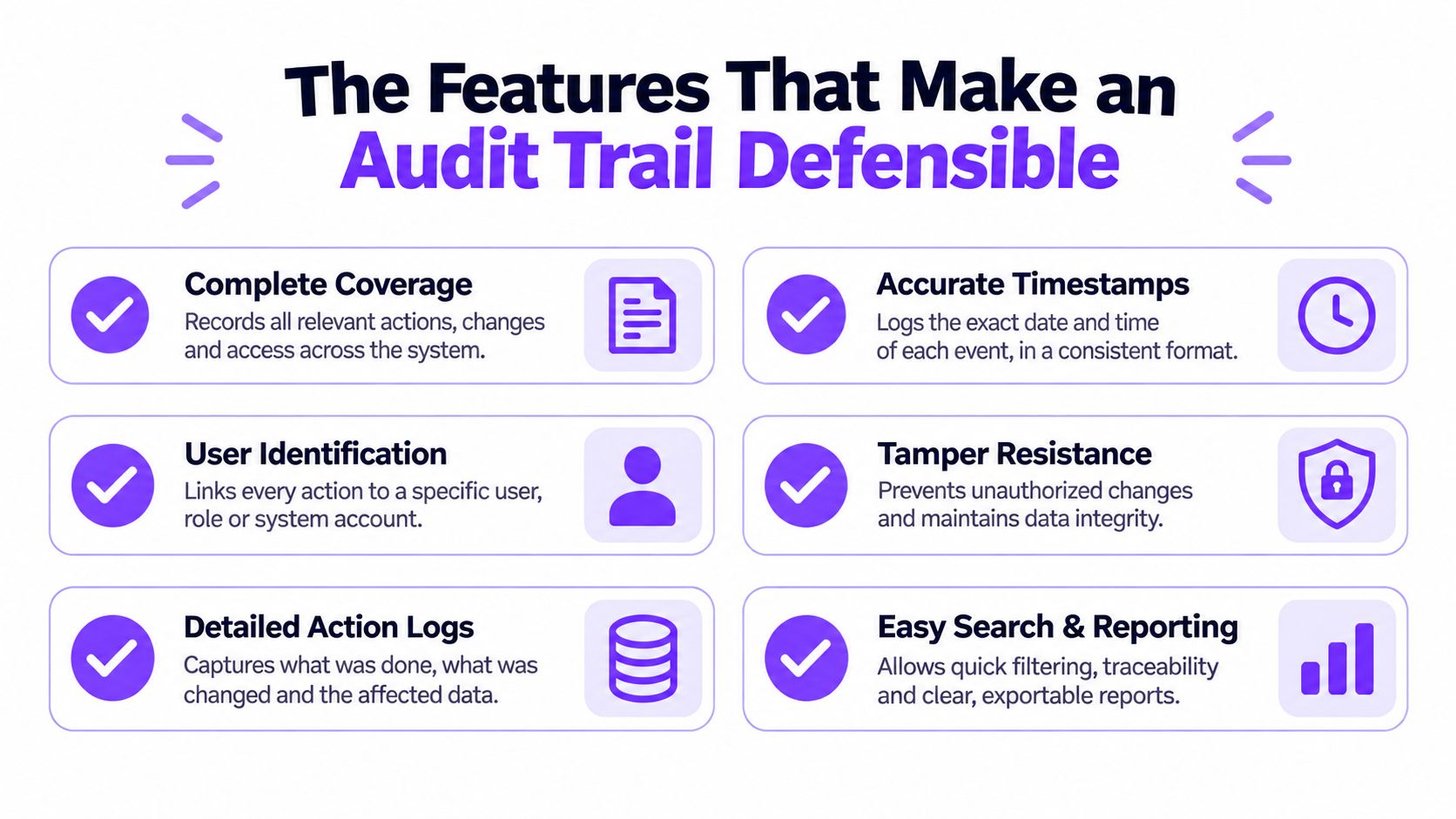
Protection against rewriting history
Immutable or write-once storage makes it harder for an administrator or attacker to alter a past event without detection. Append-only records allow new entries while protecting earlier ones. Cryptographic controls can strengthen that design. A system may hash records or sign event batches during ingestion, then store validation metadata separately. During review, the organization should be able to check whether the evidence still matches the record first captured.
Attribution and separation of duties
Every event should identify the actor or service account, action, target object, timestamp, and outcome. “Document changed” provides little context. “Recruiting administrator changed recipient routing for the staffing agreement, action succeeded” gives a reviewer something specific to verify.
Role-based permissions control who can view or manage the trail. Separation of duties also matters. The person who changes a document should not be able to alter the evidence used to examine that change. Ask whether administrators can modify audit settings, who can reach those settings, and whether their own administrative actions are logged.
AI-assisted contract review needs the same discipline. The record should distinguish an AI analysis from a human decision, identify the file or version processed, preserve the finding or suggested revision, and show whether a person accepted, rejected, or edited it.
Time you can trust
A contract workflow may include views, edits, approvals, and signatures. If system clocks disagree, reviewers may not know which event came first. Reliable time synchronization helps preserve the sequence during an investigation.
Test the workflow yourself. Create a document, change a field, send it, open it as the recipient, sign it, and export the record. Check that every action appears in order and that the timestamps remain consistent.
Evidence that leaves the platform
A regulator, customer, lawyer, or internal reviewer may need more than a screenshot. The system should produce a complete, human-readable evidence bundle linking the final document to its history. It should also support a retention period that fits the business's operational and regulatory needs, without forcing a small team to depend on a vendor dashboard or buy unnecessary enterprise controls.
BoloSign's workflow can include a downloadable Certificate of Completion containing the audit trail, with document integrity supported through cryptographic hash verification. When comparing tools, review TutorBase's feature set for permissions, records, and operational controls. The goal is a readable, verifiable record of what happened, not the longest possible log.
How HIPAA, GDPR, ESIGN, and eIDAS Shape the Trail
Compliance frameworks don't all ask for the same thing. They do, however, point toward a common operational requirement: the organization must be able to explain how an electronic transaction occurred and protect the information involved.
HIPAA focuses attention on review
The HIPAA Security Rule requires covered entities to implement procedures for regularly reviewing information-system activity records, including audit logs, access reports, and security-incident tracking reports. HHS guidance also addresses review frequency, documentation, responsible workforce members, and activities that may require investigation, as described in the HHS audit protocol.
For a clinic, an audit trail should therefore support more than a completed patient signature. Authorized staff should be able to review who accessed a consent form, when activity occurred, whether an action succeeded, and whether unusual access needs follow-up.
ESIGN supports electronic records, not weak evidence
The U.S. Electronic Signatures in Global and National Commerce Act says that a signature, contract, or record related to interstate or foreign commerce can't be denied legal effect solely because it is electronic. That legal foundation supports businesses that sign PDFs online, but the organization still needs reliable evidence around the transaction.
The practical questions are whether the business can identify the parties, show the document presented for signature, preserve relevant timestamps, demonstrate consent, and connect the completed signature to the final record. BoloSign's explanation of eSignature legality provides additional context for teams assessing electronic signing workflows.
GDPR requires restraint as well as accountability
GDPR-style data-minimization expectations create an important counterweight to indiscriminate logging. A business should capture enough information to support accountability, but it shouldn't retain every available system detail without a defined purpose.
That means teams should classify events, restrict access to sensitive trails, use redaction where appropriate, and document why particular records are retained. A privacy-conscious audit trail is not weaker by default. It is more deliberate about what evidence is necessary.
eIDAS expands the trust infrastructure
In the European Union, electronic signatures were first recognized through the 1999 Directive on a Community framework for electronic signatures, which took effect in January 2000. That framework was replaced by Regulation (EU) No. 910/2014, known as eIDAS, which entered into force on 17 September 2014, with core trust-services provisions applying directly across Member States on 1 July 2016. These milestones are documented by the European Commission's eSignature overview.
eIDAS covers electronic identification and trust services such as signatures, seals, timestamps, registered delivery, and electronic documents. A contract trail should therefore preserve the surrounding trust evidence, not just the visible signature.
The SEC's Rule 17a-4 offers a practical benchmark for regulated electronic records. Its audit-trail alternative requires complete, time-stamped records that capture modifications and deletions, preserve relevant identity information, support reconstruction of an original record, and remain producible in a reasonably usable electronic format when requested by the Commission. Those expectations translate well to any business that needs defensible digital records.
Retention Is Not the Same as Immutability
Keeping a document for a long time doesn't prove that its history was protected.
A company may retain a final PDF while losing the original routing, authentication, edit, and access context. It may also keep an editable event file that appears complete today but could have been changed without detection. Retention answers how long a record exists. Immutability answers whether its history can be trusted.
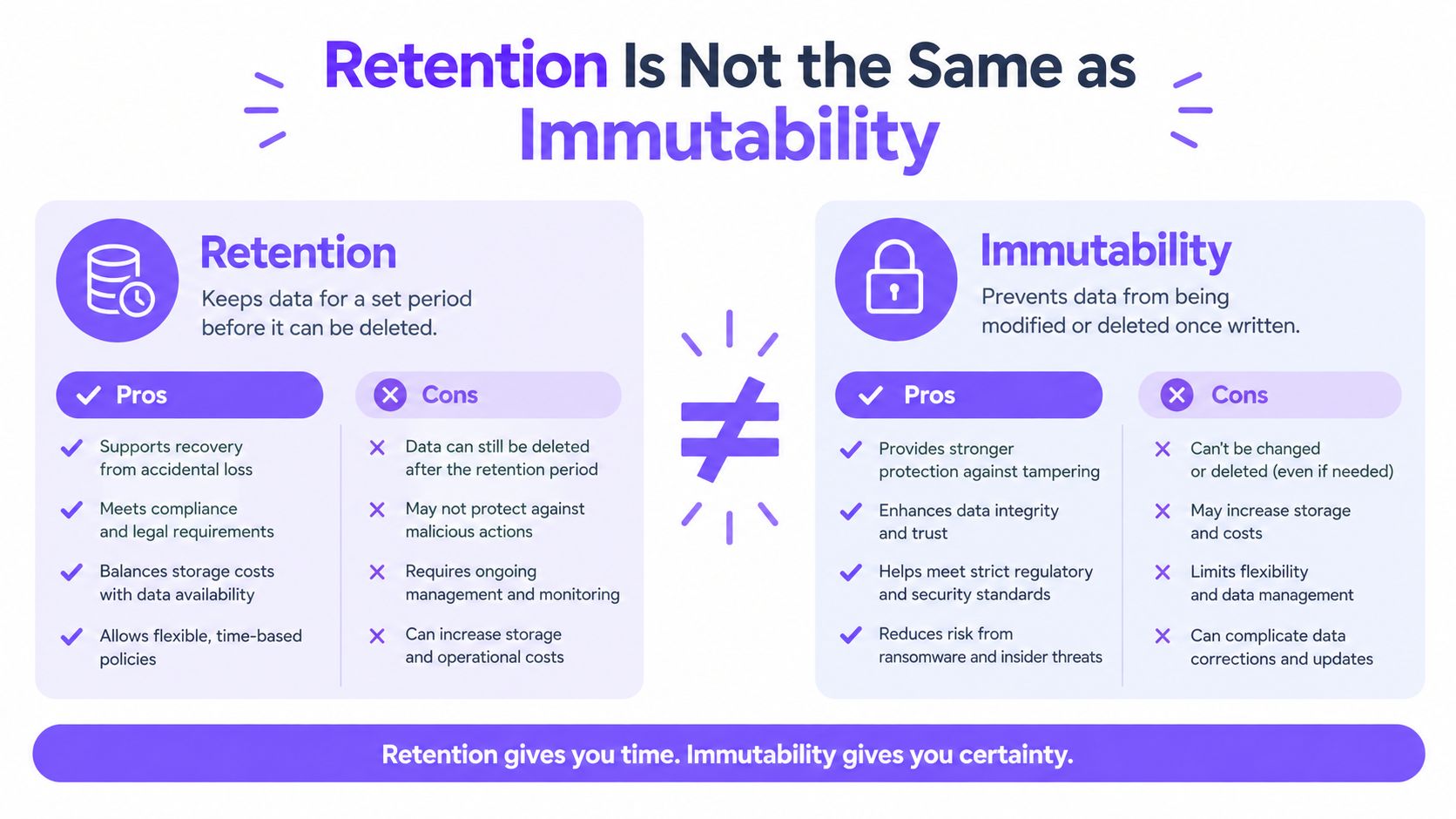
Start with evidence needs
Lean teams don't need to collect every possible event forever. They need to identify the evidence required for their highest-risk workflows.
A staffing agency may prioritize candidate identity, agreement version, recipient routing, signature events, and export history. A clinic may prioritize document access, authentication, modification, signature, and review activity. A logistics company may focus on delivery confirmation, recipient identity, failed attempts, and changes to the underlying form.
A risk-based policy can separate records into tiers:
- High-risk transactions: Preserve detailed, structured history with restricted access and protected storage.
- Routine workflows: Capture the events needed to establish completion and accountability.
- Low-value activity: Aggregate or minimize data when it doesn't support a defined operational, legal, or security purpose.
The retention period should reflect applicable law, contractual obligations, business needs, and litigation requirements. A litigation hold or regulatory requirement may suspend ordinary deletion, but that exception should be documented and controlled.
Avoid the privacy cost of “everything”
More logs can create more sensitive data to protect. They can increase discovery burden, expose personal information to unnecessary users, and make it harder for a small team to find the event that matters.
Use role-based access, searchable exports, redaction rules, and documented deletion exceptions. Keep the evidence package focused on the transaction. A reviewer usually needs a clear timeline, the relevant document version, actor identity, timestamps, outcomes, and integrity information, not an unfiltered dump of unrelated application activity.
For a lean team, the best trail is not the biggest trail. It's the smallest complete record that can withstand a reasonable question.
Before choosing a platform, ask whether an administrator can export the complete evidence bundle, verify its integrity independently, and demonstrate who accessed or changed audit settings. Those tests expose the difference between long-term storage and genuine auditability.
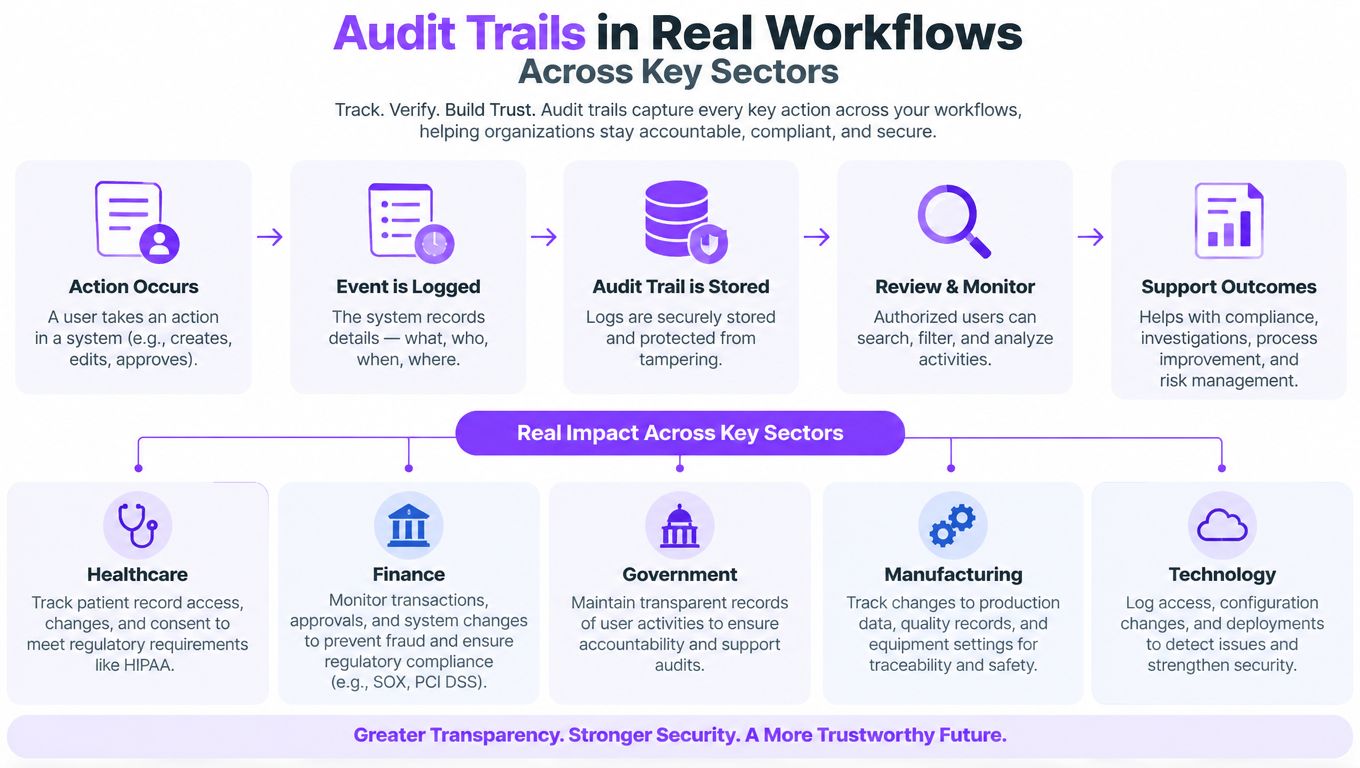
Audit Trails in Real Workflows Across Key Sectors
A strong audit trail should make sense to a business owner who doesn't work in security. The following workflows show how the record changes with the transaction.
Healthcare consent
A clinic prepares a reusable consent form and sends it to a patient. The patient receives the request, completes required fields, authenticates where configured, and signs. Authorized staff later need to review whether the correct form was presented and whether activity around protected information requires investigation.
The record should connect the template or document version to the recipient, invitation, access events, field completion, signature, completion status, and export. HIPAA obligations still depend on the organization's policies, access controls, retention, and vendor arrangements, but the audit trail gives staff a structured basis for regular review.
BoloSign can help a clinic create reusable PDFs or forms, route them to recipients, track completion, and retain the transaction history in a readable workflow.
Real-estate disclosures
A real-estate agency sends a disclosure to a buyer, seller, and another required party in sequence. The agency needs to know whether each recipient received the intended document, which authentication or access step occurred, and whether completion followed the required order.
A useful evidence package preserves the document version, recipient routing, invitation and viewing events, field completion, signatures, timestamps, and final completion status. If a buyer later asks whether a disclosure changed, the agency can present the document together with the transaction history rather than relying on an email chain.
The same pattern applies to professional services. A firm sending a statement of work can connect the approved scope, client review, internal approval, signature, and final record. BoloSign supports multi-recipient signing, reusable templates, dashboard visibility, and downloadable transaction evidence.
AI-assisted contract review
AI changes what the trail must explain. A sales operations team may use AI-powered contract intelligence to summarize a document, extract obligations, classify risk, or recommend an approval path. A log showing only “contract reviewed” doesn't establish how the automated suggestion influenced the decision.
A defensible AI-assisted record should preserve:
- Feature or model identity: Which AI capability produced the output.
- Source version: The document version supplied for analysis.
- Generated content: The extracted clause, summary, or recommendation.
- Human oversight: The reviewer who assessed the result.
- Decision context: The approval rationale or reason for an override.
- Subsequent changes: Edits made after review and before signing.
Recent research found that 74% of surveyed enterprises believed they could pass an AI-compliance audit, while only 27% said their AI-governance programs were fully mature. The figures come from Schellman's published research announcement. A related survey found that only 44% had documented AI-specific incident-response procedures, also reported in that source.
The lesson isn't to preserve every generated token. It's to preserve the decision context needed to show who reviewed the AI output, what they accepted or rejected, and what the signer ultimately approved.
Staffing teams can apply the same model to candidate agreements and client approvals. Schools can use it for enrollment and consent forms. Logistics companies can document vendor agreements and delivery confirmations. Each workflow becomes easier to investigate when the final document and its surrounding events remain together.
Choosing and Implementing Audit Trail Software
A useful buying process starts with a live workflow, not a feature page. Pick one document your team sends often, then test the complete path from creation to evidence export.
Questions to ask during evaluation
- Can the system identify actors and outcomes? Check users, service accounts, timestamps, document objects, success or failure states, and administrative actions.
- Can it protect integrity? Look for tamper-evident or write-once controls, hash verification, restricted access, and separation of duties.
- Can a non-specialist understand the export? Request a complete evidence bundle that includes the final document and readable timeline.
- Can it fit existing systems? Review BoloSign integrations for connections with tools such as Zapier, Make, HubSpot, Salesforce, Pipedrive, Google Drive, Google Sheets, Slack, and Microsoft Teams.
- Can it support your obligations? Map features and configurations to ESIGN, UETA, eIDAS, GDPR, HIPAA, ISO 27001, SOC 2, and any sector-specific requirements that apply to your organization.
BoloSign offers unlimited documents, team members, and templates at one fixed price, with no per-user or per-envelope structure described in its product offering. The platform supports reusable PDF templates, forms, multi-recipient signature requests, dashboard updates, AI-assisted contract intelligence, and one-click template import from other tools. It's positioned as 90% more affordable than traditional tools, according to the publisher's product description.
Implementation can remain manageable for a small team:
- Map the current document workflow.
- Define the events that must be evidenced.
- Configure roles, access, retention, and export permissions.
- Run a real transaction with an internal recipient.
- Export the evidence and ask someone outside the workflow to interpret it.
Don't trust a demo alone. Test whether the system can answer the question that caused you to search for audit trail software in the first place.
Closer Innovation Labs Corp. offers BoloSign, a practical platform for creating, sending, signing, and reviewing documents with structured audit evidence for small-business workflows. Visit Closer Innovation Labs Corp. to start a 7-day free trial and test how your own contracts, forms, and approvals move from signature request to exportable record.

Paresh Deshmukh
Co-Founder, BoloForms
16 Oct, 2026
Take a Look at Our Featured Articles
These articles will guide you on how to simplify office work, boost your efficiency, and concentrate on expanding your business.



