

Audit Trail Requirements for eSignatures: A 2026 Guide
Learn the audit trail requirements under ESIGN, UETA, eIDAS, GDPR and HIPAA, the fields to log, and how to keep signed records defensible.

Tired of nonsense pricing of DocuSign?
Start taking digital signatures with BoloSign and save money.
You sent a contract last month, watched it come back signed, and filed the PDF away feeling done. Then someone asks a simple question you can't answer from that file alone. Who opened it first, was the price changed before signing, and can you prove this copy is the one they agreed to? That's where audit trail requirements matter. They're not paperwork for its own sake. They're the rules for keeping an evidence package that still makes sense years later, after staff leave, software changes, or a document moves to an archive. This guide walks through what to capture, what different laws expect, how long to keep it, and how to test your own workflow before a dispute forces the test on you.
The Minimum Fields Every Audit Trail Must Capture
Say a freelancer disputes a signed statement of work. She says the start date and rate in your final PDF aren't what she agreed to. Your team pulls up the file, and it does show her signature. It doesn't show when she opened it, which version she saw, or whether anyone edited a field after she signed.
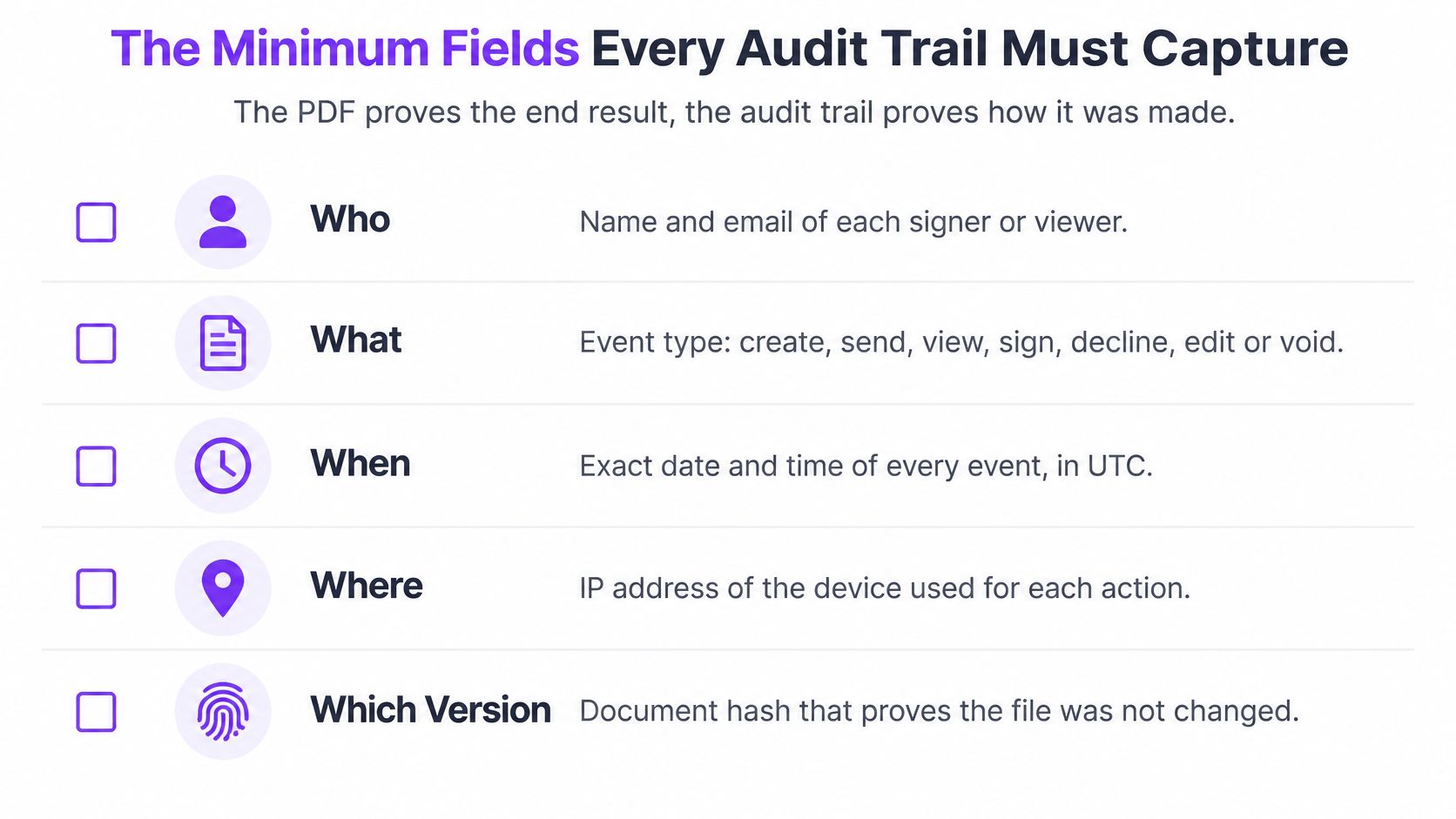
That gap is the whole lesson. The PDF proves the end result. The audit trail proves how it got there. If you want a plain-language primer on why font audit trails matter, Font Checker Pro explains the same principle for document changes: a final file without a history leaves you guessing.
The visual below condenses the core checks into who, what, when, where, and which version.
The eight fields to check
Use this table against any eSignature tool you rely on to sign PDFs online. Don't accept a vague promise of activity history. Ask whether each field below is recorded automatically and exported with the document.
| Field | What It Must Show | Sample Entry |
|---|---|---|
| Signer identity | Who signed, and how they were verified | jane.doe@example.com, verified by one-time code |
| Timestamp and time zone | When each event happened | 12 March 2026, 14:03 UTC |
| IP address and device | Where the session came from | IP recorded at signing, browser on a Windows laptop |
| Action type | What the person did | Viewed, signed, declined or voided |
| Document version | Which exact file was acted on | Document hash recorded for the file sent on 12 March |
| Signing order | Who acted at each step | Step 2 of 3, after manager approval |
| Edits | Prior and new values, and who changed them | Start date changed from 1 May to 3 May by sender |
| Completion certificate | Summary of the full process | Certificate of completion attached at final signature |
How to read the table
Signer identity needs more than a typed name. An email address alone shows where a link was sent. A one-time code, an account login, or another verification step helps connect that link to a real person. Without it, a signer can claim anyone with inbox access clicked through.
Timestamp and time zone prevent a common confusion. If a sender in Sydney, a signer in Toronto, and a server somewhere else each record a different local time, the sequence can look impossible. Record one standard, usually UTC, and store the local zone alongside it.
Document version is where many trails fail without anyone noticing. A file name isn't enough, because people reuse names like final_v2. A hash is a fingerprint created from the file's contents. Change one character and the fingerprint changes, which lets you prove the copy in dispute matches the copy that was sent.
Quick test: If an event can't be tied to a person, a time, and a document version, it won't help you much in a dispute.
Apply that test to edits and signing order too. If a manager approved a rate before the freelancer signed, the order proves it. If a start date changed, the trail should show the old value, the new value, and who made the change, not just the final result.
What ESIGN, UETA, eIDAS, GDPR and HIPAA Require
None of these laws hands you a ready-made log format. Each one sets a standard your evidence has to meet, and your audit trail is how you prove you met it. That's why two businesses can both comply while using different tools, and why a tool alone can't make you compliant if your process is sloppy.
Under the U.S. Electronic Signatures in Global and National Commerce Act text at Cornell Law, a signature, contract, or other record connected with interstate or foreign commerce cannot be denied legal effect, validity, or enforceability solely because it is electronic, and contracts formed using an electronic signature or record get the same protection. In practice, you should preserve evidence of what was presented, who signed, and how the transaction was completed.
Requirements by regime
| Regime | Where It Applies | What the Audit Trail Must Show |
|---|---|---|
| ESIGN Act (US federal) | Transactions in interstate or foreign commerce | What was presented, who signed and how the deal was completed; records kept accurate and accessible |
| UETA (US states) | Most US states that have adopted it | Attribution to the signer and intent to sign, with records that can be retained and reproduced |
| eIDAS (EU) | EU member states | Evidence of the signing event at the chosen level (simple, advanced or qualified) |
| Electronic Transactions Act 1999 (Australia) | Transactions under Commonwealth law | A reliable method that identifies the signer and shows their approval of the information |
| Electronic Communications Act 2000, s.7 (UK) | United Kingdom | Electronic signatures and certificates admissible in legal proceedings, so the record must show origin and integrity |
| PIPEDA (Canada) | Private-sector organisations handling personal information | Accountability and reasonable safeguards for personal data held in logs |
| GDPR (EU and EEA) | Processing personal data of people in the EU or EEA | Logs holding personal data must be access-controlled, documented and deleted when their stated purpose ends |
| HIPAA Security Rule (US) | Covered entities and business associates handling ePHI | Audit controls under §164.312(b): user ID, event type, date and time of activity |
Those regimes include the US ESIGN Act, US UETA, the EU eIDAS regulation, Australia's Electronic Transactions Act 1999, the UK Electronic Communications Act 2000 s.7, and Canada's PIPEDA. If you're comparing how they overlap for a global workflow, start with the eSignature legality overview and then confirm the specifics for your locations.
What triggers each law
The trigger matters as much as the rule. ESIGN is triggered by the type of commerce. HIPAA is triggered by the data, specifically electronic protected health information. GDPR and PIPEDA are triggered by personal data in the log itself, such as names, emails, and device details. eIDAS is triggered by where the transaction and signers sit in Europe.
A cross-border deal often triggers several at once. A US staffing agency placing a candidate with a European client, for example, may need ESIGN evidence for the agreement and GDPR controls for the personal data in its logs.
When more than one regime applies, let the strictest requirement set the logging standard for the whole workflow. It's simpler to run one strong standard than five weak ones.
BoloSign supports that kind of mixed workflow by letting staffing agencies send candidate agreements, healthcare providers route consent forms, real-estate teams circulate leases, and logistics companies collect delivery or vendor acknowledgments as signed PDFs. Its detailed audit trail and secure document workflow help organise the transaction evidence while teams create, send, and sign documents online.
Why a Signed PDF Alone Will Not Hold Up
A signed PDF is a photograph of a finished deal. The audit trail is the security footage and logbook that show how the deal was made. A photograph can be genuine and still leave the important questions unanswered.
A workspace like the one below is where most agreements now close, on a laptop rather than across a desk, which makes the digital record behind the signature even more important.
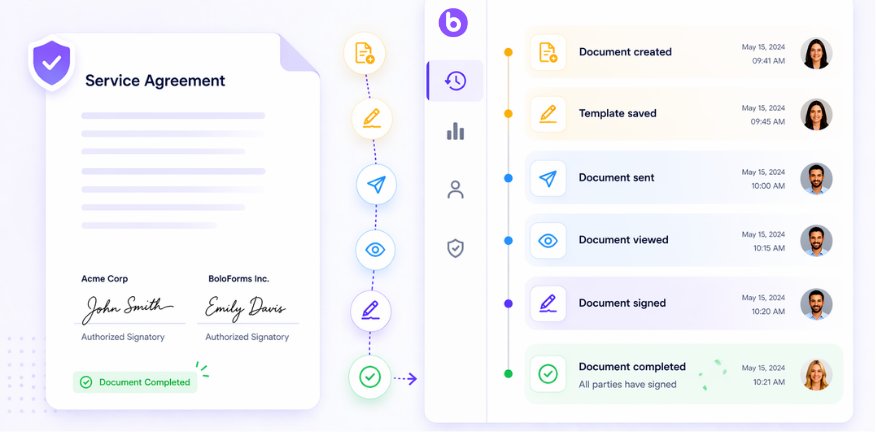
The legal problem usually isn't that a signature is electronic. The European Commission eSignature guidance explains that under eIDAS an electronic signature cannot be denied legal effect or admissibility as evidence solely because it is electronic or because it does not qualify as a qualified signature, and it names an electronic-signature audit trail as a feature that increases confidence in defending a signing event in court, alongside one-time passwords and explicit acceptance actions. It also notes that a qualified electronic time stamp receives a legal presumption of accuracy under Article 41(2).
A challenge in three questions
Say a client claims they never saw the final scope. A useful trail answers in order. It shows the link opened on 12 March at 14:03 from the client's email, the version hash matches the file sent, and the signature followed four minutes later from the same device.
That maps to the three questions a court or counterparty will ask:
Did they see it: Delivery, access, and authentication events answer this.
Did they sign it: Identity, signing action, and time answer this.
Has it changed since: The document hash and an uneditable event history answer this.
If you're setting up a workflow from scratch, the step-by-step walkthrough on how to eSign a document shows where those events are created during sending and signing. The short video below gives a visual sense of that signing flow before you test your own.
Three weaknesses undermine an otherwise complete trail. Missing time zones make the sequence arguable. No link to a document version lets each side produce a different file. Logs that the monitored staff can edit destroy trust in every entry, even the accurate ones.
How Long to Keep Audit Trail Records
A common myth is that an audit trail lives only as long as your platform account. Cancel the subscription, the thinking goes, and the evidence goes with it. That's backwards. Retention follows the record the trail supports, not the software you happened to use.
The FDA guidance on computerized systems used in clinical trials defines an audit trail as a secure, computer-generated, time-stamped record that reconstructs creation, modification, and deletion events. It requires retention at least as long as the underlying electronic records and availability for regulatory review and copying. Its detailed elements include the changed field, the old value, the new value, the user's identity and role, and the date and time. Read that list as a shelf-life test: every one of those elements still has to be legible on the day you export the file.
Retention rules that shape your schedule
| Rule | Retention Period | Practical Setting |
|---|---|---|
| HIPAA documentation rules | A fixed minimum period measured from each document's creation or last effective date | Treat audit logs for ePHI workflows as required documentation and hold them for the full documentation period |
| FDA clinical-systems guidance | At least as long as the electronic records they support | Tie log retention to the retention schedule of each record |
| GDPR storage limitation (Art. 5(1)(e)) | No longer than needed for the stated purpose | Set a documented schedule, then delete or anonymise when it ends |
| eIDAS and EU national rules | Set by the specific law and contract, with no single period in eIDAS | Align with the longest applicable national or contract period |
| Australia and Canada (sector rules) | Set by sector law and record-keeping rules | Confirm the period with counsel before setting the schedule |
Treat the table as a set of overlapping windows rather than five separate deadlines. Each applicable rule opens a window, and the record stays until the last one closes. GDPR works in the opposite direction: it adds a ceiling, so indefinite storage is not a safe default. You need a documented purpose and an end date for every category of log.
HR records make this concrete, because onboarding forms, policy acknowledgments, and signed agreements all sit on different clocks inside the same employee file. The HR Management 365 retention policy guide is a useful companion when you are mapping employee documents to retention periods and assigning an owner to each category.
Retention is only half the job. A log you kept for the required period but cannot read, export, or connect to the right document version after a migration is stored data, not evidence. Two habits keep a trail defensible years later. First, export each trail alongside its signed document in a format that opens without the original platform. Second, run a retrieval test on a fixed schedule: pull a record from your oldest archive and confirm the timestamps, signer identities, and version hash still resolve to a readable file. Write both habits into the policy so they survive staff turnover and system changes.
Presenting the Audit Trail as Evidence in a Dispute
A challenged record is judged on what you can produce, not on what your system once displayed on a screen. Build the package before a dispute starts, while the people who understand the workflow are still around.
Assemble the package in six steps
Pull the full export: Get the completion certificate and the complete event export for the document ID, in CSV and PDF.
Verify the file: Recompute the file hash and confirm it matches the version recorded when the document was sent.
Normalise the times: State the time zone used and convert every event to one standard so the sequence reads cleanly.
Name a custodian: Identify who can explain how the log is generated and stored, and attach the platform documentation for its logging.
Record chain of custody: Note who exported the record, when, and where the copy is stored, while the certified original stays unchanged.
Write a one-page summary: Answer directly whether they saw it, whether they signed it, and whether it has changed since.
Other service businesses face the same reconstruction problem outside contracts. A repair shop tracking repair jobs through BenchKey, for example, needs a ticket history that shows who touched a job and when, not just a final invoice. The principle travels: the history settles the argument.
A staffing example
Say a candidate disputes a pay rate. The agency exports the event log showing the rate sheet hash, an open time of 4 March 09:12 UTC, and a signature at 09:14 UTC. The candidate's claim meets a timeline, and the conversation usually ends there.
If an event is missing, say so in writing and give the reason. A documented gap is more credible than a silent one, because it shows you checked. Presentation rules vary by jurisdiction, so confirm format and certification expectations with counsel before any filing.
Audit Trail Rules Across Five Sectors
Each sector's trail should answer the question its disputes usually turn on. The fields overlap, but the pressure point differs, and that's where your contract automation setup earns its keep.
Staffing disputes usually turn on money and dates. For placement agreements and timesheet approvals, the trail must prove which rate sheet version the candidate saw and signed. Months later, when payroll and the candidate remember different numbers, the version hash and signing time settle it.
Healthcare disputes turn on access to sensitive information. For patient consent forms and business associate agreements, a final signed PDF falls short on its own, because the question is often who created, read, updated, or deleted information and when. Teams reviewing eSignature workflows built for healthcare should check that user ID, event type, date, and time are captured for activity around ePHI, not just at signing.
Real estate disputes turn on which addendum governed at closing. Lease amendments and disclosure packages pass through several hands, sometimes with parallel versions circulating. The trail must prove which addendum each party signed, in which order, before the deal closed.
Logistics disputes turn on acceptance. For delivery confirmations and vendor agreements, timestamps and signer names show when a shipment was accepted and under which contract version. A signature without a time and version can't separate a late delivery from a late signature.
Education disputes turn on authority. For consent forms for minors and certification records, the trail must show who signed for the student, in what capacity, and on what date. A name alone doesn't establish that the signer was entitled to give consent.
The regulated research benchmark
Regulated research sets the strictest version of these expectations. The 21 CFR Part 11 regulation text requires a secure, computer-generated, time-stamped audit trail under §11.10(e), states that edits must not obscure previously recorded information, and requires retention at least as long as the underlying record. FDA guidance also recommends chronological, incremental creation, preservation of the original or certified copy, and controls preventing personnel who change records from modifying the corresponding audit trail.
You may never run a clinical trial. Borrow the design anyway. An append-only history with actor, timestamp, action, affected field, and prior and new values, exportable outside the application, is what makes a record hard to repudiate in any sector.
How to Build an Audit Trail Policy Step by Step
A policy works when it's written down, assigned to someone, and tested. A settings page inside your digital signing solutions isn't a policy, because nobody outside the platform can see what you intended or verify that you followed it.
The sequence below moves from defining events to testing retrieval. Don't skip the last step just because the first seven look tidy on paper.
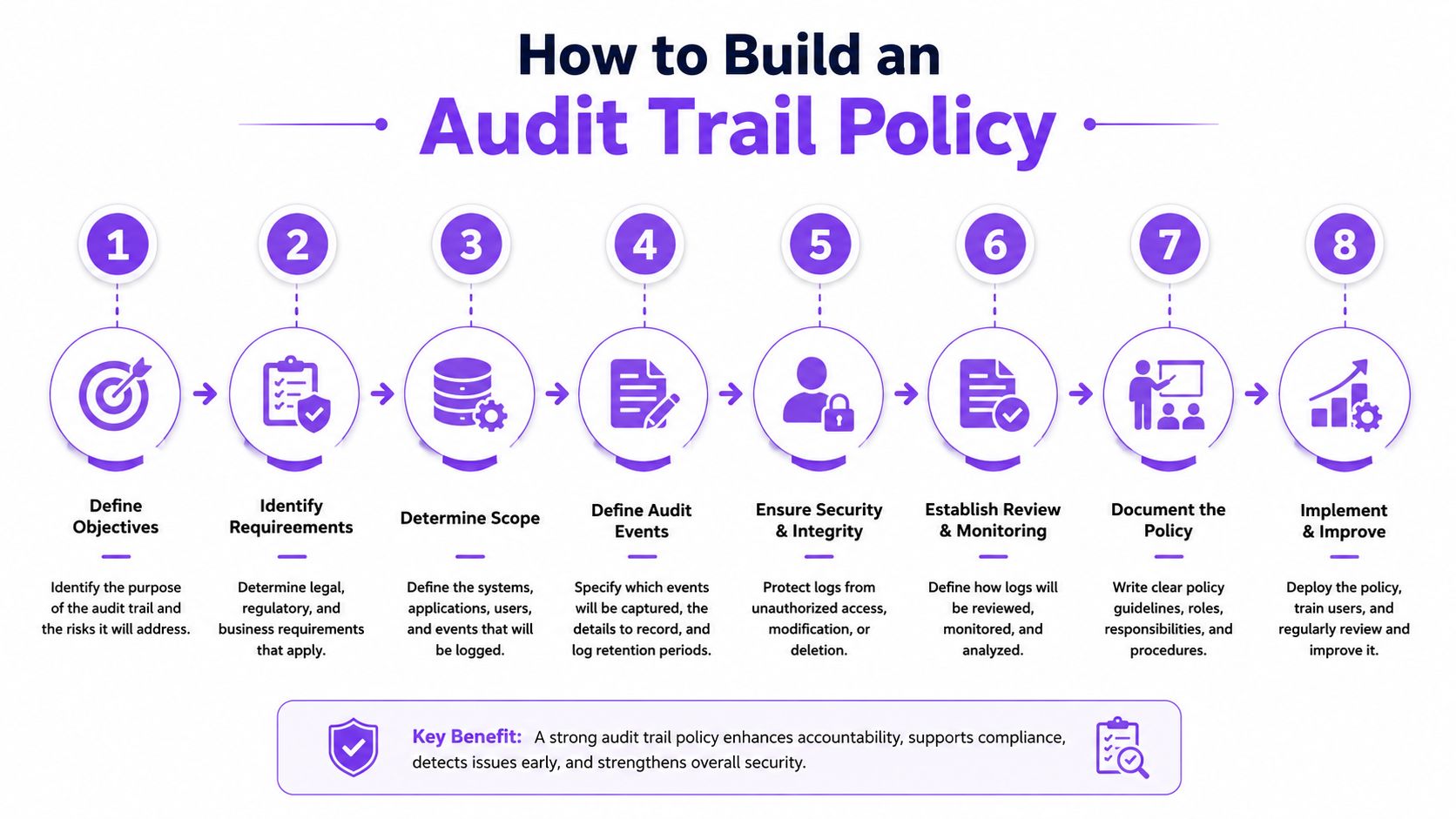
The eight steps
Define the events to log: Record create, send, view, sign, decline, edit, and void, because skipped events are the ones disputes turn on. A decline you didn't log looks like a document that vanished.
Set one time standard: Record every timestamp in UTC and store the local time zone with each event. The common slip is mixing local times across regions until events appear out of order.
Link every event to a document version: Store a hash of the exact file sent, so later edits can't pass as the original and each signature attaches to a specific version.
Make the log append-only: Block senders and staff from editing or deleting entries, and keep a certified copy. The common slip is letting the person who changes records control the log that watches those changes.
Capture signer signals: Record email, verification method, IP address, and device for each session, including for forms where you add signature to Google Form style intake flows that feed into a signing step.
Assign retention by record type: Match each log to the longest applicable rule for that record, and set a deletion or anonymisation date where privacy law requires one.
Export to an independent format: Save event data as CSV and certificates as PDF outside the platform, so the evidence survives a cancellation or migration.
Run a retrieval test each quarter: Rebuild one record from at least a year ago and confirm the sequence is clear without the original system, the original staff, or a support ticket.
Make it owned and dated
Finish by naming the policy owner and the next review date on the document itself. Ownership matters because identity providers change, integrations get replaced, and templates get rebuilt. Someone has to notice when a change quietly breaks logging for one workflow.
Test the policy on one live document rather than a sample. Samples pass because everyone behaves. Live documents reveal the forwarded link, the shared inbox, and the signer who opened the file on a phone you didn't expect.
Write down what the live test exposed and fix those gaps before you roll the policy out wider. A short policy you've tested beats a long one nobody has run.
Confirm Your Audit Trail Before the Next Contract Goes Out
Send one real document through your normal workflow today, then read the trail the way an opposing lawyer or auditor would: in order, without inside knowledge, and after it has been exported. Each event should answer who acted, what changed, when it happened, which version they saw, and why the sequence can be trusted. If identity, time, version, or signing order is missing, you found the gap while it is still cheap to fix.
A usable evidence package stays readable outside the platform. Check that the exported record still links each signer's email address, signing timestamp, IP address, and exact document version to the certificate of completion, and that the sequence makes sense without the original staff, inbox, or login. BoloSign, from Closer Innovation Labs Corp., records those fields in a tamper-proof audit trail, secures completed contracts with a tamper-proof trust seal, and provides a certificate of completion admissible as evidence in legal proceedings. It supports ESIGN, eIDAS, HIPAA, and GDPR requirements, uses AI-powered contract intelligence for reviews, and includes unlimited documents, templates, and team members for one fixed price.
Healthcare, education, retail, logistics, and event teams can create, send, and sign PDFs and forms in one workflow. Start the free trial, which includes unlimited document signing, reusable templates, signing order, audit trails, mobile signing, Google Sheets integration, and team collaboration, then run the check on your own document. If your current process cannot show who signed, when, and which version they approved, visit Closer Innovation Labs Corp. and send the next real contract through a workflow that records proof as it happens. Confirm regulated-matter requirements with qualified counsel.

Paresh Deshmukh
Co-Founder, BoloForms
31 Oct, 2026
Take a Look at Our Featured Articles
These articles will guide you on how to simplify office work, boost your efficiency, and concentrate on expanding your business.



